Skip to content
Chair & Cable

SECTION 04 · Keyboards & Mice

Keychron alternatives

A Keychron is a hot-swap socket, a configurator and three radios in a gasket-mounted case. Here is which rival board reproduces which of those, and which one is honest about not trying.

By Stephen V.Updated How we pick
#ad

We earn a commission when you buy through our Amazon links, at no extra cost to you. It never affects our rankings, and we say so when the cheaper product is the better buy. How this works.

The closest alternative to a Keychron is the NuPhy Air75 V2: hot-swappable low-profile sockets, Bluetooth plus 2.4GHz plus wired USB-C, and a 75 percent layout, which is the K3 Max’s own feature list in a different case. If you want the wireless and the keystroke but have no intention of ever opening a configurator, the Logitech MX Mechanical is the honest answer — it deletes the hot-swap sockets and the remapping entirely and spends the money on a backlight that manages itself and three-device switching that works. The budget pick is the RK ROYAL KLUDGE RK84, which reproduces the two expensive parts — hot-swap and triple-mode wireless — for the least money on this page.

It is worth being precise about what the brand sells, because “a Keychron” is not a switch feel or a price point. Strip a K8 Max, a K3 Max, a V6 or a Q11 Ultra down to the figures Keychron publishes and you get five claims: a hot-swap socket taking 3- and 5-pin MX switches, a configurator (QMK and VIA on most of the line, ZMK on the newest split), a triple connection with 2.4GHz at 1000Hz polling, Bluetooth to three devices and wired USB-C, a Mac and Windows keycap set with a physical toggle, and a gasket mount with acoustic foam. Nothing else on this page publishes all five, and the page is honest about which ones each board drops.

Which alternative reproduces which claim

AlternativeHot-swapRemappingWireless modesMac legends
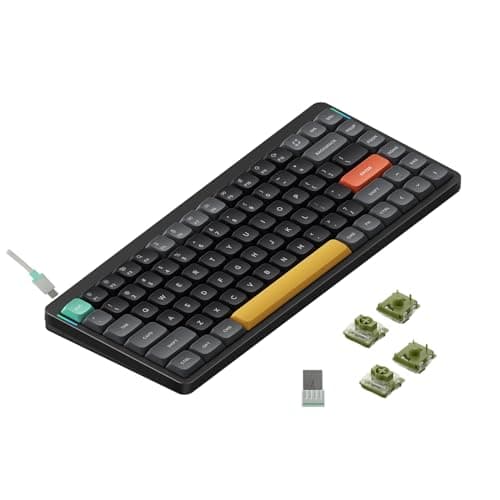
NuPhy Air75 V2Yes, low-profileNot publishedBluetooth, 2.4GHz, wiredNot published
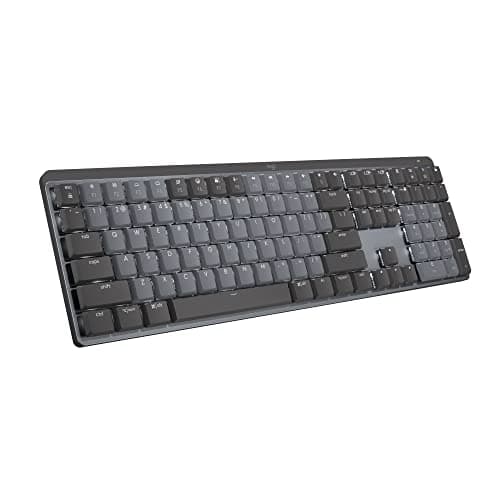
Logitech MX MechanicalNoLogi Options+ (software, not firmware)Bluetooth, Logi Bolt, wired chargingDual-platform legends
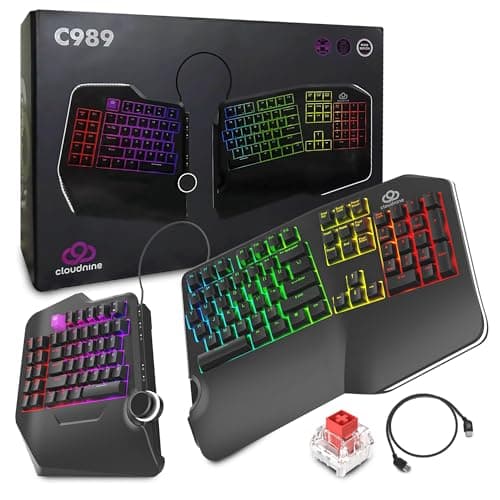
Cloud Nine C989Not published10 onboard macro keysNone — wiredNot published
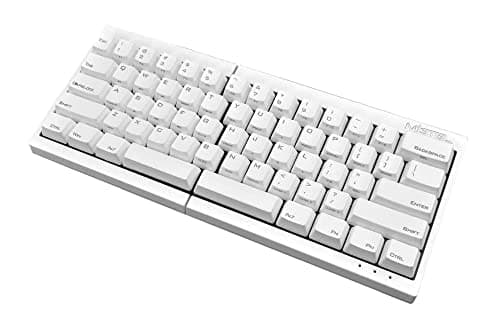
Mistel MD600Not publishedOnboard layers and macros, no softwareNone — wiredNot published
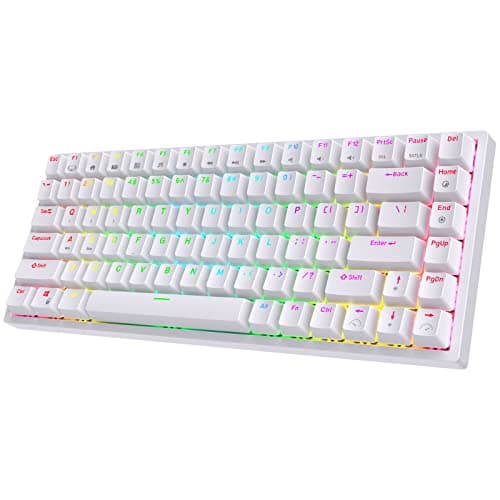
RK ROYAL KLUDGE RK84YesVendor softwareBluetooth, 2.4GHz, wiredNot published
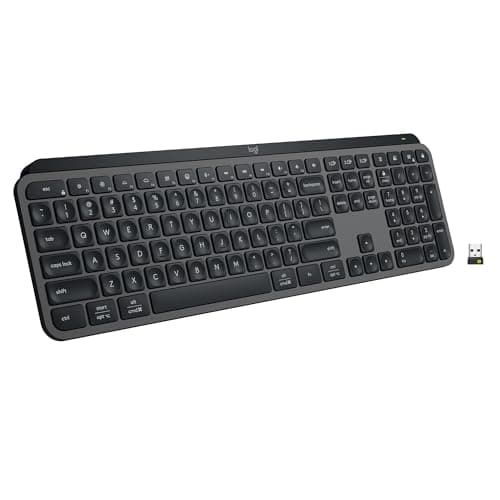
Logitech MX Keys SNo — scissor switchesLogi Options+ Smart ActionsBluetooth, Logi BoltDual-platform legends

Two columns there are worth reading carefully. The remapping column is the one buyers conflate most often: Logitech’s Options+ is application software that has to be installed and running on each machine, while QMK and VIA write a keymap into the keyboard’s own firmware, so the board behaves identically on a machine that has never heard of it. The Mistel is the interesting middle: it programs layers and macros onboard, with no software at all, which is the one thing on this page Keychron does not do more simply. And where a maker publishes no claim we have written not published rather than guessing — NuPhy’s listing specification carries the hot-swap socket and the three radios but no firmware claim, so we do not make one for it.

What people are actually replacing when they search this

Three different complaints bring buyers to this query, and they have three different answers.

  • “It is too tall.” Full-profile mechanical boards sit high enough that the wrists extend upward, which is what a wrist rest is usually papering over. The fix is low-profile: the NuPhy Air75 V2 and the MX Mechanical both publish low-profile switches, and a wrist rest is the cheaper intervention if you would rather keep the board.
  • “It is too loud.” Keychron’s gasket mount and foam help, but stock switches are quiet-ish rather than quiet. The MX Keys S is the only board here that is genuinely silent, because it is not mechanical at all — mechanical versus membrane is that argument in full, and the quiet keyboards roundup ranks the field on noise alone.
  • “It did not fix my wrists.” A hot-swap socket is not an ergonomic feature. If the problem is forearm rotation or shoulder width, the answer is a split board: the Cloud Nine C989 and the Mistel MD600 are the two here, and the split keyboards roundup ranks that field properly.

The part of the Keychron package nothing here matches

Two things, said plainly. No board on this page publishes a gasket mount with acoustic foam, which is the construction detail behind the fuller, less hollow sound Keychron boards are praised for. And none of them puts QMK or VIA firmware in your hands: the Logitech boards remap through software that must run on the host, the RK84 uses vendor software, and the two split boards store macros onboard but are not open-firmware keyboards. If either of those is why you were buying a Keychron, the honest answer is that the alternatives on this page are cheaper or quieter or more ergonomic, but they are not the same thing for less. Keyboard switches explained covers what the socket actually lets you change, and the hot-swappable keyboards roundup ranks the sockets field including the Keychrons themselves, if what you want is a comparison rather than a replacement.

The short answer

Quick picks

#ProductBest forScorePrice
01
NuPhy NuPhy Air75 V2 Low-Profile Mechanical
NuPhy Air75 V2 Low-Profile Mechanical

The closest reproduction of a Keychron K3 Max at a lower price: hot-swappable low-profile sockets, all three connection modes, and a 75 percent layout that keeps the arrows. What it does not publish is a firmware claim, so take the keymap as fixed.

Best overall - closest feature match
8.1
$56.05Amazon
02
Logitech Logitech MX Mechanical Wireless Keyboard
Logitech MX Mechanical Wireless Keyboard

The no-tinkering route. It drops the hot-swap socket and the firmware configurator and spends the budget on a proximity backlight, three-device switching and a tactile-quiet switch - which is the right trade for a shared office rather than a hobby.

Best for an office desk, no tinkering
7.5
$142.49Amazon
03
Cloud Nine Cloud Nine C989 Ergonomic Split Mechanical Keyboard
Cloud Nine C989 Ergonomic Split Mechanical Keyboard

The answer if what you wanted from the Q11 was the split rather than the metal. Halves that pull eight inches apart, built-in tenting, a full-size layout with a number pad and ten onboard macro keys, at well under the Q11's price.

Best split alternative to the Q11
7.7
$199.00Amazon
04
Mistel Mistel MD600 Split Mechanical Keyboard
Mistel MD600 Split Mechanical Keyboard

The one board here that programs itself. Layers and macros are stored onboard with no software and no configurator, on two 60 percent Cherry MX halves - which is the closest thing on this page to firmware-level remapping.

Best onboard programming, no software
8.2
$114.00Amazon
05
RK ROYAL KLUDGE RK ROYAL KLUDGE RK84 Wireless Mechanical
RK ROYAL KLUDGE RK84 Wireless Mechanical

The budget pick, and the cheapest board here that keeps the two expensive Keychron features: hot-swap sockets and all three connection modes. You pay for that with stock switches and stabilizers that rattle more than a gasket-mounted board.

Budget pick - hot-swap and wireless, cheapest
8.0
$56.99Amazon
06
Logitech Logitech MX Keys S
Logitech MX Keys S

The board to buy if the real complaint was noise rather than feel. Spherically dished scissor keys that are quiet, flat and precise, with a self-managing backlight and months of battery - and nothing inside it you can ever change.

Best if you wanted quiet, not mechanical
6.8
$109.99Amazon

#ad · Live prices from the Amazon Product API, as of November 21, 2026. Where we have no verified live price we show none — we would rather leave a gap than print a number that has rotted.

In detail

The picks, in full

01
NuPhy NuPhy Air75 V2 Low-Profile Mechanical

Best overall - closest feature match

NuPhy Air75 V2 Low-Profile Mechanical

Layout
Compact 75%
Connection
Wireless — Bluetooth or 2.4 GHz; wired USB-C
Switch type
Hot-swappable low-profile (Gateron low-profile)
Hot-swap
Yes
Feet
Adjustable feet with optional risers
8.1/10

The closest reproduction of a Keychron K3 Max at a lower price: hot-swappable low-profile sockets, all three connection modes, and a 75 percent layout that keeps the arrows. What it does not publish is a firmware claim, so take the keymap as fixed.

Matches Keychron
8.6
Typing Feel
8.6
Programmability
6
Value
9.2

Pros

  • Slim 75% layout saves desk depth and pairs neatly with a laptop
  • Hot-swap low-profile sockets, which is uncommon at this height
  • Bluetooth, 2.4 GHz, and wired all supported

Cons

  • No published QMK or VIA claim, so the remapping Keychron sells is not part of the deal
  • Compact layout drops the dedicated number pad and shuffles some keys
  • The low-profile switch choice is narrower than full-height

Skip this if…

…you need a number pad or a full set of dedicated navigation keys

$56.05View on Amazon

Price as of November 21, 2026. Prices change — Amazon's is the one that counts.

#ad · we may earn a commission from this link to NuPhy Air75 V2 Low-Profile Mechanical

02
Logitech Logitech MX Mechanical Wireless Keyboard

Best for an office desk, no tinkering

Logitech MX Mechanical Wireless Keyboard

Layout
Full-size with number pad
Connection
Wireless — Bluetooth or Logi Bolt receiver; USB-C charging
Switch type
Low-profile mechanical (tactile-quiet, linear, or clicky)
Hot-swap
No
Backlight
Smart backlight with proximity and ambient sensing
7.5/10

The no-tinkering route. It drops the hot-swap socket and the firmware configurator and spends the budget on a proximity backlight, three-device switching and a tactile-quiet switch - which is the right trade for a shared office rather than a hobby.

Matches Keychron
6.4
Typing Feel
8.4
Programmability
7
Value
8.2

Pros

  • Low-profile mechanical feel that stays comfortable next to a laptop
  • Tactile-quiet switch option is well suited to shared offices
  • Pairs to three devices and flows between them with Logitech Flow
  • Backlight brightens as your hands approach and dims to save battery

Cons

  • Switches are not hot-swappable, so the feel you buy is the feel you keep
  • Remapping happens in host software, not in the keyboard's own firmware
  • No 2.4 GHz option — Bluetooth or the Bolt receiver only

Skip this if…

…you want to swap switches yourself or you prefer a tall, full-height keystroke

$142.49View on Amazon

$179.9921% off

Price as of November 21, 2026. Prices change — Amazon's is the one that counts.

#ad · we may earn a commission from this link to Logitech MX Mechanical Wireless Keyboard

03
Cloud Nine Cloud Nine C989 Ergonomic Split Mechanical Keyboard

Best split alternative to the Q11

Cloud Nine C989 Ergonomic Split Mechanical Keyboard

Type
Split halves, up to 8 in apart, wired
Switches
Kailh Red linear mechanical
Layout
Full-size split, including a number pad section
Lighting
Per-key RGB backlighting
Programming
10 macro keys, plus a USB pass-through
7.7/10

The answer if what you wanted from the Q11 was the split rather than the metal. Halves that pull eight inches apart, built-in tenting, a full-size layout with a number pad and ten onboard macro keys, at well under the Q11's price.

Matches Keychron
6
Typing Feel
9
Programmability
7.4
Value
8.4

Pros

  • Real mechanical switches on a split board at well under the price of a metal split
  • Keeps a full-size layout, so number-pad users do not have to give one up
  • Built-in 7-degree tenting and palm support, with halves that pull up to 8 inches apart
  • Ten macro keys are programmed on the board, so they travel with it

Cons

  • Cloud Nine publishes no hot-swap socket claim, so the switch choice is permanent
  • Wired only, which gives up all three of Keychron's connection modes
  • Kailh Reds are linear, so there is no tactile bump telling you a key registered
  • Bulky — a full-size split takes more desk than any other pick here

Skip this if…

…you need a tactile bump - the Kailh Reds here are linear all the way down

$199.00View on Amazon

Price as of November 21, 2026. Prices change — Amazon's is the one that counts.

#ad · we may earn a commission from this link to Cloud Nine C989 Ergonomic Split Mechanical Keyboard

04
Mistel Mistel MD600 Split Mechanical Keyboard

Best onboard programming, no software

Mistel MD600 Split Mechanical Keyboard

Type
Fully separated 60% split, wired
Switches
Cherry MX mechanical
Layout
60% — no function row or number pad
Programming
Onboard macro and layer programming
Footprint
The smallest of any pick here
8.2/10

The one board here that programs itself. Layers and macros are stored onboard with no software and no configurator, on two 60 percent Cherry MX halves - which is the closest thing on this page to firmware-level remapping.

Matches Keychron
6.6
Typing Feel
9.1
Programmability
8.4
Value
8.6

Pros

  • Onboard layers and macros need no software on the host, which is the practical half of what QMK buys you
  • Cherry MX switches are the reference point for mechanical feel and longevity
  • Two small halves free an enormous amount of desk for the mouse
  • Separation and angle are entirely up to you

Cons

  • Mistel publishes no hot-swap socket for this board
  • Wired only, so none of Keychron's three connection modes carry over
  • A 60% layout means arrows, function keys, and numbers all live on layers you have to learn
  • No wrist rest and no tenting, so it addresses width but not forearm rotation

Skip this if…

…you use function keys, arrows, or a number pad constantly — the layers will slow you down every day

$114.00View on Amazon

Price as of November 21, 2026. Prices change — Amazon's is the one that counts.

#ad · we may earn a commission from this link to Mistel MD600 Split Mechanical Keyboard

05
RK ROYAL KLUDGE RK ROYAL KLUDGE RK84 Wireless Mechanical

Budget pick - hot-swap and wireless, cheapest

RK ROYAL KLUDGE RK84 Wireless Mechanical

Layout
Compact 75% (84-key)
Connection
Wireless — Bluetooth or 2.4 GHz; wired USB-C
Switch type
Hot-swappable mechanical
Hot-swap
Yes
Backlight
RGB
8.0/10

The budget pick, and the cheapest board here that keeps the two expensive Keychron features: hot-swap sockets and all three connection modes. You pay for that with stock switches and stabilizers that rattle more than a gasket-mounted board.

Matches Keychron
7.8
Typing Feel
8
Programmability
6.6
Value
9.4

Pros

  • Hot-swap sockets and tri-mode wireless at the lowest price on this page
  • Compact 75% layout keeps arrow and navigation keys
  • An easy, low-cost entry into swappable switches

Cons

  • Stock switches and stabilizers are noisier than the premium boards
  • Vendor software rather than QMK or VIA, and no Mac keycap set published
  • Build and software are more basic than the higher tiers

Skip this if…

…you want the quietest possible typing or premium build and stabilizers

$56.99View on Amazon

$59.995% off

Price as of November 21, 2026. Prices change — Amazon's is the one that counts.

#ad · we may earn a commission from this link to RK ROYAL KLUDGE RK84 Wireless Mechanical

06
Logitech Logitech MX Keys S

Best if you wanted quiet, not mechanical

Logitech MX Keys S

Key mechanism
Low-profile scissor, spherically dished keycaps
Connection
Bluetooth Low Energy or Logi Bolt receiver, up to 3 devices
Backlight
Proximity sensor plus ambient light sensor
Battery
1500mAh Li-Po - up to 10 days, or up to 5 months backlight off
Software
Logi Options+ with Smart Actions macros
6.8/10

The board to buy if the real complaint was noise rather than feel. Spherically dished scissor keys that are quiet, flat and precise, with a self-managing backlight and months of battery - and nothing inside it you can ever change.

Matches Keychron
4
Typing Feel
8
Programmability
6.8
Value
8.2

Pros

  • Genuinely quiet, which is the specification that matters in a shared room or on calls
  • Low profile keeps the wrists flat without a wrist rest
  • Backlight turns itself on as your hands approach and dims to the room
  • Three-device switching, so one keyboard covers a work and a personal machine

Cons

  • Not a mechanical keyboard at all, so none of Keychron's switch argument applies
  • Nothing is replaceable - a failed key or a worn keycap means a new keyboard
  • Shallow travel gives less feedback than any mechanical switch

Skip this if…

…you want to feel each keystroke register - scissor switches deliberately do not do that.

$109.99View on Amazon

$129.9915% off

Price as of November 21, 2026. Prices change — Amazon's is the one that counts.

#ad · we may earn a commission from this link to Logitech MX Keys S

Four checks before you replace a Keychron

  1. Decide whether you will ever change a switch. Hot-swap is the feature people pay for and then never use. If you have owned a hot-swap board for a year and never opened it, the MX Mechanical and the MX Keys S become much better value, because every dollar goes into the backlight, the radios and the case instead of the socket.
  2. Count the devices you type on. Keychron publishes Bluetooth to three devices plus 2.4GHz plus wired. Both Logitech boards do three devices but drop 2.4GHz; the Cloud Nine and the Mistel are wired only. The wireless keyboards roundup ranks the field on exactly that count.
  3. Check whether you need the number pad. Four of the six picks here drop it. If you live in spreadsheets, that is the constraint that decides the page for you — the full-size keyboards roundup is the one to read instead, and the compact keyboards roundup makes the opposite case.
  4. Measure the desk, not the keyboard. A split board frees a surprising amount of surface for the mouse, and a 60 percent split frees the most of anything here. That matters more on a shallow desk than any switch does — the desk depth guide has the arithmetic, and an under-desk keyboard tray is the other way to buy the space back.

Where the money goes on a mechanical keyboard

Four things, in roughly this order. The case construction comes first: a gasket mount with foam is why two boards with identical switches sound completely different, and it is the Keychron feature with no substitute on this page. Then the radios: a 1000Hz polling rate over 2.4GHz is the difference between wireless feeling instant and feeling like wireless. Then the keycaps: double-shot PBT resists the shine that ABS develops within months. The socket is last, and it is the one most listings lead with.

If the keyboard is one part of a larger upgrade, the same “what am I paying for” question applies to the desk and the chair: FlexiSpot alternatives works through the standing desk field on published frame figures, and SIHOO alternatives does the same for mid-market ergonomic chairs. For the pointer half of the desk, Logitech MX Master alternatives is the equivalent page for mice.
How we picked

We do not run a testing lab

We compiled the published manufacturer specifications, did the ergonomics, VESA and desk-depth math ourselves, and read aggregated owner reviews, then scored each product against a published rubric. The scores are judgments from documented research — they are not measurements we took, because we do not have a lab and we are not going to pretend we do. Every spec traces back to a listing or manual named in Sources.

Questions

Frequently asked

What is the closest keyboard to a Keychron K3 Max?
The NuPhy Air75 V2. Both are 75 percent low-profile boards with hot-swappable low-profile sockets and all three connection modes, and the NuPhy costs less. The difference that matters is firmware: Keychron publishes QMK remapping through its browser-based Launcher, and NuPhy’s listing specification makes no equivalent claim, so we do not credit it with one.
Is hot-swap worth paying for?
Only if you will use it. A hot-swap socket lets you change switch feel later without soldering, which is genuinely useful if you are not sure whether you want tactile or linear. If you already know, the socket is money that could have gone into the case, the radios or the keycaps — which is exactly the trade the two Logitech boards on this page make. Keyboard switches explained covers what you would actually be changing.
Do any of these alternatives support QMK or VIA?
None of the six publishes QMK or VIA firmware. The Logitech boards remap through Logi Options+, which is software that has to run on each host machine; the RK84 uses vendor software; and the Cloud Nine and Mistel store macros and layers on the board itself, which is the closest behavior to firmware remapping here because it needs nothing installed. If open firmware is the reason you bought a Keychron, no board on this page is a like-for-like replacement.
Which Keychron alternative is quietest?
The Logitech MX Keys S, by a wide margin, because it is a scissor-switch board rather than a mechanical one. Among the mechanical picks, the MX Mechanical’s tactile-quiet switch option is the quietest, and the RK84 is the loudest — its stock stabilizers are the weak point. The quiet keyboards roundup ranks the whole field on noise.

Keep reading

Receipts

Sources

We do not run a testing lab, and we do not pretend to. Specifications come from the manufacturer or retailer listing; the footprint and clearance math is ours and reproducible. Where we could not verify a number, we say so on the page rather than quietly leaving it out. Read our full method.