Fifty dollars is the most useful gift budget for a desk person, and not because it is modest. It is the tier where the things they use every day and never buy for themselves happen to live. Nobody with a decent setup goes out and orders a light bar, a power block or a felt mat; they notice the problem, mean to fix it, and forget. A gift in this tier fixes the thing they forgot. That is why these get used, and being used is what makes a gift remembered.
Every pick here is one we rank on a full category page elsewhere on this site, with the same specs and the same sources. What changes on this page is the framing: instead of arguing which product is best for the buyer, each entry explains why it lands as a gift, who it suits, and the one thing you should check before you order. All six sat under $50 at the live Amazon prices when this guide was written. The buttons show today’s price, refreshed daily, so if one has drifted over the line you will see it before you click.
Two rules shaped the list. First, no sizing risk: nothing here is fitted to a hand or a body, which rules out mice, keyboards and chairs no matter how good they are. Second, no compatibility trap, or where one exists it is a thirty-second check you can do from a photo of their desk. A light bar clips to any monitor; a power block plugs into any wall; a mat sits on any desk. The monitor arm is the exception, and its entry tells you exactly what to look for on the back of their screen. If you want the whole price ladder from ten dollars to a splurge, the general desk setup gifts page runs it; this one stays inside the fifty-dollar line.
The short answer
Quick picks
| # | Product | Best for | Score | Price |
|---|
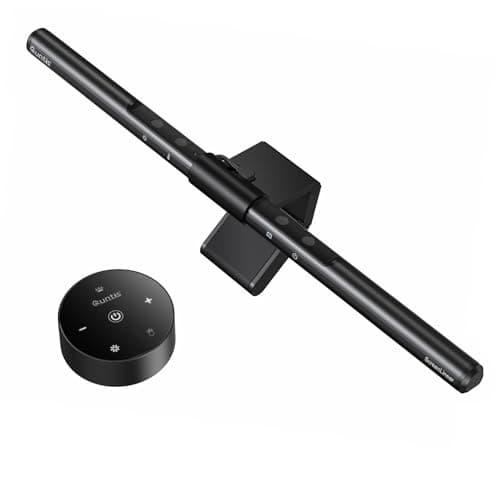
| 01 | Quntis Monitor Light BarThe gift that changes how their desk looks at night for the least money. It clips to the top of the monitor, throws light down onto the desk without putting glare on the screen, and works with any computer. | Best overall under $50 | | $39.95·Amazon |
| 02 | | Best for a cluttered desk | | $39.99·Amazon |
| 03 | Nordik Large Felt Desk MatThe gift that makes a desk look considered. A large felt mat unifies the keyboard and mouse into one quiet surface, and felt reads as a deliberate choice in a way a plastic pad never does. | Best for a desk that looks unfinished | | $24.97·Amazon |
| 04 | Creative Pebble V3 USB-C Desktop SpeakersThe gift for the person still listening through laptop speakers. One USB-C cable carries power and sound, there is no brick, and the drivers are angled up at the listener. The smallest upgrade that is still clearly an upgrade. | Best for a laptop-speaker desk | | $39.99·Amazon |
| 05 | Amazon Basics Gas Spring Single Monitor ArmThe most ergonomic gift under fifty dollars, with one check attached. A gas-spring arm lifts the screen to eye level and gives back the desk depth under it - but only if their monitor has the four VESA screw holes on the back. | Best for a monitor on its stock stand | | $25.49·Amazon |
| 06 | | Best for a too-tall desk | | $29.99·Amazon |
#ad · Live prices from the Amazon Product API, as of Sep 24, 2026. Where we have no verified live price we show none — we would rather leave a gap than print a number that has rotted.
In detail
The picks, in full
Best overall under $50
Quntis Monitor Light Bar
- Optic
- Asymmetric design to reduce screen glare
- Color temperature
- Adjustable color temperature and brightness
- Controls
- On-bar controls (some versions add a remote)
- Power
- USB powered
- Fit
- Adjustable, weighted clip
The gift that changes how their desk looks at night for the least money. It clips to the top of the monitor, throws light down onto the desk without putting glare on the screen, and works with any computer.
- Daily Use
- 9.2
- Unlikely to Own
- 9
- Universal Fit
- 9
- Value
- 9.6
Pros
- +The classic desk gift nobody buys for themselves, at the price that makes it a no-brainer
- +Clips to the monitor and takes no desk space, so it fits any setup
- +USB powered from the monitor or a hub - no wall adapter to find
- +Adjustable warm-to-cool light, which is the feature that makes a dark-room desk pleasant
Cons
- −Controls are on the bar itself, so they reach over the screen to adjust it
- −Feels lighter in the hand than the premium bars
Skip this if…
…their monitor is unusually thick at the top edge or sharply curved - check a photo; the weighted clip wants a flat-topped panel
Best for a cluttered desk
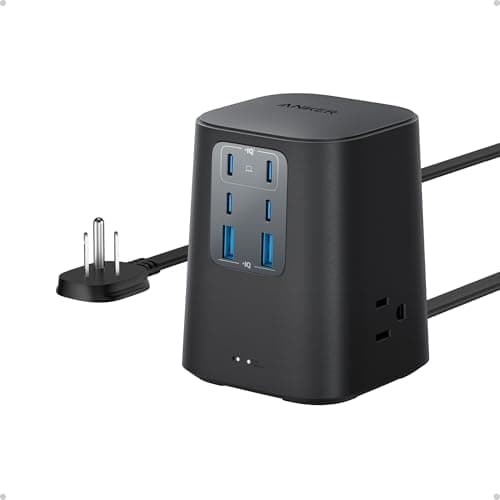
Anker Desktop Charger, 9-in-1 Power Strip with Surge Protection
- Outlets
- Nine total - AC outlets plus USB-A and USB-C
- Surge protection
- 300 joule rating
- USB-C
- High-wattage USB-C output for laptops
- Format
- Compact desktop block
- Brand
- Anker charging hardware
The gift that retires three chargers. One compact block on the desk gives them AC outlets plus USB-C fast enough to charge a laptop, so the phone brick, the laptop brick and the headphone cable all go into one thing.
- Daily Use
- 9.6
- Unlikely to Own
- 8.4
- Universal Fit
- 9.6
- Value
- 8.8
Pros
- +Solves a problem every desk has and almost nobody fixes on purpose
- +Laptop-wattage USB-C means one less power brick living on the desk
- +Anker's charging hardware has the strongest reliability record in our power strip ranking
- +Compact enough to sit on the desk rather than being kicked around under it
Cons
- −300 joules is modest surge protection - fine for phones and peripherals, light for a monitor stack
- −Fewer AC outlets than a conventional strip at the price
Skip this if…
…they already run everything through a proper under-desk surge protector - this is a desktop convenience, not a replacement for one
Best for a desk that looks unfinished
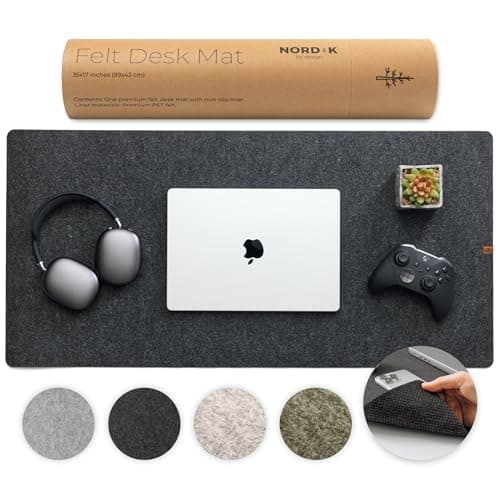
Nordik Large Felt Desk Mat
- Material
- Dense felt
- Size
- Large mat
- Feel
- Soft and quiet under keyboard and wrist
- Surface
- Single-sided, textured felt
- Care
- Shows crumbs; brushes clean
The gift that makes a desk look considered. A large felt mat unifies the keyboard and mouse into one quiet surface, and felt reads as a deliberate choice in a way a plastic pad never does.
- Daily Use
- 9.2
- Unlikely to Own
- 7.8
- Universal Fit
- 9.4
- Value
- 8.8
Pros
- +Visibly changes a desk for very little, which is the best gift ratio there is
- +Damps keyboard noise and cushions the wrist - a comfort upgrade, not just a look
- +Fits any desk and any peripherals, so there is no compatibility question
- +Warm, understated look suits a home office better than a gaming-style pad
Cons
- −Felt shows crumbs and collects pet hair, so it asks for an occasional brush
- −Single-sided, so the color you pick is the color they get
Skip this if…
…you have never seen their desk - color and material are a taste call, and felt is a stronger statement than leather
Best for a laptop-speaker desk
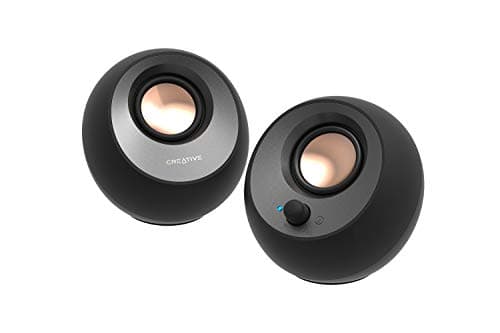
Creative Pebble V3 USB-C Desktop Speakers
- Drivers
- 2.25" full-range, angled 45 degrees upward
- Power
- 8W RMS, 16W peak
- Frequency response
- 100 Hz to 17 kHz
- Connection
- Single USB-C for power and audio; Bluetooth 5.0; USB-A adapter included
- Extras
- Gain switch for higher output on 10W USB ports; Clear Dialog processing
The gift for the person still listening through laptop speakers. One USB-C cable carries power and sound, there is no brick, and the drivers are angled up at the listener. The smallest upgrade that is still clearly an upgrade.
- Daily Use
- 8.6
- Unlikely to Own
- 8.2
- Universal Fit
- 9.2
- Value
- 9.4
Pros
- +A single USB-C cable and no power brick, so it adds almost nothing to their cable mess
- +Bluetooth as well, so a phone can play through them without unplugging anything
- +Small enough for a shallow desk beside a laptop
- +USB-A adapter in the box covers an older computer
Cons
- −Small drivers mean no real bass - background music and calls, not a listening session
- −Will not fill a room; these are one-person desk speakers
Skip this if…
…they already own desktop speakers of any kind - this is an upgrade from nothing, not from something
Best for a monitor on its stock stand
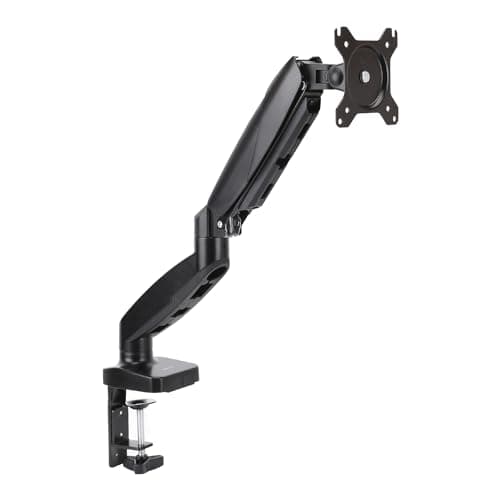
Amazon Basics Gas Spring Single Monitor Arm
- Mount
- Desk clamp or grommet
- VESA
- 75 x 75 & 100 x 100mm
- Screen size
- Up to 32"
- Weight
- Up to about 17.6 lb (8 kg)
- Motion
- Gas spring, full tilt/swivel/rotate
The most ergonomic gift under fifty dollars, with one check attached. A gas-spring arm lifts the screen to eye level and gives back the desk depth under it - but only if their monitor has the four VESA screw holes on the back.
- Daily Use
- 9.4
- Unlikely to Own
- 8.4
- Universal Fit
- 7
- Value
- 9.4
Pros
- +Puts the top of the screen at eye level, which is the single most useful ergonomic fix on a desk
- +Reclaims the desk depth a stand base eats, so the gift is also more desk
- +Clamps to the edge or fits a grommet hole, so it suits almost any desk
- +Our top-ranked monitor arm on value, not a compromise pick for the budget
Cons
- −Needs a VESA pattern on the monitor - look for four screw holes in a square on the back
- −Rated to about 17.6 lb and 32 inches, so a big ultrawide is out
- −Hardware is a step below a premium aluminum arm
Skip this if…
…you cannot confirm their monitor has VESA holes or is under 32 inches - if in doubt, pick something else on this list
How to choose under fifty dollars
Start from what you can see. A photo of their desk, or the background of a video call, tells you most of what you need: whether there is a light bar on the monitor, whether the keyboard sits on bare wood, whether the monitor is on its factory stand, whether there is a tangle of chargers. Each of those is a pick on this list, and the absence of one is your answer. If you cannot see the desk at all, the light bar and the power block are the two safest choices, because neither depends on anything about the desk except that it has a monitor and a wall socket.
The one check each pick needs
The light bar wants a monitor with a reasonably flat top edge. The arm wants VESA holes and a screen under 32 inches. The mat wants you to have a rough idea of their taste. The speakers want a desk without speakers already on it. The footrest wants a fixed-height desk. The power block wants nothing at all. None of these is difficult, but the arm is the one where a wrong guess produces a gift that cannot be used, so if you are unsure about the back of their monitor, take the safer pick.
Why the cheap tier beats the expensive one for most gifts
The expensive desk purchases are the personal ones. A chair is sized to a body, a keyboard is tuned to a set of opinions, a monitor is chosen against a desk depth and a viewing distance the owner has already measured. Those are the gifts most likely to be quietly returned. The cheap tier is impersonal in the best way: a light bar suits everyone with a monitor, a mat suits everyone with a desk. Frequency of use is what makes a gift memorable, and these get touched every single day. If you want to spend more, the under-$150 guide is the next tier, and it is built on the same rule.
Pair a small thing with a smaller thing
The under-desk headphone hook in the essentials list below is the kind of part that rides along with any of these. It is too small to be the whole gift and exactly the right size to be the second item in the box, and like everything else here it has no size and no compatibility question beyond a flat surface to stick to. Cable ties are the other classic add-on; the general desk setup gifts page ranks them, and the cable management roundup has the kit if the desk you have seen is a tangle.
Essentials
The small parts that finish the job
Nothing here changes a pick above, and none of it is a considered purchase. These are the cheap pieces that decide whether the expensive one works properly, and the ones people discover they are missing on the day the big box arrives.
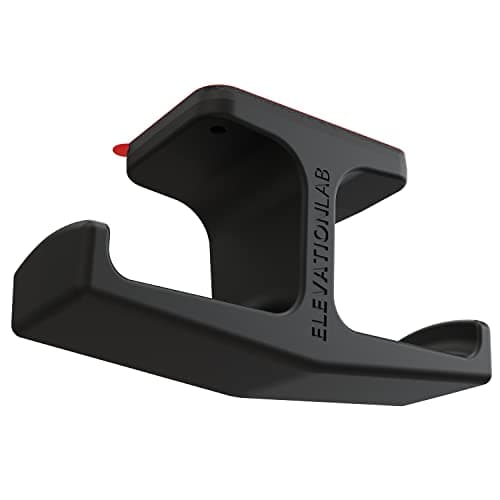
Elevation Lab The Anchor Under-Desk Headphone Mount
A headset left on the desk takes up the same surface an arm or a riser was bought to give back. Under the front edge it hangs in dead space, out of the way of the keyboard and off the cables.
Check first: adhesive mounts want a smooth, clean underside. Rough or heavily textured laminate will not hold one.
#ad · Live prices from the Amazon Product API, as of Sep 24, 2026. Where we have no verified live price we show none. We may earn a commission, at no extra cost to you.
How we picked
We do not run a testing lab
We compiled the published manufacturer specifications, did the ergonomics, VESA and desk-depth math ourselves, and read aggregated owner reviews, then scored each product against a published rubric. The scores are judgments from documented research — they are not measurements we took, because we do not have a lab and we are not going to pretend we do. Every spec traces back to a listing or manual named in Sources.
Questions
Frequently asked
What is a good desk gift under $50?+
A monitor light bar, a desktop power block with USB-C, a large felt desk mat or a pair of USB-C desktop speakers. All four get used every day, none is sized to a person, and none needs anything installed. The light bar is our top pick because it is the thing desk people most often want and least often buy for themselves.
Is a monitor arm a safe gift?+
Safe with one check. The monitor needs a VESA mounting pattern - four screw holes in a square on the back - and it needs to be under the arm’s size and weight limits, which for the arm on this list is 32 inches and about 17.6 pounds. A photo of the back of the monitor, or the model number and a quick search, settles it.
Should I buy a mouse or keyboard as a gift under $50?+
Not unless you know exactly what they use and why they want to change. Mice are sized to hands and keyboards to strong opinions, and a wrong guess is the desk gift most likely to end up in a drawer. Everything on this list was chosen because it has no size to get wrong.
How do I know what they already have?+
Look at a video-call background or ask for a photo of the desk on some pretext. A light bar, a desk mat, a monitor on an arm and desktop speakers are all visible in a single frame. Whatever is missing from that frame is the gift.
Are the prices on this page current?+
The prices in the buttons are pulled live from Amazon and refreshed daily; if a price is more than 48 hours old we hide it rather than show a stale number. All six picks were under $50 when the guide was written. If one has drifted over the line since, the button will show it.
Receipts
Sources
We do not run a testing lab, and we do not pretend to. Specifications come from the manufacturer or retailer listing; the footprint and clearance math is ours and reproducible. Where we could not verify a number, we say so on the page rather than quietly leaving it out. Read our full method.