Skip to content
Chair & Cable

SECTION 02 · Standing Desks

The best home office desks, judged on width, depth, and frame

Enough room for a laptop and a monitor, a top that survives daily use, and a frame that does not sway - the fixed desks worth your money.

By Stephen V.Updated How we pick
#ad

We earn a commission when you buy through our Amazon links, at no extra cost to you. It never affects our rankings, and we say so when the cheaper product is the better buy. How this works.

A desk is the one part of a setup you cannot upgrade with a firmware update, so it is worth getting the dimensions right the first time. For a laptop parked next to a single monitor, roughly 40 inches of width is the floor and about 48 inches is comfortable. Depth matters just as much: if the monitor sits on the surface rather than on an arm, you want close to 24 inches so the panel lands about an arm’s length away instead of pressing against your face.

Start with the footprint, because it sets everything else

Measure the wall or nook the desk will live in, then subtract a few inches of breathing room on each side. A 48-inch top gives a 15-inch laptop and a 27-inch monitor room to coexist with a notepad in the gap; anything under 40 inches forces you to stack windows on one screen instead of spreading gear across the desk. Depth is the quieter number and the one buyers skip. A monitor on its bundled stand eats 8 to 10 inches of depth before your keyboard even lands, so a 24-inch top keeps the screen at a sane viewing distance. Push that monitor onto a monitor arm and you claw the depth back for good, which is why a shallow desk and an arm often beat a deep desk and the stock stand.

Frame first, laminate second

The other decision is what holds the top up. Almost every desk in this bracket uses a particleboard or MDF top — that is normal, and it is what keeps the price sane — so the real quality signal is the frame underneath. A powder-coated steel A-frame or C-leg resists the side-to-side sway that makes typing feel like writing on a trampoline; thin folding legs and all-particleboard construction do not. Feel for frame rigidity first and judge the surface finish second. If you think you will ever want to stand, read the best standing desks roundup and the standing desk vs sitting desk comparison before you commit, because retrofitting a fixed slab into a sit-stand desk is not a thing you can do later.

How this list is ranked

Everything below is ordered the way we order everything on this site: from published specifications, manufacturer manuals, and the desk-depth math above — not from a lab we do not have. The how we pick page spells out that method in full. Once the surface is sorted, the chair you park under it decides whether the whole setup feels finished, so the best ergonomic office chairs guide is the logical next stop.

The short answer

Quick picks

#ProductBest forScorePrice
01
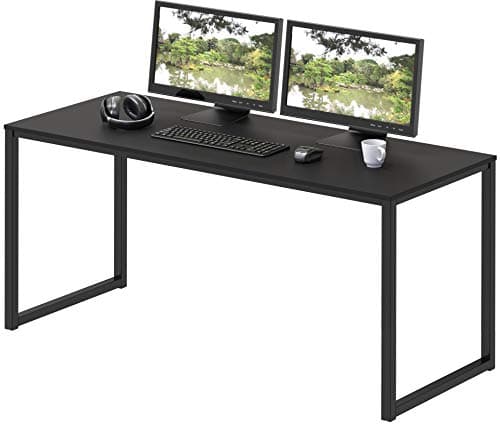
SHW SHW Mission 48" Home Office Computer Desk
SHW Mission 48" Home Office Computer Desk

A plain, sturdy 48-inch fixed desk on a steel frame - the right size for a laptop and a single monitor with nothing wasted. It is the sensible default when you do not need the surface to move.

Best overall value
8.5
$89.97Amazon
02
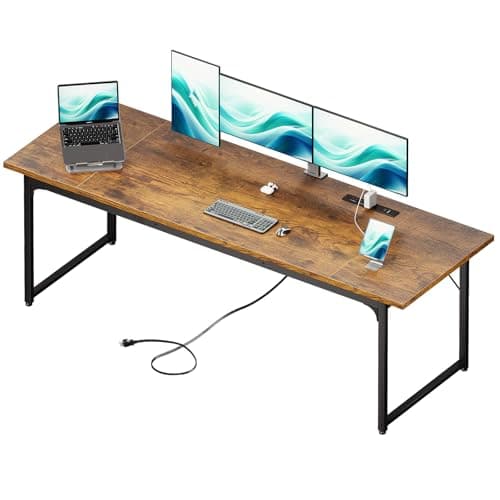
Coleshome Coleshome 79" Large Computer Desk
Coleshome 79" Large Computer Desk

A 79-inch slab built for people who run two monitors and still want elbow room. If your bottleneck is surface area rather than height, this is the cheap way to buy a lot of it.

Best big surface for dual monitors
8.0
$129.98Amazon
03
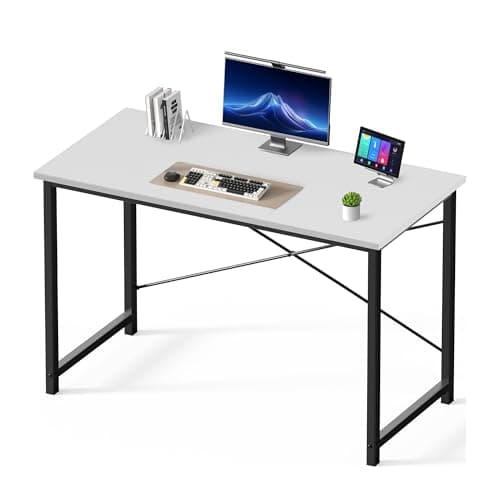
DUMOS DUMOS 47" Computer Desk for Home Office
DUMOS 47" Computer Desk for Home Office

A compact 47-inch desk aimed squarely at a tight budget and a tight room. It clears the bar for a laptop-plus-monitor setup without asking much of your wallet or your floor plan.

Best compact budget pick
7.5
$35.88Amazon
04
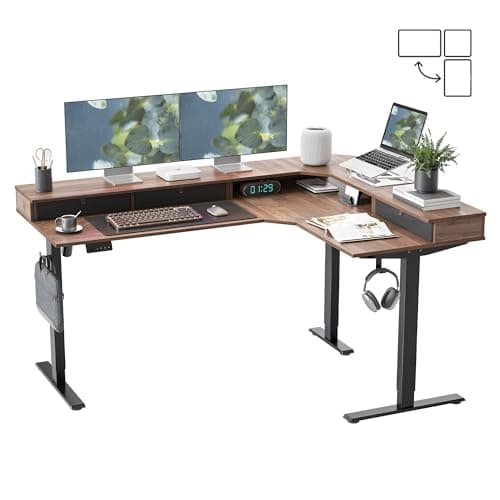
FEZIBO FEZIBO L-Shaped Electric Standing Desk (63×48")
FEZIBO L-Shaped Electric Standing Desk (63×48")

A corner desk that also rises electrically - the outlier here, and the pick if you want to fill an L-shaped nook and keep the option to stand. You pay for the motor and the extra top.

Best L-shaped corner (and it stands)
7.0
$249.98Amazon
05
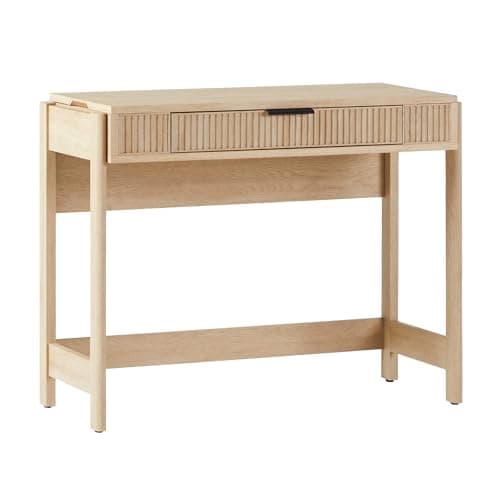
Walker Edison Walker Edison Reeded Wood Computer Desk
Walker Edison Reeded Wood Computer Desk

The one you buy because it looks like furniture rather than office gear. The fluted, reeded front reads warm in a living room; just know you are trading some working width for the styling.

Best looks and design
6.5
$193.49Amazon

#ad · Live prices from the Amazon Product API, as of Jul 24, 2026. Where we have no verified live price we show none — we would rather leave a gap than print a number that has rotted.

In detail

The picks, in full

01
SHW SHW Mission 48" Home Office Computer Desk

Best overall value

SHW Mission 48" Home Office Computer Desk

Surface
48" W x 24" D (approx.)
Height
29" fixed
Top
MDF with laminate finish
Frame
Powder-coated steel A-frame
Assembly
Bolt-together, no electronics
8.5/10

A plain, sturdy 48-inch fixed desk on a steel frame - the right size for a laptop and a single monitor with nothing wasted. It is the sensible default when you do not need the surface to move.

Stability
9
Build
8
Value
9
Ease of Setup
8

Pros

  • The 48-inch width fits a laptop and a monitor side by side with a notepad in the gap
  • Steel A-frame keeps typing wobble low for a fixed desk
  • No motor or electronics to fail down the road
  • The 24-inch depth tucks into smaller rooms and corners

Cons

  • Height is fixed at a standard 29 inches with no sit/stand option
  • The laminate top will scuff if you drag gear across it

Skip this if…

you want to alternate between sitting and standing during the day.

$89.97View on Amazon

Price as of Jul 24, 2026. Prices change — Amazon's is the one that counts.

#ad · we may earn a commission from this link to SHW Mission 48" Home Office Computer Desk

02
Coleshome Coleshome 79" Large Computer Desk

Best big surface for dual monitors

Coleshome 79" Large Computer Desk

Surface
79" W x 30" D (approx.)
Height
Fixed, standard desk height
Top
Engineered wood, water-resistant laminate
Frame
Steel legs with leveling feet
Assembly
Two-person job for the long panel
8.0/10

A 79-inch slab built for people who run two monitors and still want elbow room. If your bottleneck is surface area rather than height, this is the cheap way to buy a lot of it.

Stability
8
Build
8
Value
8
Ease of Setup
8

Pros

  • Nearly seven feet of width swallows two monitors plus a keyboard tray of gear
  • The 30-inch depth leaves room for monitors on stands and a keyboard in front
  • Leveling feet help it sit flat on uneven floors
  • Low cost per square inch of desk

Cons

  • It needs a genuinely large wall - measure before you commit
  • A single long top flexes more in the middle than a shorter one

Skip this if…

your room cannot spare a wall close to seven feet wide.

$129.98View on Amazon

$149.9913% off

Price as of Jul 24, 2026. Prices change — Amazon's is the one that counts.

#ad · we may earn a commission from this link to Coleshome 79" Large Computer Desk

03
DUMOS DUMOS 47" Computer Desk for Home Office

Best compact budget pick

DUMOS 47" Computer Desk for Home Office

Surface
47" W x 24" D (approx.)
Height
29" fixed
Top
Particleboard with laminate
Frame
Steel tube legs
Extras
Often ships with a small hook or holder
7.5/10

A compact 47-inch desk aimed squarely at a tight budget and a tight room. It clears the bar for a laptop-plus-monitor setup without asking much of your wallet or your floor plan.

Stability
7
Build
7
Value
9
Ease of Setup
7

Pros

  • Just wide enough for a laptop and a monitor at the lowest sensible price
  • The 24-inch depth fits bedrooms and dorm corners
  • Light enough for one person to build and move
  • Simple frame with little to go wrong

Cons

  • Thinner particleboard flexes more than a heavier top
  • No room to grow if you add a second monitor later

Skip this if…

you already know a second monitor is coming.

$35.88View on Amazon

Price as of Jul 24, 2026. Prices change — Amazon's is the one that counts.

#ad · we may earn a commission from this link to DUMOS 47" Computer Desk for Home Office

04
FEZIBO FEZIBO L-Shaped Electric Standing Desk (63×48")

Best L-shaped corner (and it stands)

FEZIBO L-Shaped Electric Standing Desk (63×48")

Surface
63" x 48" L-shape (corner)
Height range
Electric, about 28 to 48 in
Motor
Electric lift with memory presets
Top
Engineered wood, two-piece corner
Capacity
Rated for a multi-monitor load
7.0/10

A corner desk that also rises electrically - the outlier here, and the pick if you want to fill an L-shaped nook and keep the option to stand. You pay for the motor and the extra top.

Stability
7
Build
8
Value
7
Ease of Setup
6

Pros

  • Wraps a corner and gives two working zones on one desk
  • Electric height change means it doubles as a standing desk
  • Memory presets recall your sitting and standing heights
  • A lot of usable surface for the footprint of one corner

Cons

  • Heavier and slower to assemble than any fixed desk here
  • An L-shaped top can sway more at full standing height than a straight one
  • Costs more than the fixed desks by a wide margin

Skip this if…

you do not have a corner to build it into.

$249.98View on Amazon

$308.9919% off

Price as of Jul 24, 2026. Prices change — Amazon's is the one that counts.

#ad · we may earn a commission from this link to FEZIBO L-Shaped Electric Standing Desk (63×48")

05
Walker Edison Walker Edison Reeded Wood Computer Desk

Best looks and design

Walker Edison Reeded Wood Computer Desk

Surface
Writing-desk width, shallow depth
Height
Fixed
Top
MDF with a reeded wood-look front
Storage
Single drawer
Style
Fluted / reeded front panel
6.5/10

The one you buy because it looks like furniture rather than office gear. The fluted, reeded front reads warm in a living room; just know you are trading some working width for the styling.

Stability
6
Build
7
Value
7
Ease of Setup
6

Pros

  • Fluted front and warm finish suit a bedroom or living space
  • A drawer hides small clutter without a separate cabinet
  • Reads as furniture, not a workstation

Cons

  • Shallow depth is tight once a monitor sits on the surface
  • A styling-first desk is less rigid than a plain steel-frame slab

Skip this if…

you need a deep, wide surface more than a good-looking one.

$193.49View on Amazon

$214.9910% off

Price as of Jul 24, 2026. Prices change — Amazon's is the one that counts.

#ad · we may earn a commission from this link to Walker Edison Reeded Wood Computer Desk

How to choose a home office desk

Work outward from the space, then the frame, then the top. Measure the available width and leave a hand’s width of clearance on each side; a desk crammed wall-to-wall is a desk you resent every time you plug something in. As a rule of thumb, aim for at least 40 inches of width for a laptop-plus-monitor layout and 48 or more if you want a notepad, a mug, and a mouse pad to coexist. For a dual-monitor plan, jump to a 60-inch-plus top so the second screen is not hanging off the edge.

Depth is the spec buyers underrate. A 24-inch depth is the practical minimum once a monitor sits on the surface, because the stand alone claims most of the first foot. If you can only fit a shallow desk, budget for a monitor arm at the same time so the screen floats off the back edge and gives your keyboard room.

Then judge the frame. Steel legs with a crossbar or a wide A-frame stay steady; folding or all-particleboard legs let the whole desk shimmy when you type hard. The top itself is almost always particleboard or MDF at this price, and that is fine — a thicker top with a sealed laminate edge resists chipping and moisture better than a thin one. Finally, be honest about whether you will actually use height changes. If the answer is yes, a fixed desk is the wrong buy; send yourself to the standing desks list instead. And once the surface is picked, plan the cables that hang behind it with our under-desk cable management guide.

How we picked

We do not run a testing lab

We compiled the published manufacturer specifications, did the ergonomics, VESA and desk-depth math ourselves, and read aggregated owner reviews, then scored each product against a published rubric. The scores are judgments from documented research — they are not measurements we took, because we do not have a lab and we are not going to pretend we do. Every spec traces back to a listing or manual named in Sources.

Questions

Frequently asked

How wide should a home office desk be for a laptop and a monitor?
About 40 inches is the workable floor and 48 inches is comfortable. That leaves a 15-inch laptop and a 27-inch monitor room to sit side by side with space between them for a notepad or a mouse pad. For two monitors, step up to 60 inches or more.
Is a 24-inch deep desk deep enough?
Yes, if you plan for it. A monitor on its bundled stand uses 8 to 10 inches of depth, so a 24-inch top keeps the screen roughly an arm’s length away — the ergonomic target. Moving the monitor onto a monitor arm reclaims that depth for your keyboard and hands.
Are particleboard or MDF desk tops any good?
They are the norm in this price range and perfectly serviceable. A thicker top with a sealed laminate edge holds up to daily use and the odd spill. The bigger quality difference is the frame: a rigid steel frame under an average top beats a wobbly frame under a nicer one.
Do I need a standing desk instead?
Only if you will actually change heights. A fixed desk is cheaper, steadier, and has nothing to break. If you want the option to alternate, read the standing desk vs sitting desk comparison first so you buy the right category rather than regretting a fixed slab.
How much weight can these desks hold?
Fixed steel-framed desks in this class comfortably carry a monitor or two, a laptop, and peripherals. The limiting factor is rarely the rated load and more often how the weight is distributed — keep the heaviest gear over the legs, not floating in the middle of a long, unsupported span.

Keep reading

Receipts

Sources

We do not run a testing lab, and we do not pretend to. Specifications come from the manufacturer or retailer listing; the footprint and clearance math is ours and reproducible. Where we could not verify a number, we say so on the page rather than quietly leaving it out. Read our full method.