Skip to content
Chair & Cable

SECTION 05 · Cable Management

The Best KVM Switches for Dual Monitors

One keyboard, one mouse, and two screens shared across two or more computers — at 4K60, with the peripheral passthrough that keeps you from replugging every time you switch.

By Stephen V.Updated How we pick
#ad

We earn a commission when you buy through our Amazon links, at no extra cost to you. It never affects our rankings, and we say so when the cheaper product is the better buy. How this works.

A KVM switch answers a question a dock cannot: what do you do when you have two whole computers on one desk? A dock takes one machine and fans it out to many peripherals. A KVM — keyboard, video, mouse — does the reverse. It shares one keyboard, one mouse, and one or two monitors between multiple computers, so a single set of gear drives a work laptop and a personal desktop with a button press instead of two of everything cluttering the desk.

The specification that matters most is the one people skim past: the resolution and refresh rate the switch can actually carry. A KVM sits in the middle of your video path, so a switch capped below your monitors quietly downgrades them — you bought two sharp panels and the switch hands you a softer, slower picture. For a modern dual-monitor setup the number to look for is 4K at 60Hz per display, enough that switching between computers never costs you sharpness or smoothness. Our winner, the UGREEN dual-monitor KVM, carries 4K60 across both screens, which is why it leads the list.

How you switch is the next decision. Every KVM has a physical button on the box; better ones add keyboard hotkeys so you can jump between machines without reaching for the unit, and some include a wired remote you can sit on the desk within reach. Alongside the video, look at the USB peripheral passthrough — the extra ports that carry your keyboard, mouse, webcam, or audio interface across the switch. A KVM that passes only a keyboard and mouse but not your webcam will send you back to replugging, which is the exact chore the switch was meant to end.

One honest caveat before you buy the biggest box. If you do not actually need to share screens — both computers already have their own monitors and you only want one keyboard and mouse across both — a plain USB sharing switch does that for far less, and carries no video at all. We include two of those below for the peripheral-only case, ranked lower here precisely because they are not dual-monitor KVMs, so nobody buys one expecting it to move their displays.

To plan the rest of the two-machine desk, the best USB-C docks for dual monitors covers the one-computer path; managing cables under a desk keeps the doubled cabling in check; and how we pick explains how these are ranked.

The short answer

Quick picks

#ProductBest forScorePrice
01
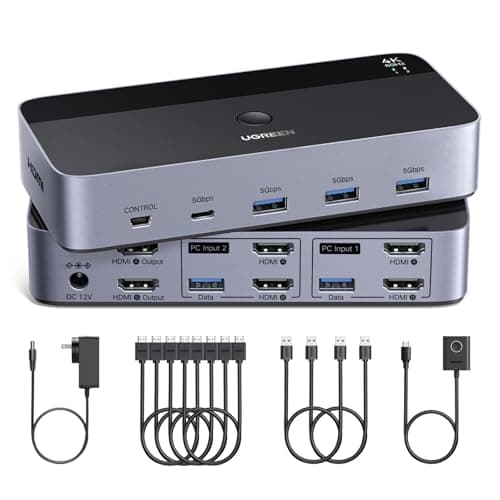
UGREEN UGREEN HDMI KVM Switch (2 Monitors, 2 PCs, 4K60)
UGREEN HDMI KVM Switch (2 Monitors, 2 PCs, 4K60)

The dual-monitor KVM we would reach for first. It carries 4K at 60Hz across both screens and passes USB peripherals, so switching two computers never costs you sharpness or a replug.

Best overall
8.9
$69.99Amazon
02
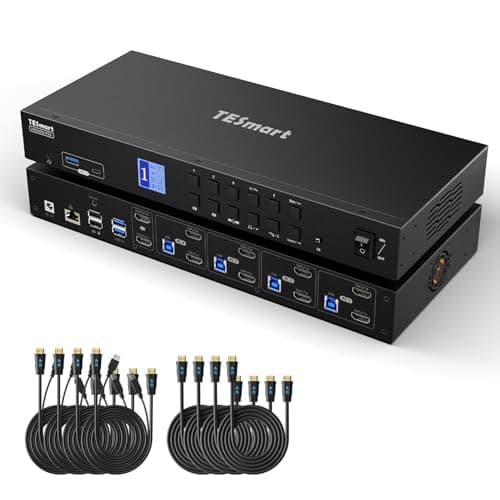
TESmart TESmart HDMI KVM Switch (4 PCs, 2 Monitors)
TESmart HDMI KVM Switch (4 PCs, 2 Monitors)

Steps the count up to four computers on the same two screens, with front buttons, hotkeys, and a remote. It is the pick when two inputs are not enough.

More computers
8.4
$461.99Amazon
03
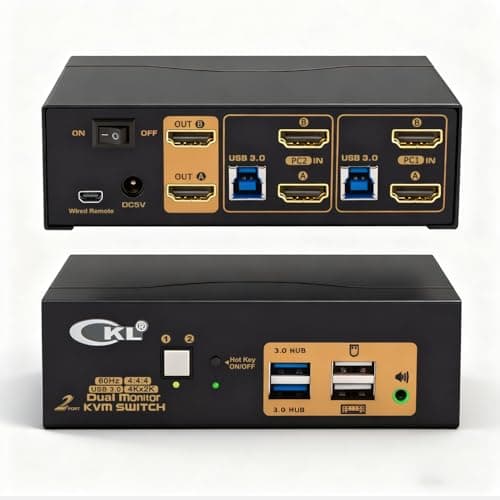
CKL CKL Dual Monitor KVM Switch (4K60)
CKL Dual Monitor KVM Switch (4K60)

A straightforward two-computer, two-monitor KVM at 4K60 that covers the essentials, including audio, without paying for a remote or extra inputs you will not use.

Value dual-monitor
8.4
$139.00Amazon
04
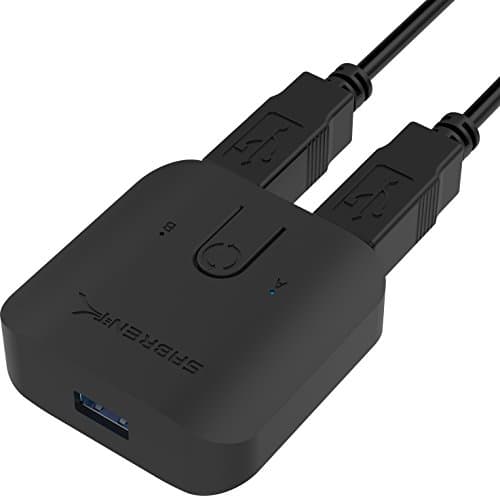
Sabrent Sabrent USB 3.0 Sharing Switch
Sabrent USB 3.0 Sharing Switch

Not a video KVM at all — it shares USB peripherals only. If both computers already have their own monitors and you just want one keyboard and mouse across them, this is the cheap, simple tool for it.

Peripheral-only sharing
7.1
$14.99Amazon
05
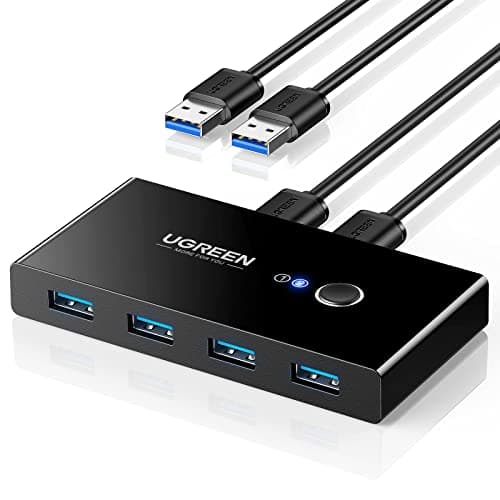
UGREEN UGREEN USB 3.0 Switch Selector
UGREEN USB 3.0 Switch Selector

The budget version of the same idea: a one-button USB 3.0 selector that flips a shared keyboard, mouse, or drive between two computers. No video, no frills, lowest cost of entry.

Budget USB switch
6.8
$29.99Amazon

#ad · Live prices from the Amazon Product API, as of Jul 24, 2026. Where we have no verified live price we show none — we would rather leave a gap than print a number that has rotted.

In detail

The picks, in full

01
UGREEN UGREEN HDMI KVM Switch (2 Monitors, 2 PCs, 4K60)

Best overall

UGREEN HDMI KVM Switch (2 Monitors, 2 PCs, 4K60)

Type
Dual-monitor HDMI KVM
Computers
2 PCs
Displays
2 monitors (HDMI)
Max resolution
4K at 60Hz per display
Switching
Button and wired remote; USB peripheral passthrough
8.9/10

The dual-monitor KVM we would reach for first. It carries 4K at 60Hz across both screens and passes USB peripherals, so switching two computers never costs you sharpness or a replug.

Dual-display support
9.2
Switching
9
Peripheral passthrough
8.8
Value
8.4

Pros

  • Full 4K60 on both monitors, so neither screen is downgraded
  • USB passthrough carries keyboard, mouse, and more across the switch
  • Wired remote lets you switch without reaching for the box

Cons

  • Two computers is the ceiling — no room for a third machine
  • Two-monitor cabling is a lot of HDMI to route on setup

Skip this if…

you need to switch between three or more computers — this tops out at two

$69.99View on Amazon

$79.9913% off

Price as of Jul 24, 2026. Prices change — Amazon's is the one that counts.

#ad · we may earn a commission from this link to UGREEN HDMI KVM Switch (2 Monitors, 2 PCs, 4K60)

02
TESmart TESmart HDMI KVM Switch (4 PCs, 2 Monitors)

More computers

TESmart HDMI KVM Switch (4 PCs, 2 Monitors)

Type
Dual-monitor HDMI KVM
Computers
4 PCs
Displays
2 monitors (HDMI)
Max resolution
4K at 60Hz per display
Switching
Front buttons, hotkeys, and remote; USB passthrough
8.4/10

Steps the count up to four computers on the same two screens, with front buttons, hotkeys, and a remote. It is the pick when two inputs are not enough.

Dual-display support
8.8
Switching
8.6
Peripheral passthrough
8.4
Value
7.8

Pros

  • Shares two screens across four computers, not just two
  • Multiple switching methods including hotkeys and a remote
  • Holds 4K60 across both displays

Cons

  • More switch than a simple two-computer desk needs
  • Four sets of input cabling is a real bundle to manage

Skip this if…

you only ever run two computers — a two-input KVM is smaller and cheaper for the same job

$461.99View on Amazon

Price as of Jul 24, 2026. Prices change — Amazon's is the one that counts.

#ad · we may earn a commission from this link to TESmart HDMI KVM Switch (4 PCs, 2 Monitors)

03
CKL CKL Dual Monitor KVM Switch (4K60)

Value dual-monitor

CKL Dual Monitor KVM Switch (4K60)

Type
Dual-monitor KVM
Computers
2 PCs
Displays
2 monitors
Max resolution
4K at 60Hz per display
Switching
Button and hotkey; USB passthrough with audio
8.4/10

A straightforward two-computer, two-monitor KVM at 4K60 that covers the essentials, including audio, without paying for a remote or extra inputs you will not use.

Dual-display support
8.6
Switching
8.2
Peripheral passthrough
8.2
Value
8.6

Pros

  • Covers the core two-by-two KVM job at 4K60
  • Includes audio passthrough alongside the USB ports
  • Hotkey switching on top of the physical button

Cons

  • No wired remote in the box
  • Two computers is the limit

Skip this if…

you want a desk remote or more than two inputs — step up to a switch built for that

$139.00View on Amazon

Price as of Jul 24, 2026. Prices change — Amazon's is the one that counts.

#ad · we may earn a commission from this link to CKL Dual Monitor KVM Switch (4K60)

04
Sabrent Sabrent USB 3.0 Sharing Switch

Peripheral-only sharing

Sabrent USB 3.0 Sharing Switch

Type
USB peripheral sharing switch (not a video KVM)
Computers
2 computers
Video
None — shares USB peripherals only
Ports
Shared USB 3.0 ports
Switching
One-button switch
7.1/10

Not a video KVM at all — it shares USB peripherals only. If both computers already have their own monitors and you just want one keyboard and mouse across them, this is the cheap, simple tool for it.

Dual-display support
2.5
Switching
8.4
Peripheral passthrough
8.8
Value
8.6

Pros

  • Dead-simple way to share a keyboard and mouse across two PCs
  • USB 3.0 speeds for a shared drive or hub
  • No drivers and nothing to configure

Cons

  • Carries no video — it does not switch monitors at all
  • Button-only switching, no hotkeys

Skip this if…

you need the switch to move your monitors too — this shares USB peripherals only, not displays

$14.99View on Amazon

Price as of Jul 24, 2026. Prices change — Amazon's is the one that counts.

#ad · we may earn a commission from this link to Sabrent USB 3.0 Sharing Switch

05
UGREEN UGREEN USB 3.0 Switch Selector

Budget USB switch

UGREEN USB 3.0 Switch Selector

Type
USB peripheral sharing switch (not a video KVM)
Computers
2 computers
Video
None — shares USB peripherals only
Ports
Shared USB 3.0 ports
Switching
One-button selector
6.8/10

The budget version of the same idea: a one-button USB 3.0 selector that flips a shared keyboard, mouse, or drive between two computers. No video, no frills, lowest cost of entry.

Dual-display support
2
Switching
8
Peripheral passthrough
8.4
Value
8.8

Pros

  • Lowest-cost way to share USB gear between two machines
  • Plug-and-play with no software
  • Compact enough to sit on the desk within reach

Cons

  • No video switching whatsoever
  • Single button only, and a modest number of shared ports

Skip this if…

you expected it to switch your screens — a USB selector never touches the video path

$29.99View on Amazon

$36.9919% off

Price as of Jul 24, 2026. Prices change — Amazon's is the one that counts.

#ad · we may earn a commission from this link to UGREEN USB 3.0 Switch Selector

How to choose a KVM switch

Start by counting two things: how many computers you need to switch between, and how many monitors each should drive. Most desks are a two-computer, two-monitor job, which is the sweet spot the winner targets. If you juggle three or four machines, step up to a switch with more inputs; if both computers already have their own screens and you only want to share a keyboard and mouse, a plain USB sharing switch is all you need — it carries no video.

Then check the resolution and refresh rate, because a KVM sits in the middle of the video path and a switch rated below your panels will cap them. For dual monitors, look for 4K at 60Hz per display so switching never softens or slows the picture. Confirm the figure applies per screen, not shared across both, and match the connector — HDMI or DisplayPort — to the outputs your computers and monitors actually use.

Switching method and USB passthrough are what you live with daily. A physical button is the baseline; hotkeys let you switch from the keyboard, and a wired remote keeps the control on the desk instead of behind it. For passthrough, count the USB ports and check they cover not just a keyboard and mouse but a webcam, audio interface, or dongle, so switching moves your whole peripheral set at once. One last detail worth a look is how the switch handles EDID, the handshake that tells each computer what monitors are attached — a KVM that holds that steady stops windows from reshuffling every time you switch away and back. Get those pieces right and a KVM turns two computers into one seamless desk.
How we picked

We do not run a testing lab

We compiled the published manufacturer specifications, did the ergonomics, VESA and desk-depth math ourselves, and read aggregated owner reviews, then scored each product against a published rubric. The scores are judgments from documented research — they are not measurements we took, because we do not have a lab and we are not going to pretend we do. Every spec traces back to a listing or manual named in Sources.

Questions

Frequently asked

What is the difference between a KVM switch and a docking station?

They work in opposite directions. A docking station takes one computer and fans it out to many peripherals and screens over a single cable. A KVM switch shares one keyboard, mouse, and monitor set across multiple computers, letting you drive several machines from one set of gear. Use a dock for one computer, a KVM for two or more.

Can a KVM switch do 4K at 60Hz on two monitors?

Yes, if it is rated for it. Because the switch sits in the video path, it has to support the resolution and refresh rate you want or it caps your monitors. Look for a dual-monitor KVM that states 4K at 60Hz per display, and confirm that figure is per screen rather than shared across both.

What is the difference between a KVM and a USB sharing switch?

A KVM carries video as well as USB, so it moves your monitors along with the keyboard and mouse when you switch computers. A USB sharing switch carries no video at all — it only passes USB peripherals between machines. If both computers already have their own screens, a USB switch is enough; if you want to share the displays too, you need a true KVM.

How do I switch between computers on a KVM?

Every KVM has a button on the unit. Many also support keyboard hotkeys, so you can jump between machines without reaching for the box, and some include a wired remote you keep on the desk. Pick the method you will actually use day to day — a button tucked behind the monitors is less convenient than a hotkey or a remote within reach.

Will a KVM pass through my webcam and other USB devices?

Only if it has enough USB passthrough ports for them. Basic KVMs carry a keyboard and mouse; better ones add extra USB ports for a webcam, headset, or audio interface so your whole peripheral set moves at once. Count the ports and match them to your devices, or you will be back to replugging the webcam every time you switch.

Keep reading

Receipts

Sources

We do not run a testing lab, and we do not pretend to. Specifications come from the manufacturer or retailer listing; the footprint and clearance math is ours and reproducible. Where we could not verify a number, we say so on the page rather than quietly leaving it out. Read our full method.