Skip to content
Chair & Cable

SECTION 07 · Setup Guides

Standing Desk Ergonomics

Most standing desks are set two inches too high and the monitor never moves when the desk does. Both are five-minute fixes, and both are why standing stops feeling good after a week.

By Stephen V.Updated How we pick
#ad

We earn a commission when you buy through our Amazon links, at no extra cost to you. It never affects our rankings, and we say so when the cheaper product is the better buy. How this works.

A standing desk is not a health device. It is a position-changing device, and the benefit comes from alternating rather than from standing. That distinction matters, because people who treat it as “standing is good” stand for four hours, get sore feet and a sore lower back, and conclude the desk was a mistake.

Here is how to set one up so that does not happen.

1. Standing height comes from your elbows, not your height

Stand up straight with your shoulders relaxed and your upper arms hanging at your sides. Bend your elbows to about 90 degrees so your forearms are parallel to the floor. The height of your palms is your desk height.

Not your wrists, not your knuckles — the surface should meet the height where your hands rest on the keyboard. Measure it with a tape rather than guessing, then set the desk to it and save it as a memory preset. Do the same seated, and save that too. Those two numbers are the whole point of a desk with presets; the fuller method is in how high should your desk be.

The most common error by a distance is setting standing height too high, which pushes the shoulders up toward the ears. If your shoulders creep up within ten minutes of standing, drop the desk an inch and try again.

2. The monitor has to move with the desk. It usually does not.

This is the mistake that quietly ruins more standing desks than any other. The screen height that is correct when you are seated is not correct when you are standing — your eye level rises by around ten to fourteen inches, but the desk only rises by about the same amount, so a monitor sitting on a fixed stand ends up in roughly the right place by luck.

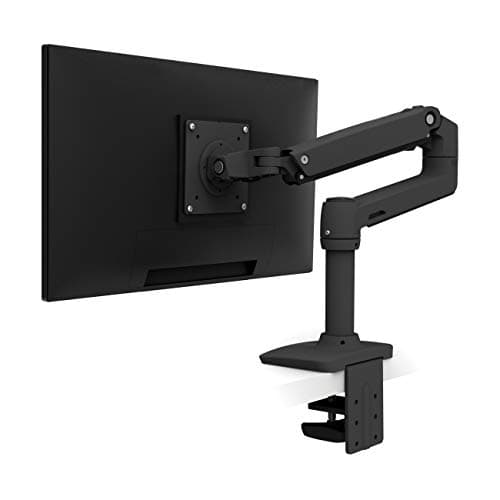
What actually changes is your viewing angle. Standing, most people hold their head slightly more upright and prefer the screen a touch higher relative to the desk than they do seated. A monitor bolted to a stand cannot reflect that; a monitor on an arm can be nudged in two seconds.

The target is the same in both positions: the top of the screen at or just below eye level, and the screen roughly an arm’s length away. If you find yourself tilting your chin up when standing, the screen is too low, not the desk. The measurement is in the monitor height guide.

3. Wrists and keyboard angle change when you stand

Standing, your forearms come in at a slightly different angle and there is nothing supporting the heel of your hand. Two consequences.

First, tilt legs are worse standing than sitting. Propping the back of a keyboard up extends the wrists, and standing already encourages that. Keep the keyboard flat or slightly negative — the reasoning is in keyboard and mouse ergonomics.

Second, the mouse matters more. Standing, people tend to reach further for the mouse and hold the arm away from the body, which loads the shoulder. Bringing the mouse closer is the fix, and the cheapest way to do that is a keyboard without a number pad — see the compact keyboard roundup.

4. What is under your feet decides how long you last

Standing still on a hard floor is genuinely uncomfortable after about twenty minutes, and it is not a fitness problem — it is that motionless standing restricts blood flow in the legs. Two things help, and one of them is free.

Shoes. Standing barefoot or in socks on a hard floor is the fastest route to sore feet. Supportive shoes make a large difference and cost nothing extra if you already own some.

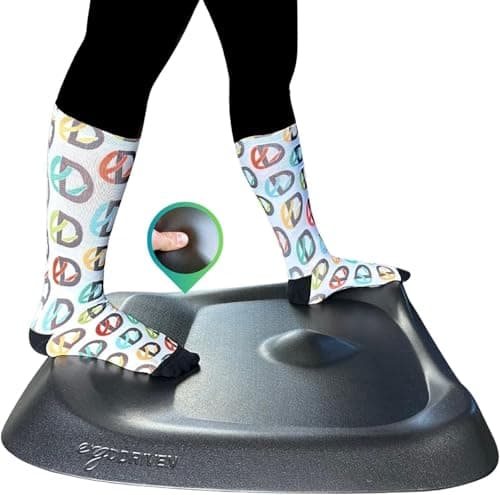
An anti-fatigue mat.A firm foam mat gives the feet something to sink slightly into and, more importantly, encourages small weight shifts. The contoured designs go further by giving you things to stand on, lean against and stretch a calf over — which is the actual mechanism, because the problem is stillness rather than hardness. The field is in the anti-fatigue mat roundup.

5. The cadence: change position before you feel it

There is no single correct ratio, and anyone quoting one precisely is inventing it. The principle that holds up is simple: change position before your body complains, and treat both sitting and standing as temporary.

A workable starting pattern is to stand for twenty to thirty minutes at a time, a few times through the day, and to sit the rest. Build up gradually — going from zero to four hours of standing on day one is how people end up with sore feet and a desk they stop raising. Anchor the switches to something that already happens: stand for calls, sit for focused writing, or switch whenever you refill a drink.

The presets on the desk matter here more than they look like they should. If changing height means holding a button and eyeballing the result, most people stop doing it within a fortnight. If it is one press, they keep going. That is the entire argument in electric versus manual.

6. Perching is the third position

Sitting and standing are not the only options, and the one in between is underrated. A leaning or perching stool puts you at roughly standing desk height with your hips open and part of your weight taken off your feet. It is less tiring than standing and more active than sitting, and it makes a long standing session possible by giving you somewhere to go halfway through.

The category overlaps with drafting chairs, which are covered in the drafting chair and stool roundup.

7. If the desk wobbles, you will stop raising it

A desk that shivers when you type at standing height is a desk you will quietly stop putting up. That is a solvable problem and usually not an expensive one — level the feet, retorque the frame bolts, check for a crossbar, and confirm you are not working at the very top of the frame’s travel. The diagnosis order is in how to fix a wobbly standing desk.

The same is true of cabling. A power lead that goes taut at full height, or a monitor cable that drags, adds a small penalty to every height change. Bundle everything with enough slack to travel and mount the strip and dock to the desk — cable management for a standing desk covers the method.
The short answer

Quick picks

#ProductBest forScorePrice
01
Ergodriven Topo by Ergodriven Standing Desk Mat
Topo by Ergodriven Standing Desk Mat

The mat that treats stillness as the problem rather than hardness. A sculpted surface with mounds and raised edges gives your feet somewhere to go, which is what keeps a standing session comfortable.

Best overall
8.9
$109.00Amazon
02
Ergotron Ergotron LX Single Monitor Arm
Ergotron LX Single Monitor Arm

The part that makes the screen height correct in both positions. Thirteen inches of Constant Force lift means the monitor moves when you do, in about two seconds and with one hand.

Best for screen height
8.5
$219.00Amazon
03
Mount-It! Mount-It! Ergonomic Sit-Stand Leaning Stool
Mount-It! Ergonomic Sit-Stand Leaning Stool

The third position. A perching stool takes weight off your feet without dropping you into a seated posture, which is what makes a long standing session actually last.

Best for perching
7.9
$199.99Amazon

#ad · Live prices from the Amazon Product API, as of Sep 6, 2026. Where we have no verified live price we show none — we would rather leave a gap than print a number that has rotted.

In detail

The picks, in full

01
Ergodriven Topo by Ergodriven Standing Desk Mat

Best overall

Topo by Ergodriven Standing Desk Mat

Type
Contoured active standing mat
Surface
Sculpted terrain with mounds and raised edges
Purpose
Prompts position changes and calf stretches
Material
Firm polyurethane foam
Edges
Integrated sloped edges
8.9/10

The mat that treats stillness as the problem rather than hardness. A sculpted surface with mounds and raised edges gives your feet somewhere to go, which is what keeps a standing session comfortable.

Fatigue Relief
9.4
Encourages Movement
9.8
Build
9
Value
7.4

Pros

  • The contours give you something to do with your feet, which addresses the actual cause of standing fatigue
  • Firm foam rather than soft, so it does not force your legs to stabilize constantly
  • Sloped edges mean stepping on and off is not a trip hazard
  • Calf stretch built into the shape, which is genuinely useful mid-afternoon

Cons

  • Costs several times a flat foam mat
  • The sculpted shape is divisive - some people want a plain flat surface
  • Bulky to move out of the way when you sit

Skip this if…

you want something you can kick aside easily - a flat mat is more practical for that.

$109.00View on Amazon

Price as of Sep 6, 2026. Prices change — Amazon's is the one that counts.

#ad · we may earn a commission from this link to Topo by Ergodriven Standing Desk Mat

02
Ergotron Ergotron LX Single Monitor Arm

Best for screen height

Ergotron LX Single Monitor Arm

Mount
Desk clamp or grommet
VESA
75 x 75 & 100 x 100mm
Screen size
Up to 34"
Weight
7 to 25 lb (3.2 to 11.3 kg)
Motion
Constant Force, about 13" lift
8.5/10

The part that makes the screen height correct in both positions. Thirteen inches of Constant Force lift means the monitor moves when you do, in about two seconds and with one hand.

Adjustment Range
9.2
Build Quality
9.6
Ease of Use
9.4
Value
5.8

Pros

  • 13 inches of lift covers the difference between a seated and a standing viewing angle
  • Constant Force moves with one finger and stays exactly where you leave it
  • Clamps to the desk, so the screen travels with it rather than needing its own stand
  • Frees the desk depth a stand base would use, which matters on a desk you lean over

Cons

  • Costs several times a value gas-spring arm
  • Adds weight and leverage to a desk that already wobbles more standing
  • Needs a clear back edge or a grommet hole

Skip this if…

your monitor has no VESA pattern - check the back before buying anything.

$219.00View on Amazon

Price as of Sep 6, 2026. Prices change — Amazon's is the one that counts.

#ad · we may earn a commission from this link to Ergotron LX Single Monitor Arm

03
Mount-It! Mount-It! Ergonomic Sit-Stand Leaning Stool

Best for perching

Mount-It! Ergonomic Sit-Stand Leaning Stool

Type
Leaning or perching stool
Height
Adjustable for standing-desk heights
Base
Weighted tilting base
Posture
Keeps hips open and the spine near-upright
Footprint
Small; tucks away when not in use
7.9/10

The third position. A perching stool takes weight off your feet without dropping you into a seated posture, which is what makes a long standing session actually last.

Height Range
8.8
Foot Support
7
Comfort
7.8
Value
8

Pros

  • Gives you somewhere to go halfway through a standing block instead of sitting down properly
  • Open hip angle keeps the lower back in a better position than a normal chair
  • Small footprint and tucks away, which a full chair does not
  • Tilting base allows small movements rather than locking you still

Cons

  • Not a chair - it is uncomfortable for long seated work by design
  • Little foot support, so shoes and a mat still matter
  • Takes a few days to stop feeling precarious

Skip this if…

you want to replace your office chair - this supplements one, it does not substitute.

$199.99View on Amazon

Price as of Sep 6, 2026. Prices change — Amazon's is the one that counts.

#ad · we may earn a commission from this link to Mount-It! Ergonomic Sit-Stand Leaning Stool

A ten-minute setup, in order

  1. Measure your standing elbow height and set the desk to it. Save it as a preset. Do the same seated.
  2. Stand at the desk and check your shoulders. If they creep up, drop the desk an inch.
  3. Set the screen.Top of the panel at or just below eye level, roughly an arm’s length away, standing. Then sit down and check it again — if it is wrong in one position, you need an arm.
  4. Flatten the keyboard. Fold the tilt legs down. Standing is where propped keyboards do the most harm.
  5. Put something under your feet. Shoes, a mat, or both.
  6. Set a cue for switching. Calls standing, writing sitting. Or every drink refill. Anything that is not willpower.

Two claims worth being skeptical about

“Standing burns significantly more calories.” The difference between sitting and standing is small in energy terms. That is not the reason to own one of these desks; changing position through the day is.

“Standing fixes back pain.”Standing badly for four hours will produce its own lower-back complaint, particularly with the desk set too high or with no mat. What helps is variation, not a different fixed posture. If back pain is the reason you are reading this, the chair you sit in for the other half of the day matters at least as much — see best office chairs for back pain.

If you do not have a standing desk yet

The two routes are a complete desk or a frame plus your own top, and the second is usually better value in the mid range. Those are covered in best standing desks and the standing desk frame roundup. If you already have a desk you like, a converter that sits on top of it is cheaper than replacing it — see best budget standing desks and converters. And whether to switch at all is argued through in standing desk vs sitting.

How we picked

We do not run a testing lab

We compiled the published manufacturer specifications, did the ergonomics, VESA and desk-depth math ourselves, and read aggregated owner reviews, then scored each product against a published rubric. The scores are judgments from documented research — they are not measurements we took, because we do not have a lab and we are not going to pretend we do. Every spec traces back to a listing or manual named in Sources.

Questions

Frequently asked

How high should a standing desk be?
At the height of your palms when you stand up straight with relaxed shoulders and your elbows bent to about 90 degrees. Measure it rather than estimating, and save it as a preset. The most common mistake is setting it too high, which pushes your shoulders up toward your ears.
How long should I stand at a standing desk?
Twenty to thirty minutes at a time, several times a day, is a workable starting pattern — and build up gradually rather than standing for hours on day one. The benefit comes from alternating positions, not from standing as such, so treat both sitting and standing as temporary.
Where should my monitor be on a standing desk?
The same target as when seated: top of the screen at or just below eye level, roughly an arm’s length away. The catch is that the correct position differs slightly between sitting and standing, which a fixed stand cannot accommodate. A monitor arm lets you nudge it in two seconds.
Do I need an anti-fatigue mat with a standing desk?
It helps considerably, and so do proper shoes. The cause of standing fatigue is stillness rather than hardness, so the mats that work best are the ones that encourage small position changes — contoured designs give you something to stand on, lean against and stretch a calf over.
Is standing all day better than sitting all day?
No. Standing still for eight hours produces its own problems — sore feet, leg fatigue and lower-back complaints — and the calorie difference is small. The point of a height-adjustable desk is changing position regularly, which is why the memory presets matter more than the height range.
Should I use a footrest or a stool with a standing desk?
A perching or leaning stool is genuinely useful as a third position: it takes weight off your feet without putting you into a full seated posture, which is what makes a long standing block sustainable. A conventional footrest belongs to the seated half of the day.

Keep reading

Receipts

Sources

We do not run a testing lab, and we do not pretend to. Specifications come from the manufacturer or retailer listing; the footprint and clearance math is ours and reproducible. Where we could not verify a number, we say so on the page rather than quietly leaving it out. Read our full method.