Skip to content
Chair & Cable

SECTION 04 · Keyboards & Mice

Mechanical or Membrane?

One lasts a decade and can be repaired; the other is quieter, flatter and cheaper. The deciding question is not which feels better - it is who else can hear you type.

By Stephen V.Updated How we pick
#ad

We earn a commission when you buy through our Amazon links, at no extra cost to you. It never affects our rankings, and we say so when the cheaper product is the better buy. How this works.

If you work alone in a room, buy mechanical. If you share a room, take calls on an open mic, or type next to someone else, buy either a membrane board or a mechanical with quiet switches. That is the practical answer, and it turns on noise rather than on feel — because feel is a preference and noise is other people’s problem.

The comparison, on what actually differs

 MechanicalMembrane / scissor
How a keypress registersIndividual switch per key, spring and stemRubber dome or scissor collapsing onto a contact sheet
Rated switch lifeTypically 50–100 million pressesTypically 5–10 million presses
RepairableYes — a single switch can be replacedNo — the contact sheet is the keyboard
NoiseAudible; clicky switches are loudQuiet by construction
HeightTall unless low-profileLow — laptop-like
Feel is chosen byYou, via switch typeThe manufacturer
Typical priceHigherLower

What is actually different inside

A membrane keyboard has one continuous sheet of contacts under all the keys. Pressing a key collapses a rubber dome (or a scissor mechanism over a dome) which bridges two contacts on that sheet. It is cheap, quiet, low and reliable — and it is one part, which means it cannot be repaired. When one key stops registering, the sheet has failed and the keyboard is finished.

A mechanical keyboard has an independent switch under every key: a housing, a spring and a stem that moves a metal contact. Each switch is a discrete component rated for tens of millions of presses, and on a hot-swappable board it can be pulled out with a five-dollar tool and replaced. That is the durability argument, and it is real.

The noise problem, stated honestly

Mechanical keyboards are louder. All of them, including the ones sold as quiet. The differences within the category are large — a clicky switch is dramatically louder than a silenced linear one — but the quietest mechanical is still noisier than an ordinary scissor keyboard.

This matters more than typing feel because it is the only property of your keyboard that other people experience. On an open microphone during a call, keystrokes come through clearly, and on a shared desk they are the thing colleagues remember. If either applies, that constraint decides the purchase and the rest of this page is commentary.

The mitigations, in order of effect: choose a linear or silent switch rather than tactile or clicky; add a foam or o-ring dampening kit; put the keyboard on a desk mat rather than a bare hard surface, which removes a surprising amount of the resonance. What each switch type sounds like is in keyboard switches explained.

Height matters more than the debate admits

A full-height mechanical keyboard is tall, and height sets wrist extension. A scissor keyboard is about as flat as a laptop, which is why many people find them more comfortable without ever thinking about why.

Low-profile mechanical switches close most of that gap, and they are the reason the third pick on this page exists. If your wrists are the actual complaint rather than the typing feel, height and angle are the levers to pull — either a low-profile board, or a full-height one paired with a wrist rest. The mechanism is in keyboard and mouse ergonomics.

Cost over ten years

A good membrane keyboard lasts several years and then goes in the bin. A hot-swappable mechanical outlives several switch sets and several keycap sets, and the parts are cheap relative to the board. Over a decade the mechanical is usually the cheaper option, and it is certainly the less wasteful one.

The caveat is that mechanical keyboards invite spending. Keycap sets, switches, dampening foam and coiled cables are all real purchases people make, and none of them makes you type faster. If you want the durability without the hobby, buy one good board with the switches you want and stop.

The short answer

Quick picks

#ProductBest forScorePrice
01
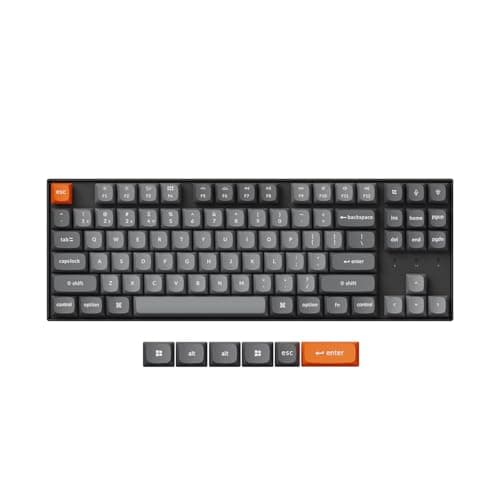
Keychron Keychron K8 Max (the mechanical case)
Keychron K8 Max (the mechanical case)

What mechanical buys you, in one board: switches you can replace without soldering, a decade of rated life per switch, and a typing feel you choose rather than accept.

Best mechanical
8.5
$79.99Amazon
02
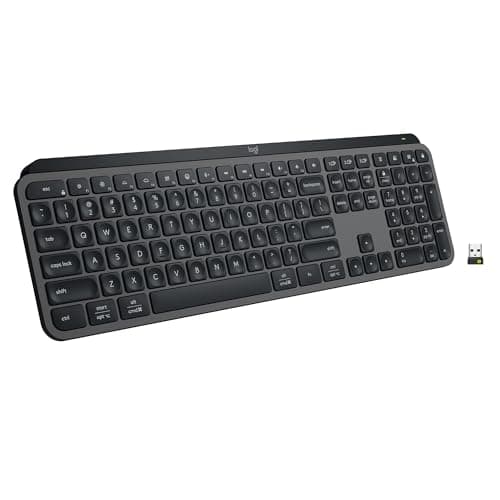
Logitech Logitech MX Keys S (the membrane case)
Logitech MX Keys S (the membrane case)

The best argument against mechanical. Spherically dished scissor keys that are quiet, flat and precise, with a backlight that manages itself and months of battery when it is off.

Best membrane
7.9
$119.99Amazon
03
No image
Logitech MX Mechanical Mini (the quiet middle)

Low-profile mechanical with Tactile Quiet switches - most of the feedback, a fraction of the noise, and a height closer to a membrane board than a mechanical one.

Best of both
8.1
Check price →

#ad · Live prices from the Amazon Product API, as of Sep 6, 2026. Where we have no verified live price we show none — we would rather leave a gap than print a number that has rotted.

In detail

The picks, in full

01
Keychron Keychron K8 Max (the mechanical case)

Best mechanical

Keychron K8 Max (the mechanical case)

Layout
Tenkeyless (87-key)
Connection
Wireless - Bluetooth or 2.4 GHz; wired USB-C
Switch type
Hot-swappable (pre-installed Gateron)
Hot-swap
Yes
Compatibility
Mac and Windows keycaps and toggle
8.5/10

What mechanical buys you, in one board: switches you can replace without soldering, a decade of rated life per switch, and a typing feel you choose rather than accept.

Typing Feel
9.2
Quietness
7
Repairability
9.6
Value
8

Pros

  • Hot-swap sockets mean a keyboard that is too loud can be fixed rather than replaced
  • Individual switches are replaceable, so one failed key is a one-dollar repair
  • Switch choice lets you pick the feel instead of accepting the manufacturer's
  • Keycaps are standard profile and replaceable, which membrane boards almost never are

Cons

  • Louder than any membrane board, even with quiet switches fitted
  • Sits tall, so it wants a wrist rest or a low-profile alternative
  • Costs several times a comparable membrane keyboard

Skip this if…

you share a room and take calls all day - even a quiet mechanical is audible on a headset mic.

$79.99View on Amazon

Price as of Sep 6, 2026. Prices change — Amazon's is the one that counts.

#ad · we may earn a commission from this link to Keychron K8 Max (the mechanical case)

02
Logitech Logitech MX Keys S (the membrane case)

Best membrane

Logitech MX Keys S (the membrane case)

Key mechanism
Low-profile scissor, spherically dished keycaps
Connection
Bluetooth Low Energy or Logi Bolt receiver, up to 3 devices
Backlight
Proximity sensor plus ambient light sensor
Battery
1500mAh Li-Po - up to 10 days, or up to 5 months backlight off
Software
Logi Options+ with Smart Actions macros
7.9/10

The best argument against mechanical. Spherically dished scissor keys that are quiet, flat and precise, with a backlight that manages itself and months of battery when it is off.

Typing Feel
8
Quietness
9.4
Repairability
4
Value
8.2

Pros

  • Genuinely quiet, which is the specification that matters in a shared room or on calls
  • Low profile keeps the wrists flat without a wrist rest
  • Backlight turns itself on as your hands approach and dims to the room
  • Three-device switching, so one keyboard covers a work and a personal machine

Cons

  • Nothing is replaceable - a failed key or a worn keycap means a new keyboard
  • Shallow travel gives less feedback than any mechanical switch
  • Expensive for a membrane board, though cheap against a premium mechanical

Skip this if…

you want to feel each keystroke register - scissor switches deliberately do not do that.

$119.99View on Amazon

$129.998% off

Price as of Sep 6, 2026. Prices change — Amazon's is the one that counts.

#ad · we may earn a commission from this link to Logitech MX Keys S (the membrane case)

03
No image

Best of both

Logitech MX Mechanical Mini (the quiet middle)

Switch type
Low-profile mechanical, Tactile Quiet
Layout
Compact, number pad removed
Connection
Bluetooth or Logi Bolt USB-A receiver, up to 3 devices
Backlight
Proximity-activated, auto-adjusting
Battery
Up to 15 days, or up to 10 months with backlighting off
8.1/10

Low-profile mechanical with Tactile Quiet switches - most of the feedback, a fraction of the noise, and a height closer to a membrane board than a mechanical one.

Typing Feel
8.6
Quietness
8.6
Repairability
5.5
Value
7.8

Pros

  • Tactile bump you can feel without the sound that gets you glared at
  • Low profile means a flatter wrist angle than a full-height mechanical
  • Multi-device switching, which enthusiast mechanical boards often lack
  • Compact footprint brings the mouse closer to the body

Cons

  • Not hot-swappable, so the switch choice is permanent
  • Low-profile mechanical still costs more than a good membrane board
  • Shorter travel than a full-height mechanical, which purists dislike

Skip this if…

you want to tune the sound and feel later - this is a keyboard you buy already decided.

Check price on Amazon →

We don't have a verified live price for this right now, so we aren't showing one.

#ad · we may earn a commission from this link to Logitech MX Mechanical Mini (the quiet middle)

The verdict

Buy mechanicalif you work in a room of your own, you type for hours, and you want a keyboard that can be repaired rather than replaced. Buy a hot-swappable one even if you have no intention of changing switches — it is what turns a wrong choice into a ten-minute fix. The field is in best mechanical keyboards for the office, and the smaller layouts are in the compact keyboard roundup.

Buy membrane if you share a room, spend your day on calls, want the flattest possible board, or simply do not care what a keyboard feels like as long as it works. A good scissor keyboard is a genuinely nice object and considerably cheaper; it just cannot be fixed.

Buy low-profile mechanical if you want the feedback and the durability but the noise or the height is the obstacle. It is the honest middle of this argument rather than a fudge, and for a lot of desks it is the right answer.

If the reason you are shopping is wrist or forearm pain rather than preference, neither category is the fix. The mechanism that helps is changing the angle your hands sit at, which means a split or tented ergonomic board — both of which come in mechanical and membrane versions.
How we picked

We do not run a testing lab

We compiled the published manufacturer specifications, did the ergonomics, VESA and desk-depth math ourselves, and read aggregated owner reviews, then scored each product against a published rubric. The scores are judgments from documented research — they are not measurements we took, because we do not have a lab and we are not going to pretend we do. Every spec traces back to a listing or manual named in Sources.

Questions

Frequently asked

Is a mechanical keyboard better than a membrane one?
It is more durable, repairable and customizable. It is not quieter, flatter or cheaper. Which is better depends on which of those you need — for a shared room or a day of open-mic calls, membrane or a quiet low-profile mechanical is genuinely the better choice.
Are mechanical keyboards too loud for an office?
Some are. Clicky switches are unmistakably loud and are the wrong choice for any shared space. Linear and silenced switches are much quieter, and adding dampening foam and a desk mat under the board removes more noise again — but even then a mechanical is audible on an open microphone.
How long do membrane keyboards last?
Membrane switches are typically rated around 5 to 10 million presses against 50 to 100 million for mechanical, and the whole keyboard fails together because the contact sheet is a single part. In practice a good membrane board lasts several years of daily use and then is replaced rather than repaired.
Is a scissor keyboard membrane or mechanical?
Membrane. A scissor switch is a stabilizing mechanism over a rubber dome — it gives a shorter, more precise travel than a plain dome, which is why laptop keyboards and premium flat keyboards use it, but the electrical contact is still a membrane sheet.
Do mechanical keyboards help with wrist pain?
Not by themselves. Wrist comfort is set by height, tilt and hand angle, and a full-height mechanical is taller than a membrane board, which can make things slightly worse without a wrist rest. What helps is a flatter board or a split and tented one — see the split keyboard picks.

Keep reading

Receipts

Sources

We do not run a testing lab, and we do not pretend to. Specifications come from the manufacturer or retailer listing; the footprint and clearance math is ours and reproducible. Where we could not verify a number, we say so on the page rather than quietly leaving it out. Read our full method.