Skip to content
Chair & Cable

SECTION 05 · Cable Management

Surge Protector vs UPS

They solve opposite problems, and the spec sheets prove it: the surge strip on this page is rated for ten times the joules of the small UPS. One is not an upgrade of the other.

By Stephen V.Updated How we pick
#ad

We earn a commission when you buy through our Amazon links, at no extra cost to you. It never affects our rankings, and we say so when the cheaper product is the better buy. How this works.

If your desk has a desktop PC on it, buy the CyberPower CP1500PFCLCD: 1000W of real capacity, a true sine wave output that an active-PFC power supply will accept, and about ten minutes of runtime at half load — enough to save and shut down. If your desk is a laptop and a monitor, you do not need a battery at all; buy the Tripp Lite Isobar and spend the difference elsewhere. The laptop already has a UPS inside it.

The two devices are routinely treated as a good/better pair, and they are not. A surge protector defends against energy arrivingon the line — a spike from a lightning strike, a compressor kicking in, a utility switching event. A UPS defends against energy leaving— a blackout, a brownout, a half-second dip that reboots a PC. Most UPS units include some surge protection, but the amount varies wildly, and this page exists because the numbers are public.

The joules number, side by side

Surge capacity is published in joules: how much excess energy the device can absorb before it stops protecting. The Tripp Lite IBAR6-6D is rated 3,330 joules. The APC Back-UPS BE850G2 publishes 354 joulesof surge energy. That is not a typo and it is not unusual — a UPS spends its budget on a battery, a transformer and an inverter, not on a bank of metal-oxide varistors.

So “a UPS covers both” is only true if its surge rating is adequate for your situation. On a desk in an area with frequent storms, the honest arrangement is a UPS for the computer and a properly rated surge strip for everything else — which is how our power strip roundup ranks on joules in the first place.

Watts, not VA, is the number to size against

Every UPS carries two capacity figures. The VA number is bigger and gets printed larger; the watt number is the one your equipment actually consumes. The CP1500PFCLCD is 1500VA but 1000W. The ST425 is 425VA but 260W. Add up your real draw — a mid-range desktop and two monitors is commonly in the 250 to 450W region under load — and buy a unit whose watt rating has headroom above it, because runtime collapses as you approach the ceiling.

The published runtimes make that visible. The CP1500PFCLCD is rated 10 minutes at half load and 2.5 minutes at full load; the ST425 is 6 minutes and 1.5 minutes. A UPS is a save-and-shut-down device, not a way to keep working through an outage.

Waveform decides compatibility, not quality

A line-interactive UPS with a true sine wave output, like the CP1500PFCLCD, produces something close to mains. A cheaper standby unit produces a simulated sine wave— a stepped approximation. Active-PFC desktop power supplies, which is most of them now, can reject a simulated wave and either refuse to run or click loudly on transfer. That is why the budget pick on this page is recommended for a router and a laptop rather than a tower.

Battery-backed outlets are not all the outlets

Every UPS here splits its sockets. The CP1500PFCLCD has 12 outlets: six surge plus battery, six surge only. The BE850G2 has nine, split six and three. Plug the computer into a surge-only socket and you have a large, expensive surge protector. Label them on day one, and put the printer and the monitor chargers on the surge-only side where they belong.

Our battery backup roundup ranks the UPS side in full, and if the real problem is that your desk has one wall socket and nine plugs, that is a power strip question rather than a battery one.

The short answer

Quick picks

#ProductBest forScorePrice
01
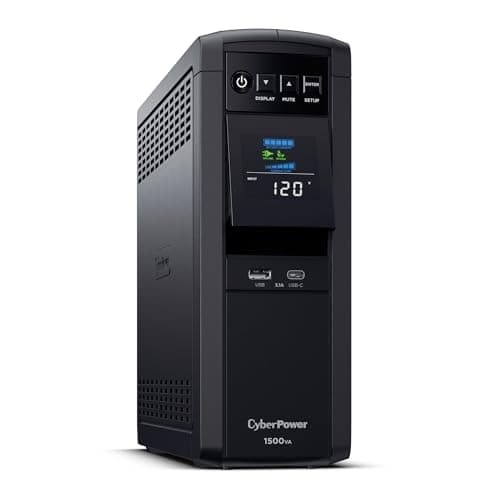
CyberPower CyberPower CP1500PFCLCD PFC Sinewave UPS, 1500VA / 1000W
CyberPower CP1500PFCLCD PFC Sinewave UPS, 1500VA / 1000W

The UPS to buy for a desktop PC. 1000W of real capacity, a true sine wave that an active-PFC power supply accepts without complaint, and a published 10 minutes at half load - which is a controlled shutdown rather than a gamble.

A desktop PC and two monitors
9.3
$239.95Amazon
02
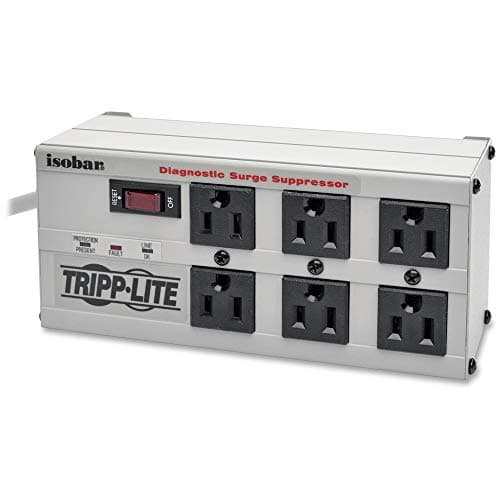
Tripp Lite Tripp Lite IBAR6-6D Isobar Metal Surge Protector, 6 Outlets
Tripp Lite IBAR6-6D Isobar Metal Surge Protector, 6 Outlets

The surge protector to buy, and the one that makes the comparison honest: 3,330 joules in an all-metal housing with three isolated filter banks - nearly ten times the surge energy rating the small UPS here publishes.

A laptop desk, or alongside a UPS
7.9
Check price →
03
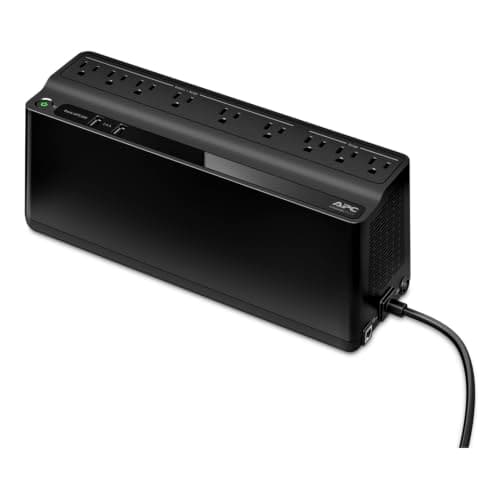
APC APC Back-UPS BE850G2, 850VA / 450W
APC Back-UPS BE850G2, 850VA / 450W

The small UPS for the things that must not reboot: router, modem, a dock, a laptop. 450W is not a tower's worth of capacity, and its 354-joule surge rating is the number that proves a UPS does not automatically replace a surge strip.

A router, modem and dock
6.8
$137.99Amazon
04
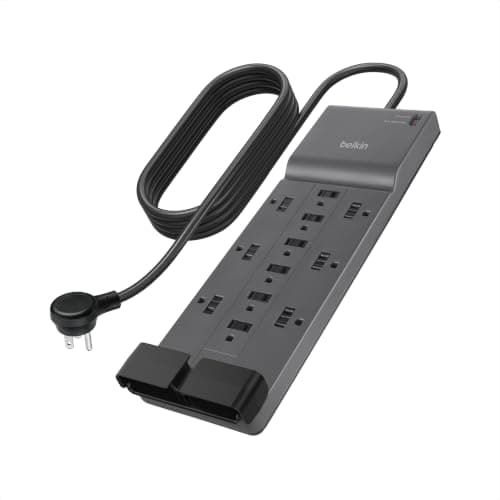
Belkin Belkin 12-Outlet Surge Protector with Flat Plug
Belkin 12-Outlet Surge Protector with Flat Plug

The practical answer to a desk with too many plugs. Twelve outlets, an 8 ft cord, a flat rotating plug that sits behind furniture, and keyhole slots so it can hang under the desk instead of on the floor.

A full desk of low-draw devices
6.5
$28.49Amazon
05
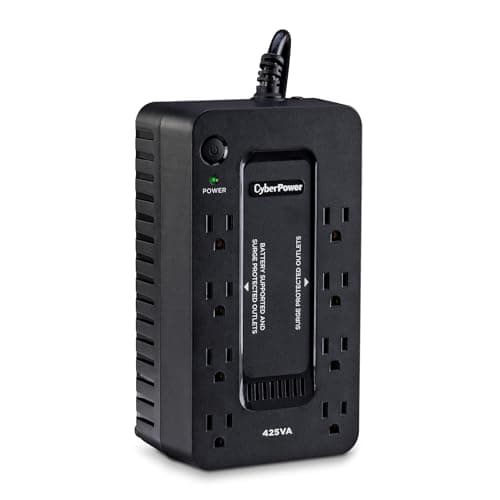
CyberPower CyberPower ST425 Standby UPS, 425VA / 260W
CyberPower ST425 Standby UPS, 425VA / 260W

The cheapest way to get a battery onto the desk, with the caveat stated: standby topology and a simulated sine wave, so it belongs behind a router, a modem or a laptop charger rather than a tower.

The cheapest battery for a router
6.1
$59.95Amazon

#ad · Live prices from the Amazon Product API, as of October 23, 2026. Where we have no verified live price we show none — we would rather leave a gap than print a number that has rotted.

In detail

The picks, in full

01
CyberPower CyberPower CP1500PFCLCD PFC Sinewave UPS, 1500VA / 1000W

A desktop PC and two monitors

CyberPower CP1500PFCLCD PFC Sinewave UPS, 1500VA / 1000W

Capacity
1500VA / 1000W
Topology
Line interactive
Waveform
Sine wave
Outlets
12 (6 surge + battery, 6 surge only)
Runtime (half / full load)
10 min / 2.5 min
USB charging
2 ports (USB-A + USB-C), 3.1A shared
Warranty
3 year, batteries included
9.3/10

The UPS to buy for a desktop PC. 1000W of real capacity, a true sine wave that an active-PFC power supply accepts without complaint, and a published 10 minutes at half load - which is a controlled shutdown rather than a gamble.

Outage Protection
9.5
Power Quality
9.5
Capacity Headroom
9.3
Value
9

Pros

  • True sine wave output, which active-PFC desktop power supplies require
  • 1000W is genuine headroom for a tower plus two screens
  • Line interactive, so it corrects brownouts without switching to battery
  • Published runtime figures at two load points, which not every maker gives

Cons

  • Heavy, and its footprint is a floor problem rather than a desk one
  • Half the outlets are surge-only, which is easy to get wrong
  • Batteries are a consumable - expect a replacement in a few years

Skip this if…

…your desk is a laptop and a monitor - the laptop battery already does this job.

$239.95View on Amazon

$274.9513% off

Price as of October 23, 2026. Prices change — Amazon's is the one that counts.

#ad · we may earn a commission from this link to CyberPower CP1500PFCLCD PFC Sinewave UPS, 1500VA / 1000W

02
Tripp Lite Tripp Lite IBAR6-6D Isobar Metal Surge Protector, 6 Outlets

A laptop desk, or alongside a UPS

Tripp Lite IBAR6-6D Isobar Metal Surge Protector, 6 Outlets

Outlets
Six widely spaced outlets across three isolated filter banks
Housing
All-metal enclosure
Filtering
Isobar isolated-bank EMI/RFI filtering
Surge rating
3,330 joules
Indicators
Diagnostic LEDs for power, line fault and protection status
7.9/10

The surge protector to buy, and the one that makes the comparison honest: 3,330 joules in an all-metal housing with three isolated filter banks - nearly ten times the surge energy rating the small UPS here publishes.

Outage Protection
1
Power Quality
9.8
Capacity Headroom
7.6
Value
8.4

Pros

  • 3,330 joules is the highest surge rating on this page by a wide margin
  • Isolated banks stop one noisy device polluting the others
  • All-metal housing, and a protection-status LED that tells you when it is spent
  • No battery to replace, ever

Cons

  • Does nothing at all in a power cut
  • Six outlets is a modest count for a full desk
  • Costs more than a 12-outlet plastic strip with a lower rating

Skip this if…

…you have a desktop PC and your power flickers - no surge protector can carry you through an outage.

Check price on Amazon →

No buyable offer at the last price check (October 23, 2026). We show nothing rather than a stale number.

#ad · we may earn a commission from this link to Tripp Lite IBAR6-6D Isobar Metal Surge Protector, 6 Outlets

03
APC APC Back-UPS BE850G2, 850VA / 450W

A router, modem and dock

APC Back-UPS BE850G2, 850VA / 450W

Capacity
850VA / 450W
Outlets
9 (6 surge + battery, 3 surge only)
Surge energy rating
354 joules
USB charging
2 ports, 1.5A maximum combined
Mounting
Floor or wall (2 keyhole sockets)
Warranty
3 year
6.8/10

The small UPS for the things that must not reboot: router, modem, a dock, a laptop. 450W is not a tower's worth of capacity, and its 354-joule surge rating is the number that proves a UPS does not automatically replace a surge strip.

Outage Protection
7.2
Power Quality
5.4
Capacity Headroom
6.2
Value
8.2

Pros

  • Keeps the network alive through a short cut, which keeps a laptop working
  • Wall-mountable, so it does not take desk or floor space
  • Nine outlets is generous for a unit this size
  • Three-year warranty and a $75,000 equipment protection policy

Cons

  • 354 joules of surge rating is low - about a tenth of the Isobar's
  • 450W will not carry a desktop PC with a discrete GPU
  • APC publishes no runtime figures and no waveform for this unit

Skip this if…

…you need to shut a desktop down gracefully - 450W and no published waveform is the wrong tool.

$137.99View on Amazon

Price as of October 23, 2026. Prices change — Amazon's is the one that counts.

#ad · we may earn a commission from this link to APC Back-UPS BE850G2, 850VA / 450W

04
Belkin Belkin 12-Outlet Surge Protector with Flat Plug

A full desk of low-draw devices

Belkin 12-Outlet Surge Protector with Flat Plug

Outlets
Twelve AC outlets
Plug
Flat rotating plug
Cord
8ft cord
Protection
Surge protection with indicator
Mounting
Keyhole slots for wall or under-desk mounting
6.5/10

The practical answer to a desk with too many plugs. Twelve outlets, an 8 ft cord, a flat rotating plug that sits behind furniture, and keyhole slots so it can hang under the desk instead of on the floor.

Outage Protection
1
Power Quality
7
Capacity Headroom
8.6
Value
9.4

Pros

  • Twelve outlets covers a monitor-heavy desk in one strip
  • Flat rotating plug fits behind a desk pushed against the wall
  • Keyhole mounting gets it off the floor, which is half of cable management
  • 8 ft of cord reaches an awkward socket

Cons

  • Belkin does not publish a joule rating for this model
  • No battery, so an outage still drops everything
  • Twelve outlets in one strip is a lot of load on one wall socket

Skip this if…

…surge rating is your priority - the Isobar publishes 3,330 joules and this listing publishes no number at all.

$28.49View on Amazon

$29.955% off

Price as of October 23, 2026. Prices change — Amazon's is the one that counts.

#ad · we may earn a commission from this link to Belkin 12-Outlet Surge Protector with Flat Plug

05
CyberPower CyberPower ST425 Standby UPS, 425VA / 260W

The cheapest battery for a router

CyberPower ST425 Standby UPS, 425VA / 260W

Capacity
425VA / 260W
Topology
Standby
Waveform
Simulated sine wave
Outlets
8 (4 surge + battery, 4 surge only)
Runtime (half / full load)
6 min / 1.5 min
Warranty
3 year
6.1/10

The cheapest way to get a battery onto the desk, with the caveat stated: standby topology and a simulated sine wave, so it belongs behind a router, a modem or a laptop charger rather than a tower.

Outage Protection
6.4
Power Quality
5
Capacity Headroom
4.2
Value
8.8

Pros

  • The lowest-cost route to outage protection for network gear
  • Eight outlets, half of them battery-backed
  • Published runtimes at two load points
  • Small enough to sit on a shelf rather than the floor

Cons

  • Simulated sine wave, which an active-PFC desktop PSU may refuse
  • 260W is a router-and-laptop budget, not a PC budget
  • Standby topology means no brownout correction without switching to battery

Skip this if…

…a desktop PC is plugged into it - the waveform is the wrong shape for most modern power supplies.

$59.95View on Amazon

$64.958% off

Price as of October 23, 2026. Prices change — Amazon's is the one that counts.

#ad · we may earn a commission from this link to CyberPower ST425 Standby UPS, 425VA / 260W

The published numbers, side by side

DeviceSurge ratingBattery capacityRuntime (half / full)Waveform
CyberPower CP1500PFCLCDNot published as joules1500VA / 1000W10 min / 2.5 minSine wave
Tripp Lite IBAR6-6D3,330 joulesNone——
APC Back-UPS BE850G2354 joules850VA / 450WNot publishedNot published
Belkin 12-outletNot publishedNone——
CyberPower ST425Not published as joules425VA / 260W6 min / 1.5 minSimulated sine

The gaps are the point. CyberPower publishes runtime and waveform but not a joule figure; APC publishes a joule figure but neither runtime nor waveform; Belkin publishes neither. Nobody on this page publishes everything, so the comparison is what each maker will actually stand behind.

Which one, in one line each

Laptop and a monitor: surge protector only. The laptop battery is already a UPS with a better runtime than anything here.

Desktop PC: a line-interactive sine-wave UPS sized in watts, plus the monitors on its surge-only outlets. This is the case the CP1500PFCLCD exists for.

Working from home on a flaky line: a small UPS behind the router and modem. If the network survives the dip, a laptop user never notices it.

Storm-prone area:both, deliberately — each on its own wall socket, with the peripherals on the high-joule strip and the computer on the UPS. The one arrangement every maker warns against is a UPS plugged into a surge protector or power strip, because the strip's clamping circuitry sits between the UPS and the mains it is trying to measure.

Four things people get wrong

Daisy-chaining. Strip into strip, or a UPS into a strip, is both a protection problem and a fire-code problem in most jurisdictions. A plain, non-surge strip on a UPS output is fine for low-draw peripherals; a second surge protector there is not.

Assuming a laser printer can go on the UPS. Its fuser draws a large inrush current and will overload a desk-sized unit. Printers go on the surge-only outlets.

Ignoring the end of life. Surge protection is consumed by use. The Isobar's protection LED exists so you know when the strip has become an extension cord; a strip without that light gives you no way to tell.

Forgetting the cables underneath.A UPS is heavy, the floor is where it lives, and a standing desk moves everything above it — standing desk cable management covers the slack a rising desk needs, and the under-desk roundup gets the rest off the carpet.
How we picked

We do not run a testing lab

We compiled the published manufacturer specifications, did the ergonomics, VESA and desk-depth math ourselves, and read aggregated owner reviews, then scored each product against a published rubric. The scores are judgments from documented research — they are not measurements we took, because we do not have a lab and we are not going to pretend we do. Every spec traces back to a listing or manual named in Sources.

Questions

Frequently asked

Do I need a surge protector if I have a UPS?
Often, yes. A UPS includes some surge protection but the amount varies hugely — the APC unit here publishes 354 joules against the Tripp Lite strip's 3,330. Give each its own wall socket, though — a UPS plugged into a surge protector is the one arrangement every maker warns against.
What size UPS do I need for a desktop PC?
Size it in watts, not VA. Add up the real draw of the tower and screens, then pick a unit whose watt rating has clear headroom — a 1000W unit like the CP1500PFCLCD for a typical desktop and two monitors. Runtime shortens sharply as load rises.
Why does a UPS need a sine wave output?
Active-PFC power supplies, which most modern desktops have, can reject a stepped “simulated” waveform and either refuse to run on battery or transfer noisily. A true sine wave output avoids the compatibility question entirely.
How long will a UPS run my computer?
Minutes, by design. The CP1500PFCLCD publishes 10 minutes at half load and 2.5 at full; the ST425 publishes 6 and 1.5. A desk UPS is there so you can save and shut down, not keep working.
Does a laptop need a UPS?
No. The battery in the laptop already rides through outages for hours. What is worth protecting is the network — a small UPS behind the router and modem keeps a laptop usable through a cut.
Are all the outlets on a UPS battery-backed?
No, and this is the most common setup mistake. The CP1500PFCLCD splits 12 outlets six and six; the BE850G2 splits nine six and three. Check the labels and put the computer on a battery-backed socket.

Keep reading

Receipts

Sources

We do not run a testing lab, and we do not pretend to. Specifications come from the manufacturer or retailer listing; the footprint and clearance math is ours and reproducible. Where we could not verify a number, we say so on the page rather than quietly leaving it out. Read our full method.