Skip to content
Chair & Cable

SECTION 04 · Keyboards & Mice

The Best Compact Keyboards

Cutting the number pad moves your mouse three to five inches closer to your shoulder line. That is the whole argument, and it is a better one than most desk upgrades can make.

By Stephen V.Updated How we pick
#ad

We earn a commission when you buy through our Amazon links, at no extra cost to you. It never affects our rankings, and we say so when the cheaper product is the better buy. How this works.

A full-size keyboard is about 17 inches wide. Roughly four of those inches are a number pad, and unless you enter figures for a living, that number pad is doing one job: pushing your mouse hand out past your shoulder. Every reach to the mouse then becomes a small shoulder abduction, repeated a few thousand times a day.

That is the ergonomic case for a compact board, and it is stronger than the desk-space case. On a small desk the reclaimed width is welcome; on any desk, bringing the mouse back in front of you is a posture change you can feel by the end of the week. The mechanism is covered in keyboard and mouse ergonomics.

Compact keyboards come in sizes, and the sizes are the entire buying decision:

  • Tenkeyless (TKL), around 87 keys.A full keyboard minus the number pad. Function row, arrows and the navigation cluster — Home, End, Page Up, Page Down — all stay. Gives back roughly four inches and changes nothing about how you type. The safe choice.
  • 75%, around 84 keys. TKL with the navigation cluster squeezed into a vertical column and the gaps closed up. Gives back another inch or so and keeps the function row. The current sweet spot for most people.
  • 65%, around 68 keys. Drops the function row entirely; F-keys move onto a layer accessed with a modifier. Arrows survive. Gives back an inch of depth as well as width.
  • 60%, around 61 keys. Drops the arrows too. A genuine commitment, and the wrong first compact keyboard for almost everyone.

The honest way to choose is to look at what you actually press. If you use F5 and F12 constantly, a 65% will annoy you daily. If you never touch the number pad but live in the arrow keys, a 75% is ideal. And if you do use a number pad occasionally — spreadsheets, accounting, CAD — a separate wireless numpad placed on the left of the keyboard gives you both, which is the arrangement almost nobody thinks of and everybody likes.

One more spec worth caring about: hot-swap sockets. A hot-swappable board lets you change the switches without soldering, which means a keyboard that is too loud for a shared room can be fixed rather than replaced. What the switch types actually do is in keyboard switches explained.

The short answer

Quick picks

#ProductBest forScorePrice
01
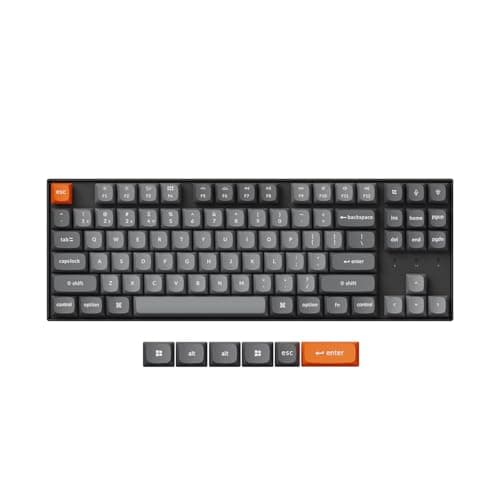
Keychron Keychron K8 Max Wireless Mechanical Keyboard
Keychron K8 Max Wireless Mechanical Keyboard

The compact board that asks nothing of you. Tenkeyless keeps every key you use, hot-swap sockets mean the switches are a decision you can revisit, and it runs wired, Bluetooth or 2.4GHz.

Best overall
8.8
$79.99Amazon
02
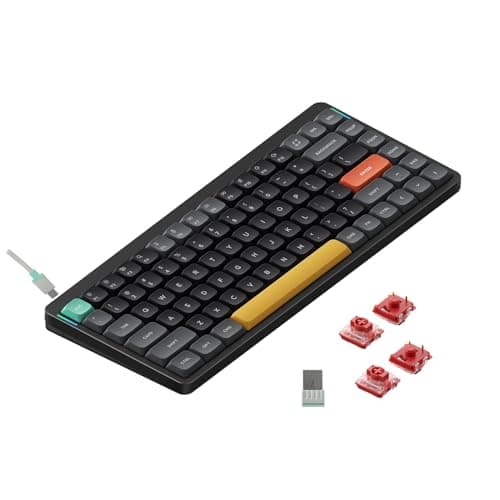
NuPhy NuPhy Air75 V2 Low-Profile Mechanical
NuPhy Air75 V2 Low-Profile Mechanical

Compact in two dimensions. A 75% layout takes width off the desk and low-profile switches take height off the keyboard, which is what actually flattens your wrist angle.

Best low-profile
8.5
$74.99Amazon
03
No image
Logitech MX Mechanical Mini Wireless Keyboard

The compact board for people who want it to disappear. Tactile Quiet switches, backlighting that turns itself on when your hands approach, and three-device switching from one key.

Best for a quiet office
8.4
Check price →
04
No image
Keychron K3 Max SE Ultra-Slim Wireless Mechanical

The thinnest way to get a real 75% mechanical. 84 keys in an aluminum body with QMK support, 2.4GHz at 1000Hz polling, and around 78 hours of battery with the light off.

Best ultra-slim
8.6
Check price →
05
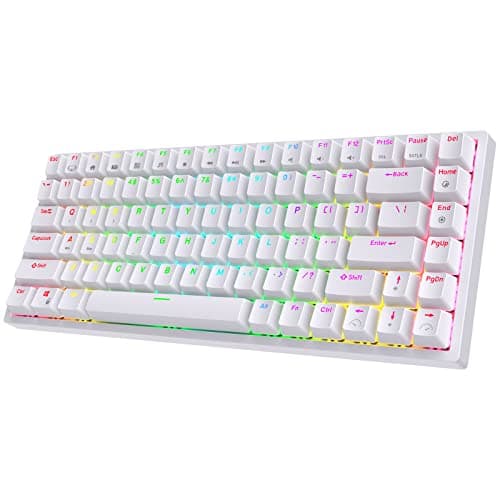
RK ROYAL KLUDGE RK ROYAL KLUDGE RK84 Wireless Mechanical
RK ROYAL KLUDGE RK84 Wireless Mechanical

The cheap way to find out whether a compact board suits you. 75%, hot-swappable and triple-mode, at a price where being wrong costs very little.

Best budget
8.5
$56.99Amazon

#ad · Live prices from the Amazon Product API, as of Sep 6, 2026. Where we have no verified live price we show none — we would rather leave a gap than print a number that has rotted.

In detail

The picks, in full

01
Keychron Keychron K8 Max Wireless Mechanical Keyboard

Best overall

Keychron K8 Max Wireless Mechanical Keyboard

Layout
Tenkeyless (87-key)
Connection
Wireless - Bluetooth or 2.4 GHz; wired USB-C
Switch type
Hot-swappable (pre-installed Gateron)
Hot-swap
Yes
Compatibility
Mac and Windows keycaps and toggle
8.8/10

The compact board that asks nothing of you. Tenkeyless keeps every key you use, hot-swap sockets mean the switches are a decision you can revisit, and it runs wired, Bluetooth or 2.4GHz.

Desk Space Saved
8.2
Keys Retained
9.6
Typing Feel
9
Value
8.4

Pros

  • TKL removes the number pad and changes nothing else, so there is no relearning
  • Hot-swap sockets let you fix a keyboard that turns out to be too loud for the room
  • Three connection modes, so it moves between a desktop and a laptop without ceremony
  • Ships with both Mac and Windows keycaps rather than choosing for you

Cons

  • Still four inches wider than a 65% board
  • Full-height mechanical, so it sits taller than a low-profile board and wants a wrist rest
  • Not the cheapest way to get a TKL

Skip this if…

you want the smallest possible footprint - a 75% or 65% goes further.

$79.99View on Amazon

Price as of Sep 6, 2026. Prices change — Amazon's is the one that counts.

#ad · we may earn a commission from this link to Keychron K8 Max Wireless Mechanical Keyboard

02
NuPhy NuPhy Air75 V2 Low-Profile Mechanical

Best low-profile

NuPhy Air75 V2 Low-Profile Mechanical

Layout
Compact 75%
Connection
Wireless - Bluetooth or 2.4 GHz; wired USB-C
Switch type
Hot-swappable low-profile (Gateron low-profile)
Hot-swap
Yes
Feet
Adjustable feet with optional risers
8.5/10

Compact in two dimensions. A 75% layout takes width off the desk and low-profile switches take height off the keyboard, which is what actually flattens your wrist angle.

Desk Space Saved
8.8
Keys Retained
8.6
Typing Feel
8.6
Value
8

Pros

  • Low-profile switches mean a much flatter wrist angle without a wrist rest
  • 75% keeps the function row while closing every wasted gap
  • Hot-swappable even at low profile, which is unusual
  • Thin enough to travel with a laptop rather than staying on the desk

Cons

  • Low-profile switch choice is far narrower than the full-height market
  • Shorter travel feels less satisfying to some typists than full-height switches
  • The compressed navigation column takes about a week to stop mis-hitting

Skip this if…

you love a deep, full-height keypress - low profile is a different feel, not a smaller version of the same one.

$74.99View on Amazon

Price as of Sep 6, 2026. Prices change — Amazon's is the one that counts.

#ad · we may earn a commission from this link to NuPhy Air75 V2 Low-Profile Mechanical

03
No image

Best for a quiet office

Logitech MX Mechanical Mini Wireless Keyboard

Layout
Compact, number pad removed
Switch type
Low-profile mechanical, Tactile Quiet
Connection
Bluetooth or Logi Bolt USB-A receiver, up to 3 devices
Backlight
Proximity-activated, auto-adjusting to room light
Battery
Up to 15 days, or up to 10 months with backlighting off
Charging
USB-C rechargeable
8.4/10

The compact board for people who want it to disappear. Tactile Quiet switches, backlighting that turns itself on when your hands approach, and three-device switching from one key.

Desk Space Saved
8.6
Keys Retained
8.4
Typing Feel
8.4
Value
7.8

Pros

  • Tactile Quiet switches give mechanical feedback without the noise that gets you glared at
  • Backlight lights up as your hands approach and dims itself to the room
  • Three-device switching is genuinely useful on a desk with a work and a personal machine
  • Ten months of battery with the backlight off is a real number, not a marketing one

Cons

  • Not hot-swappable, so the switch choice is permanent
  • Logi Bolt receiver is USB-A, which is awkward on a USB-C-only laptop
  • Costs more than the enthusiast boards here and offers less customization

Skip this if…

you want to tune the switches later - this is a keyboard you buy finished.

Check price on Amazon →

We don't have a verified live price for this right now, so we aren't showing one.

#ad · we may earn a commission from this link to Logitech MX Mechanical Mini Wireless Keyboard

04
No image

Best ultra-slim

Keychron K3 Max SE Ultra-Slim Wireless Mechanical

Layout
75% (84 keys)
Connection
2.4 GHz (1000Hz polling), Bluetooth 5.1 to 3 devices, or wired
Switch type
Hot-swappable Gateron low-profile MX
Firmware
QMK/VIA remappable
Battery
1,550mAh - up to 78 hours backlight off, 40 hours on
Body
Aluminum, LSA-profile keycaps for Mac and Windows
8.6/10

The thinnest way to get a real 75% mechanical. 84 keys in an aluminum body with QMK support, 2.4GHz at 1000Hz polling, and around 78 hours of battery with the light off.

Desk Space Saved
9
Keys Retained
8.6
Typing Feel
8.4
Value
8.6

Pros

  • QMK/VIA means every key can be remapped and layered in software you own
  • 1000Hz polling over 2.4GHz, which is the difference between wireless feeling instant and not
  • Aluminum body at a thickness where most boards go plastic
  • Ships with keycaps for both operating systems

Cons

  • 78 hours of battery is short next to the multi-month membrane boards
  • Low-profile switch selection is limited, hot-swap or not
  • QMK configuration is a rabbit hole if you let it be

Skip this if…

you never want to open a configurator - the K8 Max does the same job with less setup.

Check price on Amazon →

We don't have a verified live price for this right now, so we aren't showing one.

#ad · we may earn a commission from this link to Keychron K3 Max SE Ultra-Slim Wireless Mechanical

05
RK ROYAL KLUDGE RK ROYAL KLUDGE RK84 Wireless Mechanical

Best budget

RK ROYAL KLUDGE RK84 Wireless Mechanical

Layout
Compact 75% (84-key)
Connection
Wireless - Bluetooth or 2.4 GHz; wired USB-C
Switch type
Hot-swappable mechanical
Hot-swap
Yes
Backlight
RGB
8.5/10

The cheap way to find out whether a compact board suits you. 75%, hot-swappable and triple-mode, at a price where being wrong costs very little.

Desk Space Saved
8.8
Keys Retained
8.6
Typing Feel
8
Value
9.4

Pros

  • Hot-swap sockets at a budget price, so switch experiments cost pennies
  • Triple connection modes, same as boards costing three times more
  • 75% layout keeps the function row and the arrows
  • Cheap enough to be a genuine trial of the compact idea

Cons

  • Stabilizers on the longer keys rattle more than the premium boards
  • Stock keycaps are the first thing owners replace
  • Software is functional rather than pleasant

Skip this if…

you want it right out of the box - this is a keyboard that rewards a little tinkering.

$56.99View on Amazon

$59.995% off

Price as of Sep 6, 2026. Prices change — Amazon's is the one that counts.

#ad · we may earn a commission from this link to RK ROYAL KLUDGE RK84 Wireless Mechanical

Choosing a size without regretting it

Spend a day noticing which keys you press. Most people are surprised twice: they touch the number pad far less than they assumed, and they touch the navigation cluster — Home, End, Page Up, Page Down — far more.

If the navigation cluster matters, buy TKL or 75%. If the function row matters, do not go below 75%. If you genuinely only use letters, numbers and arrows, a 65% will feel excellent and give you back an inch of depth as well as width. Going to 60% first is how people end up with a keyboard in a drawer.

Layers are the missing-key answer

On any board smaller than TKL, the removed keys are still there — they live on a layer reached by holding a function modifier. Fn plus the number row gives F1 to F12; Fn plus the arrow cluster usually gives Home, End and the Page keys. It takes about a week to stop thinking about it.

On boards with QMK or VIA firmware you can go further and put those keys wherever you want them, which is the same capability that makes a keyboard good for programming. On closed-firmware boards you get whatever the manufacturer chose.

The separate numpad trick

If you do use a number pad occasionally, buy a compact keyboard and a separate wireless numpad, then put the numpad on the leftof the board. You keep the mouse close on the right, and your left hand — which is otherwise idle during data entry — does the numbers. It is a better arrangement than a full-size keyboard and it costs less than most people expect.

Compact does not mean flat

A full-height mechanical keyboard is tall regardless of how narrow it is, and height is what determines wrist extension. If your wrists are the actual complaint, a low-profile board does more than a narrow one — or pair a full-height board with a wrist rest that brings the heel of your hand up to meet it.

Where compact is the wrong answer

If your complaint is wrist or forearm pain rather than desk space, narrowing the keyboard is not the fix — the fix is changing the angle your hands sit at, which means a split keyboard or a tented ergonomic board. Those are wider than a compact board, not narrower, and they are solving a different problem.
How we picked

We do not run a testing lab

We compiled the published manufacturer specifications, did the ergonomics, VESA and desk-depth math ourselves, and read aggregated owner reviews, then scored each product against a published rubric. The scores are judgments from documented research — they are not measurements we took, because we do not have a lab and we are not going to pretend we do. Every spec traces back to a listing or manual named in Sources.

Questions

Frequently asked

What is the difference between TKL, 75% and 65% keyboards?
TKL is a full keyboard minus the number pad, keeping the function row, arrows and the navigation cluster. 75% is the same key set with the gaps closed and navigation squeezed into a column, saving another inch. 65% drops the function row onto a layer but keeps the arrows. 60% drops the arrows too.
Is a compact keyboard better for your wrists?
It helps your shoulder more than your wrist. Removing the number pad brings the mouse three to five inches closer to your body, which reduces the reach on every mouse movement. Wrist angle is set by keyboard height and tilt, so a low-profile board or a wrist rest is what addresses that.
Do I lose the function keys on a compact keyboard?
On TKL and 75% boards, no — the function row is still there. On 65% and smaller, the F-keys move onto a layer reached by holding a function modifier. On boards with QMK or VIA firmware you can put them wherever you like instead.
What is a hot-swappable keyboard and does it matter?
Hot-swap sockets let you pull switches out and push new ones in without soldering. It matters most for noise: a board that turns out to be too loud for a shared room can be fixed for the price of a set of switches instead of being replaced. See keyboard switches explained.
Can I still use a number pad with a compact keyboard?
Yes — buy a separate wireless numpad and place it to the left of the keyboard. Your mouse stays close on the right, and your otherwise-idle left hand handles data entry. It is a better layout than a full-size keyboard for anyone who enters numbers only some of the time.

Keep reading

Receipts

Sources

We do not run a testing lab, and we do not pretend to. Specifications come from the manufacturer or retailer listing; the footprint and clearance math is ours and reproducible. Where we could not verify a number, we say so on the page rather than quietly leaving it out. Read our full method.