Skip to content
Chair & Cable

SECTION 04 · Keyboards & Mice

The Best Trackball Mice

A trackball stops your arm moving at all. On a cramped desk, or a shoulder that has had enough, that is not a gimmick — it is the whole reason the format exists.

By Stephen V.Updated How we pick
#ad

We earn a commission when you buy through our Amazon links, at no extra cost to you. It never affects our rankings, and we say so when the cheaper product is the better buy. How this works.

Every conventional mouse, vertical or flat, works the same way: to move the cursor you move your whole arm. Over a working day that is thousands of small shoulder and elbow movements, and it requires a clear patch of desk large enough to make them in. A trackball removes both requirements at once. The device stays still and you roll a ball with a thumb or fingers, so the cursor travels while your arm does not.

That makes trackballs the right answer to two specific situations. The first is a desk with no room — a corner setup, a standing desk with a shallow tray, a train table, a desk where a very wide monitor has eaten the surface. A trackball needs only its own footprint, permanently. The second is shoulder or upper-arm strain, where the repeated reaching is the problem rather than the wrist angle. If that is your complaint, a vertical mouse improves the wrong thing; a trackball addresses it directly.

The format splits into two families, and the choice between them is more consequential than the choice of model. A thumb-operated trackball puts a small ball where your thumb rests, so the hand posture is essentially that of a normal mouse and the learning curve is short. It also loads the thumb, which is a poor choice if your thumb is the thing that hurts. A finger-operatedtrackball uses a much larger ball driven by the index and middle fingers, which spreads the work across stronger digits and gives noticeably better precision — at the cost of a bigger device and a longer adjustment.

The honest downside is precision, and it depends on which family you pick. A thumb ball is fine for documents, browsing, and code, and frustrating for detailed image work. A large finger ball with a good bearing gets close to mouse-grade accuracy once you are practiced, which is why they persist in CAD and editing rooms. Neither is a gaming device. Scores below come from published specifications, the geometry of each design, and aggregated owner reports, per how we pick.

The short answer

Quick picks

#ProductBest forScorePrice
01
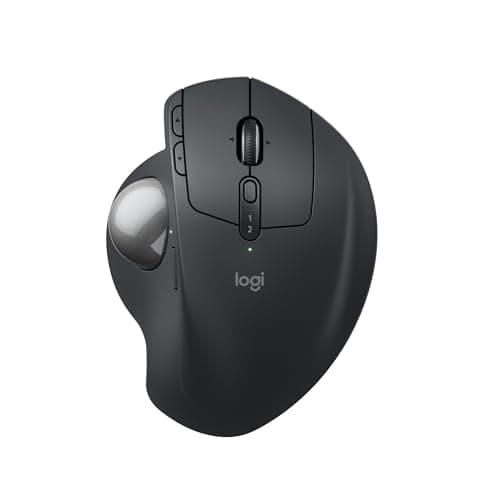
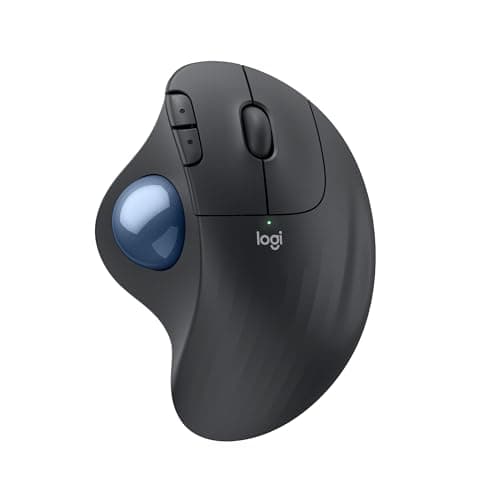
Logitech Logitech MX Ergo S Wireless Trackball
Logitech MX Ergo S Wireless Trackball

The trackball that converts people. A thumb ball on a base that tilts to twenty degrees, so you get the still-arm benefit of a trackball and a partly neutral forearm at the same time.

Best overall
8.8
$109.99Amazon
02
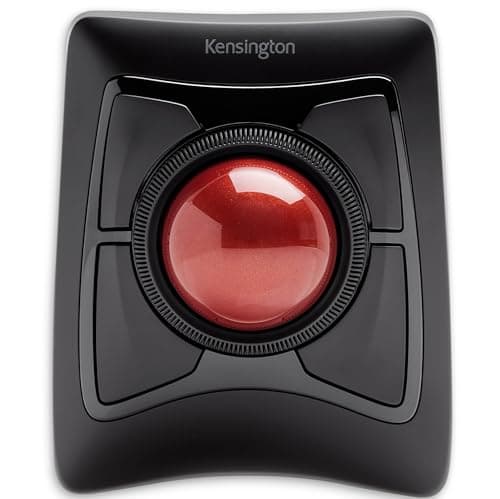
Kensington Kensington Expert Wireless Trackball (K72359WW)
Kensington Expert Wireless Trackball (K72359WW)

The precision option. A large finger-operated ball with a scroll ring around it, ambidextrous, and accurate enough that people doing detailed work choose it over a mouse rather than settling for it.

Best for precision work
8.9
$90.35Amazon
03
Logitech Logitech ERGO M575S Wireless Trackball
Logitech ERGO M575S Wireless Trackball

The sensible default and the best first trackball. Thumb-operated, comfortable, wireless, and priced so that finding out whether the format suits you is a small decision rather than a large one.

Best value
8.7
$44.99Amazon
04
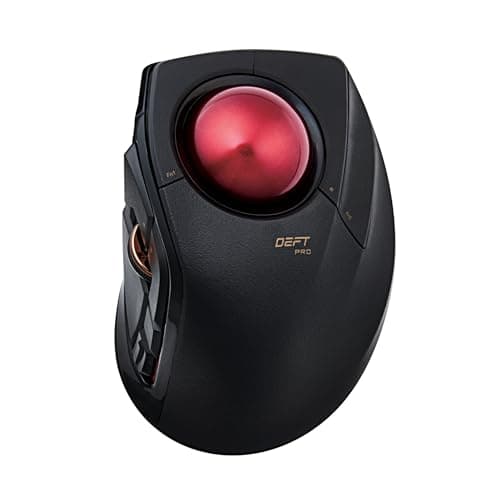
ELECOM ELECOM DEFT PRO Trackball Mouse
ELECOM DEFT PRO Trackball Mouse

The configurable one. A finger-operated ball with eight programmable buttons and three connection modes, aimed at people who want to build a workflow around the device rather than just point with it.

Best for customization
8.7
$59.99Amazon
05
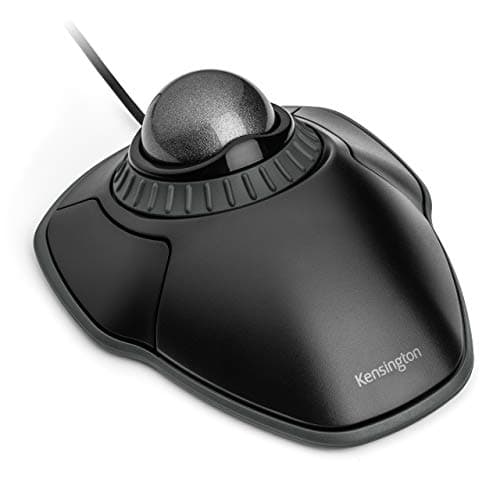
Kensington Kensington Orbit Trackball with Scroll Ring (K75327WW)
Kensington Orbit Trackball with Scroll Ring (K75327WW)

The cheapest honest trackball. A compact finger-operated ball with the scroll ring intact, wired, and small enough to be the answer when the desk genuinely has no room.

Best budget
8.4
$28.16Amazon

#ad · Live prices from the Amazon Product API, as of Sep 6, 2026. Where we have no verified live price we show none — we would rather leave a gap than print a number that has rotted.

In detail

The picks, in full

01
Logitech Logitech MX Ergo S Wireless Trackball

Best overall

Logitech MX Ergo S Wireless Trackball

Type
Thumb-operated trackball
Tilt
Adjustable base, flat or tilted to 20 degrees
Connection
Bluetooth or Logitech receiver, USB-C charging
Buttons
Programmable buttons with precision-mode toggle
Multi-device
Switches between paired computers
8.8/10

The trackball that converts people. A thumb ball on a base that tilts to twenty degrees, so you get the still-arm benefit of a trackball and a partly neutral forearm at the same time.

Arm Relief
9.4
Precision
8.4
Build
9.4
Value
8

Pros

  • The tilting base is the feature no other trackball here has — it combines the still arm with a partly rotated-neutral forearm
  • Precision-mode button drops the tracking speed for detailed work, which offsets the format's weakness
  • Build quality and switch feel are the best in this roundup
  • Multi-device switching makes it practical on a desk with two machines

Cons

  • Loads the thumb, so it is the wrong pick if your thumb is where the pain is
  • The most expensive trackball here
  • Right-handed only, with no left-handed version

Skip this if…

your complaint is thumb-base pain — a finger-operated ball moves the work to stronger digits

$109.99View on Amazon

$119.998% off

Price as of Sep 6, 2026. Prices change — Amazon's is the one that counts.

#ad · we may earn a commission from this link to Logitech MX Ergo S Wireless Trackball

02
Kensington Kensington Expert Wireless Trackball (K72359WW)

Best for precision work

Kensington Expert Wireless Trackball (K72359WW)

Type
Finger-operated trackball with large ball
Scroll
Scroll ring around the ball
Connection
Wireless via Bluetooth or USB receiver
Handedness
Ambidextrous design
Wrist support
Detachable wrist rest included
8.9/10

The precision option. A large finger-operated ball with a scroll ring around it, ambidextrous, and accurate enough that people doing detailed work choose it over a mouse rather than settling for it.

Arm Relief
9.2
Precision
9.4
Build
8.6
Value
8.4

Pros

  • The large ball driven by fingers is far more precise than any thumb design here
  • Scroll ring is genuinely better than a wheel for long documents once you are used to it
  • Ambidextrous, so left-handed users are not an afterthought and you can swap hands to rest one
  • Spreads the work across strong fingers rather than loading the thumb

Cons

  • Large footprint — it takes more desk than a mouse, which partly undoes the space argument
  • Steeper adjustment than a thumb ball; expect a week of awkwardness
  • Needs occasional cleaning of the bearings to stay smooth

Skip this if…

desk space is the reason you wanted a trackball — this is the largest device in the roundup

$90.35View on Amazon

Price as of Sep 6, 2026. Prices change — Amazon's is the one that counts.

#ad · we may earn a commission from this link to Kensington Expert Wireless Trackball (K72359WW)

03
Logitech Logitech ERGO M575S Wireless Trackball

Best value

Logitech ERGO M575S Wireless Trackball

Type
Thumb-operated trackball
Connection
Bluetooth or Logi Bolt receiver
Power
Replaceable battery with long life
Shape
Sculpted right-handed shell
Buttons
Standard buttons plus browser navigation
8.7/10

The sensible default and the best first trackball. Thumb-operated, comfortable, wireless, and priced so that finding out whether the format suits you is a small decision rather than a large one.

Arm Relief
9
Precision
7.8
Build
8.4
Value
9.4

Pros

  • Short learning curve — hand posture is close to a normal mouse, so most people adapt in days
  • Very long battery life on a single replaceable cell
  • Comfortable sculpted shell that supports the hand rather than just holding a ball
  • The least expensive route to a trackball worth keeping

Cons

  • No tilt adjustment, so the forearm stays in the flat mouse position
  • Thumb-driven precision is adequate rather than good
  • Right-handed only

Skip this if…

you want the forearm-angle benefit as well as the still-arm benefit — that is what the tilting MX Ergo S adds

$44.99View on Amazon

$49.9910% off

Price as of Sep 6, 2026. Prices change — Amazon's is the one that counts.

#ad · we may earn a commission from this link to Logitech ERGO M575S Wireless Trackball

04
ELECOM ELECOM DEFT PRO Trackball Mouse

Best for customization

ELECOM DEFT PRO Trackball Mouse

Type
Finger-operated trackball
Buttons
Eight programmable buttons
Connection
Wired, wireless receiver, or Bluetooth
Tilt
Adjustable tilt angle
Ball
Removable ball for cleaning
8.7/10

The configurable one. A finger-operated ball with eight programmable buttons and three connection modes, aimed at people who want to build a workflow around the device rather than just point with it.

Arm Relief
9
Precision
8.8
Build
8
Value
8.8

Pros

  • Eight programmable buttons genuinely change how fast you work once mapped properly
  • Three connection modes cover a desktop, a laptop, and a tablet without swapping devices
  • Finger-driven ball gives better precision than a thumb design
  • Tilt adjustment and a removable ball make it easy to keep comfortable and smooth

Cons

  • The configuration software is functional rather than polished
  • Button density means a longer period of remembering which is which
  • Materials feel utilitarian next to the Logitech picks

Skip this if…

you want to plug it in and forget it — most of this device's value is in the setup

$59.99View on Amazon

Price as of Sep 6, 2026. Prices change — Amazon's is the one that counts.

#ad · we may earn a commission from this link to ELECOM DEFT PRO Trackball Mouse

05
Kensington Kensington Orbit Trackball with Scroll Ring (K75327WW)

Best budget

Kensington Orbit Trackball with Scroll Ring (K75327WW)

Type
Finger-operated trackball, compact
Scroll
Scroll ring around the ball
Connection
Wired USB
Handedness
Ambidextrous
Footprint
The smallest device in this roundup
8.4/10

The cheapest honest trackball. A compact finger-operated ball with the scroll ring intact, wired, and small enough to be the answer when the desk genuinely has no room.

Arm Relief
8.8
Precision
7.4
Build
7.6
Value
9.6

Pros

  • Genuinely small, so it fits the cramped desks that make people want a trackball in the first place
  • Keeps the scroll ring, which is the best thing about Kensington's designs
  • Ambidextrous and cheap enough to keep one at a second desk
  • Wired, so nothing to charge or pair

Cons

  • The small ball is less precise and less pleasant than the large Expert
  • Only two buttons, with no programmable extras
  • Wired only, and the cable is a step back for a tidy desk

Skip this if…

precision matters — the small ball is the compromise that makes this one cheap and compact

$28.16View on Amazon

$36.9924% off

Price as of Sep 6, 2026. Prices change — Amazon's is the one that counts.

#ad · we may earn a commission from this link to Kensington Orbit Trackball with Scroll Ring (K75327WW)

How to choose a trackball

Pick the family first, because it is the decision that matters. Thumb- operated trackballs keep your hand in a familiar mouse posture, adapt in a few days, and load the thumb. Finger-operated trackballs use a bigger ball driven by the index and middle fingers, which gives clearly better precision and spreads the effort across stronger digits, at the cost of a larger device and a longer adjustment. If your thumb already hurts, that choice is made for you.

Then be clear about which problem you are solving. A trackball is the answer to a shoulder or upper-arm complaint and to a desk with no room. It is not primarily a wrist device — if your wrist is the issue, a vertical mouse targets it more directly. Buying the wrong format for your complaint is the most common way people conclude that ergonomic peripherals do not work.

Check the footprint honestly if desk space is the motivation. A trackball needs no sweep area, which is a genuine saving, but a large finger-operated model is itself a big object. On a really tight desk, a compact ball beats a large one even though the large one is more precise. On a desk that just lacks sweep room, take the precision.

Finally, plan for maintenance and for the adjustment period. Every trackball needs its ball lifting out and the bearings wiping every few weeks; skip it and the smoothness goes. And give yourself two weeks before judging — cursor control returns within days, but the fine accuracy takes longer, and most abandoned trackballs were abandoned in week one. A large desk mat and a chair with proper armrests both help, because a supported forearm is what makes a still-arm device comfortable.
How we picked

We do not run a testing lab

We compiled the published manufacturer specifications, did the ergonomics, VESA and desk-depth math ourselves, and read aggregated owner reviews, then scored each product against a published rubric. The scores are judgments from documented research — they are not measurements we took, because we do not have a lab and we are not going to pretend we do. Every spec traces back to a listing or manual named in Sources.

Questions

Frequently asked

Are trackballs better for your wrist?

They mainly help the shoulder and upper arm, by removing the repeated reaching that moving a mouse requires. Wrist posture on most thumb trackballs is similar to a conventional mouse. If the wrist is your problem, a vertical mouse or a tilting trackball targets it better.

Thumb or finger trackball: which is better?

Thumb models adapt faster and keep a familiar hand position, but load the thumb. Finger models are more precise and spread the work across stronger digits, at the cost of a larger device and a longer learning period. Choose finger-operated if you do detailed work or your thumb already aches.

How long does it take to learn a trackball?

Basic cursor control comes back within a few days; fine precision takes one to two weeks. Thumb models are quicker because the hand posture is familiar. Most people who give up do so in the first week, before the accuracy has returned.

Do trackballs save desk space?

Yes, because they need no sweep area at all — only their own footprint, permanently. That is the main reason they suit corner desks, shallow keyboard trays, and desks dominated by a very wide monitor. Note that large finger-operated models are big objects in their own right.

Can you game with a trackball?

For slower, strategic games, yes. For anything needing fast, precise aim, no — even a good finger-operated ball cannot match a mouse for rapid target acquisition. Most trackball users who game keep a conventional mouse alongside.

Keep reading

Receipts

Sources

We do not run a testing lab, and we do not pretend to. Specifications come from the manufacturer or retailer listing; the footprint and clearance math is ours and reproducible. Where we could not verify a number, we say so on the page rather than quietly leaving it out. Read our full method.