Skip to content
Chair & Cable

SECTION 04 · Keyboards & Mice

The Best Ergonomic Keyboards

Split, curved, or fully separated — the boards that unbend your wrists, ranked by how far they let you push the fix and how little relearning they ask for.

By Stephen V.Updated How we pick
#ad

We earn a commission when you buy through our Amazon links, at no extra cost to you. It never affects our rankings, and we say so when the cheaper product is the better buy. How this works.

An ergonomic keyboard fixes a posture problem you probably do not notice you have. A standard flat, straight board forces your wrists to bend outward and rolls your forearms inward, and you hold that slightly twisted position for eight hours a day. The whole category exists to unbend those two angles. Where the boards differ — and where the money goes — is how far they let you push the correction, and how much relearning you are willing to trade for it.

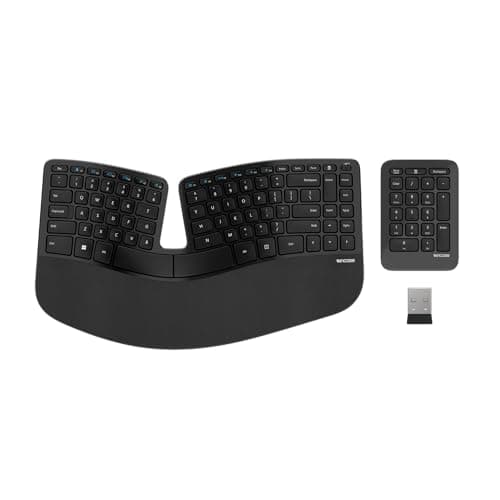
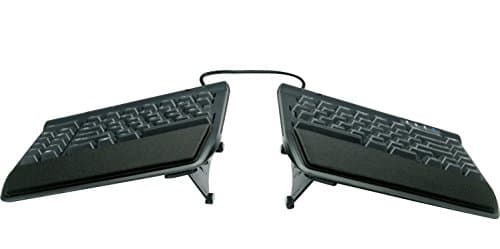
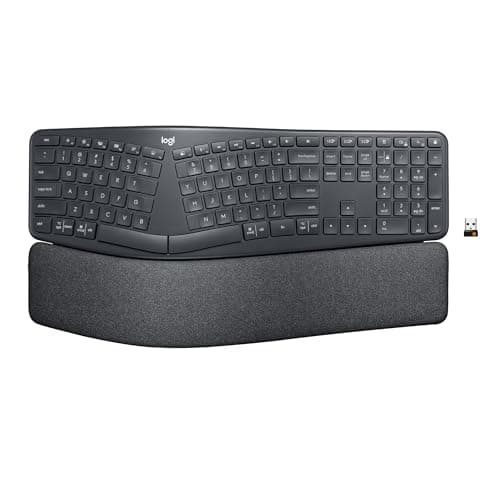
There are three broad shapes. A curved, or contoured, keyboard keeps both halves fused into one piece but fans the two key clusters apart and domes them in the middle, so your hands angle outward the way they naturally rest. This is the gentlest move, because the letters stay roughly where your fingers expect them — the Logitech Ergo K860 and the Microsoft Sculpt are the archetypes. A fully split keyboard cuts the board in two so you can place each half at shoulder width and set your own angle; the Kinesis Freestyle2 is the flexible extreme. In between sit the split mechanical boards, like the Keychron Q11, that separate into two halves and give you a real switch under every key.

Two other adjustments matter as much as the split. Tenting raises the inner edges of the halves so your palms tilt toward each other into a handshake angle, which takes the roll out of your forearms; some boards build it in, others sell it as an accessory, and a flat board asks your wrists to pronate all day. A negative or reverse tilt — lifting the front edge so the board slopes away from you — keeps your wrists from cocking upward, which is why the good ergonomic boards ship with reverse-tilt feet rather than the riser legs that raise the back. A cushioned wrist rest then supports your palms in the gaps between typing; treat it as a place to rest, not a ledge to press into while your fingers move.

The one honest warning is the adjustment period. A curved board might cost you a day or two of clumsiness; a fully split board can slow your typing for a week or more before muscle memory catches up. That dip is normal and temporary, and it is the price of the posture — push through it rather than returning the board on day three. If your wrist strain comes more from the mouse than the keyboard, pair one of these with a pick from the best ergonomic mice, and if you would rather chase typing feel than ergonomics, the best mechanical keyboards for the office lean toward quieter switches instead. Our how we pick page explains how we weight comfort, typing feel, features, and value into the scores below.

The short answer

Quick picks

#ProductBest forScorePrice
01
Logitech Logitech Ergo K860 Wireless Split Keyboard
Logitech Ergo K860 Wireless Split Keyboard

A curved, split-key layout with a genuinely good cushioned wrist rest, all in a wireless package that does not ask you to relearn where the keys live. It is the easiest ergonomic keyboard to move to.

Best overall
8.8
$149.00Amazon
02
Microsoft Microsoft Sculpt Ergonomic Keyboard
Microsoft Sculpt Ergonomic Keyboard

The keyboard that made split-curved ergonomics mainstream, and it still holds up: a domed keywell, a detachable negative-tilt riser, and a cushioned rest. The separate number pad is a nice touch.

Best value
8.3
$130.00Amazon
03
Kinesis Kinesis Freestyle2 Ergonomic Keyboard
Kinesis Freestyle2 Ergonomic Keyboard

Two completely separate halves you can place shoulder-width apart, or wherever your body wants them. The default is flat, but accessory kits add tenting when you are ready.

Most adjustable split
8.1
$141.00Amazon
04
Keychron Keychron Q11 Split Mechanical Keyboard
Keychron Q11 Split Mechanical Keyboard

A fully split, gasket-mounted mechanical board with hot-swap sockets and an aluminum body. It is the enthusiast pick if you want ergonomic spacing without giving up a real keystroke.

Best mechanical split
8.6
$239.99Amazon
05
Perixx Perixx PERIBOARD-535 Ergonomic Split Mechanical
Perixx PERIBOARD-535 Ergonomic Split Mechanical

A split ergonomic layout with real mechanical switches at a price that undercuts the enthusiast boards. A cushioned wrist rest and a straightforward wired connection round it out.

Best budget mechanical
7.9
$89.99Amazon

#ad · Live prices from the Amazon Product API, as of Jul 24, 2026. Where we have no verified live price we show none — we would rather leave a gap than print a number that has rotted.

In detail

The picks, in full

01
Logitech Logitech Ergo K860 Wireless Split Keyboard

Best overall

Logitech Ergo K860 Wireless Split Keyboard

Layout
Full-size curved split, one piece, with number pad
Connection
Wireless — Bluetooth or Logi Bolt USB receiver
Key mechanism
Low-profile scissor (membrane)
Tilt / tenting
Fixed pillowed split; reverse-tilt feet
Palm rest
Integrated cushioned
8.8/10

A curved, split-key layout with a genuinely good cushioned wrist rest, all in a wireless package that does not ask you to relearn where the keys live. It is the easiest ergonomic keyboard to move to.

Ergonomics
9.4
Typing feel
8.6
Features
8.8
Value
8.4

Pros

  • Pillowed split keeps your wrists closer to a straight line without the steep learning curve of a fully split board
  • Padded wrist rest is part of the frame, not a floppy add-on
  • Reverse-tilt feet let you set a slight negative angle so your wrists are not bent upward
  • Connects over Bluetooth or the bundled receiver and pairs to three devices

Cons

  • The split and tenting are fixed — you cannot widen the halves or steepen the tent
  • Membrane keys feel soft next to a mechanical board
  • Right-handed number pad pushes the mouse further out than a compact board would

Skip this if…

you want to adjust the split width or tent angle yourself, or you prefer a crisp mechanical keystroke

$149.00View on Amazon

Price as of Jul 24, 2026. Prices change — Amazon's is the one that counts.

#ad · we may earn a commission from this link to Logitech Ergo K860 Wireless Split Keyboard

02
Microsoft Microsoft Sculpt Ergonomic Keyboard

Best value

Microsoft Sculpt Ergonomic Keyboard

Layout
Curved split with domed keywell; detachable number pad
Connection
Wireless 2.4 GHz USB receiver
Key mechanism
Membrane dome
Tilt / tenting
Domed keywell with detachable negative-tilt riser
Palm rest
Integrated cushioned
8.3/10

The keyboard that made split-curved ergonomics mainstream, and it still holds up: a domed keywell, a detachable negative-tilt riser, and a cushioned rest. The separate number pad is a nice touch.

Ergonomics
8.8
Typing feel
8
Features
7.4
Value
9

Pros

  • Domed shape and negative-tilt riser put your forearms in a natural, slightly downhill position
  • Detachable number pad lets you bring the mouse in closer to your shoulder
  • A well-established layout that many people adjust to quickly
  • Runs on the single bundled wireless receiver

Cons

  • Uses a proprietary 2.4 GHz receiver with no Bluetooth option
  • Membrane switches and older-generation build feel dated

Skip this if…

you need Bluetooth, a rechargeable battery, or a mechanical typing feel

$130.00View on Amazon

Price as of Jul 24, 2026. Prices change — Amazon's is the one that counts.

#ad · we may earn a commission from this link to Microsoft Sculpt Ergonomic Keyboard

03
Kinesis Kinesis Freestyle2 Ergonomic Keyboard

Most adjustable split

Kinesis Freestyle2 Ergonomic Keyboard

Layout
Fully split — two separate halves joined by a cable
Separation
Halves separate up to the length of the linking cable
Connection
Wired USB
Key mechanism
Membrane (low-force)
Tenting
Flat by default; optional accessory tenting kits
8.1/10

Two completely separate halves you can place shoulder-width apart, or wherever your body wants them. The default is flat, but accessory kits add tenting when you are ready.

Ergonomics
8.9
Typing feel
7.8
Features
8
Value
7.7

Pros

  • Fully separable halves let you set shoulder-width spacing and your own angle
  • Low, thin profile keeps your wrists from cocking up
  • Optional lift and tenting kits add height when you want it

Cons

  • Ships flat — real tenting costs extra as an add-on kit
  • Wired only, and the membrane feel is functional rather than satisfying

Skip this if…

you want tenting included in the box or a wireless connection

$141.00View on Amazon

$149.005% off

Price as of Jul 24, 2026. Prices change — Amazon's is the one that counts.

#ad · we may earn a commission from this link to Kinesis Freestyle2 Ergonomic Keyboard

04
Keychron Keychron Q11 Split Mechanical Keyboard

Best mechanical split

Keychron Q11 Split Mechanical Keyboard

Layout
75% split, two aluminum halves with a rotary knob
Split
Fully split halves joined by a cable
Connection
Wired USB-C
Switch type
Hot-swappable mechanical (pre-installed Gateron)
Hot-swap
Yes — 3- and 5-pin sockets
8.6/10

A fully split, gasket-mounted mechanical board with hot-swap sockets and an aluminum body. It is the enthusiast pick if you want ergonomic spacing without giving up a real keystroke.

Ergonomics
8.5
Typing feel
9.2
Features
8.8
Value
7.9

Pros

  • Split halves plus a genuine gasket-mounted mechanical feel in one board
  • Hot-swap sockets let you change switches without soldering
  • QMK and VIA remapping, with a machined aluminum frame
  • Rotary knob for volume or scrolling

Cons

  • Heavy, and the base model is wired only
  • No tenting without a third-party stand or a DIY solution
  • Costs and weighs far more than a membrane ergo board

Skip this if…

you want a light, wireless board or built-in tenting out of the box

$239.99View on Amazon

Price as of Jul 24, 2026. Prices change — Amazon's is the one that counts.

#ad · we may earn a commission from this link to Keychron Q11 Split Mechanical Keyboard

05
Perixx Perixx PERIBOARD-535 Ergonomic Split Mechanical

Best budget mechanical

Perixx PERIBOARD-535 Ergonomic Split Mechanical

Layout
Split ergonomic, full-size with number pad
Connection
Wired USB
Switch type
Tactile mechanical (brown-style)
Hot-swap
No
Palm rest
Integrated cushioned
7.9/10

A split ergonomic layout with real mechanical switches at a price that undercuts the enthusiast boards. A cushioned wrist rest and a straightforward wired connection round it out.

Ergonomics
8
Typing feel
8.2
Features
7
Value
8.4

Pros

  • Mechanical switches on a split ergo layout without the enthusiast price
  • Fixed split with a padded wrist rest suits a first move to ergonomics
  • Simple plug-and-play wired USB

Cons

  • Fixed split and no tenting adjustment
  • No wireless option and no hot-swap sockets

Skip this if…

you want wireless, hot-swap switches, or an adjustable split angle

$89.99View on Amazon

Price as of Jul 24, 2026. Prices change — Amazon's is the one that counts.

#ad · we may earn a commission from this link to Perixx PERIBOARD-535 Ergonomic Split Mechanical

How to choose an ergonomic keyboard

Start with the one honest question: how much relearning are you willing to trade for how much correction? The more a board separates and angles your hands, the bigger the ergonomic payoff and the longer the adjustment. Work through these in order:

  • Shape. A curved one-piece board is the gentlest change and the safest first move. A fully split board gives the most correction but the steepest learning curve.
  • Tenting and tilt. Look for a negative or reverse tilt so your wrists are not bent upward, and decide whether you want tenting built in or are willing to buy an accessory kit later.
  • Wrist rest. A padded, integrated rest supports your palms between keystrokes. A hard front edge does the opposite.
  • Connection. Wireless clears a cable and often pairs to several devices; a wired board is one less battery to think about and is common on the mechanical picks.
  • Switch type. Membrane boards are quiet and cheap; mechanical boards feel far better and, if they are hot-swappable, let you change the feel and volume later.
  • Footprint. A board with a built-in number pad pushes your mouse further out. A detachable or absent number pad brings the mouse closer to your shoulder, a small posture win.

Whatever you pick, give it two full weeks before you judge it. Nearly everyone types slower at first on a more corrected shape, and nearly everyone stops noticing within a fortnight. Returning an ergonomic board in the first few days tells you about the adjustment period, not about the board.

How we picked

We do not run a testing lab

We compiled the published manufacturer specifications, did the ergonomics, VESA and desk-depth math ourselves, and read aggregated owner reviews, then scored each product against a published rubric. The scores are judgments from documented research — they are not measurements we took, because we do not have a lab and we are not going to pretend we do. Every spec traces back to a listing or manual named in Sources.

Questions

Frequently asked

Do ergonomic keyboards actually help?

For many people with wrist or forearm strain, yes — the point is posture, not magic. A split or curved board lets your forearms angle outward and your wrists stay straighter instead of bending to square up to a flat rectangle. It reduces the awkward positions your hands hold all day; it does not treat an existing injury, which is a question for a clinician.

How long does it take to get used to a split keyboard?

A gently curved one-piece board usually takes a day or two. A fully split board can slow your typing for one to two weeks before muscle memory catches up. The dip is normal and temporary. Give any ergonomic board a solid two weeks of daily use before you decide it is not for you.

Split or curved: which should a beginner get?

Curved is the easier start. A curved, one-piece board like the Logitech Ergo K860 keeps the keys roughly where your fingers already expect them, so the transition is short. A fully split board gives more correction and lets you set your own spacing, but it asks for a longer adjustment — a better second step once you know the shape suits you.

Are mechanical ergonomic keyboards worth it?

If typing feel matters to you, yes. A split mechanical board like the Keychron Q11 gives you ergonomic spacing plus a crisp, durable keystroke, and hot-swap sockets let you change the switches later. The trade-offs are cost and weight. If you mostly want the posture fix and do not care about switch feel, a membrane board costs far less.

Do I need tenting on an ergonomic keyboard?

Tenting — raising the inner edges so your palms tilt toward each other — helps take the roll out of your forearms, and many people find it the single most comfortable adjustment. Some boards build it in; others, like the Kinesis Freestyle2, offer it as an accessory kit. If you already feel forearm rotation strain, look for a board that tents.

Keep reading

Receipts

Sources

We do not run a testing lab, and we do not pretend to. Specifications come from the manufacturer or retailer listing; the footprint and clearance math is ours and reproducible. Where we could not verify a number, we say so on the page rather than quietly leaving it out. Read our full method.