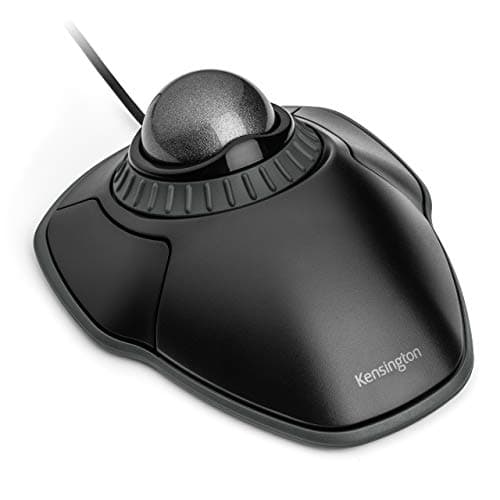
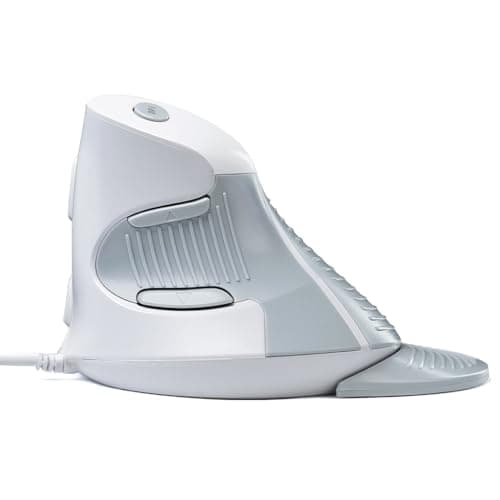
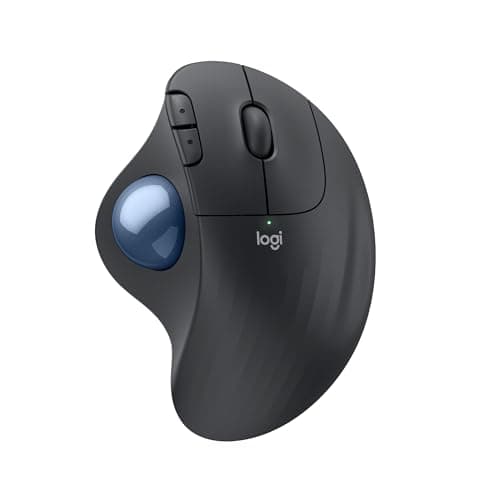
The mouse to buy under $50 is the Logitech ERGO M575S: the only wireless pick here, a thumb trackball that stops your whole forearm sweeping the desk, and the one device on this page with a build that will still be fine in three years. If you are left-handed, the Kensington Orbit is the only answer under the cap - it is the sole ambidextrous device in this price band. And the budget pick is the DELUX Wired Ergonomic Vertical Mouse, which changes your forearm angle for roughly the price of a takeaway and is the cheapest honest way to find out whether vertical helps you at all.
Here is the thing that makes this price band different from every other mouse page on this site: under $50 you are not really choosing between products. You are choosing between two shapes, and they fix different problems. Pick the wrong shape and the best execution of it will still be the wrong mouse. So this page ranks both formats in one list and leads with the question that decides it.
Step 1: which complaint are you fixing?
- Wrist and forearm. If the ache is in the forearm or the top of the wrist, the problem is usually pronation - your palm is rotated flat to hold a conventional mouse. A vertical mouse rotates the hand toward a handshake position and takes that twist out. Three of the five picks here are vertical.
- Shoulder, elbow and upper arm. If the ache is further up, the problem is usually travel - a mouse makes your whole arm sweep the desk, thousands of times a day. A trackball stays still and your thumb or fingers do the work. Two of the picks here are trackballs.
- The thumb joint itself. Then rule out thumb trackballs, including our top pick, and look at a finger-operated ball instead. Our vertical mouse versus trackball comparison works through that fork properly, and the best keyboard and mouse for wrist pain treats the keyboard as half of the same problem, which it usually is.
Nothing below is a conventional mouse, and that is deliberate rather than an oversight. At this price a conventional mouse is simply a cheaper version of the one you already have. The only thing worth buying under $50 is a different shape.
Step 2: what the cap actually takes away
Three things disappear below $50, and it is worth knowing which of them you will notice.
| What you give up | Who notices | The exception on this page |
|---|
| Wireless | Anyone who wanted a tidy desk; four of five picks here are wired | The Logitech ERGO M575S, on Bluetooth or a Bolt receiver |
| Programmable buttons and software | Anyone building shortcuts into the device rather than pointing with it | None - every pick here has standard buttons at most |
| Switch and shell durability | All-day users, within about two years | The M575S and the Kensington Orbit are the two built to last |
The third row is the one people underestimate. A vertical mouse at the bottom of this band will change your forearm angle just as effectively as a flagship - the geometry is the geometry - but the micro-switch under the left button is the part that gives out, and at $14 it gives out sooner. That is not a reason to avoid the cheap ones. It is a reason to buy the cheap one deliberately: as a test of the format, with the intention of upgrading if it works.
Step 3: the shapes, side by side
| Pick | Format | Connection | Hands | What it is for |
|---|
| Logitech ERGO M575S | Thumb trackball | Bluetooth or Logi Bolt receiver | Right only | Stopping the arm sweep, without a cable |
| Kensington Orbit | Finger trackball with scroll ring | Wired USB | Ambidextrous | Left hands, and desks with no room |
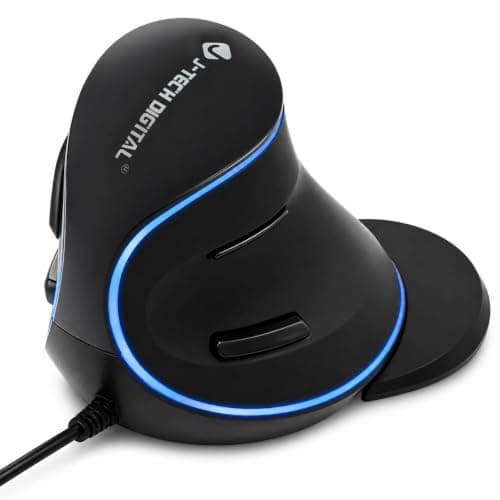
| J-Tech Digital Vertical | Vertical | Wired USB | Right only | Testing the vertical grip with browser buttons |
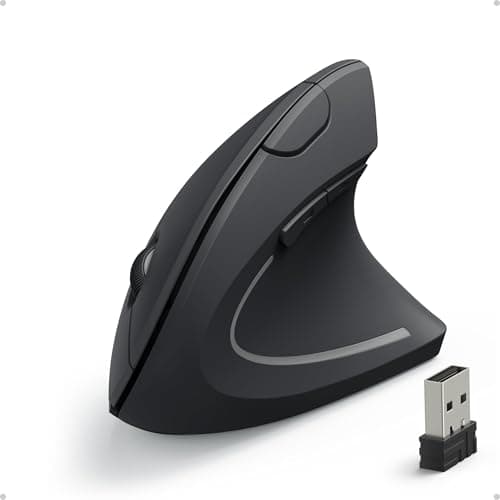
| Anker Vertical | Vertical | Wired USB | Right only | A known-quantity vertical with switchable DPI |
| DELUX Wired Vertical | Vertical | Wired USB | Right only | The cheapest real change of angle |
One pattern worth reading off that table before you scroll: four of the five are right-handed only, and three of those are the same basic vertical geometry at three different prices. If you are left-handed, this page is genuinely one pick long, and it is the Orbit.
Price check. 5 of the 5 picks below were listed under $50 on Amazon as of November 12, 2026— the figure on each buy button is the live one, and where we have no verified price we show none rather than a number that has rotted.
The short answer
Quick picks
| # | Product | Best for | Score | Price |
|---|
| 01 | Logitech ERGO M575S Wireless TrackballThe only wireless pick under the cap, and the one device here built to outlast the band. A thumb trackball with a short learning curve, long battery life on a replaceable cell, and a sculpted shell that supports the hand. | Best overall - stops the arm sweep, no cable | | $39.99·Amazon |
| 02 | | Left-handed users, and a desk with no room | | $36.99·Amazon |
| 03 | J-Tech Digital Wired Ergonomic Vertical MouseThe best way to test the vertical format properly. The same core geometry as the expensive verticals, with adjustable sensitivity and browser navigation buttons, for a fraction of the money. | Testing the vertical grip without committing | | $24.99·Amazon |
| 04 | Anker Vertical Ergonomic MouseThe vertical that introduced a lot of people to the shape, and still the known quantity in the band. Wired, simple, with three switchable DPI steps and a long track record behind it. | A known-quantity vertical mouse | | $29.99·Amazon |
| 05 | DELUX Wired Ergonomic Vertical MouseThe budget pick: the cheapest device here that genuinely changes your forearm angle. Sized around medium hands, wired, and honest about being a test of the format rather than a mouse for life. | Budget pick - the cheapest real change of angle | | $11.99·Amazon |
#ad · Live prices from the Amazon Product API, as of November 12, 2026. Where we have no verified live price we show none — we would rather leave a gap than print a number that has rotted.
In detail
The picks, in full
Best overall - stops the arm sweep, no cable
Logitech ERGO M575S Wireless Trackball
- Type
- Thumb-operated trackball
- Connection
- Bluetooth or Logi Bolt receiver
- Power
- Replaceable battery with long life
- Shape
- Sculpted right-handed shell
- Buttons
- Standard buttons plus browser navigation
The only wireless pick under the cap, and the one device here built to outlast the band. A thumb trackball with a short learning curve, long battery life on a replaceable cell, and a sculpted shell that supports the hand.
- Arm Relief
- 9
- Build
- 8.4
- Features
- 7.8
- Value
- 9.4
Pros
- +The only wireless device on this page, which is most of why it is ranked first
- +Short learning curve - hand posture is close to a normal mouse, so most people adapt in days
- +Very long battery life on a single replaceable cell
- +The least expensive route to a trackball worth keeping rather than testing
Cons
- −No tilt adjustment, so the forearm stays in the flat mouse position
- −Thumb-driven precision is adequate rather than good
- −Right-handed only, and it loads the thumb joint
Skip this if…
…your pain is in the thumb base - a finger-operated ball moves the work to stronger digits
Left-handed users, and a desk with no room
Kensington Orbit Trackball with Scroll Ring (K75327WW)
- Type
- Finger-operated trackball, compact
- Scroll
- Scroll ring around the ball
- Connection
- Wired USB
- Handedness
- Ambidextrous
- Footprint
- The smallest device on this page
The only ambidextrous device under $50, which makes it the sole option here for a left hand. A compact finger-operated ball with the scroll ring intact and the smallest footprint on the page.
- Arm Relief
- 8.8
- Build
- 7.6
- Features
- 6.8
- Value
- 9.6
Pros
- +Ambidextrous, which no other pick under the cap manages
- +Finger-driven rather than thumb-driven, so it is the right pick if the thumb joint is the problem
- +Keeps the scroll ring, which is the best thing about Kensington's designs
- +Genuinely small, so it fits the cramped desks that make people want a trackball
Cons
- −The small ball is less precise and less pleasant than Kensington's larger Expert
- −Only two buttons, with no programmable extras
- −Wired only, which is a step back for a tidy desk
Skip this if…
…precision matters - the small ball is the compromise that makes this one cheap and compact
Testing the vertical grip without committing
J-Tech Digital Wired Ergonomic Vertical Mouse
- Angle
- Vertical handshake angle
- Connection
- Wired USB
- Sensitivity
- Adjustable DPI settings
- Buttons
- Standard buttons plus browser navigation
- Power
- No battery required
The best way to test the vertical format properly. The same core geometry as the expensive verticals, with adjustable sensitivity and browser navigation buttons, for a fraction of the money.
- Arm Relief
- 8.6
- Build
- 6.8
- Features
- 7.4
- Value
- 9.4
Pros
- +The same core geometry as the premium verticals, at a fraction of the price
- +Adjustable sensitivity helps offset the precision loss that comes with the format
- +Browser navigation buttons, which the cheaper vertical here does less well
- +Wired means no batteries, no pairing, and no wake-up lag
Cons
- −Cable on the desk, which is a step backward for a tidy setup
- −Materials and switch feel are plainly budget
- −One shell size, so hand fit is luck rather than choice
Skip this if…
…you have already decided vertical is for you - put the money toward a mouse you will keep
A known-quantity vertical mouse
Anker Vertical Ergonomic Mouse
- Grip
- Vertical
- Handedness
- Right-handed
- Connection
- Wired USB
- Sensor
- Switchable DPI (800 / 1200 / 1600)
- Buttons
- Forward/back plus a DPI toggle
The vertical that introduced a lot of people to the shape, and still the known quantity in the band. Wired, simple, with three switchable DPI steps and a long track record behind it.
- Arm Relief
- 8.4
- Build
- 7
- Features
- 7
- Value
- 8.8
Pros
- +An inexpensive way to test whether a vertical grip helps your wrist
- +Three switchable DPI steps published, which the cheapest pick does not match
- +Long-standing model with a large owner track record behind it
- +Plug-and-play wired connection, nothing to charge
Cons
- −Wired only and a more basic sensor than the flagships
- −Build and buttons feel budget next to the Logitech options
- −Right-handed only
Skip this if…
…you want wireless freedom or flagship-grade build and tracking
Budget pick - the cheapest real change of angle
DELUX Wired Ergonomic Vertical Mouse
- Angle
- Vertical handshake angle
- Connection
- Wired USB
- Hand size
- Designed around medium hands
- Buttons
- Standard buttons with DPI switch
- Orientation
- Right-handed
The budget pick: the cheapest device here that genuinely changes your forearm angle. Sized around medium hands, wired, and honest about being a test of the format rather than a mouse for life.
- Arm Relief
- 8.4
- Build
- 6.2
- Features
- 6.6
- Value
- 9.7
Pros
- +Removes the forearm rotation for roughly the price of a cheap keyboard
- +Medium-hand sizing suits more people than the very large premium shells
- +Wired, so there is nothing to charge or pair
- +Cheap enough that finding out whether vertical helps costs almost nothing
Cons
- −Switch feel and scroll wheel are the weakest here and will not last like the Logitech picks
- −No wireless option, so a cable stays on the desk
- −Single size and right-handed only
Skip this if…
…you use a mouse all day every day - at this price the switches are the part that gives out first
Buy the cheap one on purpose, not by accident
There is a good argument for spending $15 here and a good argument for spending $40, and they are different arguments rather than the same one at two budgets.
Spend the least if you have never used an ergonomic shape before. Neither format is universally comfortable: some people put a vertical mouse down after a week because the grip loads their wrist differently rather than less, and plenty of people find a thumb ball transfers the ache to their thumb. Finding that out for the price of a takeaway is a sensible trade, and it is the entire reason the DELUX is on this page.
Spend the most in the band if you already know the format suits you. The M575S is not a better idea than the cheap trackball - it is the same idea with switches, a shell and a sensor that survive daily use, plus the wireless connection the others do not have. If you have already lived with a trackball, buy the one built to last.
The four questions that decide it
- Where does it hurt? Forearm and wrist points to vertical; shoulder and upper arm points to a trackball; the thumb base rules out thumb trackballs entirely.
- Which hand? If it is the left, the Orbit is the only pick here. Every other device under the cap is right-handed only.
- How big is your hand? Vertical mice come in one size at this price, so fit is luck. If your hand is at either extreme, measure it against the best mice for large and small hands, which ranks on published shell dimensions rather than on a guess.
- Is a cable acceptable? Four of the five picks are wired. If it is not, the page is one item long and the M575S is it.
What spending more actually buys
If you come back after a month and decide the format works, the upgrade path is short and worth knowing before you start. In vertical mice, the step up adds a rechargeable battery, multi-device pairing and a shell choice by hand size - the vertical mice roundup ranks those on published grip angle. In trackballs, the step up adds a tilting base that rotates your forearm as well as stopping it moving, plus programmable buttons - the trackball roundup covers thumb and finger balls separately. And if you are weighing a premium conventional mouse against any of this, MX Master alternatives approaches the same question from the other end of the price range.
Change one thing at a time
A new mouse shape takes one to two weeks to feel normal, and during that window it will feel worse rather than better. That is expected and it is not a sign you bought the wrong thing. What is worth checking in the same week is the rest of the position: a mouse sitting four inches further right than it needs to be will undo most of what a better shape buys you. Keyboard and mouse ergonomics has the measurement, and if your keyboard has a number pad you are not using, the full-size keyboards page explains how much reach it is costing you.
How we picked
We do not run a testing lab
We compiled the published manufacturer specifications, did the ergonomics, VESA and desk-depth math ourselves, and read aggregated owner reviews, then scored each product against a published rubric. The scores are judgments from documented research — they are not measurements we took, because we do not have a lab and we are not going to pretend we do. Every spec traces back to a listing or manual named in Sources.
Questions
Frequently asked
What is the best ergonomic mouse under $50?+
The Logitech ERGO M575S, on the strength of being the only wireless device under the cap and the one built to survive daily use. If you are left-handed the answer changes to the Kensington Orbit, which is the only ambidextrous pick in this price band, and if you only want to find out whether a vertical grip helps you, the DELUX is the cheapest honest test.
Is a cheap ergonomic mouse actually worth buying?+
For testing a format, yes - the geometry that changes your wrist or arm position is the same at $14 as at $80, and that geometry is where the benefit comes from. What you give up is durability: switches, scroll wheels and shells at the bottom of this band wear out noticeably sooner. Buy cheap to find out whether the shape suits you, then buy properly once you know.
Vertical mouse or trackball under $50?+
Decide by where it hurts. A vertical mouse fixes forearm rotation, so it is the answer for wrist and forearm ache. A trackball fixes arm travel, so it is the answer for shoulder and upper-arm ache. Neither fixes the other, which is why both formats are on this page rather than one.
Vertical mouse versus trackball works through the fork in detail.
Is there a wireless ergonomic mouse under $50?+
One on this page: the Logitech ERGO M575S, which connects over Bluetooth or a Logi Bolt receiver and runs a long time on a replaceable cell. The three vertical picks and the Kensington Orbit are all wired, which is the single most consistent thing the price cap takes away.
Receipts
Sources
We do not run a testing lab, and we do not pretend to. Specifications come from the manufacturer or retailer listing; the footprint and clearance math is ours and reproducible. Where we could not verify a number, we say so on the page rather than quietly leaving it out. Read our full method.