Skip to content
Chair & Cable

SECTION 01 · Monitors & Arms

One wide screen or two - the honest call

Field of view, window management, desk width, and price weighed side by side, so you buy the layout that fits how you actually work.

By Stephen V.Updated How we pick
#ad

We earn a commission when you buy through our Amazon links, at no extra cost to you. It never affects our rankings, and we say so when the cheaper product is the better buy. How this works.

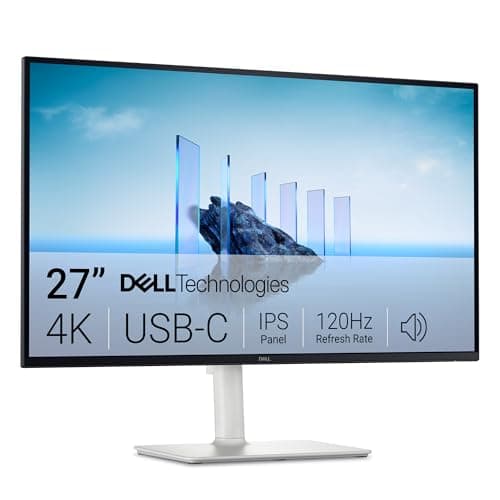
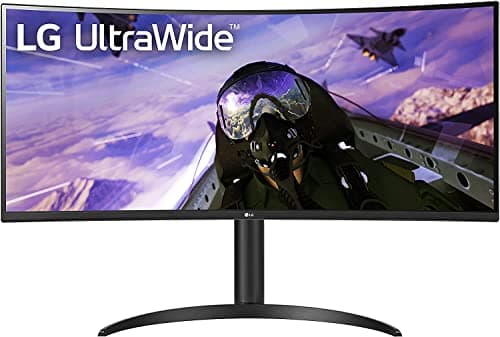
Ultrawide or dual monitor is the fork every enthusiast hits on the second serious upgrade, and the honest answer is that neither wins outright — they solve different problems. A single 34-inch ultrawide like the LG 34WP65C removes the seam down the middle of your view and keeps the whole rig to one cable. Two 27-inch 4K panels like the Dell S2725QC deliver more total pixels and let you rotate one screen vertical. Pick the trade that matches how you actually work.

Field of view goes to the ultrawide: one continuous 3440×1440 sweep with nothing interrupting it, which is why it feels more immersive for a single wide task — a long timeline, a wide spreadsheet, a game. Raw multitasking goes to dual: two independent screens mean you can run one app full-screen while a reference document sits on the other, and you can spin one panel into portrait for code or long pages, a move an ultrawide simply cannot make. The seam that dual buyers dislike is exactly the boundary that makes each screen its own tidy zone.

ConsiderationUltrawide (one screen)Dual monitors (two screens)
Field of viewOne seamless 21:9 sweepWide, but split by a seam
Window managementManual snapping or a tiling toolEach screen is its own zone
Desk width neededAbout 32 inches for a 34-inch panelRoughly 48 inches for two 27-inch panels
BezelsNone across the middleA seam sits dead center
Vertical rotationNot possibleRotate one for code or documents
PriceOne panel to buyTwo panels, often more in total
ErgonomicsOne height to setTwo heights, one can go portrait

Choose ultrawide if

  • You work in one wide app at a time and the center bezel of a dual rig annoys you.
  • You want the simplest setup — one cable, one mount, one height to dial in.
  • Your desk is a standard width and you value immersion over raw pixel count.

Choose dual if

  • You keep a reference window open beside your main task and want each in its own zone.
  • You write code or read long documents and want one screen rotated vertical.
  • You have the desk width for two 27-inch panels and want the most total resolution.

Our lean for most desks is the ultrawide — it wins on simplicity and immersion, and the ultrawide roundupranks the panels — but the dual rig is the right call if a vertical screen or maximum pixel count matters to you. Either way, get both screens to eye level on monitor arms, drive them cleanly from a laptop with a USB-C dock, and plan the layout with our dual-monitor setup guide.

The short answer

Quick picks

#ProductBest forScorePrice
01
LG LG 34WP65C-B 34" UltraWide (the one-screen pick)
LG 34WP65C-B 34" UltraWide (the one-screen pick)

One curved 34-inch panel at 3440 x 1440 removes the center bezel, keeps cabling to a single input, and wraps you in a continuous field of view.

Best if you want one screen
8.4
$449.00Amazon
02
Dell Dell 27 Plus 4K S2725QC (buy two for dual)
Dell 27 Plus 4K S2725QC (buy two for dual)

Two 27-inch 4K panels give more total pixels than any single ultrawide, plus the freedom to rotate one vertical - at the cost of a center bezel and a wider footprint.

Best if you want two screens
7.9
$299.99Amazon

#ad · Live prices from the Amazon Product API, as of Jul 24, 2026. Where we have no verified live price we show none — we would rather leave a gap than print a number that has rotted.

In detail

The picks, in full

01
LG LG 34WP65C-B 34" UltraWide (the one-screen pick)

Best if you want one screen

LG 34WP65C-B 34" UltraWide (the one-screen pick)

Screen
34" curved (1800R)
Resolution
3440 x 1440 (21:9 UWQHD)
Refresh rate
160Hz
Desk width
One panel, about 32" wide
8.4/10

One curved 34-inch panel at 3440 x 1440 removes the center bezel, keeps cabling to a single input, and wraps you in a continuous field of view.

Field of View
8.6
Multitasking
7.8
Setup Simplicity
9
Value
8.2

Pros

  • No center bezel - a continuous 3440 x 1440 canvas across 34 inches
  • One monitor means one power cable, one video cable, and one mount
  • The 1800R curve keeps the far edges at an even viewing distance

Cons

  • You cannot rotate half of it vertical for code or long documents
  • Total pixel height stays at 1440, unlike a rotated second screen

Skip this if…

you rely on a vertical screen for code or documents, which only a rotatable second monitor gives you.

$449.00View on Amazon

Price as of Jul 24, 2026. Prices change — Amazon's is the one that counts.

#ad · we may earn a commission from this link to LG 34WP65C-B 34" UltraWide (the one-screen pick)

02
Dell Dell 27 Plus 4K S2725QC (buy two for dual)

Best if you want two screens

Dell 27 Plus 4K S2725QC (buy two for dual)

Screens
Two 27" 4K IPS panels
Resolution
3840 x 2160 each
Total width
About 48" side by side
Connectivity
USB-C (65W), HDMI each
7.9/10

Two 27-inch 4K panels give more total pixels than any single ultrawide, plus the freedom to rotate one vertical - at the cost of a center bezel and a wider footprint.

Field of View
8
Multitasking
9
Setup Simplicity
6.8
Value
7.8

Pros

  • Two 4K panels stack up more total resolution than a single 34-inch ultrawide
  • Rotate one screen vertical for code, documents, or long web pages
  • Each screen runs a full-screen app without any window-management fuss

Cons

  • A bezel sits in the center of your field of view
  • Two panels need more desk width and two sets of cables

Skip this if…

a seam in the middle of your view bothers you, or your desk cannot hold two 27-inch panels side by side.

$299.99View on Amazon

$349.9914% off

Price as of Jul 24, 2026. Prices change — Amazon's is the one that counts.

#ad · we may earn a commission from this link to Dell 27 Plus 4K S2725QC (buy two for dual)

Deciding between the two

Reduce the choice to one question: do you work in one wide window, or two separate ones? If your day is a single sprawling task — a video timeline, a wide spreadsheet, a broad codebase view — the ultrawide’s unbroken canvas is the better tool, and it keeps the desk and cabling simple. If your day is two things at once — a document beside a browser, a terminal beside a reference — two screens give each its own space, and a rotated portrait panel is a real advantage the ultrawide cannot offer.

Then confirm the desk can hold your pick. A 34-inch ultrawide wants about 32 inches of width; two 27-inch panels want closer to 48 inches, plus the depth to angle them slightly inward. Both approaches benefit from getting the screens up on arms so the tops land at eye level, and both are easiest to run from a single laptop through a dock that carries video and power on one cable. Budget for the mount and the cabling in the same purchase, because a great pair of screens set too low and tangled in cables undoes the upgrade.

How we picked

We do not run a testing lab

We compiled the published manufacturer specifications, did the ergonomics, VESA and desk-depth math ourselves, and read aggregated owner reviews, then scored each product against a published rubric. The scores are judgments from documented research — they are not measurements we took, because we do not have a lab and we are not going to pretend we do. Every spec traces back to a listing or manual named in Sources.

Questions

Frequently asked

Is an ultrawide better than dual monitors for productivity?

Neither is universally better. An ultrawide is better for one wide task with no center bezel; dual monitors are better for running two separate apps and for rotating one screen vertical. Match the choice to whether you work in one wide window or two.

Does a 34-inch ultrawide replace two monitors?

Roughly, in width. A 34-inch 3440×1440 ultrawide gives about the horizontal space of two 24-inch monitors without the center seam. It does not match the total pixel count or the vertical rotation of two 27-inch 4K panels.

How much desk width do I need for each?

Plan for about 32 inches of width for a 34-inch ultrawide, and roughly 48 inches for two 27-inch panels side by side. Measure your desk before you commit — the width requirement is the spec most likely to veto a setup.

Can you rotate an ultrawide vertically?

In practice, no — a 34-inch-plus ultrawide is far too wide to sit on its side usefully. If you want a portrait screen for code or documents, a dual-monitor setup is the way to get it, with one panel rotated on a compatible arm.

Is a dual-monitor setup harder to set up?

A little. You align two panels, run two sets of cables, and set two heights instead of one. It is not difficult, and our dual-monitor setup guide walks through alignment, arrangement, and cabling.

Keep reading

Receipts

Sources

We do not run a testing lab, and we do not pretend to. Specifications come from the manufacturer or retailer listing; the footprint and clearance math is ours and reproducible. Where we could not verify a number, we say so on the page rather than quietly leaving it out. Read our full method.