Buy the SIHOO Doro C300 Pro V2: it is the only chair here with a published 3D headrestalongside 8D armrests, a dynamic lumbar and a recline that locks at 105, 125 and 135 degrees — and the recline is the half of the equation most headrest buyers forget. A headrest does nothing in an upright chair. It earns its place when you lean back, and it only supports your neck if you can move it to where your neck is.
That is the whole ranking axis on this page: how many axes the headrest moves on. A 3D headrest adjusts height, depth and angle. A 2D headrest gives you two of those, usually height and angle. A headrest with no published adjustment is a fixed pad at one height, and if that height is wrong for your torso it pushes your head forward into exactly the posture you bought the chair to avoid.
The flagships are deliberately absent. The Herman Miller Aeron and Steelcase Series 2ship with no headrest in their standard configurations, which is a design position rather than an oversight — both are built around upright task work. If a headrest is non-negotiable, the chairs below are where the money goes instead.
Three things decide whether a headrest works
Height travel. The pad has to land at the base of your skull, not between your shoulder blades and not against the back of your head. A tall sitter in a chair with a fixed headrest will usually find it in the wrong place, which is why this page ranks adjustment ahead of padding.
Angle. A headrest at the wrong angle contacts the back of your skull and tips your chin down. The angle adjustment is what lets the pad meet your neck instead.
Back height. A headrest can only be as high as the backrest it is mounted to. Every chair on this page is a high-back design for that reason; a mid-back chair with a headrest bolted on top is a different and worse product.
Who should skip a headrest
If you work upright all day and never recline past about 110 degrees, a headrest is dead weight and the budget is better spent on lumbar and armrests — the two adjustments that change how your back feels at hour six. Our long-hours roundup ranks on exactly that, and chairs for back pain puts the lumbar first.
If you do lean back — on calls, while reading, while thinking — the headrest is the cheapest neck support you will ever buy, and the recline lock is what makes it usable. Set both together: how to adjust an office chair has the order to do it in.
The short answer
Quick picks
| # | Product | Best for | Score | Price |
|---|
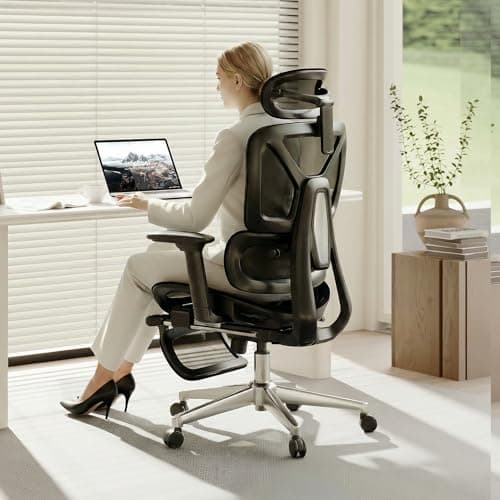
| 01 | No image SIHOO Doro C300 Pro V2 Ergonomic ChairThe best headrest here and the best chair around it. A published 3D headrest, 8D Bionic armrests, a dynamic self-adjusting lumbar and a recline that locks at 105, 125 and 135 degrees - so there is a position where the headrest genuinely carries your head. | Anyone who actually reclines | | Check price → |
| 02 | FlexiSpot ErgoX Ergonomic Office ChairThe other published 3D headrest, and the one with the highest capacity on this page at 400 lb. A retractable footrest turns the reclined position into something you can actually hold, which is the point of a headrest. | Reclining with your feet up | | $269.99·Amazon |
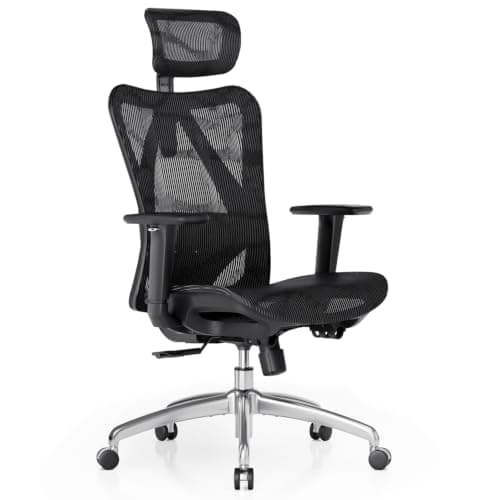
| 03 | SIHOO M57 Ergonomic Mesh ChairThe value pick with a headrest that moves. An adjustable headrest, a dual-adjustable lumbar you can set for height and depth, and 3D arms - the full adjustment list at a mid-budget price, with the recline as the thing it gives up. | Adjustment on a budget | | $199.99·Amazon |
| 04 | | The cheapest moving headrest | | $129.98·Amazon |
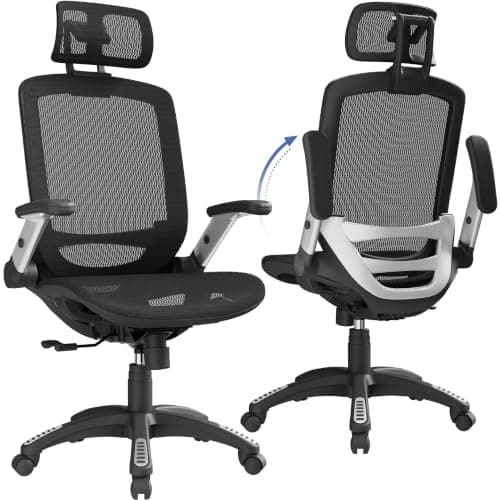
| 05 | Gabrylly Ergonomic Mesh Office ChairThe honest 2D headrest. Gabrylly publishes two axes rather than three, the armrests flip up but do not adjust, and the recline stops at 120 degrees - all of which is fine at this price as long as you know it before you buy. | A high-back mesh chair for very little | | $219.50·Amazon |
#ad · Live prices from the Amazon Product API, as of October 23, 2026. Where we have no verified live price we show none — we would rather leave a gap than print a number that has rotted.
In detail
The picks, in full
Anyone who actually reclines
SIHOO Doro C300 Pro V2 Ergonomic Chair
- Back
- Breathable mesh with a 3D headrest
- Lumbar
- Dynamic self-adjusting lumbar support
- Armrests
- 8D Bionic adjustable armrests
- Backrest
- 3-position recline lock at 105, 125 and 135 degrees
- Capacity
- Up to 330 lb
The best headrest here and the best chair around it. A published 3D headrest, 8D Bionic armrests, a dynamic self-adjusting lumbar and a recline that locks at 105, 125 and 135 degrees - so there is a position where the headrest genuinely carries your head.
- Headrest Adjustment
- 9.6
- Recline
- 9.4
- Adjustability
- 9.2
- Value
- 8.8
Pros
- +3D headrest - height, depth and angle, which is the full set
- +A 135-degree locked recline is the position a headrest exists for
- +8D armrests are more adjustment than chairs at twice the price publish
- +330 lb capacity and a self-adjusting lumbar need no setup to work
Cons
- −Build quality is mid-tier next to a 12-year-warranty flagship
- −A self-adjusting lumbar removes the choice as well as the chore
- −Mesh back only - no upholstered option
Skip this if…
…you want flagship materials and a decade-long warranty, or you never lean back past upright.
Reclining with your feet up
FlexiSpot ErgoX Ergonomic Office Chair
- Seat & back
- AeroWeave air-mesh, breathable
- Lumbar
- Dynamic lumbar with a 5-level adjustable back
- Armrests
- 3D adjustable armrests
- Extras
- 3D headrest and a retractable footrest
- Capacity
- Up to 400 lb
The other published 3D headrest, and the one with the highest capacity on this page at 400 lb. A retractable footrest turns the reclined position into something you can actually hold, which is the point of a headrest.
- Headrest Adjustment
- 9.4
- Recline
- 9
- Adjustability
- 8.6
- Value
- 8.6
Pros
- +3D headrest and a retractable footrest - the reclined position is fully supported
- +400 lb rating is the highest here
- +Five-level back adjustment sets the headrest's starting height as well
- +AeroWeave mesh across seat and back, so the recline does not get hot
Cons
- −3D armrests rather than the 8D set on the SIHOO above
- −Materials are mid-range, not flagship
- −A footrest adds a thing to catch your shins on when you stand
Skip this if…
…you want flagship-grade materials or 4-way arms.
Adjustment on a budget
SIHOO M57 Ergonomic Mesh Chair
- Back
- Breathable S-shaped mesh
- Headrest
- Adjustable headrest
- Lumbar
- Dual-adjustable (height and depth)
- Armrests
- 3D adjustable armrests
- Capacity
- Up to 330 lb
The value pick with a headrest that moves. An adjustable headrest, a dual-adjustable lumbar you can set for height and depth, and 3D arms - the full adjustment list at a mid-budget price, with the recline as the thing it gives up.
- Headrest Adjustment
- 8
- Recline
- 7
- Adjustability
- 8.4
- Value
- 9.2
Pros
- +Adjustable headrest plus a lumbar that moves on two axes at a budget price
- +3D armrests, which most chairs at this price fix in one position
- +S-shaped mesh back sets the headrest at a sensible starting height
- +330 lb rating matches the flagship-value pick above
Cons
- −SIHOO does not publish how many axes the headrest moves on
- −No deep lockable recline, so the headrest sees less use
- −Build is a step below the ErgoX
Skip this if…
…you want a deep, lockable lounge recline.
The cheapest moving headrest
Ticova Ergonomic Office Chair with Adjustable Lumbar Support
- Back
- High-back breathable mesh
- Headrest
- Adjustable headrest
- Lumbar
- Adjustable lumbar support, height and depth
- Armrests
- Adjustable armrests
- Seat
- Height-adjustable gas lift with tilt lock
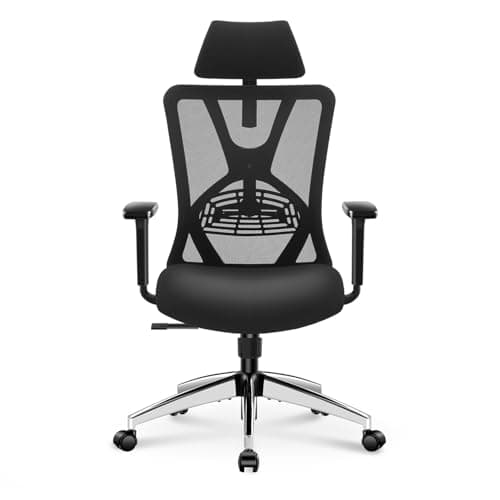
The budget chair that still gets both supports right: an adjustable headrest on a high mesh back, and a lumbar that moves for height and depth. The arms are adjustable but Ticova does not say on how many axes.
- Headrest Adjustment
- 7.8
- Recline
- 7.4
- Adjustability
- 7.8
- Value
- 9.4
Pros
- +An adjustable headrest at the bottom of the price range here
- +Lumbar moves for height and depth, which budget chairs usually fix
- +High mesh back gives the headrest somewhere sensible to sit
- +Tilt lock, so the reclined position can be held
Cons
- −No published capacity figure
- −Armrest axes are not specified
- −Short warranty next to any premium chair
Skip this if…
…you are near the upper end of any weight range - Ticova publishes no capacity for this chair.
A high-back mesh chair for very little
Gabrylly Ergonomic Mesh Office Chair
- Back
- Full breathable mesh, high back
- Headrest
- 2D adjustable headrest
- Armrests
- Flip-up armrests (fixed)
- Recline
- 90 to 120 degrees, tilt lock
- Capacity
- Up to 280 lb
The honest 2D headrest. Gabrylly publishes two axes rather than three, the armrests flip up but do not adjust, and the recline stops at 120 degrees - all of which is fine at this price as long as you know it before you buy.
- Headrest Adjustment
- 7
- Recline
- 6.6
- Adjustability
- 6.4
- Value
- 9
Pros
- +A published 2D headrest rather than a vague one
- +Flip-up arms let the chair tuck fully under a shallow desk
- +Tilt locks anywhere between 90 and 120 degrees
- +Full mesh back and seat for the money
Cons
- −2D rather than 3D - no depth adjustment on the headrest
- −Armrests flip but do not adjust for height or width
- −120 degrees is a shallow recline for a headrest chair
Skip this if…
…you recline deeply - 120 degrees is not far enough back for the headrest to take much weight.
Headrest adjustment, as published
| Chair | Headrest | Recline | Capacity |
|---|
| SIHOO Doro C300 Pro V2 | 3D | Locks at 105 / 125 / 135 deg | 330 lb |
| FlexiSpot ErgoX | 3D | 5-level adjustable back | 400 lb |
| SIHOO M57 | Adjustable, axes not published | Not published | 330 lb |
| Ticova | Adjustable, axes not published | Tilt lock | Not published |
| Gabrylly | 2D | 90 to 120 deg, tilt lock | 280 lb |
Blank cells are blank on purpose. SIHOO and Ticova both describe their headrests as adjustable without saying on how many axes, and neither Ticova nor FlexiSpot publishes a recline angle. We would rather show you the gap than fill it with a number from a retailer bullet point.
One chair was deliberately not ranked: the Yaheetech high-back has a headrest and lumbar support at the lowest price on this site, but the listing does not say the headrest adjusts at all. On a page whose entire axis is adjustment, that rules it out of the ranking while still making it the right answer for a lowest-possible-price buyer.
Set the headrest in this order
1. Seat height first. Feet flat, knees at about 90 degrees. Every other adjustment depends on this one, and a chair set too high changes where your shoulders sit against the back.
2. Lumbar second. The pad goes into the curve of your lower back. Setting the lumbar changes your torso angle, which moves your head.
3. Recline third, and lock it. Find the angle you will actually work and rest at. On the SIHOO Doro that is one of 105, 125 or 135 degrees.
4. Headrest last, in the reclined position.Lean back, then set the pad to the base of your skull — not the back of your head. If the chair has depth adjustment, bring the pad forward until it contacts without pushing.
5. Armrests after that. Elbows at about 90 degrees, shoulders down. Keyboard and mouse ergonomics covers what the arms are supposed to be doing.
A headrest is not a neck treatment
A headrest changes where the weight of your head is carried when you lean back. It does not fix neck pain caused by a screen in the wrong place, and the screen is the more common culprit by a wide margin — monitor height is the first thing to check, not the last. If pain persists, that is a question for a clinician, not a shopping list.
Essentials
The small parts that finish the job
Nothing here changes a pick above, and none of it is a considered purchase. These are the cheap pieces that decide whether the expensive one works properly, and the ones people discover they are missing on the day the big box arrives.
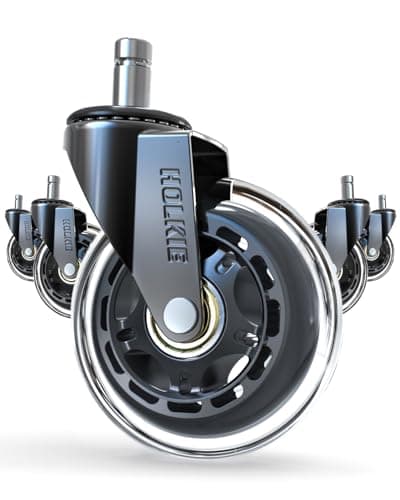
HOLKIE Rollerblade-Style Chair Casters, 3 in (set of 5)
The cheapest real upgrade a chair you already own can take. Hard nylon wheels fight carpet and skate on hard floors; wider rubber casters roll on both and stay put when you sit down.
Check first: chair stems are not standardized. Pull one existing caster out and measure its stem diameter and length against the listing before ordering.
#ad · Live prices from the Amazon Product API, as of October 23, 2026. Where we have no verified live price we show none. We may earn a commission, at no extra cost to you.
How we picked
We do not run a testing lab
We compiled the published manufacturer specifications, did the ergonomics, VESA and desk-depth math ourselves, and read aggregated owner reviews, then scored each product against a published rubric. The scores are judgments from documented research — they are not measurements we took, because we do not have a lab and we are not going to pretend we do. Every spec traces back to a listing or manual named in Sources.
Questions
Frequently asked
Do I need an office chair with a headrest?+
Only if you recline. A headrest supports your neck when you lean back, which helps on calls and reading breaks. If you work upright all day it does nothing, and the money is better spent on lumbar adjustment and armrests.
What does a 3D headrest mean?+
Three axes of adjustment — height, depth and angle. A 2D headrest moves on two, usually height and angle. A headrest with no stated adjustment is fixed, and fixed only works if its one position happens to suit your torso.
Why do the Aeron and Steelcase Series 2 have no headrest?+
Both are designed around upright task posture in their standard configurations, so neither ships with one. It is a design position rather than a missing feature — if a headrest matters to you, those chairs are the wrong starting point.
Where should an office chair headrest sit?+
At the base of your skull, contacting without pushing your head forward, set while you are leaning back in the position you actually use. Setting it upright and then reclining puts it in the wrong place.
Can I add a headrest to a chair that does not have one?+
Aftermarket headrests exist but they bolt to the top of a backrest that was not engineered for the load, and fit is model-specific. We do not rank them. Buying a high-back chair designed with one is the more reliable route.
Does a headrest help with neck pain?+
It can reduce the load on your neck while reclined, but most desk neck pain comes from screen height rather than seating. Fix
the monitor height first, and see a clinician if the pain continues.
Receipts
Sources
We do not run a testing lab, and we do not pretend to. Specifications come from the manufacturer or retailer listing; the footprint and clearance math is ours and reproducible. Where we could not verify a number, we say so on the page rather than quietly leaving it out. Read our full method.