Skip to content
Chair & Cable

SECTION 04 · Keyboards & Mice

The Best Keyboards for Mac

A Mac keyboard is not a Windows keyboard with different stickers. The ones worth buying ship Mac legends, put Command where your thumb expects it, and switch between a Mac, an iPad and a work machine without replugging.

By Stephen V.Updated How we pick
#ad

We earn a commission when you buy through our Amazon links, at no extra cost to you. It never affects our rankings, and we say so when the cheaper product is the better buy. How this works.

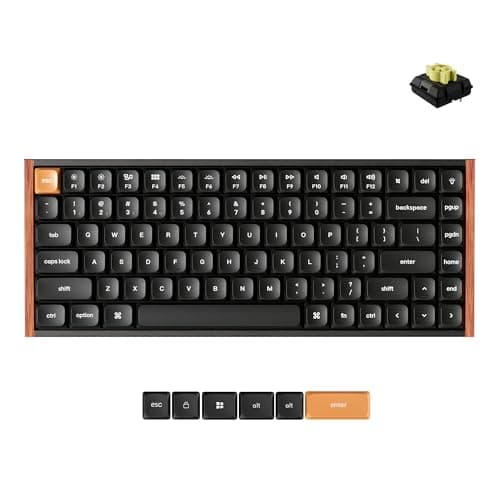
The Keychron K8 Max is the keyboard to buy for most Mac desks: it ships Mac and Windows keycaps with a hardware toggle between the two layouts, runs wired, Bluetooth or 2.4 GHz, and its switches are hot-swappable, so the one decision people usually regret stays reversible. If your office needs to stay quiet, buy the Logitech MX Mechanical Mini for Macinstead — Tactile Quiet switches and three-device Bluetooth across Macs and iPads.

Almost any USB or Bluetooth keyboard will type on a Mac. That is not the question. The question is whether the modifier keys are where macOS expects them, whether the legends match the keys you actually press, and whether the board can follow you between a MacBook, a Studio or Mini, and an iPad without a cable dance. Those three things are what separate the boards below from the hundreds that merely work.

What to look for in a Mac keyboard

Mac legends and a layout toggle.On a Windows board, the key to the left of the spacebar is Alt and the next one over is the Windows key. On a Mac, that order is reversed: Option sits inboard, Command next to the spacebar. macOS can remap them in Settings, but the printing on the keycaps will then be wrong forever. A board that ships a Mac keyset and a hardware Mac/Windows switch — as the Keychron boards here do — solves it in hardware instead.

Multi-device switching, and how many devices. Mac desks are rarely single-machine desks. Bluetooth boards that hold three paired hosts and switch with one key are the ones that survive a work laptop arriving. The MX Mechanical Mini for Mac does three Macs or iPads; the K3 Max SE does three over Bluetooth 5.2 plus a separate 2.4 GHz link.

Switch type, and whether it can change.Low-profile switches sit closer to the desk, which flattens your wrist angle — the same argument our keyboard and mouse ergonomics guide makes about keyboard height. Hot-swap sockets matter more than the switch that ships in them, because the switch you want after a month is often not the one you ordered. Keyboard switches explained covers linear against tactile if you have not chosen yet.

Width, honestly considered.A full-size board pushes your mouse hand outward past your shoulder all day. Tenkeyless and 75% layouts bring it back in, which is the quiet ergonomic win in this category — and the reason four of the five picks below have no number pad. If you want the number pad and the narrow footprint, the separate-numpad boards in our compact keyboard roundup are the better page.

What we are not going to claim.We do not measure actuation force or type-test boards in a lab, and nothing below is scored on sound. Every specification here comes from the manufacturer’s own product page, named in Sources, and where a maker does not publish a Mac layout — as Logitech does not for the MX Keys S — we say so rather than assuming it.

The short answer

Quick picks

#ProductBest forScorePrice
01
Keychron Keychron K8 Max Wireless Mechanical Keyboard
Keychron K8 Max Wireless Mechanical Keyboard

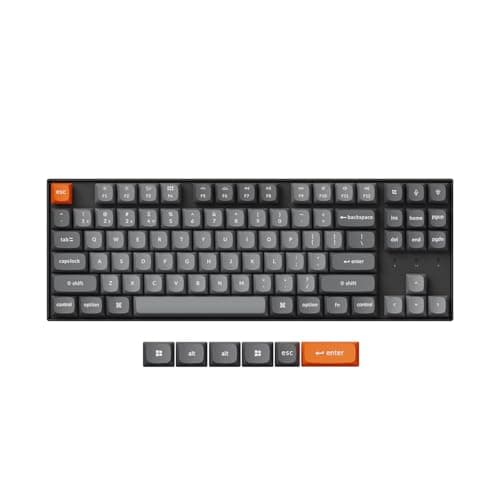
The Mac keyboard that asks nothing of you. Both keysets and a hardware Mac/Windows toggle in the box, a tenkeyless layout that keeps the arrow keys, and hot-swap sockets so the switches stay a decision you can revisit.

Most Mac desks
9.1
$79.99Amazon
02
Logitech Logitech MX Mechanical Mini for Mac Wireless Keyboard
Logitech MX Mechanical Mini for Mac Wireless Keyboard

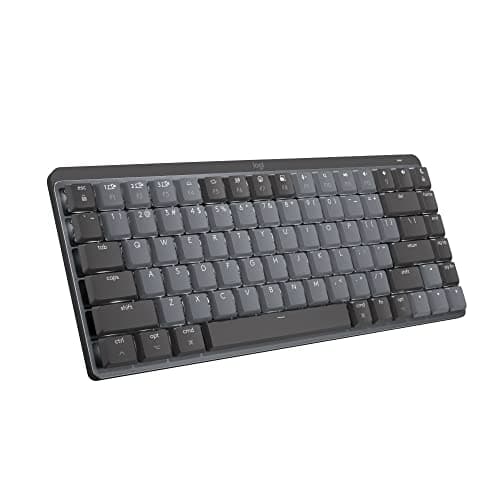
The Mac-native pick for a shared room. It is sold as a Mac product rather than adapted into one, the Tactile Quiet switches are the quietest mechanical option here, and the backlight turns itself on as your hands arrive.

A quiet office
8.6
$159.99Amazon
03
Keychron Keychron K3 Max SE Ultra-Slim Wireless Mechanical
Keychron K3 Max SE Ultra-Slim Wireless Mechanical

The thinnest way to get a real mechanical on a Mac desk. A 75% layout with low-profile hot-swap switches, Mac-layout double-shot PBT keycaps, and 2.4 GHz at 1000 Hz polling for a desktop Mac.

The smallest mechanical footprint
9.2
$104.99Amazon
04
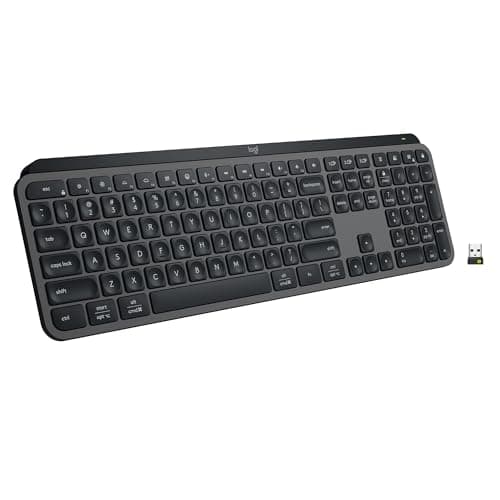
Logitech Logitech MX Keys S
Logitech MX Keys S

The pick for anyone who prefers the feel of an Apple Magic Keyboard and wants a bigger, better version of it. Spherically dished scissor keys, a self-managing backlight, and published macOS support - though it is the universal layout, not a Mac-legended board.

People who like scissor keys
7.2
$129.99Amazon
05
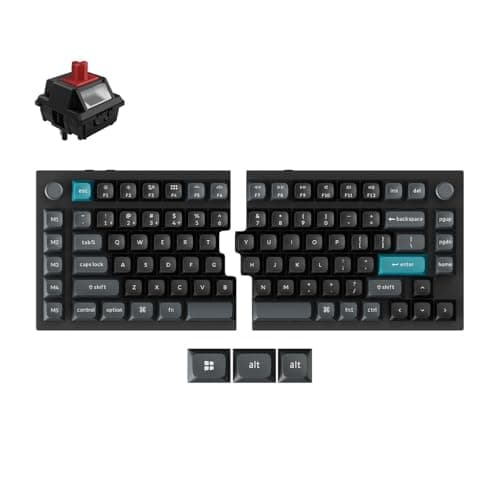
Keychron Keychron Q11 Ultra 8K Split Mechanical Keyboard
Keychron Q11 Ultra 8K Split Mechanical Keyboard

The Mac board for someone whose shoulders are the actual problem. A fully split 75% in machined metal with wirelessly synced halves and KSA-profile PBT keycaps printed for Mac and Windows.

Shoulder width and a Mac keyset
8.8
Check price →

#ad · Live prices from the Amazon Product API, as of October 5, 2026. Where we have no verified live price we show none — we would rather leave a gap than print a number that has rotted.

In detail

The picks, in full

01
Keychron Keychron K8 Max Wireless Mechanical Keyboard

Most Mac desks

Keychron K8 Max Wireless Mechanical Keyboard

Layout
Tenkeyless (87-key)
Mac support
Mac and Windows keycaps and a layout toggle
Connection
Wireless - Bluetooth or 2.4 GHz; wired USB-C
Switch type
Hot-swappable (pre-installed Gateron)
Hot-swap
Yes
9.1/10

The Mac keyboard that asks nothing of you. Both keysets and a hardware Mac/Windows toggle in the box, a tenkeyless layout that keeps the arrow keys, and hot-swap sockets so the switches stay a decision you can revisit.

Mac Layout
9.6
Multi-Device
8.8
Switch Flexibility
9.6
Desk Footprint
8.2

Pros

  • Ships the Mac keyset and the toggle, so the legends match what the keys do
  • Three connection modes, including 2.4 GHz for a desktop Mac that never sleeps
  • Hot-swap sockets mean a switch you dislike costs a few dollars, not a keyboard
  • Tenkeyless keeps the arrows and function row while pulling the mouse back in

Cons

  • Still wider than a 75% board if desk space is the binding constraint
  • Full-height switches sit taller than the low-profile boards below
  • Keychron's remapping lives in a web configurator you have to open

Skip this if…

…you want the smallest possible footprint - the K3 Max SE below is the same idea in 75%.

$79.99View on Amazon

Price as of October 5, 2026. Prices change — Amazon's is the one that counts.

#ad · we may earn a commission from this link to Keychron K8 Max Wireless Mechanical Keyboard

02
Logitech Logitech MX Mechanical Mini for Mac Wireless Keyboard

A quiet office

Logitech MX Mechanical Mini for Mac Wireless Keyboard

Layout
Compact Mac layout, number pad removed
Mac support
Sold as the Mac edition; pairs up to 3 Macs or iPads
Switch type
Low-profile mechanical, Tactile Quiet
Connection
Bluetooth Low Energy, up to 3 devices
Backlight
Proximity-activated, auto-adjusting to room light
Battery
Up to 15 days, or up to 10 months with backlighting off
8.6/10

The Mac-native pick for a shared room. It is sold as a Mac product rather than adapted into one, the Tactile Quiet switches are the quietest mechanical option here, and the backlight turns itself on as your hands arrive.

Mac Layout
9.8
Multi-Device
9.2
Switch Flexibility
6
Desk Footprint
9.2

Pros

  • Quietest keystroke of any mechanical board here, which decides shared rooms
  • Three-device Bluetooth covers a Mac, an iPad and a work laptop
  • Low-profile switches keep the board close to the desk surface
  • Proximity backlight is genuinely useful rather than decorative

Cons

  • No hot-swap - the switches are the switches, permanently
  • Bluetooth only; there is no 2.4 GHz fallback if pairing misbehaves
  • 15 days of battery with the backlight on means regular charging

Skip this if…

…you want to tune the switches later - this is a keyboard you buy finished.

$159.99View on Amazon

Price as of October 5, 2026. Prices change — Amazon's is the one that counts.

#ad · we may earn a commission from this link to Logitech MX Mechanical Mini for Mac Wireless Keyboard

03
Keychron Keychron K3 Max SE Ultra-Slim Wireless Mechanical

The smallest mechanical footprint

Keychron K3 Max SE Ultra-Slim Wireless Mechanical

Layout
75% low-profile
Mac support
Double-shot PBT Mac layout keycaps, Windows compatible
Connection
2.4 GHz (1000 Hz polling), Bluetooth 5.2 to 3 devices, or wired
Switch type
Hot-swappable Keychron Milk POM low-profile
Firmware
QMK, remapped in the Keychron Launcher web app
Acoustics
EPDM plate foam plus bottom-case foam
9.2/10

The thinnest way to get a real mechanical on a Mac desk. A 75% layout with low-profile hot-swap switches, Mac-layout double-shot PBT keycaps, and 2.4 GHz at 1000 Hz polling for a desktop Mac.

Mac Layout
9.2
Multi-Device
9.4
Switch Flexibility
8.8
Desk Footprint
9.6

Pros

  • Low profile and 75% at once - the narrowest and flattest board here
  • Hot-swap low-profile sockets, which are rare
  • 1000 Hz polling over 2.4 GHz, plus three Bluetooth hosts
  • QMK means the Mac modifier order is yours to set permanently

Cons

  • 75% compresses the arrow and function cluster, which takes a week
  • Low-profile switch choice is narrower than full-height
  • QMK via a web configurator will not appeal to everyone

Skip this if…

…you never want to open a configurator - the K8 Max does the same job with less setup.

$104.99View on Amazon

Price as of October 5, 2026. Prices change — Amazon's is the one that counts.

#ad · we may earn a commission from this link to Keychron K3 Max SE Ultra-Slim Wireless Mechanical

04
Logitech Logitech MX Keys S

People who like scissor keys

Logitech MX Keys S

Key mechanism
Low-profile scissor, spherically dished keycaps
Operating systems
Windows, macOS, Chrome OS, Linux, iPadOS (per Logitech)
Connection
Bluetooth Low Energy or Logi Bolt receiver, up to 3 devices
Backlight
Proximity sensor plus ambient light sensor
Battery
1500 mAh - up to 10 days, or up to 5 months backlight off
7.2/10

The pick for anyone who prefers the feel of an Apple Magic Keyboard and wants a bigger, better version of it. Spherically dished scissor keys, a self-managing backlight, and published macOS support - though it is the universal layout, not a Mac-legended board.

Mac Layout
7.2
Multi-Device
9.2
Switch Flexibility
5.5
Desk Footprint
6.8

Pros

  • Closest feel to the Mac keyboard most people already own, in a sturdier body
  • macOS listed in Logitech's own compatibility list
  • Three-device switching with Logi Bolt as well as Bluetooth
  • Five months of battery with the backlight off

Cons

  • Logitech does not publish a Mac-specific layout for this model - the legends are universal
  • Full-size with a number pad, so it is the widest board here
  • Scissor switches deliberately do not give you a mechanical keystroke

Skip this if…

…you want Mac legends printed on the keycaps - buy the MX Mechanical Mini for Mac or a Keychron.

$129.99View on Amazon

Price as of October 5, 2026. Prices change — Amazon's is the one that counts.

#ad · we may earn a commission from this link to Logitech MX Keys S

05
Keychron Keychron Q11 Ultra 8K Split Mechanical Keyboard

Shoulder width and a Mac keyset

Keychron Q11 Ultra 8K Split Mechanical Keyboard

Layout
75% split, two CNC-machined metal halves
Mac support
KSA-profile PBT keycaps for Mac and Windows
Split
Wirelessly synced halves - no connecting cable
Connection
2.4 GHz, Bluetooth, or wired USB-C
Switch type
Hot-swappable 3-pin or 5-pin MX (pre-installed Keychron Silk POM)
8.8/10

The Mac board for someone whose shoulders are the actual problem. A fully split 75% in machined metal with wirelessly synced halves and KSA-profile PBT keycaps printed for Mac and Windows.

Mac Layout
9
Multi-Device
8.6
Switch Flexibility
9.4
Desk Footprint
8

Pros

  • Separating the halves sets your hands at shoulder width, not keyboard width
  • Mac keycaps included on an enthusiast-grade metal board
  • Hot-swap MX sockets, unlike almost every other split keyboard
  • No tether between the halves to route around a desk mat

Cons

  • Heavy, expensive, and a week of adjustment before your typing speed returns
  • No built-in tenting - that is an accessory
  • Overkill if your hands are comfortable on a tenkeyless

Skip this if…

…you have never typed on a split board - read the switching guide first, then decide.

Check price on Amazon →

No buyable offer at the last price check (October 5, 2026). We show nothing rather than a stale number.

#ad · we may earn a commission from this link to Keychron Q11 Ultra 8K Split Mechanical Keyboard

The five boards, compared

KeyboardLayoutMac keysetHostsHot-swap
Keychron K8 MaxTenkeyless, full heightYes, plus toggleBT, 2.4 GHz, wiredYes
MX Mechanical Mini for MacCompact Mac, low profileYes, Mac edition3 over BluetoothNo
Keychron K3 Max SE75%, low profileYes, PBT Mac layout3 BT + 2.4 GHz + wiredYes (low profile)
Logitech MX Keys SFull size, scissorNot published3 over BT or BoltNo
Keychron Q1175% split, full heightYes, KSA PBTBT, 2.4 GHz, wiredYes

Set the modifiers once, properly

If you do end up on a Windows-legended board, macOS can swap the keys: System Settings, Keyboard, Keyboard Shortcuts, Modifier Keys, then pick the keyboard from the dropdown and reassign Option and Command. The setting is stored per keyboard, so your laptop keyboard keeps its own mapping. What it cannot do is reprint the keycaps, which is why the hardware toggle on the Keychron boards is worth the few dollars it adds.

Three Mac-specific details people hit

Function row behaviour.Mac keysets print brightness and Mission Control on F1 to F12. On a Windows-layout board those keys send plain function codes until you either flip the board’s own Fn toggle or tick the macOS option to use F1 to F12 as standard function keys.

Bluetooth wake.A Bluetooth keyboard cannot wake a Mac that has fully powered down, and on some desktop Macs it will not wake the machine from deep sleep reliably either. If that matters, use a board with a 2.4 GHz receiver or a wired mode — two of the five above have both.

iPad as the third host. The MX Mechanical Mini for Mac counts iPads in its three paired devices, which makes it the one board here aimed squarely at a Mac-plus-iPad desk rather than a Mac-plus-PC one.

What to buy alongside it

A new keyboard changes your wrist angle, and the two cheap parts that finish the job are a wrist rest sized to the board and a mouse that matches your hand. The wrist rest roundup has lengths for tenkeyless and full-size boards, and the mice-by-hand-size roundup covers the shell dimensions. If the Mac in question is a laptop, get it off the desk first — the laptop desk setup guide is the order to do it in, and the Mac monitor roundup covers the screen.

Still deciding between the MX Keys S and one of the mechanical boards here? That is the older argument, and mechanical vs membrane makes the case both ways without reference to the operating system. If you would rather the keyboard and mouse arrived together on one receiver, the keyboard and mouse combo roundup is the page for that — just check the Mac layout question first, because most combos ship Windows legends.
How we picked

We do not run a testing lab

We compiled the published manufacturer specifications, did the ergonomics, VESA and desk-depth math ourselves, and read aggregated owner reviews, then scored each product against a published rubric. The scores are judgments from documented research — they are not measurements we took, because we do not have a lab and we are not going to pretend we do. Every spec traces back to a listing or manual named in Sources.

Questions

Frequently asked

What is the best keyboard for a Mac?
The Keychron K8 Max, for most desks: it ships Mac and Windows keycaps with a hardware layout toggle, connects three ways, and its switches are hot-swappable. If the room needs to stay quiet, the Logitech MX Mechanical Mini for Mac is the better pick.
Do I need a Mac-specific keyboard, or will any keyboard work?
Any keyboard will type. A Mac-specific one puts Command next to the spacebar and prints the right legends on the keycaps. You can remap the modifiers in macOS on any board, but the printing stays wrong, which is the daily annoyance people underestimate.
How do I swap Command and Option on a Windows keyboard?
System Settings, Keyboard, Keyboard Shortcuts, Modifier Keys. Choose the external keyboard from the dropdown and reassign Option and Command. The change applies to that keyboard only.
Can one keyboard switch between a Mac and a work PC?
Yes - that is what multi-host boards are for. All five picks here hold multiple paired devices, and the Keychron boards add a hardware Mac/Windows layout switch so the modifier order changes with the host. If you want to share one screen as well as one keyboard, a KVM switch is the other way to solve it.
Are low-profile keyboards better for a Mac?
They are closer to what Mac users are used to, and a lower board flattens your wrist angle. The trade is a shorter keystroke. The K3 Max SE and the MX Mechanical Mini for Mac are the low-profile picks here; the K8 Max and Q11 are full height.
Is the MX Keys S the same as MX Keys for Mac?
No. Logitech lists macOS among the supported systems for the MX Keys S, but does not publish a Mac-specific layout for it on that product page - the legends are universal. If Mac legends matter to you, buy a board sold as a Mac edition.

Keep reading

Receipts

Sources

We do not run a testing lab, and we do not pretend to. Specifications come from the manufacturer or retailer listing; the footprint and clearance math is ours and reproducible. Where we could not verify a number, we say so on the page rather than quietly leaving it out. Read our full method.