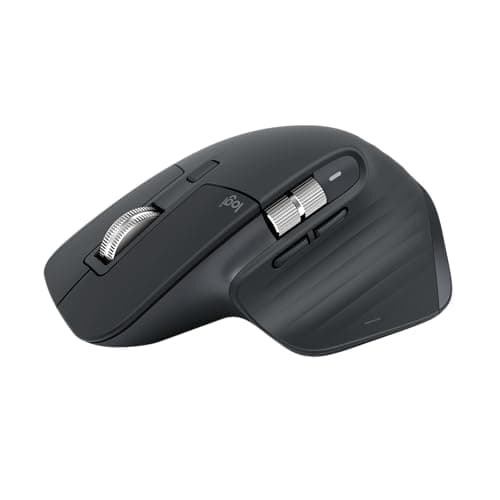
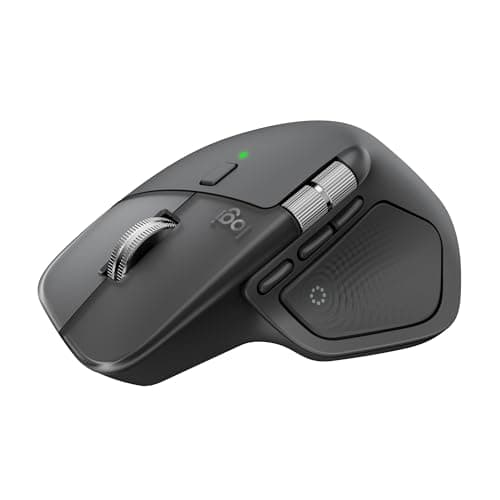
One question decides this. Do you use the gesture button on the mouse you have now? If you press it every hour to switch desktops or trigger a shortcut, buy the MX Master 4 — its Haptic Sense Panel and Actions Ring are that button turned into a menu you can feel, and it is the only real change between the two. If you have never touched it, buy the MX Master 3S: it has the same sensor, the same wheel, the same quiet clicks and the same battery claim, it weighs less, and it costs less.
Everything else about these two mice is close enough that it will not change your mind. Both track at up to 8,000 DPI on glass, both use the machined-steel MagSpeed wheel that free-spins through 1,000 lines a second, both have the horizontal thumb wheel, both claim 70 days on a charge and three hours from a one-minute top-up, and both are right-handed, medium-to-large-hand shapes. Logitech kept the body and changed the thumb.
The comparison, on what actually differs
| | MX Master 4 | MX Master 3S |
|---|
| Headline feature | Haptic Sense Panel + Actions Ring | Quiet Clicks + 8K sensor (both carried over) |
| Thumb area | Haptic panel with feedback, plus the two thumb buttons | Gesture button, plus the two thumb buttons |
| Buttons | 8 | 7 |
| Sensor | Darkfield, 200–8,000 DPI | Darkfield, 200–8,000 DPI |
| Scroll | MagSpeed + thumb wheel | MagSpeed + thumb wheel |
| Weight | 150 g (5.29 oz) | 141 g (4.97 oz) |
| Footprint | 128.2 x 88.4 x 50.8 mm | 124.9 x 84.3 x 51 mm |
| Battery | 650 mAh, up to 70 days | 500 mAh, up to 70 days |
| Wireless | Bluetooth LE 5.1 or Bolt; “2x” radio claim | Bluetooth LE or Bolt |
| Receiver in the box | USB-C Bolt receiver (works in USB-A too) | USB-A Bolt on the standard edition; none on the Bluetooth edition |
| Native OS haptics | Windows 11 Advanced Haptics | — |
| Minimum OS for Options+ | Windows 11 / macOS 13 | Windows 10 / macOS 10.15 |
| Warranty | 1 year | 1 year |
| Typical price | Higher | Lower |
What the MX Master 4 does that the 3S does not
Three things, and two of them live under your thumb.
The Haptic Sense Panel. Where the 3S has a single gesture button, the 4 has a panel that vibrates. Logitech ties that feedback to specific events — an image snapping to a grid, a desktop switch, a notification, a slider hitting a stop — and lets you set the intensity per action in Logi Options+. On Windows 11 it plugs into the operating system’s own Advanced Haptics, so window snapping and PowerPoint alignment buzz without a plugin. On macOS the feedback comes from Options+ and its plugins, which at launch cover Photoshop, Lightroom and Zoom, with Premiere Pro listed as coming.
The Actions Ring. Press the panel and a radial menu opens at the cursor with shortcuts for the app you are in. Logitech’s own claim is that it saves up to a third of your time on the tasks it measured and cuts mouse travel by up to 63 percent; treat those as manufacturer numbers. The honest version is simpler: it turns menu-hunting into a thumb press for the things you do most in each app, and the haptic tick tells you which slice you are on without looking down. If you are the kind of person who already remaps buttons and keeps a shortcut cheat sheet, that is a genuine daily gain. If you are not, it is a feature you will demo once.
The radio and the receiver. Logitech claims twice the connection strength from a new chip, moved antenna and a USB-C Bolt dongle. That matters most on a desk where the receiver sits behind a metal tower or on a dock crowded with USB 3 devices, which is exactly the kind of interference that makes a wireless mouse stutter. It also matters that the receiver is in the box: the 3S listing linked on this page is the Bluetooth edition, which ships without one, and the standard 3S with the USB-A Bolt receiver costs closer to the 4 than the headline gap suggests. Check the live prices on the cards above before assuming the 3S is the bargain — on some days it is not.
What the MX Master 3S does that the 4 does not
Weigh less and cost less. That is the whole list, and it is not a small list. The 3S was already a 141 g mouse, heavy by the standards of anything not built for productivity, and the 4 adds 9 g to that. On a big desk mat with a palm grip the extra mass is barely there; if you fingertip-grip and flick across a 49-inch super ultrawide, you will feel it. The 3S also runs Options+ on Windows 10 and macOS 10.15, where the 4 wants Windows 11 and macOS 13 — irrelevant on a current machine, relevant on a work laptop the IT department has not touched.
Everything the 3S is loved for carried straight over. The Quiet Clicks — 90 percent less click noise by Logitech’s measure — are on both. The SmartShift wheel that ratchets until you flick it and then free-spins is on both. Flow, which lets the cursor cross from a Windows PC to a Mac and drag a file with it, is on both. If you own a 3S and it works, nothing on this page should make you replace it.
The thing neither of them fixes
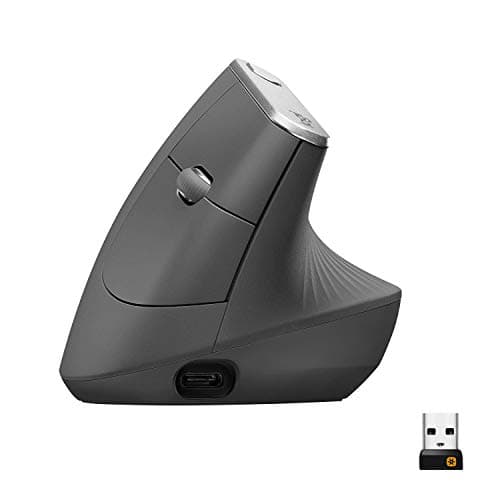
Your forearm angle. Both mice are sculpted and both tilt the hand a few degrees, and Logitech is careful to say “more natural posture” rather than anything stronger. A palm-down grip still rotates the forearm bones over each other, and if that is where your ache lives, a bigger battery and a haptic panel will not help. The fix is a vertical shape — the MX Vertical below, or the smaller Lift for small hands — and the trade is real: a slower sensor, fewer buttons, no MagSpeed. That decision is laid out in the vertical mouse roundup and, against the other pain-driven option, in vertical mouse vs trackball. The general rule — that the mouse sits inside the same reach zone as the keyboard — is in keyboard and mouse ergonomics.
Hand size, before either
Both MX Masters are sized for medium-to-large hands; that is Logitech’s own language for the shape, and the 4 is a few millimeters larger in every direction. If your palm does not reach the thumb wheel comfortably on a 3S, the 4 will not help. A compact shape is the better buy regardless of which generation, and the site’s ergonomic mouse roundup ranks by grip and hand size first for exactly that reason.
Windows or Mac changes the answer a little
On Windows 11 the MX Master 4 gets native OS haptics; on a Mac it does not, and the feedback comes only from Options+ and its plugins. That makes the 4’s premium easier to justify on a Windows desk than on a Mac desk. A “for Mac” edition of both mice exists as a Bluetooth-only variant in Apple colors, so if your machine is a MacBook with no free USB-A port and Bluetooth that behaves, it is the same mouse without a dongle you will never plug in. On a desk built around a USB-C dock with spare ports, the standard editions and their receivers are the safer pairing.
The verdict
Buy the MX Master 4 if you already lean on the gesture button, if you work in apps with deep shortcut sets (Photoshop, Lightroom, spreadsheets, an IDE), if your receiver has to live behind a tower or on a crowded dock, or if you need a receiver in the box and your machine has no Bluetooth. The Actions Ring is not a gimmick for that person; it is the gesture button grown up.
Buy the MX Master 3S if you want the sensor, the wheel, the quiet clicks and the battery, and you know you will never open the Actions Ring. It is the same mouse underneath, lighter, and it costs less — just confirm which edition you are buying. The Bluetooth edition has no receiver; the standard edition does and costs more.
Buy the MX Vertical — or the Lift if your hands are small — if the reason you are shopping is a wrist that hurts by afternoon. Neither Master is an ergonomic fix in that sense, and it is worth being honest about that before spending on the newer one.
Whichever arrives, install Logi Options+ on day one. Both Masters are ordinary mice without it: the thumb wheel, the gesture or haptic panel, per-app profiles and Flow all live in the software. The rest of the desk — a keyboard chosen for reach rather than switches, and where both sit relative to the screen — is in the compact keyboard roundup and the desk setup guide.