Skip to content
Chair & Cable

SECTION 05 · Cable Management

The Best UPS Battery Backups for a Desk Setup

A surge protector does nothing when the power simply stops. These six units are ranked on watts rather than the VA number on the box, on whether the waveform suits a modern power supply, and on how many outlets are actually battery-backed.

By Stephen V.Updated How we pick
#ad

We earn a commission when you buy through our Amazon links, at no extra cost to you. It never affects our rankings, and we say so when the cheaper product is the better buy. How this works.

Everything else on this site assumes the power stays on. The surge protector under the desk is insurance against a spike arriving down the mains, and it is worth having, but it has no answer at all to the opposite problem: the voltage going away. When that happens the monitors blink out, the tower drops mid-write, and the only question that matters is whether anything was holding the machine up for the thirty seconds it needed to close its files. A UPS is a battery and an inverter in a box, and on a desk its job is almost never to let you keep working through an outage. It is to turn a hard crash into an orderly shutdown.

The number on the front of the box is the one you should pay least attention to. Every unit here is sold on its VA rating — 1500VA, 850VA, 425VA — and VA is apparent power, not the watts your equipment actually draws. The watt figure is always lower, and the ratio is not a constant you can assume: CyberPower rates the CP1500PFCLCD at 1500VA / 1000W and the CP1500AVRLCD3 at the same 1500VA but only 900W. Two units with identical VA numbers, a hundred watts apart in what they can really carry. Find the watt rating before anything else and size against that, because the watt number is the one your load runs into first.

Then work out what your desk actually draws, which is less than you think. A desktop power supply is labeled for its peak capacity, not its consumption — a 750W unit in a machine doing spreadsheets and video calls is pulling a fraction of that at the wall. Monitors are modest too: a 27-inch panel is typically in the tens of watts rather than the hundreds. The honest way to size a UPS is to measure the real draw with a cheap plug-in meter, add the screens, and then leave headroom — both because a UPS at its rated limit has almost no runtime, and because batteries lose capacity with age. Sizing so your desk sits near half of the unit’s watt rating is the comfortable place to land. If you would rather not measure, bias upward: the cost of too much capacity is money, and the cost of too little is the thing you bought it to prevent.

The waveform is the specification that quietly decides whether this works at all. When a line-interactive UPS switches to battery it has to synthesize AC, and it does so either as a true sine wave or as a stepped approximation marketed as “simulated sine wave.” Most things do not care. Desktop power supplies with active power factor correction — which is most current ones, and effectively all of the 80 PLUS units in enthusiast builds — sometimes do: the failure mode manufacturers warn about is the power supply refusing the stepped waveform and dropping the load, or audibly buzzing, at the exact moment the UPS was supposed to save you. CyberPower sells an entire product line on this distinction and publishes the waveform for every model, which is why the sine wave units are ranked above the cheaper stepped one here even where the stepped one has a longer published runtime. If a desktop tower is plugged in, buy the sine wave.

Runtime specifications are real, but they are not about your desk.When CyberPower publishes “10 minutes / 2.5 minutes” for the CP1500PFCLCD, those figures are measured at half and full of the unit’s1000W rating — 500W and 1000W — not at whatever your setup draws. A typical desk sits below the half-load point, so it will run longer than the half-load figure, and that is the direction the error runs in your favor. What the numbers are genuinely good for is comparing units and resetting expectations: nothing in this class gives you an hour. Every one of these is a two-to-fifteen-minute device, which is ample for a scripted shutdown and nowhere near enough to finish a workday. If you need to keep working through a long outage, you are shopping for a portable power station, not a desk UPS.

Half the outlets on most of these have no battery behind them, and people get this wrong on the first install. A “12 outlet” UPS typically means six on battery plus surge and six on surge only, in two labeled banks. CyberPower spells out the split on every model and APC publishes it too. Plug the tower and the primary monitor into the battery bank, then put the printer, the desk lamp, the speakers and the phone chargers on the surge-only side, because anything you park on the battery eats runtime from everything else. One hard rule: a laser printer should never go on a UPS at all. Its fuser draws a large inrush that can overload the inverter outright, and printing is not something you need to finish during a blackout.

Finally, treat the battery as a wear item rather than a spec.Sealed lead acid cells in this class are generally good for a few years before capacity falls off, and the failure is quiet — the unit keeps showing a happy light and then delivers thirty seconds instead of ten minutes. Two things follow. Buy a unit whose battery is user-replaceable, so year four is a cartridge rather than a landfill decision. And check that the warranty covers the battery and not just the electronics: CyberPower states its three-year warranty includes the batteries, which is a materially better promise than a three-year warranty that excludes the one part guaranteed to wear out. Every unit below is ranked on published manufacturer specifications, and where a manufacturer does not publish a figure this page says so rather than filling the gap.

The short answer

Quick picks

#ProductBest forScorePrice
01
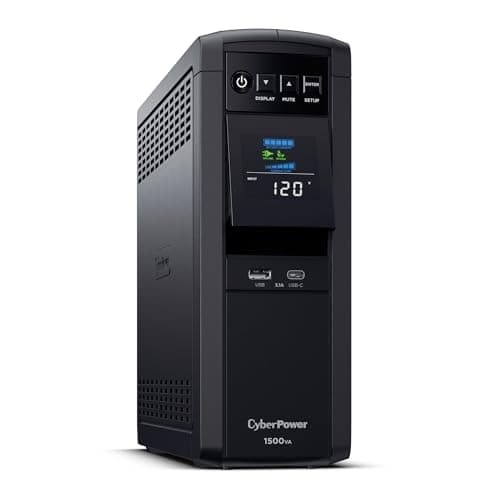
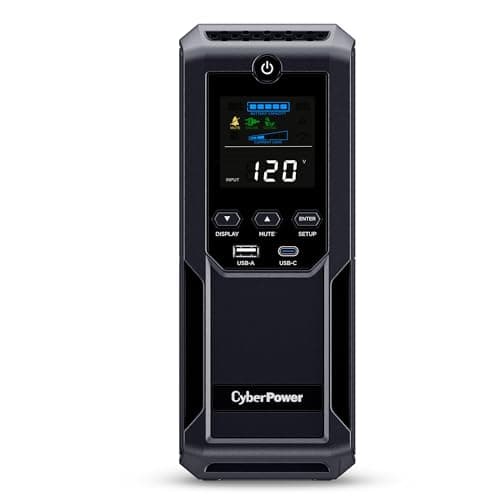
CyberPower CyberPower CP1500PFCLCD PFC Sinewave UPS, 1500VA / 1000W
CyberPower CP1500PFCLCD PFC Sinewave UPS, 1500VA / 1000W

The most watts of true sine wave power in this group, and the one unit here that comfortably covers a tower plus three screens. It also carries the longest list of things you only notice later: a battery-inclusive warranty, a tilting color display for a UPS that lives on the floor, and a USB-C port that still works on battery.

Best overall
9.1
$239.95Amazon
02
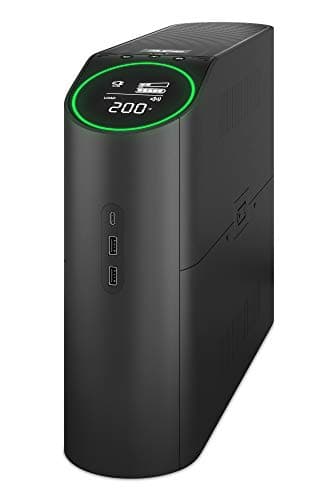
APC APC Back-UPS Pro for Gaming BGM1500B-US, 1500VA / 900W
APC Back-UPS Pro for Gaming BGM1500B-US, 1500VA / 900W

APC's pure sine wave answer in the same class, with the best-documented surge rating here and a battery you are clearly expected to replace rather than discard. The RGB lighting is either the reason you buy it or the reason you do not.

Best APC alternative
8.5
$306.99Amazon
03
CyberPower CyberPower CP1500AVRLCD3 Intelligent LCD UPS, 1500VA / 900W
CyberPower CP1500AVRLCD3 Intelligent LCD UPS, 1500VA / 900W

The longest published runtime on this page and the cheapest route to a 1500VA unit, with one specification that decides whether it belongs on your desk: the output is a simulated sine wave, not a true one. Excellent for monitors, docks, laptops and network gear; a calculated risk behind a modern desktop power supply.

Best value 1500VA
8.4
$199.95Amazon
04
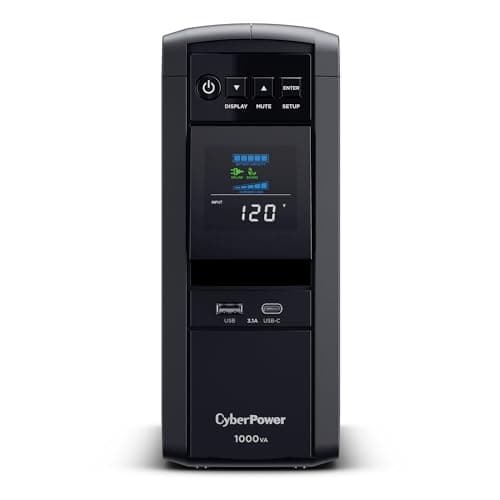
CyberPower CyberPower CP1000PFCLCD PFC Sinewave UPS, 1000VA / 600W
CyberPower CP1000PFCLCD PFC Sinewave UPS, 1000VA / 600W

True sine wave output at the smallest sensible size for a desk. The right unit for a laptop-and-dock setup, a mini PC, or a modest tower with two screens - and the cheapest way to stop worrying about the waveform entirely.

Best for a laptop or small-form-factor desk
8.1
$179.95Amazon
05
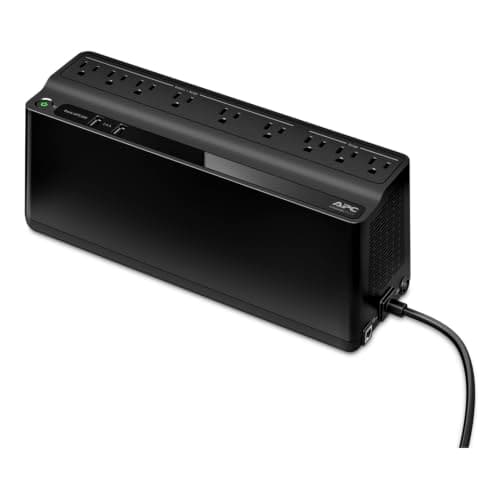
APC APC Back-UPS BE850G2, 850VA / 450W
APC Back-UPS BE850G2, 850VA / 450W

The right answer when the thing you actually need to keep alive is the network rather than the computer. Six battery outlets, a 450W rating, and two keyhole sockets so it mounts on a wall and stops competing for floor space under the desk.

Best for a router, modem and dock
6.9
$137.70Amazon
06
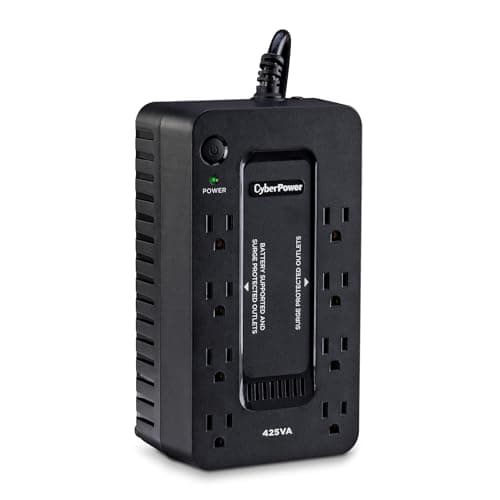
CyberPower CyberPower ST425 Standby UPS, 425VA / 260W
CyberPower ST425 Standby UPS, 425VA / 260W

The cheapest honest UPS on this page, and it is honest because it does not pretend to be more. A standby unit with 260W and four battery outlets: enough to ride out the brief flickers that reboot a router, and not enough for anything with a graphics card in it.

Best budget pick
6.3
$59.95Amazon

#ad · Live prices from the Amazon Product API, as of Oct 4, 2026. Where we have no verified live price we show none — we would rather leave a gap than print a number that has rotted.

In detail

The picks, in full

01
CyberPower CyberPower CP1500PFCLCD PFC Sinewave UPS, 1500VA / 1000W

Best overall

CyberPower CP1500PFCLCD PFC Sinewave UPS, 1500VA / 1000W

Capacity
1500VA / 1000W
Topology
Line interactive
Waveform
Sine wave
Outlets
12 (6 surge + battery, 6 surge only)
Runtime (half / full load)
10 min / 2.5 min
USB charging
2 ports (USB-A + USB-C), 3.1A shared
Warranty
3 year, batteries included
Equipment guarantee
$500,000
9.1/10

The most watts of true sine wave power in this group, and the one unit here that comfortably covers a tower plus three screens. It also carries the longest list of things you only notice later: a battery-inclusive warranty, a tilting color display for a UPS that lives on the floor, and a USB-C port that still works on battery.

Power Quality
9.5
Capacity Headroom
9.3
Runtime
8.6
Value
9

Pros

  • 1000W is the highest real capacity here - 100W more than every other 1500VA unit on this page, which all rate 900W
  • True sine wave output, so an active PFC desktop power supply has nothing to object to
  • Six battery-backed outlets is enough for a tower, two monitors, a dock and the network gear
  • CyberPower states the three-year warranty covers the batteries, not just the electronics
  • The color LCD tilts up to 22 degrees, which is the difference between readable and useless on a unit sitting under the desk
  • USB-A and USB-C charge ports keep working on battery power
  • Supports remote management with the optional RMCARD205 and CyberPower's PowerPanel Business software

Cons

  • Only half the 12 outlets are battery-backed, so the usable count is six and the layout needs planning
  • 2.5 minutes at a full 1000W load is a reminder that a loaded UPS buys seconds, not minutes - the headroom is the point
  • Physically the largest and heaviest option here, and it wants floor space you may have already allocated under the desk
  • Costs meaningfully more than the simulated sine wave CP1500AVRLCD3 for the same VA number, which only makes sense once you know why the waveform matters

Skip this if…

…nothing on the desk is a desktop tower. If you run a laptop and a dock, the sine wave and the 1000W rating are both wasted money - take the CP1000PFCLCD or the BE850G2 instead.

$239.95View on Amazon

$274.9513% off

Price as of Oct 4, 2026. Prices change — Amazon's is the one that counts.

#ad · we may earn a commission from this link to CyberPower CP1500PFCLCD PFC Sinewave UPS, 1500VA / 1000W

02
APC APC Back-UPS Pro for Gaming BGM1500B-US, 1500VA / 900W

Best APC alternative

APC Back-UPS Pro for Gaming BGM1500B-US, 1500VA / 900W

Capacity
1500VA / 900W
Waveform
Pure sine wave
Outlets
10 (6 surge + battery, 4 surge only)
Surge energy rating
1080 joules
USB charging
2 ports (Type A + Type C)
Software
PowerChute Serial Shutdown
Warranty
3 year
Equipment protection
$150,000
8.5/10

APC's pure sine wave answer in the same class, with the best-documented surge rating here and a battery you are clearly expected to replace rather than discard. The RGB lighting is either the reason you buy it or the reason you do not.

Power Quality
9.4
Capacity Headroom
8.8
Runtime
7.6
Value
8

Pros

  • Pure sine wave output in APC's own words, so it is safe with an active PFC power supply
  • A published 1080 joule surge rating - the only unit here where APC or CyberPower states the joule figure outright, and it is a high one
  • User-replaceable battery with a dedicated APC replacement cartridge, which makes year four a $60 part rather than a new UPS
  • Six of the ten outlets are battery-backed, the same usable count as the 12-outlet CyberPower in a smaller footprint
  • Ships with PowerChute Serial Shutdown for scripted, unattended shutdown
  • AVR corrects voltage dips and surges without dropping to battery

Cons

  • 900W against the CP1500PFCLCD's 1000W for more money - you pay more and carry less
  • APC does not publish half-load or full-load runtime figures on the product page, so the one number you would most want to compare is missing
  • The $150,000 connected equipment policy is a third of CyberPower's $500,000 on the CP1500PFCLCD
  • RGB lighting on a box that lives under a desk is a cost with no function, and there is no non-RGB version of this exact model
  • APC does not state the topology on the product page either

Skip this if…

…you are comparing on paper and want the most capacity per dollar - this is the more expensive way to get 900W, and its advantages are the replaceable battery and the documented joule rating rather than raw output.

$306.99View on Amazon

Price as of Oct 4, 2026. Prices change — Amazon's is the one that counts.

#ad · we may earn a commission from this link to APC Back-UPS Pro for Gaming BGM1500B-US, 1500VA / 900W

03
CyberPower CyberPower CP1500AVRLCD3 Intelligent LCD UPS, 1500VA / 900W

Best value 1500VA

CyberPower CP1500AVRLCD3 Intelligent LCD UPS, 1500VA / 900W

Capacity
1500VA / 900W
Topology
Line interactive
Waveform
Simulated sine wave
Outlets
12 (6 surge + battery, 6 surge only)
Runtime (half / full load)
12 min / 3 min
USB charging
2 ports (USB-A 2.4A, USB-C 15W)
Data line protection
Ethernet and coaxial
Warranty
3 year
8.4/10

The longest published runtime on this page and the cheapest route to a 1500VA unit, with one specification that decides whether it belongs on your desk: the output is a simulated sine wave, not a true one. Excellent for monitors, docks, laptops and network gear; a calculated risk behind a modern desktop power supply.

Power Quality
6.6
Capacity Headroom
8.8
Runtime
9
Value
9.2

Pros

  • 12 minutes at half load is the longest published half-load runtime here, beating the sine wave CP1500PFCLCD's 10 minutes
  • The least expensive way onto a 1500VA / 900W unit with six battery outlets
  • A 15W USB-C port, which is the most useful charge port on this page and more than the CP1500PFCLCD's shared 3.1A
  • Ethernet and coaxial data line protection, which the PFC Sinewave models do not list
  • Carries the same $500,000 connected equipment guarantee as the flagship

Cons

  • Simulated sine wave output - the one real reason not to buy it, and it rules the unit out behind an active PFC desktop power supply where the published risk is a dropped load or a buzzing PSU on transfer
  • 900W rather than the 1000W of the CP1500PFCLCD at the same VA rating
  • The longer runtime is partly a function of the lower watt rating, so it is not a straight win over the sine wave model
  • Only six of the twelve outlets carry the battery, as with every 12-outlet unit here

Skip this if…

…a desktop tower with an 80 PLUS or active PFC power supply is plugged into it. Spend the difference on the CP1500PFCLCD - the waveform is the whole reason that model exists.

$199.95View on Amazon

$219.959% off

Price as of Oct 4, 2026. Prices change — Amazon's is the one that counts.

#ad · we may earn a commission from this link to CyberPower CP1500AVRLCD3 Intelligent LCD UPS, 1500VA / 900W

04
CyberPower CyberPower CP1000PFCLCD PFC Sinewave UPS, 1000VA / 600W

Best for a laptop or small-form-factor desk

CyberPower CP1000PFCLCD PFC Sinewave UPS, 1000VA / 600W

Capacity
1000VA / 600W
Topology
Line interactive
Waveform
Sine wave
Outlets
10 (5 surge + battery, 5 surge only)
Runtime (half / full load)
8 min / 1 min
Warranty
3 year
Equipment guarantee
$350,000
8.1/10

True sine wave output at the smallest sensible size for a desk. The right unit for a laptop-and-dock setup, a mini PC, or a modest tower with two screens - and the cheapest way to stop worrying about the waveform entirely.

Power Quality
9.4
Capacity Headroom
7
Runtime
7.4
Value
8.6

Pros

  • Sine wave output at the lowest price on this page, so an active PFC power supply is a non-issue
  • 600W comfortably covers a mini PC or laptop dock plus two monitors and the network gear
  • Smaller and lighter than the 1500VA units, which matters when it has to share the underside of the desk with a tray and a dock
  • Same three-year CyberPower warranty, with a $350,000 equipment guarantee

Cons

  • 1 minute at full load - at 600W this unit has essentially no reserve, so it must be sized with real headroom rather than filled
  • CyberPower does not list USB charge ports in this model's specifications, unlike both 1500VA units here
  • Five battery-backed outlets rather than six, which a tower, two monitors, a dock and a router will use up exactly
  • 600W rules it out for a gaming tower with a discrete graphics card under load

Skip this if…

…your machine is a full desktop with a discrete graphics card. Measure first, but a build like that will push a 600W unit close to the limit where its runtime collapses to about a minute.

$179.95View on Amazon

Price as of Oct 4, 2026. Prices change — Amazon's is the one that counts.

#ad · we may earn a commission from this link to CyberPower CP1000PFCLCD PFC Sinewave UPS, 1000VA / 600W

05
APC APC Back-UPS BE850G2, 850VA / 450W

Best for a router, modem and dock

APC Back-UPS BE850G2, 850VA / 450W

Capacity
850VA / 450W
Outlets
9 (6 surge + battery, 3 surge only)
Surge energy rating
354 joules
USB charging
2 ports, 1.5A maximum combined
Mounting
Floor or wall (2 keyhole sockets)
Warranty
3 year
Equipment protection
$75,000
6.9/10

The right answer when the thing you actually need to keep alive is the network rather than the computer. Six battery outlets, a 450W rating, and two keyhole sockets so it mounts on a wall and stops competing for floor space under the desk.

Power Quality
6.4
Capacity Headroom
6.2
Runtime
6.8
Value
8.2

Pros

  • Wall-mountable, which is the only unit here that can get off the floor entirely and out of the under-desk fight with a tray and a PC mount
  • Six battery-backed outlets out of nine - the best battery-to-total ratio on this page
  • APC rates it to run home networking gear for hours during an outage, which is exactly the job a router and modem need
  • Transformer-spaced outlets, so the modem's wall-wart does not block its neighbors
  • User-replaceable battery cartridge and a 3-year warranty

Cons

  • APC does not publish the output waveform for this model, so it cannot be recommended behind a desktop tower with an active PFC power supply - treat the waveform as unknown rather than assumed
  • 450W is not a desktop capacity; a tower plus two monitors will exceed it
  • 354 joules is modest surge protection next to the 1080 joules of APC's own BGM1500B-US
  • 1.5A total across both USB ports is a slow charge shared two ways
  • APC does not publish half-load or full-load runtime figures on the product page

Skip this if…

…you are buying it to protect a desktop PC. This is a network-and-peripherals unit; the moment a tower is involved you need a sine wave model with at least twice the watts.

$137.70View on Amazon

$159.9914% off

Price as of Oct 4, 2026. Prices change — Amazon's is the one that counts.

#ad · we may earn a commission from this link to APC Back-UPS BE850G2, 850VA / 450W

06
CyberPower CyberPower ST425 Standby UPS, 425VA / 260W

Best budget pick

CyberPower ST425 Standby UPS, 425VA / 260W

Capacity
425VA / 260W
Topology
Standby
Waveform
Simulated sine wave
Outlets
8 (4 surge + battery, 4 surge only)
Runtime (half / full load)
6 min / 1.5 min
Warranty
3 year
Equipment guarantee
$75,000
6.3/10

The cheapest honest UPS on this page, and it is honest because it does not pretend to be more. A standby unit with 260W and four battery outlets: enough to ride out the brief flickers that reboot a router, and not enough for anything with a graphics card in it.

Power Quality
6
Capacity Headroom
4.2
Runtime
6
Value
8.8

Pros

  • By far the lowest price here, and still a real UPS with a real battery rather than a surge strip
  • 260W covers a router, a modem, a network switch and an external drive with room to spare
  • Four battery-backed outlets out of eight, published clearly
  • Compact and light enough to sit behind the monitor or on a shelf
  • Same three-year CyberPower warranty as the expensive models

Cons

  • Standby topology rather than line interactive, so there is no AVR - it rides through brownouts by switching to battery instead of correcting the voltage, which uses battery life
  • Simulated sine wave, which rules out an active PFC desktop power supply
  • 260W is a peripherals budget, not a computer budget - a single monitor and a tower will exceed it
  • No LCD, so the only status you get is lights and beeps
  • The lowest equipment guarantee here at $75,000

Skip this if…

…a desktop PC or even a large monitor is going on the battery side. At 260W this is for the network cupboard and the small stuff; buying it for a battlestation is buying the wrong tool.

$59.95View on Amazon

$64.958% off

Price as of Oct 4, 2026. Prices change — Amazon's is the one that counts.

#ad · we may earn a commission from this link to CyberPower ST425 Standby UPS, 425VA / 260W

How to size and choose a UPS

Start with watts, not VA, and get the number from a meter rather than a guess. Plug a cheap inline power meter between the wall and your existing power stripand read it while you work normally, then once more with something demanding running. That second figure is the one to size against. Add the monitors if they are on a different strip. Then buy a unit whose watt rating is roughly double that number: a UPS running near its limit has a runtime measured in seconds, and the published full-load figures on this page — one minute for the CP1000PFCLCD, 2.5 for the CP1500PFCLCD — show exactly how fast that falls away.

Next, answer one question: is a desktop tower going on the battery? If yes, buy a true sine wave unit and stop considering the stepped ones, because a power supply with active power factor correction can refuse a simulated sine wave at the moment of transfer. That is the single reason the CP1500PFCLCD is ranked first and the cheaper, longer-running CP1500AVRLCD3 is ranked third. If no — if this is a laptop, a dock, monitors and network gear — the stepped units are good hardware at a lower price and the objection does not apply to you.

The in-between capacities are usually a trap worth naming. CyberPower also sells the CP1350PFCLCD at 1350VA / 880W, which sits between the 1000W and the 600W sine wave models. On paper it is a sensible middle rung; in practice it is priced close enough to the 1000W CP1500PFCLCD that you give up 120W of headroom and two minutes of full-load runtime to save very little. Check both prices on the day, but if the gap is small, take the bigger unit — headroom is the thing that ages well as the battery fades.

Plan where it physically goes before you buy, because a 1500VA UPS is a heavy box with a five-foot cord and it is competing for the same volume as a cable tray, a mounted towerand your knees. It belongs on the floor rather than in a tray — it is the heaviest thing in the setup and it needs air — and it wants to be near the wall outlet, not daisy-chained off a strip. That last point matters: a UPS plugs into the wall, and the strip plugs into the UPS, never the other way around.

Then wire it in the right order. Tower and primary monitor into the battery bank. Dock, router and modem into the battery bank if there is room, because an internet connection you can still use during a brief outage is most of the value. Everything else — second monitor if you are tight, speakers, lamps, chargers — onto the surge-only side. Laser printer onto the wall, never the UPS. Finally, install the manufacturer’s shutdown software and actually configure it: CyberPower ships PowerPanel and APC ships PowerChute, and an unconfigured UPS gives you a beeping box and a dead machine ten minutes later instead of a clean shutdown. Set it to hibernate or power down at a battery threshold you choose, then pull the plug once to watch it work. Testing it on a Tuesday afternoon is how you find out it was never armed.
How we picked

We do not run a testing lab

We compiled the published manufacturer specifications, did the ergonomics, VESA and desk-depth math ourselves, and read aggregated owner reviews, then scored each product against a published rubric. The scores are judgments from documented research — they are not measurements we took, because we do not have a lab and we are not going to pretend we do. Every spec traces back to a listing or manual named in Sources.

Questions

Frequently asked

Do I need a UPS if I already have a good surge protector?
They solve different failures. A surge protector clamps a voltage spike coming down the mains; it has no stored energy, so when the supply stops it stops too. A UPS carries a battery, which is what turns a sudden outage into a controlled shutdown. If your power is genuinely stable and your work is all cloud-saved, a surge protector may be enough. If you have a desktop that writes large files, a NAS, or you live somewhere with brownouts and flickers, the battery is the part that saves data.
What is the difference between VA and watts, and which should I use?
VA is apparent power and watts is real power; for this class of hardware the watt rating is always the lower number and it is the one your load actually meets. The ratio is not fixed, which is why you cannot convert between them with a rule of thumb: the CP1500PFCLCD and the CP1500AVRLCD3 are both 1500VA, but one is rated 1000W and the other 900W. Always shop on the watt figure.
Does pure sine wave really matter, or is it marketing?
It matters for one specific load: a desktop power supply with active power factor correction, which covers most current 80 PLUS units. On a stepped “simulated sine wave” output those supplies can buzz or drop the load at the instant the UPS transfers to battery — the exact moment you needed it. It does not matter much for monitors, laptop chargers, routers, docks or external drives. So the answer depends entirely on whether a tower is plugged in: if yes, pay for the sine wave; if no, the cheaper stepped units are fine.
Which outlets do I plug things into?
Most of these units split their outlets into two labeled banks — one battery-plus-surge, one surge-only — and only the battery bank keeps working during an outage. Put the computer, the primary monitor and your network gear on the battery side, and the lamp, speakers, chargers and printer on the surge-only side. Everything you add to the battery bank shortens the runtime for everything else on it, so treat those outlets as a budget.
How long will a UPS actually run my setup?
Minutes, not hours. The published figures — 10 minutes at half load for the CP1500PFCLCD, 12 for the CP1500AVRLCD3, 6 for the ST425 — are measured at half and full of each unit’s own watt rating, not at your desk’s draw. Since most desks sit below the half-load point, real runtime is usually somewhat better than the half-load number. It is still a shutdown window rather than a work window. Anyone who needs to keep working through a long outage should be looking at a portable power station instead.
Can I plug a laser printer or a space heater into it?
No. A laser printer’s fuser and any resistive heater draw a large inrush current that can overload the inverter and trip the whole unit, taking down the computer you bought it to protect. Both belong in a wall outlet. If a printer must share the UPS chassis, put it on the surge-only bank — never the battery side.
How long does the battery last, and can I replace it?
Sealed lead acid batteries in this class typically fade after a few years, and they fail quietly — the unit still looks healthy and simply delivers a fraction of its former runtime. Buy a model with a user-replaceable battery, which both APC units here are documented for, and check that the warranty covers the cell: CyberPower states its three-year warranty includes the batteries. Plan on a replacement cartridge rather than a replacement UPS, and test the unit once a year by pulling its plug.

Keep reading

Receipts

Sources

We do not run a testing lab, and we do not pretend to. Specifications come from the manufacturer or retailer listing; the footprint and clearance math is ours and reproducible. Where we could not verify a number, we say so on the page rather than quietly leaving it out. Read our full method.