Most advice about small desks talks about width, because width is the number on the box. In practice, width decides how much stuff fits and depth decides whether the setup works at all— because a monitor needs to sit at roughly arm’s length from your eyes, and a shallow desk puts it too close no matter how wide it is.
Do this before you shop. Sit at your current desk, put your arm out straight and note where your fingertips land relative to the screen. That distance, plus a couple of inches for the monitor’s own depth, is the minimum depth you need. For most people it comes to somewhere between 24 and 28 inches with a monitor on its own stand.
Here is the good news, and the reason this page exists on a site about multi-monitor setups: a monitor armreclaims four to six inches of that depth instantly, because it removes the stand base and pushes the panel back over the desk edge. A 20-inch-deep desk with an arm behaves like a 26-inch desk with a stand. On a small desk, the arm is not an accessory — it is the thing that makes the desk viable.
That has one consequence for shopping: the desk has to be able to take a clamp. A monitor arm clamp needs a clear run along the back edge with nothing behind it — no hutch upright, no shelf leg, no back rail — and it needs a top thick enough and stiff enough not to bow. Desks with shelving above the surface look like they save space and often make an arm impossible.
Two more things worth knowing before the picks. Cheap small desks are almost all the same construction: a particleboard or MDF top on a powder-coated steel tube frame. What separates them is the bracing — an X-brace across the back or under the top is the difference between a desk that tolerates typing and one that shivers. And the depth published in the listing is the top’s depth, not the usable depth; a desk with a rear cable lip or a shelf loses two or three inches of it.
The short answer
Quick picks
#ad · Live prices from the Amazon Product API, as of October 23, 2026. Where we have no verified live price we show none — we would rather leave a gap than print a number that has rotted.
In detail
The picks, in full
Best overall
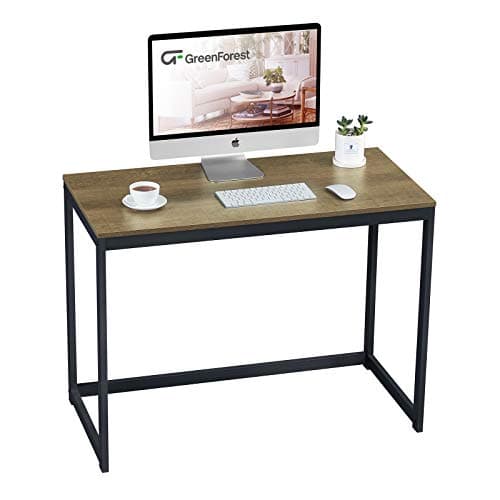
GreenForest 40-Inch Computer Desk for Small Spaces
- Dimensions
- 39.37" W x 19.68" D x 29.5" H
- Frame
- 40mm powder-coated metal tube
- Top
- Thick particleboard
- Clear back edge
- Yes - no hutch or rear rail
- Height
- 29.5" fixed
The best-proportioned small desk here: 39.4 inches wide by 19.7 deep on a 40mm steel frame, with a clear back edge that a monitor arm can clamp to.
- Usable Depth
- 7.4
- Frame Stiffness
- 8.2
- Arm Friendly
- 9.2
- Value
- 9.2
Pros
- +29.5 inches is the standard desk height, so a normal chair works without a footrest
- +Nothing above the surface, so a monitor arm can clamp anywhere along the back edge
- +40mm frame tube is chunkier than most desks in this price band
- +Simple rectangle, which is easier to place in a small room than an L or a corner unit
Cons
- −19.7 inches deep is too shallow for a monitor on its own stand - plan on an arm
- −No storage of any kind
- −Particleboard top will chip at the edges if it takes a knock
Skip this if…
…you are not going to fit a monitor arm - at under 20 inches deep the screen will sit too close.
Best budget
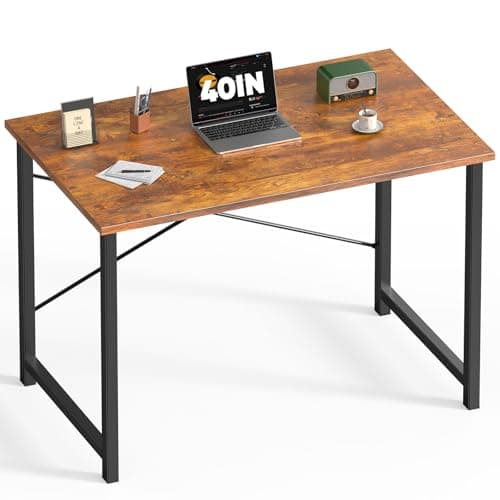
DUMOS 40 Inch Small Computer Desk
- Width
- 40"
- Height
- 29.33"
- Weight capacity
- 265 lb
- Bracing
- X-shaped reinforcement structure
- Top
- Scratch- and water-resistant surface on a steel frame
The cheapest desk on the site that is not junk. An X-shaped brace and a 265 lb rating on a 40-inch top, for less than the price of a decent keyboard.
- Usable Depth
- 7.2
- Frame Stiffness
- 8.4
- Arm Friendly
- 8.6
- Value
- 9.8
Pros
- +The X-brace is the single feature that separates a stable cheap desk from a shaky one
- +265 lb rating is generous for the price and covers any realistic desk load
- +29.33 inches lands within a fraction of standard desk height
- +Cheap enough to be a stopgap without regret if the room changes
Cons
- −No storage, no cable management, no adjustment
- −Finish quality is what the price implies - expect visible edge banding
- −The brace occupies the space where a footrest or tower would go
Skip this if…
…you want the desk to last through several moves - this is a good desk for right now.
Best small desk with storage
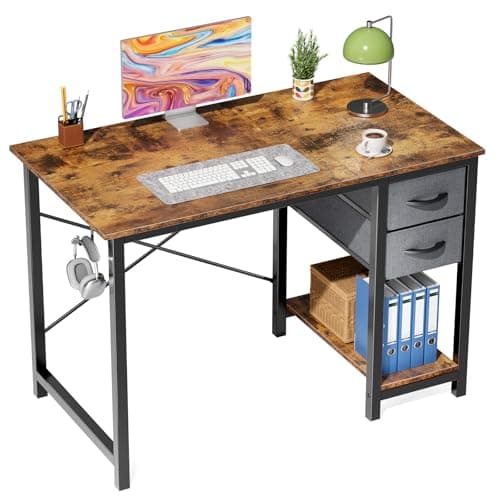
Sweetcrispy 40-Inch Computer Desk with Drawers
- Width
- 40"
- Construction
- High-grade MDF top on solid steel tubes
- Bracing
- Reinforced X-frame with triangular support
- Drawers
- Double-layer fabric, mountable left or right, or removable
- Extras
- Side hook for headphones or a bag
Storage without losing the clear back edge. The fabric drawers hang from the underside on either flank and come off entirely, so the desk can be a storage desk on Monday and a bare one on Friday.
- Usable Depth
- 7.2
- Frame Stiffness
- 8.6
- Arm Friendly
- 8.8
- Value
- 9.2
Pros
- +Drawers mount on either side or come off, which matters when the desk has to fit one specific corner
- +Triangular-braced steel frame with anti-slip foot pads
- +The side hook removes the most common small-desk clutter item from the surface
- +MDF top takes a knock better than bare particleboard
Cons
- −Fabric drawers are storage, not filing - nothing heavy is going in them
- −Same shallow-depth caveat as every 40-inch desk here
- −Drawer mounting eats some knee clearance on whichever side it lands
Skip this if…
…you need real drawers - see the full-size desks with proper storage instead.
Best for the smallest rooms
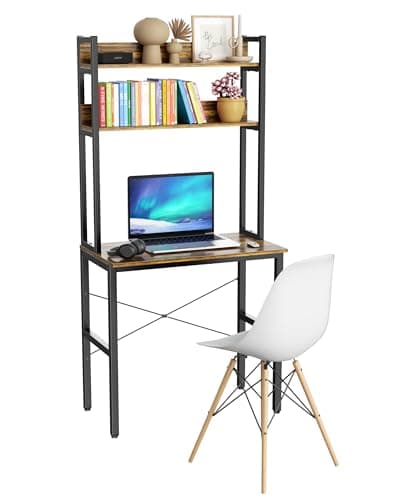
Aquzee 31" Small Desk with Shelves and Hutch
- Desktop width
- 31.5"
- Top thickness
- 0.7"
- Top material
- FSC-certified wood panels, waterproof and scratch-resistant finish
- Frame
- Heavy-duty metal, 1.18" x 1.18" tube, powder coated
- Storage
- Open hutch with double-layer upper shelves
The smallest genuinely usable desk here, and the one to buy when the room is the constraint rather than the budget. The hutch gets the clutter off a 31-inch surface - at the cost of the back edge.
- Usable Depth
- 6.8
- Frame Stiffness
- 8
- Arm Friendly
- 4.5
- Value
- 8.4
Pros
- +31.5 inches fits where nothing else on this list will
- +The hutch moves books, a router and a speaker off a very small surface
- +FSC-certified panels with a properly sealed finish, which is unusual at this size
- +Rust-resistant powder-coated frame rather than painted tube
Cons
- −The hutch uprights sit on the back edge, so a clamp-on monitor arm has nowhere to go
- −0.7-inch top is under the 3/4-inch minimum most arm clamps want anyway
- −31.5 inches of width is one monitor and a keyboard, and nothing else
Skip this if…
…you plan to mount a monitor arm - the hutch and the thin top both rule it out.
Best-looking small desk
Nathan James Parker Modern Writing Desk
- Dimensions
- 42" W x 24" D x 30" H
- Top
- MDF with a walnut or acacia finish
- Legs
- Solid rubberwood, twist-in tapered
- Weight capacity
- 250 lb
- Storage
- Open cubby and a small closed drawer
The one that looks like furniture. 42 by 24 inches on solid rubberwood legs with a 250 lb rating - the small desk to buy if it has to live in a room people sit in.
- Usable Depth
- 8.8
- Frame Stiffness
- 7.4
- Arm Friendly
- 7.6
- Value
- 7
Pros
- +24 inches deep is the only depth here that works with a monitor on its own stand
- +Finished back panel, so it can float in a room rather than face a wall
- +Twist-in legs make assembly a five-minute job with no tools
- +The cubby swallows a laptop at the end of the day, which is the whole point of a desk in a living room
Cons
- −Five times the price of the DUMOS for the same category of furniture
- −Tapered wooden legs are less rigid under a heavy monitor arm than a steel frame
- −The drawer is small enough to be decorative
Skip this if…
…the desk lives in a dedicated office - you are paying for looks you will not see.
How to make a small desk carry a real setup
The gap between a small desk that feels cramped and one that feels deliberate is three decisions, and none of them is the desk.
1. Get the screen off the surface
A monitor stand base is typically 8 to 10 inches deep and sits exactly where you want to put a notebook — Dell publishes 9.3 inches with the stand against 2.3 inches without it on its 34-inch UltraSharp, and the desk depth guide runs that subtraction across a whole desktop. An arm removes it, pushes the panel back past the desk edge, and turns a 20-inch-deep desk into something workable. On a desk this size the arm is the highest-value purchase you will make; the field is in the monitor arm roundup, and the case for one over a stand is in monitor arm vs stand.
If a clamp is genuinely impossible — a hutch, a thin top, a glass surface — a monitor riser is the fallback: it does not reclaim depth, but it does reclaim the space underneath.
2. Get the tower and the power off the floor and off the top
On a small desk, every square inch of surface is contested. An under-desk cable tray holding the power strip and the dock removes the second-biggest consumer of desk area after the monitor stand, and it means the desk can be moved without unplugging anything. The whole method is in the under-desk cable management guide.
3. Shrink the keyboard, not the screen
A full-size keyboard with a number pad is about 17 inches wide and pushes the mouse out past your shoulder line, which is the single most common cause of shoulder ache on a narrow desk. A tenkeyless or 75% board gives back three to five inches and brings the mouse back in front of you. Our compact keyboard picks cover the layouts, and keyboard and mouse ergonomics explains why the width matters more than the height. For the full sequence — monitor off the surface first, then the keyboard, then vertical storage, then the cables — our small space desk setup guide runs the depth arithmetic on a 19.68-inch top.
What about a small standing desk?
Small electric standing desks exist and start at around 40 inches wide, but the frame under a compact desk is proportionally more prone to wobble because the feet are closer together. If a small desk needs to go up and down, prioritize a three-stage frame and a crossbar over surface size — the reasoning is in how to fix a wobbly standing desk and the frames themselves are in the desk frame roundup.
How we picked
We do not run a testing lab
We compiled the published manufacturer specifications, did the ergonomics, VESA and desk-depth math ourselves, and read aggregated owner reviews, then scored each product against a published rubric. The scores are judgments from documented research — they are not measurements we took, because we do not have a lab and we are not going to pretend we do. Every spec traces back to a listing or manual named in Sources.
Questions
Frequently asked
What is the minimum depth for a computer desk?+
About 24 inches if the monitor sits on its own stand, because the stand base eats 8 to 10 inches and the screen still needs to be roughly an arm’s length from your eyes. With a monitor arm, 20 inches is workable, because the arm pushes the panel back over the desk edge and removes the base entirely.
Can you fit two monitors on a 40-inch desk?+
Two 24-inch panels are about 42 inches of combined width, so on a 40-inch desk they will overhang slightly — which is fine on an arm, where the screens float past the desk edge, and not fine on stands. A better answer at this width is one screen plus a
rotated second panel, which needs far less width.
Can I clamp a monitor arm to a small desk?+
Usually, if three things are true: the back edge is clear of hutches and rails, the top is at least about 3/4 of an inch thick, and it does not visibly flex when you press down on it. Thin tops and desks with shelving above the surface are the two cases where a clamp will not work.
Are small desks less stable than full-size ones?+
Not inherently — stability comes from bracing, not size. A small desk with an X-brace or a triangulated steel frame is steadier than a wide desk with four unbraced legs. The specification to look for is explicit bracing, and the tell in person is whether the desk shivers when you type hard.
How high should a desk be?+
Most fixed desks are 29 to 30 inches, which suits people around 5 foot 10. If you are shorter, the fix is usually a
footrestand a higher chair rather than a different desk. The measurement that decides it is your seated elbow height — it is in
our desk height guide.
Receipts
Sources
We do not run a testing lab, and we do not pretend to. Specifications come from the manufacturer or retailer listing; the footprint and clearance math is ours and reproducible. Where we could not verify a number, we say so on the page rather than quietly leaving it out. Read our full method.