Skip to content
Chair & Cable

SECTION 06 · Desk Accessories

The best standing desk accessories

Most standing desks stop going up within a month, and it is almost never the desk's fault. These are the six parts that fix the reasons people quit.

By Stephen V.Updated How we pick
#ad

We earn a commission when you buy through our Amazon links, at no extra cost to you. It never affects our rankings, and we say so when the cheaper product is the better buy. How this works.

Buy the Topo by Ergodriven matfirst if your desk already rises cleanly — what is under your feet is the single biggest factor in how long you last standing. But if your cables snag or your power strip is on the floor, fix that first instead: a cable spine and a clamp-on power strip are what stop a sit-stand desk from quietly becoming a fixed one.

That is the whole argument of this page. A standing desk is the one piece of desk furniture that moves, and almost every complaint about standing desks is really a complaint about something that does not move with it. Cables that are tight at full height. A monitor cable that unplugs itself. A keyboard that was at elbow height sitting and is now two inches too low. Feet that hurt after twenty minutes on a hard floor. None of those are solved by a better desk; all of them are solved by a part that costs a fraction of one.

We have ordered the picks the way we would actually buy them, which is not the order a store would show you. The general accessory layer — mats, lamps, laptop stands, speakers — is covered in the desk setup accessories guide. This page is only the parts that exist because the desk goes up and down.

Step 1: make the cables survive the travel

A sit-stand desk moves about 20 inches. Every cable running to the floor has to be 20 inches longer than it needs to be when seated, and that slack has to go somewhere when the desk is down. Left loose, it piles under the desk, catches on a chair arm, and eventually pulls something out of a port at the top of the stroke.

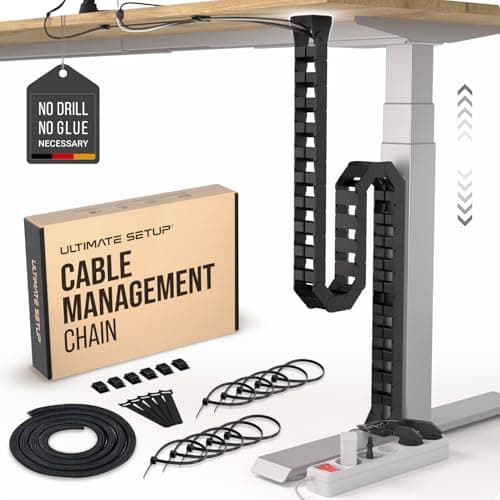
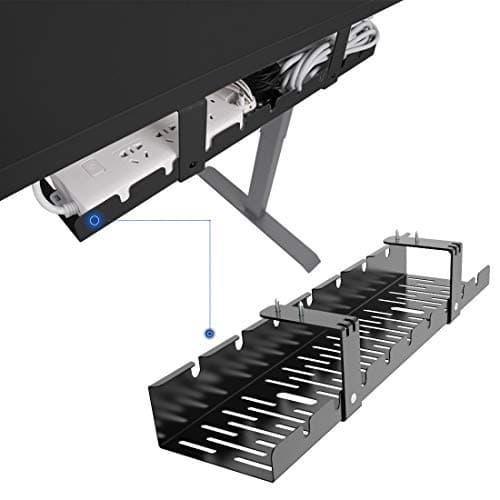
A segmented cable spine solves it properly: the whole bundle travels inside a flexible chain anchored to the desk and the floor, so it extends and folds on its own. Pair it with a tray that keeps the bundle off the floor in the first place. The full treatment is in the standing desk cable management guide.

Step 2: put the power on the desk, not on the floor

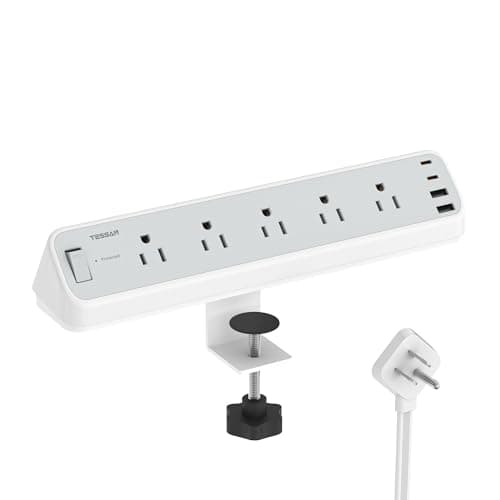
If the power strip is on the floor, every cable from the desktop has to reach the floor — which is the problem in step one, doubled. Clamp a strip to the desk edge instead and the only cable that travels is the single feed to the wall. Monitor bricks, laptop chargers, and the desk’s own controller all plug in at desk height and stop moving.

Check the joule rating while you are there, because the desk motor and your screens are now on the same strip. Our desk power strip roundup ranks them on exactly that, and surge protector vs UPS covers when a strip is not enough.

Step 3: fix what is under your feet

Standing still on a hard floor is more tiring than walking, because nothing is pumping blood back up your legs. A contoured or active mat fixes that in two ways: it cushions, and more importantly it gives your feet somewhere to change position — a mound to stretch a calf on, a raised edge to roll an ankle over.

A balance board goes further and keeps you genuinely moving, which some people love and some find distracting on calls. Either beats a flat kitchen mat. The full mat ranking is here, and standing desk ergonomicscovers the cadence — change position before you feel it, not after.

Step 4: get the keyboard to elbow height in both positions

This is the one almost everybody misses. Your correct keyboard height sitting and your correct keyboard height standing are both “elbow height” — and a sit-stand desk delivers both, as long as you set the desk by your elbows rather than by a number on the controller. Where it breaks is on a desk whose minimum height is too tall for you seated, which is very common: many frames bottom out around 28 to 29 inches, and plenty of people need less.

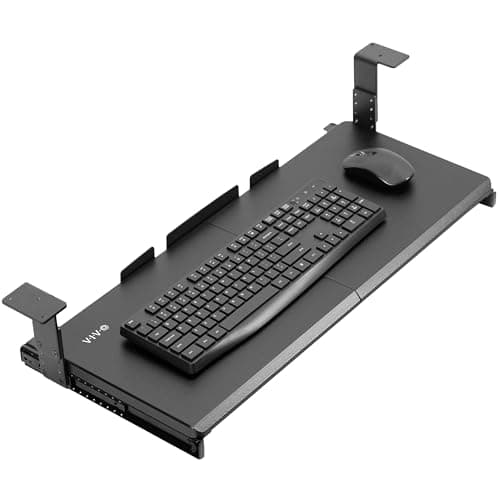
An under-desk tray buys back two to five inches below the desktop, which fixes the seated position without compromising the standing one. It is also the cheapest fix for wrist extension at either height — the full ranking is in the keyboard tray roundup, and the desk height guide has the arithmetic for your body.

What we deliberately did not include

A monitor arm is not on this page, even though it belongs on a standing desk, because it is not a standing-desk accessory — it is a monitor accessory, and it has its own roundup. Same for under-desk PC mounts: a tower on the floor beside a desk that rises is a cable-length problem, and the under-desk mount roundup covers it properly. And we have left out the anti-fatigue footrests, because a footrest is for sitting; it does nothing once the desk is up. The footrest roundup is the right page if you spend most of the day seated.

The order, and what each part costs you

BuyFixesSkip it if
Cable spineSlack that snags and unplugs things at full heightEverything already runs through one clean bundle
Clamp-on power stripEvery cable having to reach the floorYour desk has a built-in power module
Under-desk tray (cables)A pile of bricks and cable on the floorYou have fewer than three powered devices
Standing mat or boardFeet and legs quitting before your work doesYou stand on carpet for under 30 minutes a day
Keyboard trayA desk whose lowest height is still too tall seatedYour elbows already sit level with the desktop

The short answer

Quick picks

#ProductBest forScorePrice
01
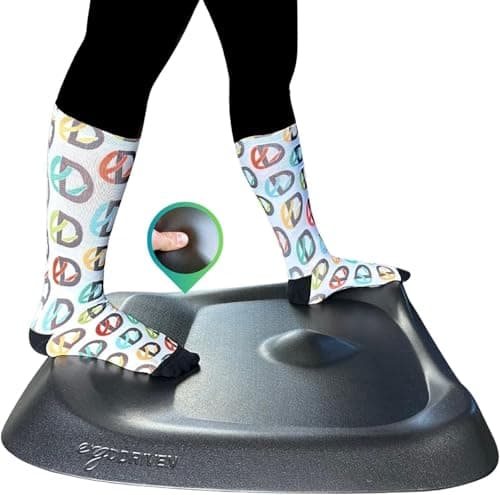
Ergodriven Topo by Ergodriven Standing Desk Mat
Topo by Ergodriven Standing Desk Mat

The accessory that buys the most standing time per dollar. The sculpted terrain is the point: mounds and raised edges give your feet somewhere to go, so you shift position without thinking about it instead of locking out your knees.

Standing longer without thinking about it
8.9
$109.00Amazon
02
Ultimate Setup Ultimate Setup Under-Desk Cable Management Vertebrae (133 cm)
Ultimate Setup Under-Desk Cable Management Vertebrae (133 cm)

The part that exists only because the desk moves. A segmented spine carries the whole bundle from the desktop to the floor and extends and folds with the travel, so the slack is managed by design rather than by hope.

Cables that move with the desk
8.7
$49.90Amazon
03
TESSAN TESSAN Desk Clamp Power Strip with Surge Protection
TESSAN Desk Clamp Power Strip with Surge Protection

Moves the power to the desk, which cuts the number of cables that have to reach the floor to one. A 2100 joule rating and a 10-foot cord, with the outlets at desk-edge height where you can actually see them.

Power that rises with the desk
9.1
$37.12Amazon
04
FLEXISPOT FLEXISPOT Under Desk Cable Management Tray
FLEXISPOT Under Desk Cable Management Tray

A metal raceway designed for height-adjustable frames, with a low profile that does not steal knee clearance. It is where the bundle lives before it drops into the spine - the two parts are a pair, not alternatives.

Getting the bundle off the floor
8.3
$29.99Amazon
05
VIVO VIVO Under Desk 27 x 11 in Adjustable Keyboard Tray (MOUNT-KB27HB)
VIVO Under Desk 27 x 11 in Adjustable Keyboard Tray (MOUNT-KB27HB)

The fix for a desk whose lowest setting is still too tall for you seated. It drops the board 2.5 to 5 inches below the desktop across five settings, which is exactly the range most people are missing.

Elbow height in the seated position
8.4
$49.99Amazon
06
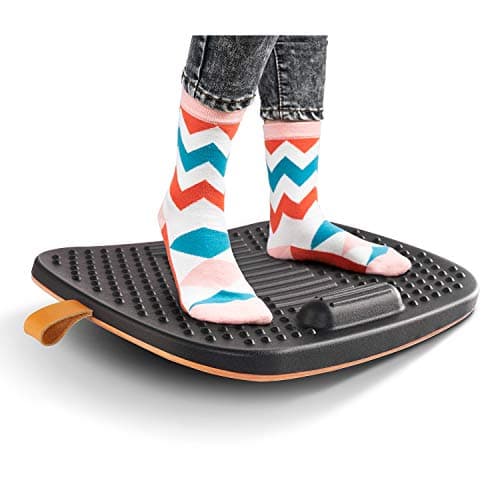
FEZIBO FEZIBO Standing Desk Balance Board with Anti-Fatigue Bar
FEZIBO Standing Desk Balance Board with Anti-Fatigue Bar

The active option: a rocking board with a massage and stretch bar built into the deck. It keeps you genuinely moving rather than standing still, which is the whole point - and it is the cheapest way to make standing interesting.

Keeping moving while standing
8.8
$79.99Amazon

#ad · Live prices from the Amazon Product API, as of October 23, 2026. Where we have no verified live price we show none — we would rather leave a gap than print a number that has rotted.

In detail

The picks, in full

01
Ergodriven Topo by Ergodriven Standing Desk Mat

Standing longer without thinking about it

Topo by Ergodriven Standing Desk Mat

Type
Contoured active standing mat
Surface
Sculpted terrain with mounds and raised edges
Purpose
Prompts position changes and calf stretches
Material
Firm polyurethane foam
Edges
Integrated sloped edges
8.9/10

The accessory that buys the most standing time per dollar. The sculpted terrain is the point: mounds and raised edges give your feet somewhere to go, so you shift position without thinking about it instead of locking out your knees.

Standing Time Gained
9.4
Encourages Movement
9.8
Build
9
Value
7.4

Pros

  • The terrain prompts movement, which is what actually prevents fatigue - cushioning alone does not
  • Firm foam rather than soft, so it supports rather than sinking underfoot
  • Sloped edges mean you do not trip stepping on and off it
  • Nothing to install, adjust or maintain

Cons

  • It is a large object that lives on your floor, visible all the time
  • Firm foam feels hard for the first week if you are used to a soft kitchen mat
  • Costs more than a flat anti-fatigue mat of the same area

Skip this if…

…you stand on carpet for less than half an hour a day - a flat mat is enough at that dose.

$109.00View on Amazon

Price as of October 23, 2026. Prices change — Amazon's is the one that counts.

#ad · we may earn a commission from this link to Topo by Ergodriven Standing Desk Mat

02
Ultimate Setup Ultimate Setup Under-Desk Cable Management Vertebrae (133 cm)

Cables that move with the desk

Ultimate Setup Under-Desk Cable Management Vertebrae (133 cm)

Type
Flexible segmented cable spine
Length
133 cm, adjustable by removing segments
Designed for
Sit-stand desks
Function
Carries the full bundle through the desk's travel
Color
Black
8.7/10

The part that exists only because the desk moves. A segmented spine carries the whole bundle from the desktop to the floor and extends and folds with the travel, so the slack is managed by design rather than by hope.

Travel Handling
9.6
Capacity
8.6
Install Ease
8.4
Value
8

Pros

  • Solves the one cable problem a fixed desk never has - 20 inches of travel, twice a day
  • Segments come off, so the length matches your own desk height range
  • Keeps the bundle off the floor and out of the chair's path
  • Nothing snags, so you stop hesitating before pressing the up button

Cons

  • It is visible under the desk, and it looks like what it is
  • Fitting it means unplugging and re-routing everything once
  • Capacity is finite - a very large bundle wants two runs or a tray as well

Skip this if…

…your desk is against a wall with a floor outlet directly beneath it - then a straight drop is already fine.

$49.90View on Amazon

Price as of October 23, 2026. Prices change — Amazon's is the one that counts.

#ad · we may earn a commission from this link to Ultimate Setup Under-Desk Cable Management Vertebrae (133 cm)

03
TESSAN TESSAN Desk Clamp Power Strip with Surge Protection

Power that rises with the desk

TESSAN Desk Clamp Power Strip with Surge Protection

Mounting
Clamps to the desk edge
Surge protection
2100 joule rating
Cord
10 ft
Outlets
AC outlets plus USB charging ports
Position
Outlets sit at desk-edge height
9.1/10

Moves the power to the desk, which cuts the number of cables that have to reach the floor to one. A 2100 joule rating and a 10-foot cord, with the outlets at desk-edge height where you can actually see them.

Travel Handling
9.2
Surge Protection
9.2
Outlet Usability
9
Value
8.8

Pros

  • Every brick and charger plugs in at desk height and stops travelling
  • 10-foot cord is long enough to reach the wall at full desk extension
  • 2100 joules is real protection for the desk motor and the screens on the same strip
  • USB ports at the desk edge replace a separate charger

Cons

  • The clamp needs a clear flat strip of desk edge, which a drawer or a tray can occupy
  • Visible at the desk edge by design
  • Joule ratings degrade over time on any surge protector, including this one

Skip this if…

…your desk already has a built-in power module - you would be adding a second one.

$37.12View on Amazon

Price as of October 23, 2026. Prices change — Amazon's is the one that counts.

#ad · we may earn a commission from this link to TESSAN Desk Clamp Power Strip with Surge Protection

04
FLEXISPOT FLEXISPOT Under Desk Cable Management Tray

Getting the bundle off the floor

FLEXISPOT Under Desk Cable Management Tray

Type
Metal cable raceway tray
Mounting
Screw-mount under the desktop
Designed for
Height-adjustable desk frames
Includes
Cable ties for securing the run
Profile
Low profile to preserve knee clearance
8.3/10

A metal raceway designed for height-adjustable frames, with a low profile that does not steal knee clearance. It is where the bundle lives before it drops into the spine - the two parts are a pair, not alternatives.

Travel Handling
8.4
Capacity
7.8
Install Ease
8
Value
8.8

Pros

  • Metal rather than mesh, so it holds a heavy brick without sagging
  • Low profile keeps it clear of your knees at seated height
  • Designed around sit-stand frames, so the mounting points avoid the crossbar
  • Cable ties included, which is the part people forget to order

Cons

  • Screw-mount means drilling pilot holes into the underside of the top
  • Capacity is modest next to a large cable box
  • Needs at least 0.75 inches of solid top to screw into

Skip this if…

…you are not willing to drill the desktop - a clamp-on tray is the compromise.

$29.99View on Amazon

$33.9412% off

Price as of October 23, 2026. Prices change — Amazon's is the one that counts.

#ad · we may earn a commission from this link to FLEXISPOT Under Desk Cable Management Tray

05
VIVO VIVO Under Desk 27 x 11 in Adjustable Keyboard Tray (MOUNT-KB27HB)

Elbow height in the seated position

VIVO Under Desk 27 x 11 in Adjustable Keyboard Tray (MOUNT-KB27HB)

Working surface
26.8 x 11 in, tray 0.6 in thick
Drop below desktop
2.5 to 5 in
Height settings
5 settings 0.6 in apart, 2.4 in of total range
Slide-out travel
Extends approx. 7.8 in from the desk edge
Weight capacity
11 lb
Mounting
Screws to the underside; minimum desktop thickness 0.75 in
8.4/10

The fix for a desk whose lowest setting is still too tall for you seated. It drops the board 2.5 to 5 inches below the desktop across five settings, which is exactly the range most people are missing.

Drop Below Desk
8.4
Tilt and Adjustment
7.2
Fit and Install
8.2
Value
9.8

Pros

  • 2.5 to 5 inches of drop covers the gap between a frame's minimum height and a short user's elbow height
  • Slides back 12 inches under the desk when you stand, so it is out of the way
  • 27 inches wide takes a full-size board plus mousing room
  • Costs very little next to the desk it rescues

Cons

  • Screws into the underside of the top, so it is not a renter-friendly install
  • 11 lb capacity rules out resting your forearms heavily on it
  • Needs a clear flat underside, which a cable tray may already occupy - plan the layout

Skip this if…

…your elbows already sit level with the desktop - the tray then puts the board too low.

$49.99View on Amazon

Price as of October 23, 2026. Prices change — Amazon's is the one that counts.

#ad · we may earn a commission from this link to VIVO Under Desk 27 x 11 in Adjustable Keyboard Tray (MOUNT-KB27HB)

06
FEZIBO FEZIBO Standing Desk Balance Board with Anti-Fatigue Bar

Keeping moving while standing

FEZIBO Standing Desk Balance Board with Anti-Fatigue Bar

Type
Rocking balance board with anti-fatigue features
Motion
Side-to-side rocking
Extras
Integrated massage and stretch bar
Size
Large board format
Surface
Textured non-slip top
8.8/10

The active option: a rocking board with a massage and stretch bar built into the deck. It keeps you genuinely moving rather than standing still, which is the whole point - and it is the cheapest way to make standing interesting.

Standing Time Gained
8.6
Encourages Movement
9.7
Build
8.2
Value
8.8

Pros

  • Constant small movement is better for legs than any amount of cushioning
  • The stretch bar gives calves something to work against between tasks
  • Textured top stays grippy in socks
  • Costs less than most contoured mats

Cons

  • Rocking is distracting on video calls, and visibly so
  • Not a cushion - on a hard floor you may want a mat as well for still periods
  • Takes a few days before it stops demanding your attention

Skip this if…

…you spend your standing time on calls - the movement reads on camera and in your voice.

$79.99View on Amazon

Price as of October 23, 2026. Prices change — Amazon's is the one that counts.

#ad · we may earn a commission from this link to FEZIBO Standing Desk Balance Board with Anti-Fatigue Bar

Essentials

The small parts that finish the job

Nothing here changes a pick above, and none of it is a considered purchase. These are the cheap pieces that decide whether the expensive one works properly, and the ones people discover they are missing on the day the big box arrives.

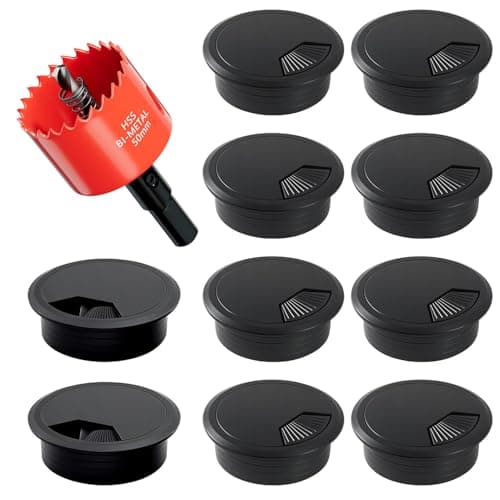
  • 2-Inch Desk Grommet Kit with Hole Saw (10 pack)

    2-Inch Desk Grommet Kit with Hole Saw (10 pack)

    Cables that drop straight through the desktop stay where you put them. Cables routed around the back edge get dragged every time the desk moves or the chair rolls back, which is what undoes a tidy run within a week. The hole saw is in the box, so the cut and the finished edge come from one purchase.

    Check first: decide the hole position and check your desktop thickness before you cut. A grommet hole is not reversible.

#ad · Live prices from the Amazon Product API, as of October 23, 2026. Where we have no verified live price we show none. We may earn a commission, at no extra cost to you.

How we picked

We do not run a testing lab

We compiled the published manufacturer specifications, did the ergonomics, VESA and desk-depth math ourselves, and read aggregated owner reviews, then scored each product against a published rubric. The scores are judgments from documented research — they are not measurements we took, because we do not have a lab and we are not going to pretend we do. Every spec traces back to a listing or manual named in Sources.

Questions

Frequently asked

What accessories do you actually need for a standing desk?
Three: something that carries the cables through the travel, power mounted on the desk rather than the floor, and something under your feet. A keyboard tray is the fourth if the desk's lowest height is still too tall for you seated. Everything else is optional.
Do I need an anti-fatigue mat for a standing desk?
On a hard floor, yes, if you stand for more than about half an hour at a stretch. Standing still is tiring because nothing is pumping blood back up your legs, and a contoured mat helps mostly by giving your feet somewhere to change position rather than by being soft.
How do I stop cables snagging when the desk rises?
Reduce the number of cables that reach the floor to one. Clamp a power strip to the desk edge so everything plugs in at desk height, put the bundle in an under-desk tray, and run the single remaining drop inside a segmented cable spine that extends and folds with the travel.
Should the keyboard height change when I stand?
The height relative to you should not - it is elbow height in both positions, which is why you set the desk by your elbows and not by a number. What changes is your wrist angle, which tends to drop slightly standing, so a tray with a little negative tilt helps.
Is a balance board better than a mat?
It is better at keeping you moving and worse at being unobtrusive. If your standing hours are meeting hours, the rocking shows on camera. Many people end up with both: the board for focused work, the mat for calls.
Do I need a different power strip for a standing desk?
A clamp-on one, ideally. A floor strip forces every cable to travel the full height of the desk; a desk-edge strip means only its own feed does. Check the joule rating, because the desk motor and your monitors now share the strip.
What about a footrest?
A footrest is a seated accessory - it does nothing once the desk is up. It is still worth having if you spend most of the day sitting, but it is not a standing desk accessory and we have left it off this page for that reason.

Keep reading

Receipts

Sources

We do not run a testing lab, and we do not pretend to. Specifications come from the manufacturer or retailer listing; the footprint and clearance math is ours and reproducible. Where we could not verify a number, we say so on the page rather than quietly leaving it out. Read our full method.