Skip to content
Chair & Cable

SECTION 05 · Cable Management

Why Your USB Hub Keeps Disconnecting

A drive that unmounts, a webcam that drops mid-call, a mouse that stutters. Six causes, in the order worth checking - and only one of them is a broken hub.

By Stephen V.Updated How we pick
#ad

We earn a commission when you buy through our Amazon links, at no extra cost to you. It never affects our rankings, and we say so when the cheaper product is the better buy. How this works.

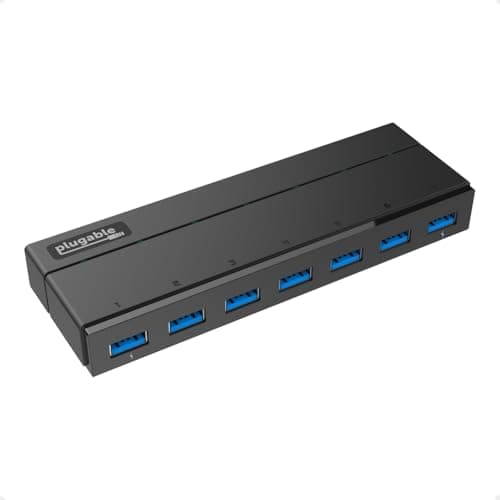
Nine times out of ten the hub is fine and the current budget is not. The USB 3.0 specification allots 900 mA per port, and a bus-powered hub does not create more current — it divides what the host gives it between everything plugged in. The fix is a hub with its own power supply: the Plugable 7-port ships a 36W adapter and gives every port the full 900 mA, with two ports raised to 1.5A for charging. Work through the six causes below in order before you buy anything, though, because two of them are free.

Cause 1: the hub is bus-powered and you are over budget

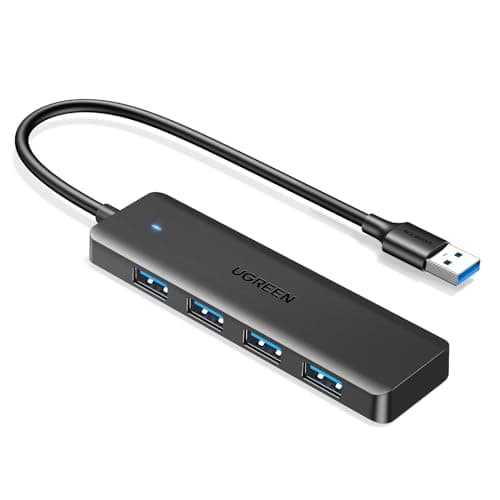
Bus-powered means the hub takes all its power from the host port. A slim travel hubis bus-powered by design — the UGREEN 4-port on this page states “bus powered, no external supply” and weighs 33 grams, which is exactly why it works in a bag and fails on a desk.

The devices that break it are the ones with a motor, a radio or a heater: a portable hard drive spinning up, a 4K webcam, an audio interface, a phone charging, an SSD under sustained write. Symptoms are a drive that unmounts mid-copy, a webcam that disappears when the drive wakes, or a hub that works until you plug in the fourth thing.

The test: unplug everything, then add devices one at a time and note which one breaks it. If the hub recovers when the drive is removed, it is power, not hardware.

Cause 2: too many hubs in a chain

USB allows a maximum of five hub tiers between the host controller and a device. Monitors with built-in hubs, docks, keyboards with pass-through ports and the hub itself all count as tiers, and it is easy to accumulate four without noticing: laptop, dock, monitor hub, keyboard, mouse receiver.

The test:plug the problem device straight into the computer. If it is stable there, flatten the chain — move one device to the host and give the hub fewer dependants.

Cause 3: the cable is too long or the wrong one

Passive USB cables have length limits that fall as speed rises, and a 5 Gbps link over a long cheap cable is marginal in a way a 480 Mbps one was not. The hubs here publish short host leads for exactly this reason: 0.5 ft on the UGREEN slim hub, 2 ft on the SABRENT, 3.3 ft on the UGREEN powered hub.

The test:swap the host cable for the shortest one you own. If the dropouts stop, the cable was the problem — and an extension on the host side of a hub is almost always a mistake.

Cause 4: the operating system is turning the hub off

On Windows, every USB root hub has a power-management setting called Allow the computer to turn off this device to save power, and USB selective suspend does precisely that. The result looks like a hardware fault: the hub works, goes quiet for a while, then drops the devices on it.

The fix: in Device Manager, open each USB Root Hub and each Generic USB Hub, go to Power Management, and clear that checkbox. Then check USB selective suspend in your power plan's advanced USB settings. On macOS this is handled differently and is rarely the cause.

Cause 5: bandwidth, not power

A USB 3.0 hub's 5 Gbps is shared across every port— the Plugable and SABRENT specs both say “5Gbps shared”. A 4K webcam, an external SSD and an audio interface on one hub are competing for the same pipe, and the symptom is dropped video frames or audio crackle rather than a disconnect.

The fix: split by bandwidth, not by convenience. Webcam and audio interface on the host or on separate controllers; keyboard, mouse and dongles on the hub, because they need almost nothing. If you need genuine per-device bandwidth, that is a Thunderbolt dock question.

Cause 6: USB 3.0 interference with 2.4 GHz receivers

This one surprises people. USB 3.0 signalling radiates noise in the 2.4 GHz band — Intel published a white paper on the effect — and a wireless keyboard or mouse receiver plugged into a USB 3.0 port or hub, next to a USB 3.0 hard drive, can stutter or drop input entirely.

The fix:move the receiver to a USB 2.0 port, or to the far end of the hub away from the 3.0 traffic, or onto a short extension so it sits away from the hub body. If you have a Bluetooth option on the keyboard, use it. This is the cause behind a surprising number of “my mouse is laggy since I got a dock” complaints.

What to look for when you replace it

Once you have ruled out the free fixes, the hub spec that matters is the power supply, and the second is per-port switches. A hub with its own adapter stops dividing the host's current; a hub with a switch per port lets you power-cycle one device without unplugging the rest, which turns troubleshooting from guesswork into a sequence. The three hubs below are chosen for those two properties, plus one that shows what causes the problem in the first place.

If the devices that drop out are the ones with motors or screens in them, the hub is running out of current rather than misbehaving — powered vs unpowered has that arithmetic.

The short answer

Quick picks

#ProductBest forScorePrice
01
Plugable Plugable 7-Port USB 3.0 Hub with 36W Power Adapter
Plugable 7-Port USB 3.0 Hub with 36W Power Adapter

The fix for a power problem, and the only hub here that publishes its per-port current. A 36W adapter gives all seven ports the specification's 900 mA, with ports 1 and 7 raised to 1.5A under BC 1.2 - and no drivers on any OS.

Drives, webcams and audio gear
8.7
$39.95Amazon
02
UGREEN UGREEN 7-in-1 Powered USB-C Hub (5 x USB-A, 2 x USB-C)
UGREEN 7-in-1 Powered USB-C Hub (5 x USB-A, 2 x USB-C)

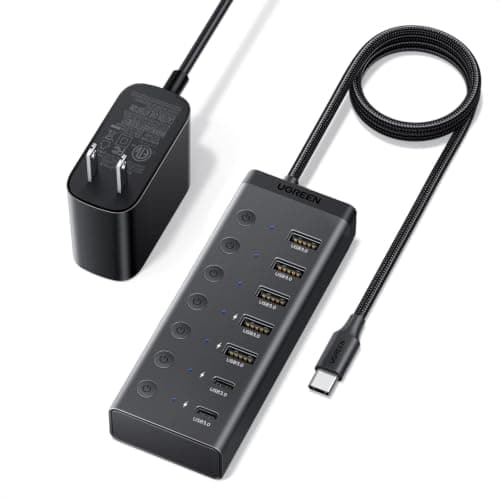
The powered hub for a USB-C machine, and the easiest one to troubleshoot with: a 24W supply of its own plus an individual on/off switch for every port, so you can isolate a misbehaving device without crawling under the desk.

A USB-C desk, and isolating a fault
9.0
$29.99Amazon
03
SABRENT SABRENT 4-Port USB 3.0 Hub with Individual Power Switches
SABRENT 4-Port USB 3.0 Hub with Individual Power Switches

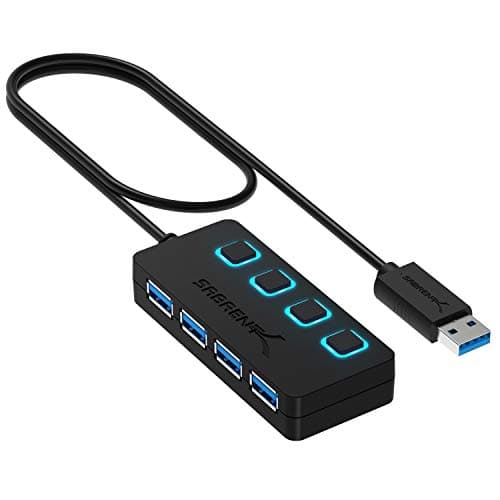
The cheap diagnostic tool. Bus powered, so it will not solve a current problem - but a switch and an LED per port tell you which device is drawing when, which is information the expensive hubs do not give you.

Low-draw devices and fault-finding
7.8
$14.95Amazon
04
UGREEN UGREEN USB 3.0 Hub, 4 Ports Ultra-Slim
UGREEN USB 3.0 Hub, 4 Ports Ultra-Slim

Here to show the cause, not to fix it. Bus powered, 33 grams, a 0.5 ft cable and data only - a genuinely good travel hub, and the exact wrong hub for a desk with a drive and a webcam on it.

A laptop bag, not a desk
6.3
$6.98Amazon

#ad · Live prices from the Amazon Product API, as of October 23, 2026. Where we have no verified live price we show none — we would rather leave a gap than print a number that has rotted.

In detail

The picks, in full

01
Plugable Plugable 7-Port USB 3.0 Hub with 36W Power Adapter

Drives, webcams and audio gear

Plugable 7-Port USB 3.0 Hub with 36W Power Adapter

Ports
7 x USB 3.0, 5Gbps shared
Power
36W external adapter included
Charging ports
Ports 1 and 7 deliver up to 1.5A with BC 1.2 signaling
Standard ports
900mA each, per the USB 3.0 specification
Drivers
None required on Windows, macOS or Linux
8.7/10

The fix for a power problem, and the only hub here that publishes its per-port current. A 36W adapter gives all seven ports the specification's 900 mA, with ports 1 and 7 raised to 1.5A under BC 1.2 - and no drivers on any OS.

Power Headroom
9.6
Diagnosability
7
Port Count
9.2
Value
8.8

Pros

  • 36W of its own power removes the current budget as a cause outright
  • Publishes per-port current, which almost no hub listing does
  • Two 1.5A charging ports with proper BC 1.2 signaling
  • Driverless on Windows, macOS and Linux, including after an OS update

Cons

  • USB-A host plug, so a USB-C-only laptop needs an adapter
  • 5Gbps is still shared across all seven ports
  • A mains brick, so this is a desk device not a travel one

Skip this if…

…the devices you are connecting are a keyboard, a mouse and a flash drive - bus power is genuinely enough for those.

$39.95View on Amazon

Price as of October 23, 2026. Prices change — Amazon's is the one that counts.

#ad · we may earn a commission from this link to Plugable 7-Port USB 3.0 Hub with 36W Power Adapter

02
UGREEN UGREEN 7-in-1 Powered USB-C Hub (5 x USB-A, 2 x USB-C)

A USB-C desk, and isolating a fault

UGREEN 7-in-1 Powered USB-C Hub (5 x USB-A, 2 x USB-C)

Ports
5 x USB-A and 2 x USB-C, all 5Gbps
Host connector
USB-C, on a 3.3 ft cable
Power
24W DC input, adapter included
Switches
Individual on/off switch per port
Function
Data only - no video output and no host charging
9.0/10

The powered hub for a USB-C machine, and the easiest one to troubleshoot with: a 24W supply of its own plus an individual on/off switch for every port, so you can isolate a misbehaving device without crawling under the desk.

Power Headroom
8.4
Diagnosability
9.6
Port Count
9.2
Value
8.8

Pros

  • Its own 24W supply, so ports are not splitting the host's budget
  • A switch per port is the fastest way to find the device causing dropouts
  • Native USB-C host connector on a sensible 3.3 ft lead
  • Two USB-C downstream ports as well as five USB-A

Cons

  • 24W is less headroom than the Plugable's 36W
  • No video output and no host charging - this is a hub, not a dock
  • 5Gbps rather than 10Gbps

Skip this if…

…you were hoping one box would also drive a monitor - see hub versus dock for that.

$29.99View on Amazon

$39.9925% off

Price as of October 23, 2026. Prices change — Amazon's is the one that counts.

#ad · we may earn a commission from this link to UGREEN 7-in-1 Powered USB-C Hub (5 x USB-A, 2 x USB-C)

03
SABRENT SABRENT 4-Port USB 3.0 Hub with Individual Power Switches

Low-draw devices and fault-finding

SABRENT 4-Port USB 3.0 Hub with Individual Power Switches

Ports
4 x USB 3.0, 5Gbps shared
Switches
Individual power switch and LED per port
Power
Bus powered - no external supply
Cable
2 ft USB 3.0 attached
Compatibility
Driverless on Windows and macOS, backward compatible to USB 2.0
7.8/10

The cheap diagnostic tool. Bus powered, so it will not solve a current problem - but a switch and an LED per port tell you which device is drawing when, which is information the expensive hubs do not give you.

Power Headroom
5
Diagnosability
9.4
Port Count
7.4
Value
9.4

Pros

  • An LED and a switch per port makes the draw visible rather than theoretical
  • Short 2 ft attached cable, which removes cable length as a variable
  • Backward compatible to USB 2.0, useful for a 2.4 GHz receiver
  • Cheap enough to keep as a test tool

Cons

  • Bus powered, so it divides the host's 900 mA like any other
  • Four ports only
  • Will not fix a drive that unmounts under load

Skip this if…

…a portable hard drive is what keeps dropping - this hub cannot supply it, by design.

$14.95View on Amazon

Price as of October 23, 2026. Prices change — Amazon's is the one that counts.

#ad · we may earn a commission from this link to SABRENT 4-Port USB 3.0 Hub with Individual Power Switches

04
UGREEN UGREEN USB 3.0 Hub, 4 Ports Ultra-Slim

A laptop bag, not a desk

UGREEN USB 3.0 Hub, 4 Ports Ultra-Slim

Ports
4 x USB-A 3.0, 5Gbps
Power
Bus powered, no external supply
Cable
0.5 ft attached
Size and weight
0.4" thick, 33 g
Function
Data only - no charging or video support
6.3/10

Here to show the cause, not to fix it. Bus powered, 33 grams, a 0.5 ft cable and data only - a genuinely good travel hub, and the exact wrong hub for a desk with a drive and a webcam on it.

Power Headroom
4
Diagnosability
4
Port Count
7.4
Value
9.8

Pros

  • 33 grams and 0.4 in thick - it genuinely disappears in a bag
  • Very short cable, so the link itself is never the problem
  • Four ports for keyboards, mice, dongles and flash drives
  • Costs very little and needs no adapter

Cons

  • Bus powered, which is the single most common cause of dropouts
  • No charging support at all
  • Four low-draw devices is its real ceiling

Skip this if…

…you are reading this page because something keeps disconnecting - this is the class of hub that causes it.

$6.98View on Amazon

$9.9930% off

Price as of October 23, 2026. Prices change — Amazon's is the one that counts.

#ad · we may earn a commission from this link to UGREEN USB 3.0 Hub, 4 Ports Ultra-Slim

Symptom to cause, in one table

What you seeMost likely causeFirst thing to try
External drive unmounts mid-copyCurrent budget on a bus-powered hubMove the drive to a host port, then buy a powered hub
Everything drops after idle, then returnsWindows USB selective suspendClear “turn off this device to save power” on every USB hub
Wireless mouse stutters since adding a hub or dockUSB 3.0 noise in the 2.4 GHz bandMove the receiver to a USB 2.0 port or away from the hub
Webcam drops frames during callsShared 5 Gbps bandwidthPut the webcam on the host, dongles on the hub
Device works direct but not through the hubToo many hub tiers, or cable lengthFlatten the chain; swap in the shortest host cable
Hub dead on one port onlyGenuinely a hardware faultTest that port with a known-good device, then replace

The ten-minute diagnostic, in order

1. Unplug everything from the hub. Then add one device at a time, using it properly between each addition. The device that breaks it is the one to move.

2. Plug the problem device directly into the computer. Stable there means the hub or the chain; unstable there means the device or its cable.

3. Swap the host cable for the shortest you own. Free, and it eliminates a whole category.

4. Turn off USB power management. Windows Device Manager, every USB Root Hub and Generic USB Hub, Power Management tab.

5. Count your hub tiers. Monitor hubs, docks and keyboard pass-through ports all count towards the five-tier limit.

6. Move the 2.4 GHz receiver. Away from the hub, onto USB 2.0 if you have it.

7. Only then buy a powered hub.And check the adapter wattage rather than the port count — 24W to 36W is the band that actually fixes things.

When the hub is not the problem at all

If what you really need is a monitor and a laptop charger on one cable, a hub is the wrong device and no amount of troubleshooting will make it the right one. Hub versus docking station sets out the three capabilities that differ, and the dual-monitor dock roundup covers the devices that have them.

If the problem is that two computers want the same keyboard, mouse and screen, that is a switch rather than a hub — two computers, one desk goes through the four ways to do it, and the KVM roundup ranks the boxes.

And if the dropouts started when the desk went up, check the cables before the hub: a sit-stand desk that lifts eight inches puts tension on every lead, and a tugged host cable looks exactly like a flaky hub. Standing desk cable management covers the service loops that prevent it.
How we picked

We do not run a testing lab

We compiled the published manufacturer specifications, did the ergonomics, VESA and desk-depth math ourselves, and read aggregated owner reviews, then scored each product against a published rubric. The scores are judgments from documented research — they are not measurements we took, because we do not have a lab and we are not going to pretend we do. Every spec traces back to a listing or manual named in Sources.

Questions

Frequently asked

Why does my USB hub keep disconnecting?
Usually the current budget. A bus-powered hub divides the host port's supply between its ports, and the USB 3.0 specification allots only 900 mA per port, so a drive or webcam spinning up pushes the total over. A hub with its own power adapter removes the cause.
Do I need a powered USB hub?
For external drives, 4K webcams, audio interfaces or charging a phone, yes. For keyboards, mice, wireless dongles and flash drives, bus power is fine and far more portable.
How many USB hubs can I chain together?
USB allows a maximum of five hub tiers between the host controller and a device, and docks, monitor hubs and keyboard pass-through ports all count. Flatten the chain rather than adding another hub to it.
Why does my wireless mouse lag when plugged into a USB 3.0 hub?
USB 3.0 signalling radiates noise in the 2.4 GHz band, which is the band wireless receivers use. Move the receiver to a USB 2.0 port or physically away from the hub and the 3.0 devices around it.
Does Windows turn off USB hubs to save power?
It can. Each USB Root Hub has an “Allow the computer to turn off this device to save power” setting enabled by default, and USB selective suspend in the power plan does the same thing. Clearing both fixes dropouts that happen after an idle period.
Will a longer USB cable cause disconnections?
It can at 5 Gbps, where passive cable length limits are much tighter than they were at USB 2.0 speeds. Use the shortest host cable you have, and avoid putting an extension on the host side of a hub.

Keep reading

Receipts

Sources

We do not run a testing lab, and we do not pretend to. Specifications come from the manufacturer or retailer listing; the footprint and clearance math is ours and reproducible. Where we could not verify a number, we say so on the page rather than quietly leaving it out. Read our full method.