Skip to content
Chair & Cable

SECTION 04 · Keyboards & Mice

The best quiet keyboards for an office

Nobody publishes a decibel rating for a keyboard, so we rank on the mechanism instead - the four parts of a board that actually make the sound.

By Stephen V.Updated How we pick
#ad

We earn a commission when you buy through our Amazon links, at no extra cost to you. It never affects our rankings, and we say so when the cheaper product is the better buy. How this works.

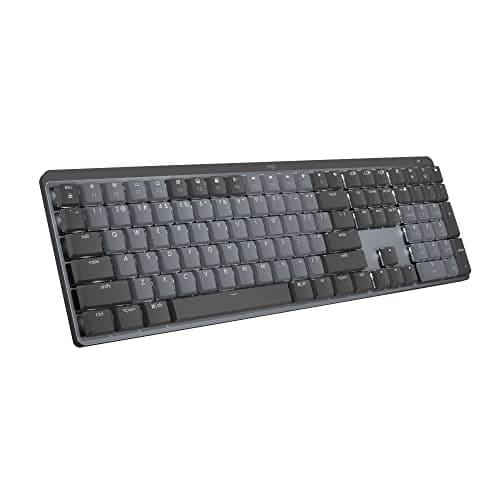
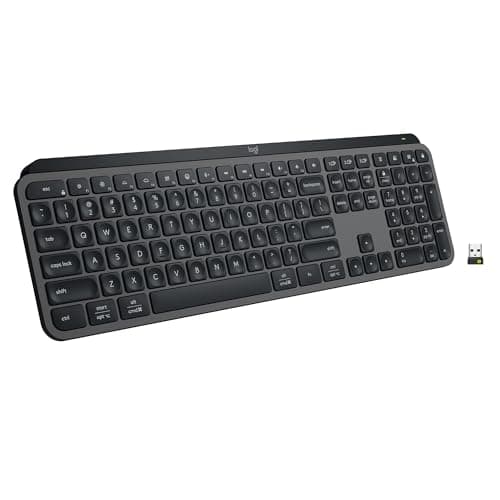
The quietest board here is the Logitech MX Keys S, and it is not a close call: a low-profile scissor switch has barely any travel to make noise with. If you want the feedback of a mechanical keyboard without the sound that gets you glared at on a call, the Logitech MX Mechanicalwith its Tactile Quiet switch is the one to buy — or the MX Mechanical Mini for Mac if you would rather lose the number pad than the desk space.

A warning about the category first. No manufacturer on this page publishes a decibel figure, and the ones that do elsewhere measure in conditions that have nothing to do with your desk. So we are not going to print numbers we cannot source. What we can do is rank on mechanism, because keyboard noise is not mysterious — it comes from four places, and you can read all four off a spec sheet.

Where the noise actually comes from

1. The switch.A clicky switch has a mechanism inside that is designed to make a sound; nothing will quiet it. A linear or tactile switch is quieter. A switch marketed as “silent” has rubber dampers on the stem that cushion both the downstroke and the return. A scissor-switch membrane, like the MX Keys S, has the least moving mass of all.

2. The travel.Most of a keystroke’s noise is the bottom-out and the return — the keycap hitting the plate and the stem snapping back up. A low-profile board has less distance to fall, which is why low profile and quiet tend to arrive together.

3. The case. An empty plastic case is a drum. Gasket mounting, where the plate sits on rubber rather than bolted to the shell, changes a hollow clack into a duller thock. It is the main reason two boards with identical switches can sound nothing alike.

4. The big keys.Space, enter and shift sit on stabilizers, and unlubricated stabilizers rattle. On most office boards you cannot do anything about this — on a hot-swap board you can.

Read those four against any listing and you can predict how a board will sound without a single review. Mechanism-by-mechanism detail is in keyboard switches explained, and the broader argument is in mechanical vs membrane.

Quiet for whom: the room or the microphone?

These are different problems. For a shared room, what annoys the person beside you is the sharp peak of a bottom-out, so travel and case damping matter most. For a microphone, the enemy is the low thud that travels through the desk into the mic stand — and that is not really a keyboard problem at all. A desk mat under the board absorbs it; an arm-mounted or shock-mounted mic avoids it. Our desk mat roundup and microphone roundup both cover that side of it.

If you are on calls all day, the cheapest real improvement is not a new keyboard: it is pushing the board back a few inches so the mic is no longer directly over it, and putting something soft underneath.

The hot-swap route, if you are willing to do ten minutes of work

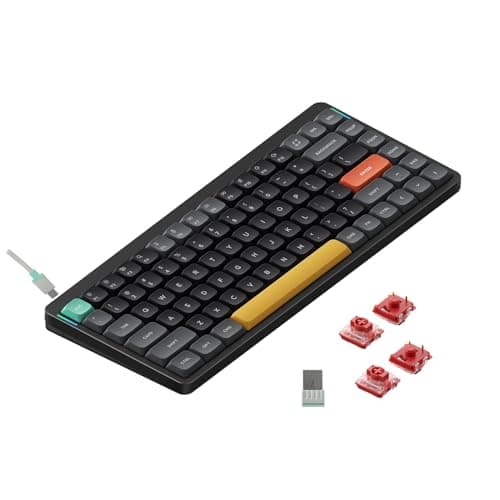
The quietest mechanical board is one you finish yourself. A hot-swap socket means you can pull the factory switches out with a puller and press silent switches in — no soldering, no warranty question, about ten minutes for a 75% board. The NuPhy Air75 V2 below is the only board here with hot-swap sockets, and it is the reason it earns a place over quieter-sounding boards: its ceiling is higher than its stock sound.

Two cheap additions do most of the rest. A set of keycaps in PBT rather than thin ABS sounds a little deeper. And a layer of foam in the case, on a board that allows it, kills the hollow resonance. Neither is necessary; both are reversible.

What to expect from each mechanism

MechanismCharacter of the soundWhat you trade
Low-profile scissor (membrane)A soft tap, almost no return noiseVery little feedback; nothing is replaceable
Low-profile mechanical, quiet tactileA muted bump you can feel and barely hearCosts more; switches usually fixed
Full-height linear, gasket-mountedA dull thock rather than a clackTaller board, so a wrist rest matters
Full-height silent switches (hot-swapped in)The quietest mechanical option there isTen minutes of work and a parts order
Clicky switch, any heightLoud by designNothing you add will fix it

The short answer

Quick picks

#ProductBest forScorePrice
01
Logitech Logitech MX Keys S
Logitech MX Keys S

The quietest board we rank, because a low-profile scissor switch has almost no travel to make noise with. Spherically dished keycaps keep it accurate rather than mushy, and the backlight turns itself on as your hands approach.

The quietest option, full stop
8.8
$119.99Amazon
02
Logitech Logitech MX Mechanical Wireless Keyboard
Logitech MX Mechanical Wireless Keyboard

The compromise most people want: a real mechanical switch in a low-profile body, available in a tactile-quiet variant. You get the bump under your finger and a sound your colleagues will not comment on.

Mechanical feel, office volume
8.7
$149.99Amazon
03
No image
Logitech MX Mechanical Mini for Mac

The same Tactile Quiet switch in a compact Mac layout, and the board to pick if the keyboard has to share the desk with a trackpad or a tablet. Ten months of battery with the backlight off is a published figure, not a marketing one.

A quiet compact board
8.4
Check price →
04
NuPhy NuPhy Air75 V2 Low-Profile Mechanical
NuPhy Air75 V2 Low-Profile Mechanical

The one with a ceiling. Hot-swappable low-profile sockets mean you can press silent switches in yourself, which makes this the quietest board here in its best configuration rather than in the box.

Fitting silent switches yourself
8.1
$66.49Amazon
05
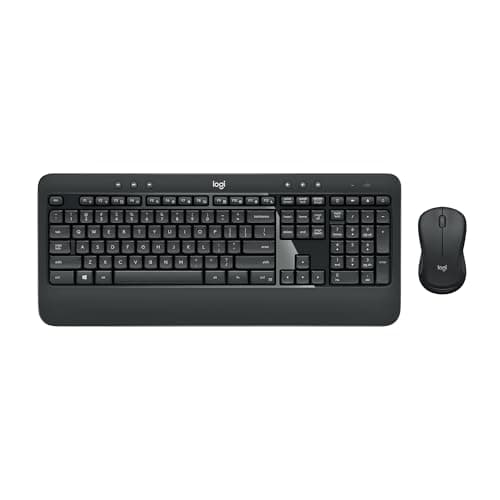
Logitech Logitech MK540 Advanced Wireless Combo
Logitech MK540 Advanced Wireless Combo

The budget answer, and a quiet one by default: a full-size membrane board with an integrated palm rest, plus a mouse, on one receiver. Membrane keys are the cheapest route to a board nobody can hear.

Quiet on a budget
8.4
$49.99Amazon

#ad · Live prices from the Amazon Product API, as of October 23, 2026. Where we have no verified live price we show none — we would rather leave a gap than print a number that has rotted.

In detail

The picks, in full

01
Logitech Logitech MX Keys S

The quietest option, full stop

Logitech MX Keys S

Key mechanism
Low-profile scissor, spherically dished keycaps
Layout
Full-size with number pad
Connection
Bluetooth Low Energy or Logi Bolt receiver, up to 3 devices
Backlight
Proximity sensor plus ambient light sensor
Battery
1500mAh Li-Po - up to 10 days, or up to 5 months backlight off
8.8/10

The quietest board we rank, because a low-profile scissor switch has almost no travel to make noise with. Spherically dished keycaps keep it accurate rather than mushy, and the backlight turns itself on as your hands approach.

Quietness
9.6
Typing Feel
8
Office Fit
9.4
Value
8.2

Pros

  • Least moving mass of any mechanism here, which is why it is the quietest
  • Low profile keeps the wrists flat without needing a palm rest
  • Three-device switching covers a work and a personal machine from one board
  • Dished keycaps make a flat board surprisingly accurate

Cons

  • Nothing is replaceable - a failed key means a new keyboard
  • Shallow travel gives less feedback than any mechanical switch
  • Expensive for a membrane board

Skip this if…

…you want to feel each keystroke register - scissor switches deliberately do not do that.

$119.99View on Amazon

$129.998% off

Price as of October 23, 2026. Prices change — Amazon's is the one that counts.

#ad · we may earn a commission from this link to Logitech MX Keys S

02
Logitech Logitech MX Mechanical Wireless Keyboard

Mechanical feel, office volume

Logitech MX Mechanical Wireless Keyboard

Layout
Full-size with number pad
Switch type
Low-profile mechanical (tactile-quiet, linear, or clicky)
Connection
Wireless - Bluetooth or Logi Bolt receiver; USB-C charging
Hot-swap
No
Backlight
Smart backlight with proximity and ambient sensing
8.7/10

The compromise most people want: a real mechanical switch in a low-profile body, available in a tactile-quiet variant. You get the bump under your finger and a sound your colleagues will not comment on.

Quietness
8.4
Typing Feel
8.8
Office Fit
9
Value
8.4

Pros

  • The tactile-quiet switch option is the whole point - buy that variant, not the clicky one
  • Low profile means less travel to bottom out, so less noise than a full-height board
  • Pairs to three devices and flows between them
  • Backlight brightens as your hands approach and dims to save battery

Cons

  • Switches are not hot-swappable, so the choice you make at checkout is permanent
  • The clicky variant exists and is loud - check which one you are adding to the cart
  • No 2.4 GHz option; Bluetooth or the Bolt receiver only

Skip this if…

…you want to swap switches later, or you prefer a tall, full-height keystroke.

$149.99View on Amazon

$179.9917% off

Price as of October 23, 2026. Prices change — Amazon's is the one that counts.

#ad · we may earn a commission from this link to Logitech MX Mechanical Wireless Keyboard

03
No image

A quiet compact board

Logitech MX Mechanical Mini for Mac

Layout
Compact Mac layout, number pad removed
Switch type
Low-profile mechanical, Tactile Quiet
Connection
Bluetooth Low Energy, up to 3 Macs or iPads
Backlight
Proximity-activated, auto-adjusting to room light
Battery
Up to 15 days, or up to 10 months with backlighting off
8.4/10

The same Tactile Quiet switch in a compact Mac layout, and the board to pick if the keyboard has to share the desk with a trackpad or a tablet. Ten months of battery with the backlight off is a published figure, not a marketing one.

Quietness
8.4
Typing Feel
8.4
Office Fit
8.8
Value
7.8

Pros

  • Tactile Quiet switches give mechanical feedback without the volume
  • Compact layout frees three to six inches of desk width for the mouse
  • Three-device switching across Macs and iPads
  • Mac legends printed rather than remapped, which matters more than it sounds

Cons

  • Not hot-swappable, so the switch choice is permanent
  • Bluetooth only - no receiver in the box
  • No number pad, and the Mac layout is a compromise on Windows

Skip this if…

…you enter numbers all day - a compact board puts the number pad behind a layer key.

Check price on Amazon →

We don't have a verified live price for this right now, so we aren't showing one.

#ad · we may earn a commission from this link to Logitech MX Mechanical Mini for Mac

04
NuPhy NuPhy Air75 V2 Low-Profile Mechanical

Fitting silent switches yourself

NuPhy Air75 V2 Low-Profile Mechanical

Layout
Compact 75%
Switch type
Hot-swappable low-profile (Gateron low-profile)
Hot-swap
Yes
Connection
Wireless - Bluetooth or 2.4 GHz; wired USB-C
Feet
Adjustable feet with optional risers
8.1/10

The one with a ceiling. Hot-swappable low-profile sockets mean you can press silent switches in yourself, which makes this the quietest board here in its best configuration rather than in the box.

Quietness
7.6
Typing Feel
8.6
Office Fit
8
Value
8.2

Pros

  • Hot-swap sockets at this height are rare, and they are what let you buy quiet later
  • Low-profile switches already have less travel noise than full-height
  • Bluetooth, 2.4 GHz and wired all supported
  • 75% layout keeps the function row and arrows while saving desk width

Cons

  • Stock switches are not the quiet ones - the quiet version is a separate parts order
  • No number pad, and some keys are shuffled in the compact layout
  • Low-profile switch choice is narrower than full-height, silent options included

Skip this if…

…you do not want a project - the Logitech boards above are quiet straight out of the box.

$66.49View on Amazon

Price as of October 23, 2026. Prices change — Amazon's is the one that counts.

#ad · we may earn a commission from this link to NuPhy Air75 V2 Low-Profile Mechanical

05
Logitech Logitech MK540 Advanced Wireless Combo

Quiet on a budget

Logitech MK540 Advanced Wireless Combo

Keyboard
Full size with number pad and integrated palm rest
Connection
Single Logitech Unifying USB receiver, encrypted, up to 10m
Keyboard battery
Rated up to 36 months
Mouse
Contoured ambidextrous shape with rubber side grips
Durability
Spill resistant to 60ml, abrasion-resistant key printing
8.4/10

The budget answer, and a quiet one by default: a full-size membrane board with an integrated palm rest, plus a mouse, on one receiver. Membrane keys are the cheapest route to a board nobody can hear.

Quietness
8.8
Typing Feel
6.8
Office Fit
8.6
Value
9.4

Pros

  • Membrane keys are inherently quiet, and this is the cheapest good one
  • Includes a mouse, so it replaces both halves of a noisy setup at once
  • Three years of rated keyboard battery on ordinary cells
  • Ambidextrous mouse works left-handed, which almost no combo bothers with

Cons

  • No Bluetooth and no multi-device switching - the receiver is the only route
  • Plastic palm rest rather than a cushioned one
  • Mushier than the MX Keys S for roughly the same quietness class

Skip this if…

…you switch between two machines - this set pairs to one receiver and stays there.

$49.99View on Amazon

$59.9917% off

Price as of October 23, 2026. Prices change — Amazon's is the one that counts.

#ad · we may earn a commission from this link to Logitech MK540 Advanced Wireless Combo

How we picked

We do not run a testing lab

We compiled the published manufacturer specifications, did the ergonomics, VESA and desk-depth math ourselves, and read aggregated owner reviews, then scored each product against a published rubric. The scores are judgments from documented research — they are not measurements we took, because we do not have a lab and we are not going to pretend we do. Every spec traces back to a listing or manual named in Sources.

Questions

Frequently asked

What is the quietest keyboard for an office?
A low-profile scissor-switch board - the Logitech MX Keys S here. There is simply less mechanism moving and less distance for a keycap to fall, which is where typing noise comes from. If you want mechanical feedback as well, the quietest route is a low-profile tactile-quiet switch.
Are mechanical keyboards too loud for a shared office?
Clicky ones are, by design. Linear and quiet tactile switches in a low-profile body are not, and a gasket-mounted case damps what is left. The switch label on the listing tells you most of what you need to know before you buy.
Do silent switches really make a difference?
Yes - they add rubber dampers on the switch stem that cushion both the bottom-out and the return, which are the two loudest moments of a keystroke. They also soften the feel slightly, which some people dislike. On a hot-swap board you can fit them in about ten minutes with no soldering.
Why does my keyboard sound hollow?
Because the case is acting as a drum. An unlined plastic shell with the switch plate bolted straight to it resonates; gasket mounting or a layer of case foam stops it. Rattling space and shift keys are a separate problem - unlubricated stabilizers.
How do I stop my keyboard from being picked up on calls?
Move the microphone off the desk or away from directly over the board, and put something soft under the keyboard - a desk mat absorbs the low thud that travels through the surface. That combination helps more than changing keyboards does.
Is a membrane keyboard always quieter than a mechanical one?
Usually, but not automatically. A low-profile mechanical with quiet tactile switches can be quieter than a cheap membrane board with a hollow case. The mechanism, the travel and the case together decide it - not the category name.
Does a wrist rest make a keyboard quieter?
No. It changes your wrist angle, not the sound. What does help is a soft surface under the board itself, which absorbs the part of the noise that travels into the desk.

Keep reading

Receipts

Sources

We do not run a testing lab, and we do not pretend to. Specifications come from the manufacturer or retailer listing; the footprint and clearance math is ours and reproducible. Where we could not verify a number, we say so on the page rather than quietly leaving it out. Read our full method.