Skip to content
Chair & Cable

SECTION 04 · Keyboards & Mice

Keyboard Switches Explained

Three switch families, two numbers and one decision about noise. Once you understand what each one changes, the color-coded marketing stops mattering.

By Stephen V.Updated How we pick
#ad

We earn a commission when you buy through our Amazon links, at no extra cost to you. It never affects our rankings, and we say so when the cheaper product is the better buy. How this works.

A mechanical switch is a small mechanism under each key: a housing, a spring and a stem that moves a metal contact. Every switch does the same job, and the differences between them come down to three things — whether you feel anything on the way down, how hard you have to push, and how much noise it makes doing it.

The three families

Linear. The stem travels straight down with no bump and no click. The resistance rises smoothly with the spring, and the keypress registers somewhere in the middle without announcing itself. Linears are the quietest family and the one most often chosen for gaming, because there is nothing to push past. Typists sometimes find them vague: without feedback, you tend to bottom out every key, which is harder on the fingers.

Tactile. The stem has a bump partway down that you feel as a small resistance and then a release, positioned at or near the point where the key registers. That bump tells your finger the press worked, which means you can stop pushing before the key hits the bottom. For long typing sessions this is the most-recommended family, and it is the safe default if you do not know what you want.

Clicky. A tactile bump plus a separate mechanism that makes an audible click at the same moment. The feedback is unmistakable, the sound is loud, and it is the single fastest way to become unpopular in a shared room. Buy these only if you work alone.

The two numbers

Actuation force is how hard you have to press for the key to register, given in grams. Common values run from roughly 45g to 65g. Lighter switches are faster and less tiring but easier to trigger by accident; heavier ones resist mistakes and ask more of your fingers over a long day. If you have a habit of resting your fingers on the keys, heavier is safer.

Travelis how far the key moves. Full-height switches typically travel around 4mm and register roughly halfway down. Low-profile switches travel around 3mm or less, which feels faster and sits the whole keyboard lower — which matters for wrist angle more than most people realize. The height argument is in keyboard and mouse ergonomics.

Colors mean nothing across brands

The color naming came from Cherry MX, where Red is linear, Brown is tactile and Blue is clicky. Every other manufacturer then borrowed the colors loosely, so a Gateron Brown, a Kailh Brown and a Cherry Brown are three different switches that share a name. Read the family and the force rating, not the color.

Silent switches, and what they actually silence

A switch marked silent or silenced has dampening material inside the housing that absorbs the impact at the top and bottom of travel. It genuinely reduces noise, and it also softens the feel slightly — some people like that, some find it mushy.

What silent switches do not quieten is the other half of keyboard noise: the case. A hollow plastic keyboard on a hard desk resonates, and that resonance is often louder than the switches. Foam kits, o-rings under the keycaps and a desk mat under the board all attack that side of the problem, and together they do more than a switch change alone.

Hot-swap is the feature that makes all of this reversible

On a hot-swappable keyboard, each switch sits in a socket rather than being soldered to the circuit board. You pull it out with a cheap puller and push a new one in — no soldering, no risk, about ten minutes for a full board.

This is the single most important specification on this page, because it turns switch choice from a permanent decision into an experiment. A keyboard that turns out to be too loud for your office becomes a keyboard with the wrong switches in it, which is a twenty-dollar problem instead of a hundred-and-fifty-dollar one. Every board in our compact keyboard picks except the closed-firmware Logitech is hot-swappable, and it is worth prioritizing.

Magnetic and Hall effect switches

A newer category worth knowing about. Instead of a metal contact, these use a magnet in the stem and a sensor in the board, so the keyboard measures how far the key has traveled rather than detecting a single on-off point. That allows an adjustable actuation point — you can set a key to register at 1mm or at 3mm — and rapid-trigger behavior that resets the instant the key starts moving up.

The benefits are real for fast-paced games and largely irrelevant for typing. They also cost more, and Hall effect boards are not hot-swappable with normal mechanical switches. Interesting, not necessary.

How to choose without buying five keyboards

The recommendation almost everyone regrets ignoring: buy a switch tester before you buy a keyboard. It is a small block holding a set of real switches you can press, and ten minutes with one tells you more than any amount of reading. If you would rather not, buy a hot-swappable board with tactile switches — the safest default for typing — and change them later if you were wrong.

The short answer

Quick picks

#ProductBest forScorePrice
01
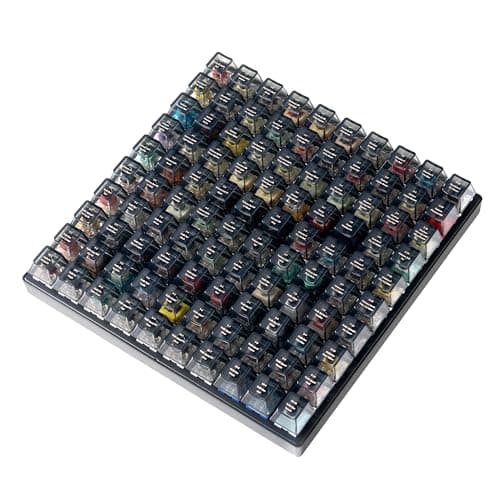
Keychron Keychron Switch Tester 100 Max Edition
Keychron Switch Tester 100 Max Edition

One hundred real switches in a weighted block with the names printed on the caps. Ten minutes with this saves a wrong keyboard, which is the whole economic argument for owning one.

Best switch tester
8.8
$59.99Amazon
02
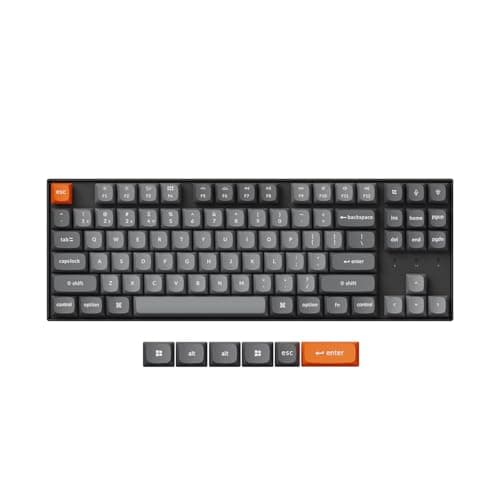
Keychron Keychron K8 Max Wireless Mechanical Keyboard
Keychron K8 Max Wireless Mechanical Keyboard

The board to buy if you would rather learn by doing. Hot-swap sockets mean the switches that arrive are a starting point rather than a commitment.

Best hot-swappable starting point
8.6
$79.99Amazon

#ad · Live prices from the Amazon Product API, as of Sep 6, 2026. Where we have no verified live price we show none — we would rather leave a gap than print a number that has rotted.

In detail

The picks, in full

01
Keychron Keychron Switch Tester 100 Max Edition

Best switch tester

Keychron Switch Tester 100 Max Edition

Switch count
100 total - 88 mechanical and 12 magnetic Hall effect
Brands included
Keychron, Gateron, Kailh and Huano
Keycaps
Black transparent ABS, each printed with its switch name
Construction
Steel plate, acoustic foam, silicone feet
Connectivity
None - this is a feel tester, not a keyboard
8.8/10

One hundred real switches in a weighted block with the names printed on the caps. Ten minutes with this saves a wrong keyboard, which is the whole economic argument for owning one.

Switch Coverage
9.8
Realism of Feel
8.8
Labeling
9.4
Value
7.2

Pros

  • Every keycap is labeled, so you can note what you liked instead of guessing later
  • Steel plate and acoustic foam mean the feel and sound approximate a real keyboard rather than a plastic tray
  • Includes 12 magnetic Hall effect switches, which almost no tester covers
  • Switches lift out individually if you want to compare two side by side

Cons

  • Not a keyboard - it has no circuit board and connects to nothing
  • Expensive for a tool you use for an afternoon and then shelve
  • One hundred options can be paralyzing; start with three or four families

Skip this if…

you already own a hot-swappable board - buying a few loose switches is cheaper than a full tester.

$59.99View on Amazon

Price as of Sep 6, 2026. Prices change — Amazon's is the one that counts.

#ad · we may earn a commission from this link to Keychron Switch Tester 100 Max Edition

02
Keychron Keychron K8 Max Wireless Mechanical Keyboard

Best hot-swappable starting point

Keychron K8 Max Wireless Mechanical Keyboard

Layout
Tenkeyless (87-key)
Connection
Wireless - Bluetooth or 2.4 GHz; wired USB-C
Switch type
Hot-swappable (pre-installed Gateron)
Hot-swap
Yes
Compatibility
Mac and Windows keycaps and toggle
8.6/10

The board to buy if you would rather learn by doing. Hot-swap sockets mean the switches that arrive are a starting point rather than a commitment.

Switch Coverage
9.4
Realism of Feel
9
Labeling
7.5
Value
8.4

Pros

  • Hot-swap sockets turn a wrong switch choice into a ten-minute fix
  • Ships with a mainstream Gateron switch, which is a sensible baseline to compare against
  • Three connection modes and both keycap sets in the box
  • Standard switch footprint, so the whole aftermarket fits it

Cons

  • Full-height board, so it sits tall and wants a wrist rest
  • Even quiet switches in this board are louder than a scissor keyboard
  • Buying switches to experiment with adds up

Skip this if…

you want a keyboard you never think about again - a closed membrane board is the calmer purchase.

$79.99View on Amazon

Price as of Sep 6, 2026. Prices change — Amazon's is the one that counts.

#ad · we may earn a commission from this link to Keychron K8 Max Wireless Mechanical Keyboard

A short recommendation, by situation

You type all day in a shared room. Silent linear or silent tactile, around 45 to 50g, in a board with foam. Add a desk mat. Do not buy clicky under any circumstances.

You type all day in your own room. Tactile, 55 to 65g. The bump lets you stop short of bottoming out, which is easier on the fingers over eight hours than a linear that gives you nothing to aim at.

You game more than you type. Linear, lighter weight. Nothing to push past means faster repeated presses, and the lack of feedback matters less when your fingers are already resting on the keys.

You have wrist or finger fatigue.Switch type is the wrong lever. Look at keyboard height and hand angle first — a low-profile board, a wrist rest, or a split keyboard will do far more than a different spring weight. That said, if you are bottoming out hard on every key, a lighter tactile switch genuinely helps.

Keycaps change the sound as much as switches do

Thin ABS caps ring; thicker PBT caps sound duller and deeper. If you like the feel of your board and dislike the sound, a keycap set is a cheaper experiment than a switch set, and it is reversible in five minutes.

What none of this changes

Switch choice does not make you type faster, and it does not fix an uncomfortable desk. The order of operations for a keyboard that hurts is height, then angle, then layout width, and only then switches. That order is set out in keyboard and mouse ergonomics, and the layout question is in the compact keyboard roundup.
How we picked

We do not run a testing lab

We compiled the published manufacturer specifications, did the ergonomics, VESA and desk-depth math ourselves, and read aggregated owner reviews, then scored each product against a published rubric. The scores are judgments from documented research — they are not measurements we took, because we do not have a lab and we are not going to pretend we do. Every spec traces back to a listing or manual named in Sources.

Questions

Frequently asked

What is the difference between linear, tactile and clicky switches?
A linear switch travels straight down with no feedback. A tactile switch has a bump partway down that you feel when the key registers. A clicky switch has that bump plus a mechanism that makes an audible click. Tactile is the usual recommendation for typing; clicky is the wrong choice for any shared room.
Which keyboard switch is quietest?
A silent linear switch, which has dampening material inside the housing to absorb the impact at both ends of travel. But roughly half of keyboard noise comes from the case resonating rather than the switches, so foam inside the board and a desk mat underneath it matter nearly as much as the switch choice.
What does actuation force mean on a keyboard switch?
How hard you have to press, in grams, before the key registers. Common values run about 45g to 65g. Lighter switches are quicker and less tiring but easier to trigger accidentally; heavier ones resist mistakes and ask more of your fingers across a long day.
Are Cherry MX Brown and Gateron Brown the same?
No. The color naming started with Cherry MX and was borrowed loosely by everyone else, so Browns from different manufacturers differ in bump size, spring weight and smoothness. Read the switch family and the force rating rather than trusting the color.
What is a hot-swappable keyboard?
One where each switch sits in a socket rather than being soldered to the board, so switches can be pulled and replaced with a cheap tool in about ten minutes. It is the feature that makes switch choice reversible, which is why it is worth prioritizing even if you never intend to change them.
Do I need to try switches before buying a keyboard?
It is the cheapest way to avoid a wrong keyboard, and a labeled switch tester takes about ten minutes to use. If you would rather not, buy a hot-swappable board with tactile switches — the safe default for typing — and change them later if you turn out to disagree.

Keep reading

Receipts

Sources

We do not run a testing lab, and we do not pretend to. Specifications come from the manufacturer or retailer listing; the footprint and clearance math is ours and reproducible. Where we could not verify a number, we say so on the page rather than quietly leaving it out. Read our full method.