Skip to content
Chair & Cable

SECTION 07 · Setup Guides

How to Build a Desk Setup in a Small Space

The problem is almost never the desk's width. It is the depth a monitor stand eats, and getting it back is the single highest-value move in a small room.

By Stephen V.Updated How we pick
#ad

We earn a commission when you buy through our Amazon links, at no extra cost to you. It never affects our rankings, and we say so when the cheaper product is the better buy. How this works.

Do the depth arithmetic before you buy anything. A compact desk like the GreenForest 40-inch is 19.68 inches deep. A typical 27-inch monitor on its own stand occupies eight to ten of those inches front to back, which leaves under ten inches for your keyboard, your mouse and your forearms — and the screen ends up roughly a foot from your face. The single highest-value move in a small room is an arm that puts the monitor past the back edge, and everything else on this page is a smaller version of the same idea.

The instinct in a small room is to buy a smaller monitor. That is the wrong trade. Buy the screen you want and reclaim the footprint underneath it, in this order: monitor off the surface, keyboard narrower, storage upward, cables off the floor.

Move 1: get the monitor off the desk

A monitor arm clamps to the rear edge and holds the panel behind the desk line rather than on it. You recover the whole stand footprint — typically eight to ten inches of depth — and you can push the screen back to a proper viewing distance that a 20-inch-deep desk cannot otherwise provide.

Two fit checks first, and they are the same ones that decide any arm install. The desk needs a flat, clear strip at the back edgefor the clamp jaw — the GreenForest below publishes “clear back edge: yes, no hutch or rear rail”, which is exactly the property to look for — and it needs a couple of inches of clearance behind it, because the clamp body sits there. A desk shoved flat to the wall wastes the arm's reach. The monitor arm install guide has all four measurements.

If the desk is glass, hollow-core or a floating shelf, a clamp is not safe and a riseris the fallback — it does not recover depth, but it does give you the space under the screen back.

Move 2: shrink the keyboard, not the monitor

A full-size keyboard with a number pad is roughly 17 to 18 inches wide. A 75% layoutlike the Keychron K3 Max SE keeps the function row and the arrow keys while dropping the number pad, and the four or so inches you save go straight to the mouse — which is the real constraint on a narrow desk, because a cramped mouse zone makes you move the mouse from the wrist instead of the elbow.

Low-profile matters too in a small setup, because a thinner board sits closer to the desk surface and needs less wrist extension without a rest taking up more depth. Our compact keyboard roundup ranks the layouts by what each one gives up.

Move 3: build upward, but you only have one back edge

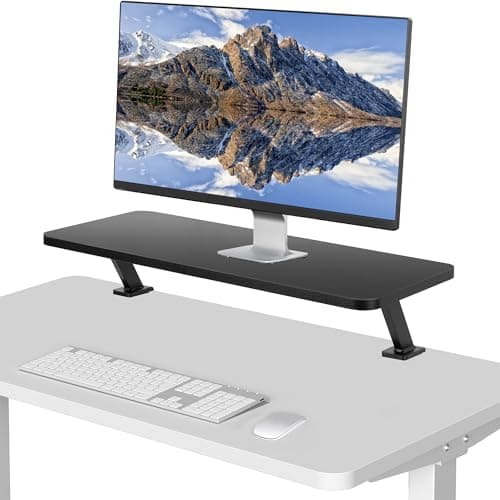
A clamp-on desk shelf raises a strip of storage above the desktop while occupying no desktop space at all— the VIVO shelf below mounts to the rear edge on posts. It is the right place for a dock, a drive, a lamp base or a speaker that would otherwise sit in your keyboard zone.

The honest catch: a monitor arm clamp and a clamp-on shelf both want the same rear edge, and on a 40-inch desk there is rarely room for both plus a clamp-on power strip. Decide which one earns the edge. On most small desks the arm wins, because depth is worth more than shelf space.

Move 4: get everything off the floor

In a small room the floor under the desk is also the floor you walk on, and a nest of cables there is both a trip hazard and the reason the desk cannot move. An under-desk tray and a couple of sleeves collapse the whole mess into one run; a PC mount gets the tower off the carpet and out of the knee space.

This is not cosmetic in a small space. It is what makes the desk a piece of furniture you can vacuum under and pull out from the wall, which in a box room is the difference between a workspace and an obstacle. Under-desk cable management covers the parts.

What about standing?

A full sit-stand desk in a small room is often the wrong shape — the frame needs width and the top needs depth. A compact converter that sits on the desk you already own is the realistic version: the FLEXISPOT 28-inch converter has a 28 in work surface and installs by being put down, which on a 40 in desk leaves room either side. It does occupy the desktop when lowered, which is the trade.

The short answer

Quick picks

#ProductBest forScorePrice
01
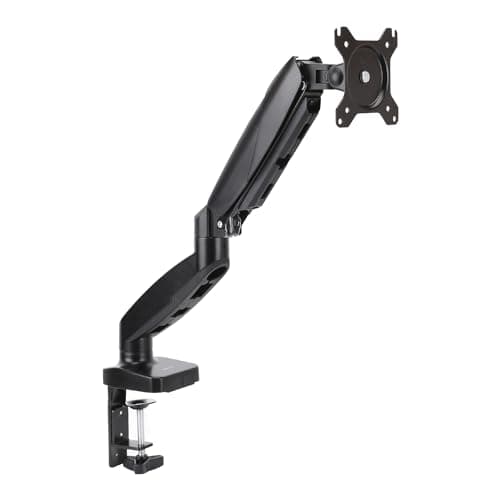
Amazon Basics Amazon Basics Gas Spring Single Monitor Arm
Amazon Basics Gas Spring Single Monitor Arm

The first thing to buy for a small desk. Clamp or grommet mounting, both VESA patterns, and a ceiling of about 17.6 lb that covers most 24 to 32 in panels - recovering the eight to ten inches of depth the stand was using.

Recovering desk depth
9.3
$27.29Amazon
02
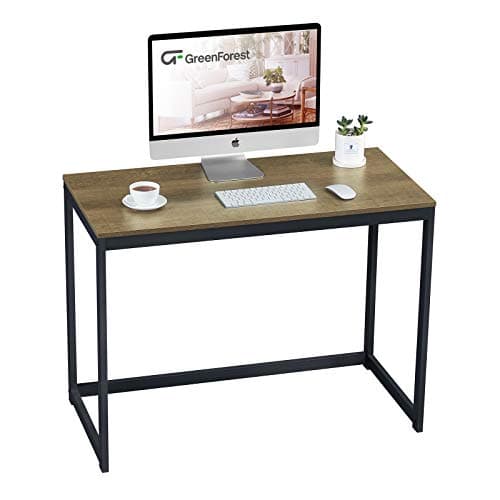
GreenForest GreenForest 40-Inch Computer Desk for Small Spaces
GreenForest 40-Inch Computer Desk for Small Spaces

The compact desk that does the one thing a small setup needs: a genuinely clear back edge, with no hutch and no rear rail, so a monitor arm or a clamp-on shelf can actually mount to it. 39.37 by 19.68 in on a 40mm metal tube frame.

A small desk an arm can clamp to
8.6
$51.32Amazon
03
No image
Keychron K3 Max SE Ultra-Slim Wireless Mechanical

The keyboard that gives the mouse its space back. A 75% low-profile layout keeps the function row and arrows while dropping the number pad, and it pairs to three devices over Bluetooth or runs on a 1000 Hz 2.4 GHz link.

Giving the mouse room
8.8
Check price →
04
VIVO VIVO Clamp-On Desk Shelf, 26" Single Monitor Riser
VIVO Clamp-On Desk Shelf, 26" Single Monitor Riser

Vertical storage that costs no desktop. A 26 in shelf on clamp posts at the rear edge, so a dock, a drive or a lamp base leaves the keyboard zone entirely - as long as you are not using that edge for an arm.

Storage with zero footprint
8.4
$59.99Amazon

#ad · Live prices from the Amazon Product API, as of October 23, 2026. Where we have no verified live price we show none — we would rather leave a gap than print a number that has rotted.

In detail

The picks, in full

01
Amazon Basics Amazon Basics Gas Spring Single Monitor Arm

Recovering desk depth

Amazon Basics Gas Spring Single Monitor Arm

Mount
Desk clamp or grommet
VESA
75 x 75 and 100 x 100mm
Screen size
Up to 32"
Weight
Up to about 17.6 lb (8 kg)
Motion
Gas spring, full tilt/swivel/rotate
9.3/10

The first thing to buy for a small desk. Clamp or grommet mounting, both VESA patterns, and a ceiling of about 17.6 lb that covers most 24 to 32 in panels - recovering the eight to ten inches of depth the stand was using.

Space Recovered
9.6
Fit Flexibility
9
Install Ease
9.2
Value
9.4

Pros

  • Frees the entire monitor stand footprint, which is the biggest single gain on a shallow desk
  • Clamp and grommet hardware both included, so the fit decision stays open
  • Rotates to portrait, which is how a narrow desk gets a second usable orientation
  • 17.6 lb ceiling suits the panels most small desks actually carry

Cons

  • Needs a flat clear rear edge and a couple of inches behind the desk
  • Occupies the rear edge a clamp-on shelf would want
  • Not the arm for a heavy 34 in-plus ultrawide

Skip this if…

…your desk is glass or hollow-core - a clamp is not safe on either, and a riser is the fallback.

$27.29View on Amazon

Price as of October 23, 2026. Prices change — Amazon's is the one that counts.

#ad · we may earn a commission from this link to Amazon Basics Gas Spring Single Monitor Arm

02
GreenForest GreenForest 40-Inch Computer Desk for Small Spaces

A small desk an arm can clamp to

GreenForest 40-Inch Computer Desk for Small Spaces

Dimensions
39.37" W x 19.68" D x 29.5" H
Frame
40mm powder-coated metal tube
Top
Thick particleboard
Clear back edge
Yes - no hutch or rear rail
Height
29.5" fixed
8.6/10

The compact desk that does the one thing a small setup needs: a genuinely clear back edge, with no hutch and no rear rail, so a monitor arm or a clamp-on shelf can actually mount to it. 39.37 by 19.68 in on a 40mm metal tube frame.

Space Recovered
7.4
Fit Flexibility
9.2
Install Ease
8.4
Value
9.2

Pros

  • A clear back edge is rare at this size and is what makes an arm possible
  • 40mm steel tube frame is stiffer than the thin-tube desks at this price
  • 39.37 in of width fits an alcove or a bedroom wall
  • 29.5 in fixed height works with a converter on top

Cons

  • 19.68 in of depth is shallow - an arm is close to mandatory, not optional
  • Fixed height, so a keyboard tray is the only way to lower the typing surface
  • Particleboard top, which cannot take a heavy grommet install

Skip this if…

…you want to keep the monitor on its own stand - 19.68 inches of depth does not allow it comfortably.

$51.32View on Amazon

Price as of October 23, 2026. Prices change — Amazon's is the one that counts.

#ad · we may earn a commission from this link to GreenForest 40-Inch Computer Desk for Small Spaces

03
No image

Giving the mouse room

Keychron K3 Max SE Ultra-Slim Wireless Mechanical

Layout
75% low-profile
Connection
2.4 GHz (1000Hz polling), Bluetooth 5.2 to 3 devices, or wired
Switch type
Hot-swappable Keychron Milk POM low-profile
Keycaps
Double-shot PBT, Mac layout, Windows compatible
Acoustics
EPDM plate foam plus bottom-case foam
8.8/10

The keyboard that gives the mouse its space back. A 75% low-profile layout keeps the function row and arrows while dropping the number pad, and it pairs to three devices over Bluetooth or runs on a 1000 Hz 2.4 GHz link.

Space Recovered
8.6
Fit Flexibility
8.4
Install Ease
9.6
Value
8.6

Pros

  • Drops the number pad without losing the function row or the arrows
  • Low profile sits close to the desk, so no wrist rest is needed to eat more depth
  • Three Bluetooth hosts, useful when a laptop and a desktop share one small desk
  • Hot-swappable, so the feel can change without buying another board

Cons

  • No number pad - a dealbreaker for spreadsheet work
  • 75% layouts compress the right-hand cluster, which takes a week to relearn
  • Low-profile switch choice is narrower than full-height

Skip this if…

…you enter numbers all day - buy a full-size board and find the width elsewhere.

Check price on Amazon →

We don't have a verified live price for this right now, so we aren't showing one.

#ad · we may earn a commission from this link to Keychron K3 Max SE Ultra-Slim Wireless Mechanical

04
VIVO VIVO Clamp-On Desk Shelf, 26" Single Monitor Riser

Storage with zero footprint

VIVO Clamp-On Desk Shelf, 26" Single Monitor Riser

Type
Clamp-on desk shelf
Width
26" shelf
Mounting
Clamps to the rear desk edge
Desk area
Occupies no desktop space at all
Adjustment
Height set at the clamp posts
8.4/10

Vertical storage that costs no desktop. A 26 in shelf on clamp posts at the rear edge, so a dock, a drive or a lamp base leaves the keyboard zone entirely - as long as you are not using that edge for an arm.

Space Recovered
8.8
Fit Flexibility
7.6
Install Ease
8.6
Value
8.6

Pros

  • Takes no desktop space, which no riser that sits on the desk can match
  • 26 in of shelf holds a dock, a drive and a speaker clear of the work area
  • Height set at the posts, so it can clear a keyboard parked underneath
  • Removable, with no holes in the desk

Cons

  • Competes with a monitor arm for the same rear edge
  • Needs the same clear flat back edge an arm does
  • Does not recover any depth - it adds height, not room

Skip this if…

…you are fitting a monitor arm - on a 40 in desk there is usually only room for one rear-edge clamp.

$59.99View on Amazon

Price as of October 23, 2026. Prices change — Amazon's is the one that counts.

#ad · we may earn a commission from this link to VIVO Clamp-On Desk Shelf, 26" Single Monitor Riser

Where the depth goes on a 19.68-inch desk

What takes the depthRoughly how muchHow to get it back
Monitor stand base8 to 10 inA clamp-on arm, mounted behind the back edge
Keyboard plus wrist rest7 to 9 inA low-profile board, or an under-desk tray
Forearm resting space3 to 4 inNothing - this is the part you must protect
Dock, drive, speaker2 to 5 inA clamp-on shelf, or under the desk

Add the first two rows and you are already past 19.68 inches before your arms arrive. That is the whole argument for the arm, and the desk depth guide runs the same arithmetic across every common desk size.

The order to spend in

1. Monitor arm. Biggest depth gain per dollar, and it also fixes the screen height. Check the four fit measurements first.

2. A narrower keyboard. Four inches of width handed to the mouse, for less than the arm costs.

3. Cable management. Cheap, and it is what lets the desk move at all in a small room.

4. Vertical storage, if the rear edge is still free. A clamp-on shelf, or a wall shelf above the desk if it is not.

5. A different desk, last. Replace the desk only once you know what depth you actually need, and buy one with a clear back edge so the arm has something to hold. The small desk roundup ranks them on usable depth and whether an arm can clamp to them.

Five small-space mistakes

Buying a smaller monitor. The stand is the problem, not the panel. A 27-inch screen on an arm fits a shallow desk better than a 24-inch screen on its stand.

Pushing the desk flat against the wall. It feels like saving space and it costs two to four inches of arm travel, which is the depth you just paid to recover.

Choosing a desk with a hutch or a rear rail. It looks like storage. It removes the mounting surface for every clamp accessory you might later want.

Using a riser on an already-shallow desk.A riser that sits on the desktop adds height but consumes the same footprint. On a 20-inch desk, that is the wrong direction — arm versus stand makes the case both ways.

Forgetting the chair needs to tuck. In a box room the chair's swept area matters as much as the desk's footprint. Flip-up armrests let a chair slide fully under a shallow desk, which several of the chairs in the budget chair roundup have for exactly this reason.
Essentials

The small parts that finish the job

Nothing here changes a pick above, and none of it is a considered purchase. These are the cheap pieces that decide whether the expensive one works properly, and the ones people discover they are missing on the day the big box arrives.

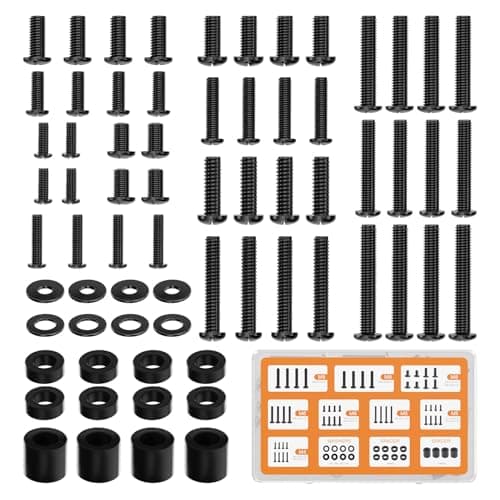
  • WALI Universal Mounting Hardware Set (M4, M5, M6, M8)

    WALI Universal Mounting Hardware Set (M4, M5, M6, M8)

    Arms ship with one length of screw. Thick panels, recessed VESA patterns and curved backs regularly need a longer thread or a spacer, and a mixed M4 to M8 kit turns a half-finished install into a ten-minute job.

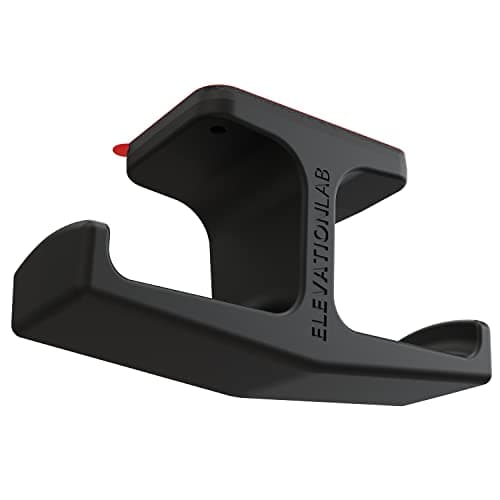
  • Elevation Lab The Anchor Under-Desk Headphone Mount

    Elevation Lab The Anchor Under-Desk Headphone Mount

    A headset left on the desk takes up the same surface an arm or a riser was bought to give back. Under the front edge it hangs in dead space, out of the way of the keyboard and off the cables.

    Check first: adhesive mounts want a smooth, clean underside. Rough or heavily textured laminate will not hold one.

#ad · Live prices from the Amazon Product API, as of October 23, 2026. Where we have no verified live price we show none. We may earn a commission, at no extra cost to you.

How we picked

We do not run a testing lab

We compiled the published manufacturer specifications, did the ergonomics, VESA and desk-depth math ourselves, and read aggregated owner reviews, then scored each product against a published rubric. The scores are judgments from documented research — they are not measurements we took, because we do not have a lab and we are not going to pretend we do. Every spec traces back to a listing or manual named in Sources.

Questions

Frequently asked

How deep does a desk need to be?
With the monitor on an arm, about 20 inches is workable. With the monitor on its own stand, you want 28 to 30 inches, because the stand takes eight to ten of them before your keyboard and forearms get any.
What is the best monitor setup for a small desk?
One good screen on a clamp-on arm, pushed back past the desk's rear edge. That recovers the stand's whole footprint and lets you set a proper viewing distance, which a shallow desk otherwise cannot provide.
Should I buy a smaller monitor for a small desk?
Usually not. The stand is what eats the space, not the panel. Keep the screen size you want and mount it on an arm instead.
Can I fit a standing desk in a small room?
A compact converter that sits on your existing desk is the realistic option — a 28 in work surface fits on a 40 in desk with room either side. A full sit-stand frame needs width for the legs and depth for the top.
Is a 60% or 75% keyboard better for a small desk?
A 75% layout is the better trade for most people: it drops the number pad, which is the four inches you want back, while keeping the function row and the arrow keys. A 60% saves a little more and removes keys most people use daily.
Can I use a monitor arm on a desk against the wall?
Yes, but pull the desk two to three inches off the wall. The clamp body sits behind the rear edge and the arm needs room to travel back — a desk flat to the wall wastes a good part of the reach you bought.

Keep reading

Receipts

Sources

We do not run a testing lab, and we do not pretend to. Specifications come from the manufacturer or retailer listing; the footprint and clearance math is ours and reproducible. Where we could not verify a number, we say so on the page rather than quietly leaving it out. Read our full method.