Skip to content
Chair & Cable

SECTION 03 · Ergonomic Chairs

Steelcase Leap or Gesture?

Both are 400-pound-rated, 12-year-warranty chairs from the same maker. They solve different problems, and one question about how you use your arms settles it.

By Stephen V.Updated How we pick
#ad

We earn a commission when you buy through our Amazon links, at no extra cost to you. It never affects our rankings, and we say so when the cheaper product is the better buy. How this works.

One question decides this. Do your arms stay on the keyboard, or do they move?If you type all day, buy the Leap — it has the better back mechanism and it costs less. If your day involves a phone, a tablet, a stylus, a controller or a lot of leaning to talk to people, buy the Gesture, because its arms go places no other chair’s do.

Everything else about these two chairs is close enough that it will not change your mind. Both are rated to 400 lb, both carry a 12-year warranty, both use a flexing rather than a fixed back, and both are built to a commercial-contract standard that is the actual reason people buy Steelcase.

The comparison, on what actually differs

 Leap V2Gesture
Headline featureLiveBack + separately adjustable lumbar360° armrests
Lumbar adjustmentHeight and firmnessHeight
Seat depthAdjustableAdjustable
Recline behaviorNatural Glide — seat slides forward as you lean backSynchronized back and seat tilt
Armrest movement4D — up/down, in/out, forward/back, pivot360° rotation plus full height and width range
Weight capacity400 lb400 lb
Warranty12 years12 years
Typical priceHighHigher

What the Leap does that the Gesture does not

Two things, and both are about the back.

Lumbar firmness is a separate control.Nearly every chair lets you move the lumbar support up and down. The Leap also lets you set how hard it pushes. That matters because the correct amount of lumbar pressure is personal in a way height is not — some people want the curve filled, others want it barely touched, and a chair that only offers position forces the wrong answer on half of them.

Natural Glide.When you recline in a conventional chair, your torso moves backward and your eyes move away from the screen, which is why most people recline for thirty seconds and then sit forward again. The Leap’s seat slides forward as the back tilts, keeping your eyes and hands roughly where they were. The practical result is that you recline more often, which is the whole point of a chair that reclines. On a desk with a monitor on an arm, this pairs well — you can push the screen back to match.

What the Gesture does that the Leap does not

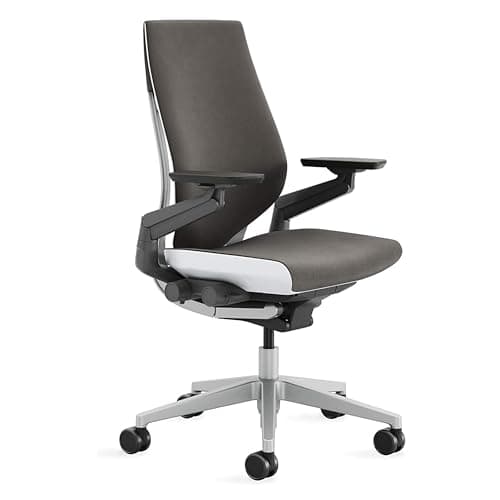
One thing, done extremely well: the arms. The Gesture’s armrests rotate a full 360 degrees around their pivot and have the largest width range of any office chair currently sold. In practice that means an armrest can support your forearm while you hold a phone, angle inward to a narrow typing position, swing out of the way entirely, or come forward to support a tablet on your lap.

Whether that is worth the price difference depends entirely on your day. For a developer or writer whose hands are on a keyboard for six hours, it is not. For someone who alternates between typing, a tablet, a phone call and turning to talk to someone, it is the single most useful mechanism on any chair reviewed on this site. The general principle — that arm height and width are part of the same system as keyboard position — is covered in keyboard and mouse ergonomics.

The thing neither of them has

Neither ships with a headrest in its standard configuration. If you recline to read or think and want your head supported, that is a real omission, and the aftermarket attachments for both are mediocre. Chairs with a proper integrated headrest at a fraction of the price are in the mesh chair roundup, and the recline-first argument is covered in gaming chair vs office chair.

Buying used, which is how most people buy these

Both chairs have long second-hand lives because contract furniture is replaced on a schedule rather than when it fails. If you go that route, three checks matter: the gas cylinder should hold height under load without sinking, the arm pads should not be split, and the tilt tension knob should have resistance through its whole travel. A refurbished chair with a fresh cylinder and new arm pads is a genuinely good buy; one with a sinking cylinder is a repair job. And check whether any remaining warranty transfers — on many contract chairs it does not.

The short answer

Quick picks

#ProductBest forScorePrice
01
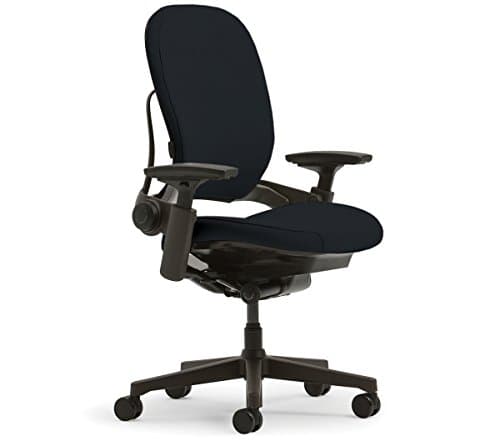
Steelcase Steelcase Leap Chair V2 (the back specialist)
Steelcase Leap Chair V2 (the back specialist)

The chair to buy if your problem is your back. LiveBack reshapes as you move, lumbar height and firmness adjust separately, and the seat glides forward as you recline so you stay in reach of the keyboard.

Best for back support
8.7
$1,350.96Amazon
02
Steelcase Steelcase Gesture (the armrest specialist)
Steelcase Gesture (the armrest specialist)

The chair to buy if your problem is your arms. Its 360-degree armrests have the widest published movement range of any office chair, which is the entire reason it costs more than a Leap.

Best armrests
8.5
$1,510.48Amazon
03
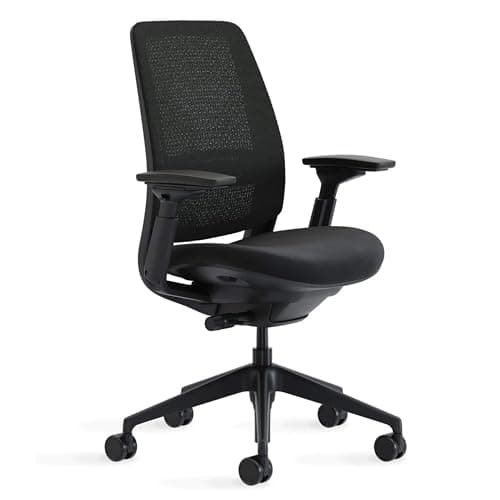
Steelcase Steelcase Series 2 (the value Steelcase)
Steelcase Series 2 (the value Steelcase)

The chair that makes both of the above hard to justify for most people. Same maker, same 400 lb rating, a weight-activated recline and 4-way arms, at roughly half the money.

Best value
8.8
$633.08Amazon

#ad · Live prices from the Amazon Product API, as of Sep 6, 2026. Where we have no verified live price we show none — we would rather leave a gap than print a number that has rotted.

In detail

The picks, in full

01
Steelcase Steelcase Leap Chair V2 (the back specialist)

Best for back support

Steelcase Leap Chair V2 (the back specialist)

Back
LiveBack, changes shape as you move
Lumbar
Adjustable lumbar height and firmness, separately
Seat
Adjustable seat depth
Recline
Natural Glide system, 5-position tilt with tension control
Armrests
Fully adjustable 4D arms
Capacity
400 lb
Warranty
12 years, covering the entire chair
8.7/10

The chair to buy if your problem is your back. LiveBack reshapes as you move, lumbar height and firmness adjust separately, and the seat glides forward as you recline so you stay in reach of the keyboard.

Back Support
9.6
Armrest Range
8.2
Seat Adjustment
9.4
Value
7.4

Pros

  • Lumbar height and firmness adjust independently, which almost nothing else offers
  • Natural Glide slides the seat forward as the back reclines, so reclining does not push you away from the desk
  • Adjustable seat depth suits both long and short femurs
  • 12-year whole-chair warranty

Cons

  • Arms adjust in four directions but do not rotate
  • No headrest in standard configurations
  • Premium price, and widely resold in variable condition

Skip this if…

you work with your arms in unusual positions all day - the Gesture's arms are the reason it exists.

$1,350.96View on Amazon

Price as of Sep 6, 2026. Prices change — Amazon's is the one that counts.

#ad · we may earn a commission from this link to Steelcase Leap Chair V2 (the back specialist)

02
Steelcase Steelcase Gesture (the armrest specialist)

Best armrests

Steelcase Gesture (the armrest specialist)

Armrests
360 degree arms - the widest width range on the market
Back
24.06" high x 16.25" wide, flexing backrest
Capacity
400 lb
Adjustment
Seat height, depth, recline tension and tilt lock
Warranty
12 years
8.5/10

The chair to buy if your problem is your arms. Its 360-degree armrests have the widest published movement range of any office chair, which is the entire reason it costs more than a Leap.

Back Support
8.8
Armrest Range
9.9
Seat Adjustment
8.8
Value
6.4

Pros

  • Arms rotate a full 360 degrees around their pivot, so they support a phone, a tablet or a controller as well as a keyboard
  • Arms move inward far enough to support a narrow typing posture, which fixed-width arms cannot
  • Same 400 lb rating and 12-year warranty as the Leap
  • Back flexes rather than bracing, in the same family as the Leap's LiveBack

Cons

  • The most expensive chair on this page
  • No separate lumbar firmness control - back support is less finely tunable than the Leap's
  • The armrest advantage is worth nothing if you only ever type

Skip this if…

your day is keyboard, keyboard and more keyboard - you are paying for range you will not use.

$1,510.48View on Amazon

Price as of Sep 6, 2026. Prices change — Amazon's is the one that counts.

#ad · we may earn a commission from this link to Steelcase Gesture (the armrest specialist)

03
Steelcase Steelcase Series 2 (the value Steelcase)

Best value

Steelcase Series 2 (the value Steelcase)

Back type
Air LiveBack mesh, flexes in two dimensions
Lumbar
Height-adjustable lumbar support
Armrests
4-way adjustable (up/down, pivot, forward/back, side to side)
Recline
Weight-activated tension with 3 additional settings
Capacity / warranty
400 lb; 12-year mechanism warranty
8.8/10

The chair that makes both of the above hard to justify for most people. Same maker, same 400 lb rating, a weight-activated recline and 4-way arms, at roughly half the money.

Back Support
8.8
Armrest Range
8.4
Seat Adjustment
7.6
Value
9.2

Pros

  • Weight-activated recline sets its own tension, removing the adjustment people most often get wrong
  • Mesh back rather than upholstery, so it runs cooler than either flagship
  • 4-way arms cover the axes that matter for keyboard height and width
  • 400 lb capacity and a 12-year mechanism warranty at well under flagship money

Cons

  • No adjustable seat depth, which the Leap and Gesture both have
  • Lumbar adjusts for height but not firmness
  • No headrest option in the standard configuration

Skip this if…

your femurs are long or short enough that fixed seat depth is a real problem.

$633.08View on Amazon

Price as of Sep 6, 2026. Prices change — Amazon's is the one that counts.

#ad · we may earn a commission from this link to Steelcase Series 2 (the value Steelcase)

The verdict

Buy the Leap V2 if you type most of the day, if lower-back support is the reason you are shopping, or if you want to be able to recline without leaving the keyboard. It is the better chair for the more common problem, and it costs less than the Gesture.

Buy the Gestureif your arms move — phone, tablet, stylus, controller, or a job that involves turning to talk to people. The armrests are not a marketing feature; they are a genuinely different mechanism, and nothing else on the market matches their range.

Buy the Series 2if neither of those descriptions is emphatically you. Same maker, same 400 lb rating, same 12-year mechanism warranty, a cooler mesh back, and a recline that sets its own tension — for roughly half the money. It gives up adjustable seat depth and lumbar firmness, which matters for some bodies and not for others. The direct comparison against the other flagship in this class is in Herman Miller vs Steelcase, and the Herman Miller pair are compared in Aeron vs Embody.

Whichever arrives, spend twenty minutes setting it up. A Leap adjusted badly is worse than a mid-range chair adjusted well, and the order matters — it is in how to adjust an office chair.

Essentials

The small parts that finish the job

Nothing here changes a pick above, and none of it is a considered purchase. These are the cheap pieces that decide whether the expensive one works properly, and the ones people discover they are missing on the day the big box arrives.

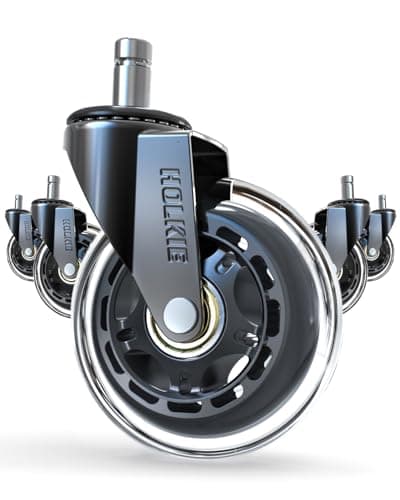
  • HOLKIE Rollerblade-Style Chair Casters, 3 in (set of 5)

    HOLKIE Rollerblade-Style Chair Casters, 3 in (set of 5)

    The cheapest real upgrade a chair you already own can take. Hard nylon wheels fight carpet and skate on hard floors; wider rubber casters roll on both and stay put when you sit down.

    Check first: chair stems are not standardized. Pull one existing caster out and measure its stem diameter and length against the listing before ordering.

#ad · Live prices from the Amazon Product API, as of Sep 6, 2026. Where we have no verified live price we show none. We may earn a commission, at no extra cost to you.

How we picked

We do not run a testing lab

We compiled the published manufacturer specifications, did the ergonomics, VESA and desk-depth math ourselves, and read aggregated owner reviews, then scored each product against a published rubric. The scores are judgments from documented research — they are not measurements we took, because we do not have a lab and we are not going to pretend we do. Every spec traces back to a listing or manual named in Sources.

Questions

Frequently asked

Is the Steelcase Gesture worth the extra money over the Leap?
Only if you use your arms in varied positions during the day. The Gesture’s 360-degree armrests are its reason to exist, and they are genuinely unmatched. If your hands are on a keyboard almost all the time, the Leap gives you a better back mechanism for less.
Which is better for lower back pain, Leap or Gesture?
The Leap, because it adjusts lumbar firmness as well as height. Being able to set how hard the support pushes — not just where it sits — is the difference between a lumbar that helps and one you end up ignoring. The broader selection on lumbar fit is in best office chairs for back pain.
Do the Leap and Gesture come with a headrest?
Not in standard configurations. Both are designed around upright working posture. Aftermarket headrest attachments exist for both and are generally mediocre; if a headrest matters to you, a chair designed with one is the better route.
What is Steelcase Natural Glide?
It is the Leap’s recline mechanism: as the backrest tilts, the seat slides forward, so your eyes and hands stay roughly in place instead of moving away from the screen and keyboard. The practical effect is that people actually recline instead of sitting rigidly upright all day.
Is a used Steelcase Leap a good buy?
Often yes — contract chairs are replaced on schedule rather than at failure, so many are structurally fine. Check that the gas cylinder holds height under load, that the arm pads are not split, and that the tilt tension has resistance through its travel. Confirm whether any remaining warranty transfers, because on contract furniture it frequently does not.

Keep reading

Receipts

Sources

We do not run a testing lab, and we do not pretend to. Specifications come from the manufacturer or retailer listing; the footprint and clearance math is ours and reproducible. Where we could not verify a number, we say so on the page rather than quietly leaving it out. Read our full method.