Skip to content
Chair & Cable

SECTION 02 · Standing Desks

The best desks for three monitors

A third screen is a desk problem before it is a monitor problem. Ranked on the width the array needs and whether a triple mount can clamp to the top at all.

By Stephen V.Updated How we pick
#ad

We earn a commission when you buy through our Amazon links, at no extra cost to you. It never affects our rankings, and we say so when the cheaper product is the better buy. How this works.

Buy the Coleshome 79-inch if you have the wall: 79 inches wide by about 30 deep is the only desk here that takes three 27-inch screens on their own stands with room left for a keyboard. If you do not have seven feet of wall, buy the SHW Mission 55 x 60 L-shapeand a triple mount — the corner splits the array across two shorter runs, and the open frame is what lets the mount clamp. Both are fixed-height; the Cubiker 63 x 55 electric L is the pick if the desk also has to rise.

The reason a third monitor goes wrong is almost never the monitor. It is that three screens need a surface most people do not have, and the mount that would solve it cannot grip the desk they do have. So before you look at a single desk, do the arithmetic.

The width three screens actually need

A 16:9 panel is roughly its diagonal multiplied by 0.872, so a 27-inch screen is about 23.5 inches of glass and a 24-inch is about 20.9. Three 27-inch panels side by side are therefore around 70 inches of screen before you add bezels, and three 24-inch panels around 63. That is the starting number, and it is why a 48-inch desk cannot host a triple setup no matter how the monitors are mounted.

Two things reduce it. Angling the outer screens inward shortens the straight-line span, because you are measuring the chord rather than the arc — a 30-degree toe-in on each wing pulls a 70-inch array in by several inches. And putting the array on a mount rather than on three stands removes the stand feet entirely, which are the parts that fight the keyboard. The VIVO triple mount below publishes 68 inches of arm span with up to 32.5 inches of reach, which is the spec that makes a 55-inch desk workable.

The practical thresholds: about 72 inches of straight desk for three 27-inch panels on their own stands, about 55 inches with a triple mount and the outer screens angled in, and 60 or more if the middle screen is a 32. Our desk width guide runs the same arithmetic for one and two screens.

Depth matters more than it does on a dual setup

Three screens push the outer panels toward your periphery, and the instinctive fix is to pull the whole array closer — which is the wrong move, because the middle screen then sits too close to read comfortably. You want the array further back than a single monitor, which means depth.

A 24-inch deep desk is too shallow for three screens on stands; 30 inches is comfortable. If your desk is shallower than that, a mount with real reach fixes it by hanging the screens out over the rear edge instead of standing them on the surface. The arithmetic for your own viewing distance is in the desk depth guide, and the triple monitor setup guidecovers the arrangement itself — which screen goes in the middle, and what to do about the two video outputs most laptops have.

The rear edge is the spec that silently kills the plan

Every triple mount here is a C-clamp or grommet mount, and a clamp needs a clear, flat strip of rear edge within its thickness range. The VIVO pole clamps tops up to 3.25 inchesthick. What defeats it is not thickness, though — it is a hutch, a rear rail, a shelf, or a top that overhangs its frame with nothing solid behind it.

This is why the open-frame desks on this page outrank prettier ones. A desk with storage above the surface is a desk you cannot mount three screens to. The arm installation guide has the four fit checks; run them on the desk you are considering before you order anything.

Three screens is a load, not a decoration

Three 27-inch panels, a mount pole, a keyboard, and a laptop is real weight, and it all lands on a few square inches of clamp. On a fixed desk the concern is the top bowing in the middle over a long span. On a sit-stand desk it is the published capacity and the wobble at standing height — a tall pole with three screens on it is a lever, and it amplifies every bit of frame flex. If you are going the sit-stand route, read what a standing desk can actually hold first, and the wobble diagnosis order second.

What fits what

Desk shapeThree screens on standsThree screens on a mount
48 in straightNoNo - the array is wider than the desk
55 in straightNoYes, with the outer screens angled in
60-63 in straightThree 24-inch panels, tightYes, comfortably
79 in straightYes, three 27-inch panelsYes, with room for a fourth screen vertically
L-shape (55-63 in main run)Two on the main run, one on the returnYes - the main run takes the array, the return stays clear

The short answer

Quick picks

#ProductBest forScorePrice
01
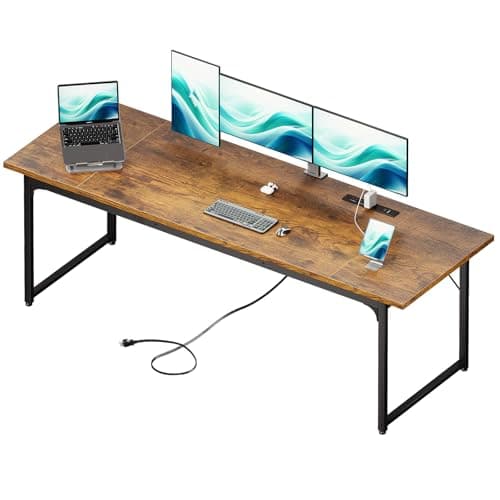
Coleshome Coleshome 79" Large Computer Desk
Coleshome 79" Large Computer Desk

The only desk here that hosts three 27-inch screens on their own stands and still leaves a keyboard zone. 79 inches wide by about 30 deep, with leveling feet - which matter on a span this long, because an uneven floor shows up as a rock under three screens.

Three screens without a mount
9.3
$119.99Amazon
02
SHW SHW Mission 55 x 60 L-Shaped Home Office Desk
SHW Mission 55 x 60 L-Shaped Home Office Desk

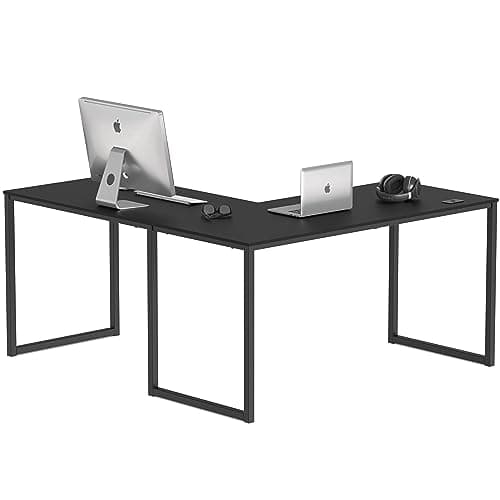
The answer when the wall is not seven feet long. The corner splits a three-screen array across two shorter runs, and the frame is completely open underneath - which is what lets a triple mount clamp and the three video cables disappear.

Three screens in a corner
9.0
$129.87Amazon
03
Cubiker Cubiker Reversible L-Shaped Electric Standing Desk, 63 x 55
Cubiker Reversible L-Shaped Electric Standing Desk, 63 x 55

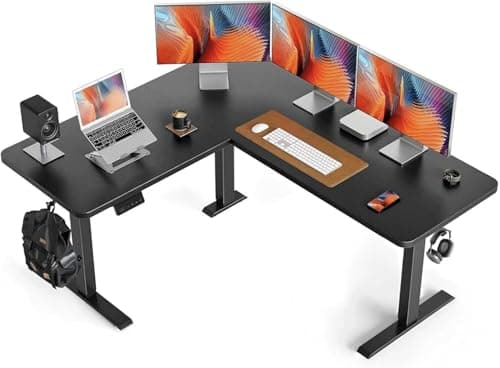
The triple-screen desk that also rises. A 63-inch main run is enough for an array on a mount, and the multi-leg powered frame is doing the real work - it is what keeps a large L-shaped top from twisting through the travel.

A triple setup that stands
8.4
Check price →
04
FEZIBO FEZIBO L-Shaped Electric Standing Desk (63 x 48")
FEZIBO L-Shaped Electric Standing Desk (63 x 48")

The compact electric corner: a 63-inch run with a 48-inch return, memory presets, and a smaller footprint than the Cubiker. The pick for a three-screen nook where the return is a laptop zone rather than a second array.

The smallest electric corner
8.1
Check price →
05
VIVO VIVO Electric Dual Motor Desk Frame (DESK-V103E)
VIVO Electric Dual Motor Desk Frame (DESK-V103E)

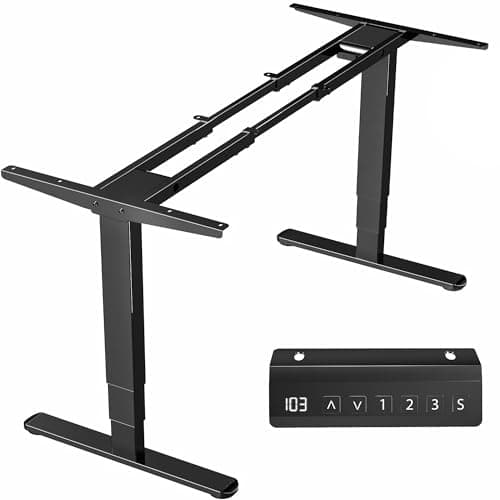
The route to a width no retailer stocks. This frame publishes tops from 40 to 85 inches long and 23 to 43 deep with a 220 lb capacity, so a 76-inch top for three screens plus the depth they want becomes a thing you can build.

A custom width for the array
9.0
$249.99Amazon

#ad · Live prices from the Amazon Product API, as of October 23, 2026. Where we have no verified live price we show none — we would rather leave a gap than print a number that has rotted.

In detail

The picks, in full

01
Coleshome Coleshome 79" Large Computer Desk

Three screens without a mount

Coleshome 79" Large Computer Desk

Surface
79" W x 30" D (approx.)
Height
Fixed, standard desk height
Top
Engineered wood, water-resistant laminate
Frame
Steel legs with leveling feet
Assembly
Two-person job for the long panel
9.3/10

The only desk here that hosts three 27-inch screens on their own stands and still leaves a keyboard zone. 79 inches wide by about 30 deep, with leveling feet - which matter on a span this long, because an uneven floor shows up as a rock under three screens.

Width for Three
9.8
Depth
9.2
Mountability
8.6
Value
9.4

Pros

  • 79 inches clears the roughly 70 inches of glass three 27-inch panels need
  • 30 inches of depth keeps the middle screen at a readable distance on its own stand
  • Leveling feet stop the long span from rocking on an uneven floor
  • Lowest cost per square inch of desktop on this page

Cons

  • Needs a genuinely clear seven-foot wall, plus room to pull the chair back
  • A single long top flexes more in the middle than a shorter one - keep the heaviest load over a leg
  • Fixed height only
  • The long panel does not turn on a stair landing; check the carry-in path

Skip this if…

…your wall is under about 72 inches - a mount on a 55-inch desk is the better answer than a desk you cannot fit.

$119.99View on Amazon

$149.9920% off

Price as of October 23, 2026. Prices change — Amazon's is the one that counts.

#ad · we may earn a commission from this link to Coleshome 79" Large Computer Desk

02
SHW SHW Mission 55 x 60 L-Shaped Home Office Desk

Three screens in a corner

SHW Mission 55 x 60 L-Shaped Home Office Desk

Footprint
55" x 60" L-shape
Orientation
Reversible - return on either side
Surface
Laminate desktop on a steel frame
Storage
None - open underneath
Assembly
Bolt-together frame
9.0/10

The answer when the wall is not seven feet long. The corner splits a three-screen array across two shorter runs, and the frame is completely open underneath - which is what lets a triple mount clamp and the three video cables disappear.

Width for Three
8.8
Depth
8.4
Mountability
9.4
Value
9.2

Pros

  • Two runs of 55 and 60 inches host an array that no single wall in the room could
  • Fully open underneath, so a mount clamps anywhere and cable trays bolt straight on
  • Reversible at build time, so the return lands on the correct side of the room
  • Nothing mechanical to fail

Cons

  • The corner itself is dead space for screens - the array goes on one run, not across the joint
  • Laminate marks more easily than a solid top
  • The steel frame is not heavy gauge, so place a triple-mount clamp over a rail rather than mid-span
  • No storage at all

Skip this if…

…you want all three screens in one straight line - the corner is the point of this desk, and a straight 72-inch top is the alternative.

$129.87View on Amazon

Price as of October 23, 2026. Prices change — Amazon's is the one that counts.

#ad · we may earn a commission from this link to SHW Mission 55 x 60 L-Shaped Home Office Desk

03
Cubiker Cubiker Reversible L-Shaped Electric Standing Desk, 63 x 55

A triple setup that stands

Cubiker Reversible L-Shaped Electric Standing Desk, 63 x 55

Footprint
63" x 55" L-shape
Adjustment
Electric height adjustment
Orientation
Reversible configuration
Frame
Multi-leg powered frame supporting both arms
Surface
Laminate desktop
8.4/10

The triple-screen desk that also rises. A 63-inch main run is enough for an array on a mount, and the multi-leg powered frame is doing the real work - it is what keeps a large L-shaped top from twisting through the travel.

Width for Three
8.6
Depth
8.4
Mountability
8.4
Value
8

Pros

  • 63 inches of main run takes a mounted three-screen array with the wings angled in
  • Multi-leg frame is more rigid under a tall mount pole than a two-leg desk of the same size
  • Corner shape and sit-stand travel in one desk, which few desks offer
  • Reversible, so it fits either corner of the room

Cons

  • Three screens on a pole wobble more at standing height than at sitting height, on any desk
  • Cable management is harder: two arms of cabling that all have to travel vertically
  • More to level and assemble than any fixed desk here
  • Costs more than a fixed L of the same surface area

Skip this if…

…you will not actually raise it - a fixed L is cheaper, simpler and more rigid under this load.

Check price on Amazon →

No buyable offer at the last price check (October 23, 2026). We show nothing rather than a stale number.

#ad · we may earn a commission from this link to Cubiker Reversible L-Shaped Electric Standing Desk, 63 x 55

04
FEZIBO FEZIBO L-Shaped Electric Standing Desk (63 x 48")

The smallest electric corner

FEZIBO L-Shaped Electric Standing Desk (63 x 48")

Surface
63" x 48" L-shape (corner)
Height range
Electric, about 28 to 48 in
Motor
Electric lift with memory presets
Top
Engineered wood, two-piece corner
Capacity
Rated for a multi-monitor load
8.1/10

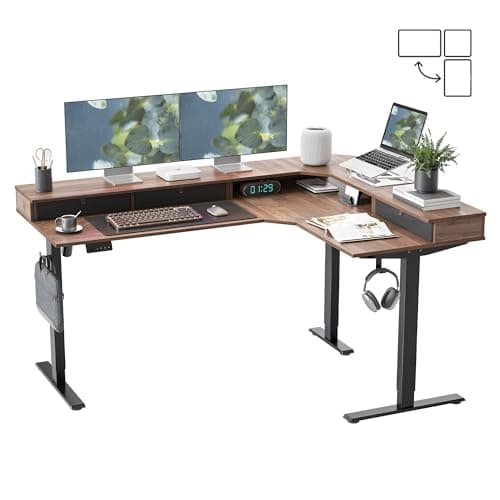
The compact electric corner: a 63-inch run with a 48-inch return, memory presets, and a smaller footprint than the Cubiker. The pick for a three-screen nook where the return is a laptop zone rather than a second array.

Width for Three
8.2
Depth
8.2
Mountability
8
Value
7.8

Pros

  • 63-inch main run hosts a mounted array while the 48-inch return stays a clear work zone
  • Memory presets recall sitting and standing heights, so the array height stays consistent
  • Fits a corner that the 63 x 55 Cubiker would overfill
  • Two working zones out of one footprint

Cons

  • An L-shaped top can sway more at full standing height than a straight one
  • Heavier and slower to assemble than any fixed desk here
  • The two-piece top has a seam across the corner, which is where a clamp should not go
  • Costs more than the fixed desks by a wide margin

Skip this if…

…you do not have a corner to build it into - a straight electric desk of the same price is more rigid.

Check price on Amazon →

No buyable offer at the last price check (October 23, 2026). We show nothing rather than a stale number.

#ad · we may earn a commission from this link to FEZIBO L-Shaped Electric Standing Desk (63 x 48")

05
VIVO VIVO Electric Dual Motor Desk Frame (DESK-V103E)

A custom width for the array

VIVO Electric Dual Motor Desk Frame (DESK-V103E)

Tabletop
40" to 85" long, 23" to 43" deep, 3/4" minimum thickness
Height range
23.5" to 49.3"
Lift
Dual motor, 3-stage columns, 38mm/s
Weight capacity
220 lb
Controller
Push-button with 3 memory settings
Warranty
3 years
9.0/10

The route to a width no retailer stocks. This frame publishes tops from 40 to 85 inches long and 23 to 43 deep with a 220 lb capacity, so a 76-inch top for three screens plus the depth they want becomes a thing you can build.

Width for Three
9.6
Depth
9.6
Mountability
9.2
Value
7.6

Pros

  • The published 40 to 85-inch range covers every triple-screen width, including the 72 to 79 inches a stand-mounted array needs
  • Tops up to 43 inches deep, which no complete desk on this page offers
  • 220 lb capacity covers three panels, a mount pole and a tower on the desk
  • You choose a top thick and solid enough to take a triple clamp, which is where cheap complete desks fail

Cons

  • You supply, drill and finish the top - a real afternoon of work
  • A top near the 85-inch end flexes more at standing height, and three screens make that visible
  • The 3/4-inch minimum thickness rules out thin or hollow-core tops
  • Total cost often lands above a complete desk of the same width

Skip this if…

…a stock 63 or 79-inch desk fits your wall - you are buying a build you do not need.

$249.99View on Amazon

Price as of October 23, 2026. Prices change — Amazon's is the one that counts.

#ad · we may earn a commission from this link to VIVO Electric Dual Motor Desk Frame (DESK-V103E)

Essentials

The small parts that finish the job

Nothing here changes a pick above, and none of it is a considered purchase. These are the cheap pieces that decide whether the expensive one works properly, and the ones people discover they are missing on the day the big box arrives.

  • 2-Inch Desk Grommet Kit with Hole Saw (10 pack)

    2-Inch Desk Grommet Kit with Hole Saw (10 pack)

    Cables that drop straight through the desktop stay where you put them. Cables routed around the back edge get dragged every time the desk moves or the chair rolls back, which is what undoes a tidy run within a week. The hole saw is in the box, so the cut and the finished edge come from one purchase.

    Check first: decide the hole position and check your desktop thickness before you cut. A grommet hole is not reversible.

#ad · Live prices from the Amazon Product API, as of October 23, 2026. Where we have no verified live price we show none. We may earn a commission, at no extra cost to you.

How we picked

We do not run a testing lab

We compiled the published manufacturer specifications, did the ergonomics, VESA and desk-depth math ourselves, and read aggregated owner reviews, then scored each product against a published rubric. The scores are judgments from documented research — they are not measurements we took, because we do not have a lab and we are not going to pretend we do. Every spec traces back to a listing or manual named in Sources.

Questions

Frequently asked

How wide does a desk need to be for three monitors?
About 72 inches for three 27-inch panels on their own stands, because three 16:9 screens at that diagonal are roughly 70 inches of glass. With a triple mount and the outer screens angled inward, 55 to 60 inches works, because the mount removes the stand feet and lets the array sit back over the rear edge.
Can I run three monitors on a 60-inch desk?
Yes, with a mount. Three 24-inch panels fit at 60 inches even on stands; three 27-inch panels need the stands gone. The VIVO triple mount publishes 68 inches of span and 32.5 inches of reach, which is what makes a 60-inch desk comfortable rather than crowded.
Is an L-shaped desk good for three monitors?
It is the best option when the room has no long wall. Put the array on the main run and keep the return as a laptop or paperwork zone. What it is not good for is three screens in one straight line across the corner joint - the angle and the seam both get in the way.
How deep should a desk be for three monitors?
30 inches if the screens sit on their own stands. Three screens widen your field of view, so the array wants to be further away than a single monitor, not closer. On a 24-inch deep desk, use a mount with real reach and hang the panels past the rear edge.
Will a triple monitor mount clamp to any desk?
No. A C-clamp needs a clear, flat rear edge inside its thickness range - the VIVO pole here states up to 3.25 inches. A hutch, a rear rail, a shelf, or a top with nothing solid behind the edge all defeat it, which is why open-frame desks rank higher on this page.
Can a standing desk hold three monitors?
Published capacities are usually the easy part - the VIVO frame here is rated at 220 lb. The real issue is leverage: a tall mount pole with three screens on it amplifies frame flex, so wobble at standing height is the thing to plan for rather than the weight.
Do I need three identical monitors?
No, but matching the height and the scaling is what makes a three-screen desk pleasant. Mixed panel heights are the most common complaint, and a mount fixes it because every arm sets its own height independently.

Keep reading

Receipts

Sources

We do not run a testing lab, and we do not pretend to. Specifications come from the manufacturer or retailer listing; the footprint and clearance math is ours and reproducible. Where we could not verify a number, we say so on the page rather than quietly leaving it out. Read our full method.