Skip to content
Chair & Cable

SECTION 02 · Standing Desks

The Best Desks with Drawers

Storage in a desk always costs you something - legroom, cable space, or working depth. Here is which desks charge the least for it.

By Stephen V.Updated How we pick
#ad

We earn a commission when you buy through our Amazon links, at no extra cost to you. It never affects our rankings, and we say so when the cheaper product is the better buy. How this works.

Every drawer in a desk is bought with something else. A pedestal of drawers takes the legroom on one side and the underside where a cable tray or a tower would go. A shallow center drawer takes an inch of thigh clearance. A hutch takes the air a monitor arm needs. None of that makes storage a bad idea — a desk that swallows the stationery and the paperwork is the single biggest contributor to a desktop that stays clear — but it does mean the right question is not “how many drawers” but “what am I paying for them with.”

Decide what the drawers are for first

Three jobs, and they want different desks. If the job is paperwork, you need one deep file drawer that takes hanging folders, and the other drawers barely matter; a desk with a proper file drawer replaces a filing cabinet and reclaims the floor it stood on. If the job is small clutter— pens, cables, dongles, the things that migrate across a desk — then several shallow drawers beat one deep one, because a deep drawer full of small things is a bin. If the job is bulk, a cabinet with a door does more than any drawer, because you can put things in it that are not drawer-shaped.

What the pedestal costs underneath

This is the trade-off nobody photographs. A drawer pedestal occupies the space where three things normally live: your legs when you sit at an angle, a desktop tower, and the under-desk cable tray that keeps the whole rig serviceable. On a 48-inch desk with a pedestal on one side, you have roughly half the underside left, and it has to hold all three.

The practical order of operations: if a tower has to live under the desk, buy a reversible desk and put the pedestal on the opposite side. If a cable tray is going under there, check there is a clear run of underside at least 17 inches long for a standard tray. And if you use a footrest, remember the pedestal narrows the space it has to sit in.

Runners are the part that fails

At this price point drawers ride on one of two things: plastic side runners, or metal ball- bearing slides. The plastic ones work fine when the drawer is light and start sticking and racking once you load them with paper, which is precisely what a file drawer is for. Metal slides cost more and are the difference between a desk you still like in three years and one whose bottom drawer you stop opening. When a listing does not say, assume plastic.

The second durability point is how the pedestal attaches. On better desks the drawer cabinet is a structural member that supports the top; on cheaper ones it hangs off the underside, and that joint is where a loaded desk starts to sag. A desk whose cabinet reaches the floor is generally the stronger design.

Storage and monitor arms are in competition

If you intend to mount a screen, check the rear edge before you buy. Hutches, back rails, and full-width storage bases all block the clear stretch of edge a monitor arm clamp needs, and a desk that is otherwise perfect can be unusable for mounting. A grommet hole through the top is the alternative, but most storage desks do not have one and drilling through a laminate top over a cabinet is not a casual job. The full reasoning is in monitor arm vs stand.

How this list is ranked

Usable desktop first, because a desk you cannot work on is not solved by storage; then the storage itself, then build, then value. Everything comes from published manufacturer dimensions and listings rather than a lab — see how we pick. If your priority is surface rather than storage, the home office desks and dual-monitor desks roundups are the better starting points.

The short answer

Quick picks

#ProductBest forScorePrice
01
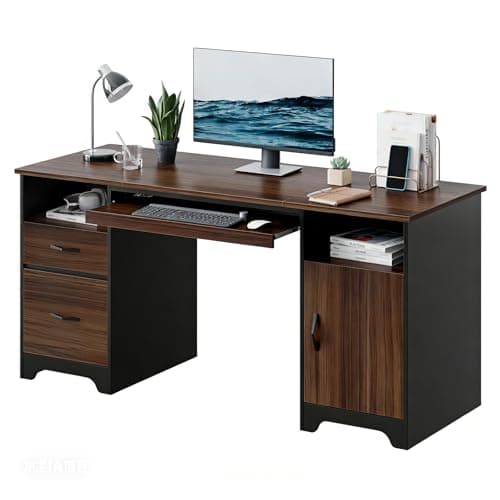
Bestier Bestier 59" Office Desk with File Drawer, Keyboard Tray and 2 Drawers
Bestier 59" Office Desk with File Drawer, Keyboard Tray and 2 Drawers

The most complete answer at the price. A 59-inch top wide enough for two screens, a file drawer that takes hanging folders, and a keyboard tray that buys back the working depth the drawers would otherwise cost you.

Best overall
8.7
$209.99Amazon
02
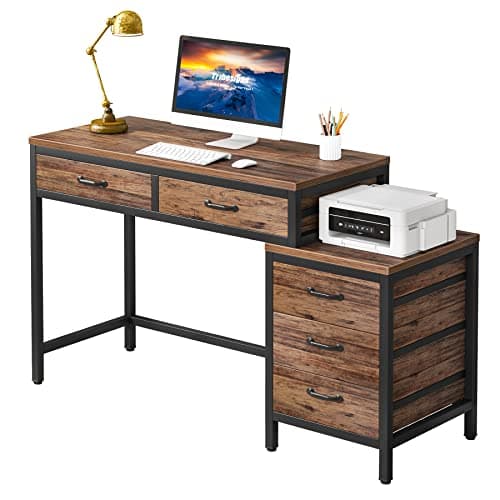
Tribesigns Tribesigns Computer Desk with 5 Drawers (Reversible)
Tribesigns Computer Desk with 5 Drawers (Reversible)

Five drawers is the most storage per dollar here, and the reversible cabinet means the pedestal lands on whichever side leaves your legs and your tower alone.

Most storage
8.6
$125.99Amazon
03
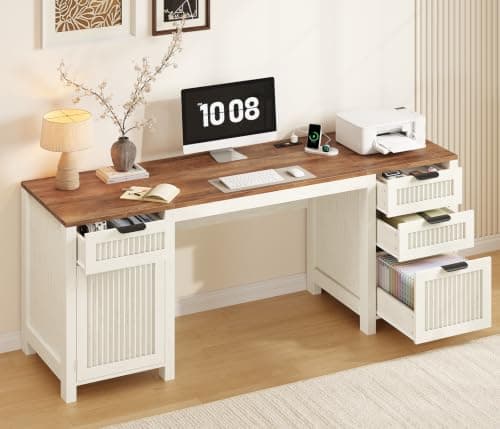
Fluted 62" Fluted Computer Desk with 4 Drawers and Storage Cabinet
62" Fluted Computer Desk with 4 Drawers and Storage Cabinet

The one that looks like furniture. 62 inches is enough for two screens, and the fluted front and cabinet mean it reads as a sideboard in a living room rather than a workstation.

Best looks and width
8.4
$239.98Amazon
04
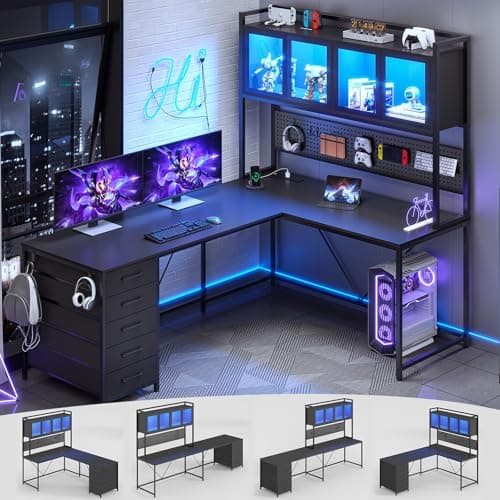
SEDETA SEDETA L-Shaped Corner Desk with Drawers and Hutch
SEDETA L-Shaped Corner Desk with Drawers and Hutch

Storage in all three dimensions. Drawers below, a hutch and shelves above, and a corner footprint - the pick when the desk has to be the whole office in one piece of furniture.

Best for small rooms
8.4
$179.99Amazon

#ad · Live prices from the Amazon Product API, as of Sep 6, 2026. Where we have no verified live price we show none — we would rather leave a gap than print a number that has rotted.

In detail

The picks, in full

01
Bestier Bestier 59" Office Desk with File Drawer, Keyboard Tray and 2 Drawers

Best overall

Bestier 59" Office Desk with File Drawer, Keyboard Tray and 2 Drawers

Surface
59" W x 22" D x 30" H
Storage
File drawer for letter, A4 and legal hanging folders, plus two storage drawers
Extras
Pull-out keyboard tray and two cable holes
Capacity
Desktop up to 200 lb; file drawer 40 lb, storage drawers 20 lb
Finish
Cherry wood-look
8.7/10

The most complete answer at the price. A 59-inch top wide enough for two screens, a file drawer that takes hanging folders, and a keyboard tray that buys back the working depth the drawers would otherwise cost you.

Usable Desktop
8.6
Storage
9
Build
8
Value
9

Pros

  • A file drawer rated for letter, A4 and legal hanging folders is the one storage feature that replaces a cabinet
  • The keyboard tray returns the working depth a drawer pedestal normally eats
  • 59 inches is enough width for two monitors and a keyboard, which most storage desks are not
  • Two cable holes and a 200 lb top mean the desk can carry a real multi-monitor rig rather than a laptop

Cons

  • 22 inches deep is under the 24 we recommend if a monitor sits on its own stand rather than an arm
  • The top is carried on two side pedestals, so the clear underside is only the span between them
  • Drawer runners are the usual weak point at this price and the first thing to wear

Skip this if…

a desktop tower has to live under the desk — the pedestals take both sides

$209.99View on Amazon

Price as of Sep 6, 2026. Prices change — Amazon's is the one that counts.

#ad · we may earn a commission from this link to Bestier 59" Office Desk with File Drawer, Keyboard Tray and 2 Drawers

02
Tribesigns Tribesigns Computer Desk with 5 Drawers (Reversible)

Most storage

Tribesigns Computer Desk with 5 Drawers (Reversible)

Storage
Five drawers in a cabinet pedestal
Orientation
Reversible - cabinet mounts left or right
Top
MDF with a wood-look finish
Frame
Panel and leg construction
Use
Writing desk with an integrated drawer cabinet
8.6/10

Five drawers is the most storage per dollar here, and the reversible cabinet means the pedestal lands on whichever side leaves your legs and your tower alone.

Usable Desktop
7.6
Storage
9.6
Build
7.8
Value
9.4

Pros

  • Five drawers genuinely replaces a separate filing unit in a small room
  • Reversible build means you choose which side loses its legroom
  • Compact footprint for the amount of storage it carries
  • Costs less than most plain desks of the same width

Cons

  • A five-drawer pedestal is a lot of the underside gone
  • Shallower working depth than a plain desk of the same width
  • Panel construction is less rigid than a steel frame under typing load

Skip this if…

you want an open underside for cable management and a footrest

$125.99View on Amazon

$139.9910% off

Price as of Sep 6, 2026. Prices change — Amazon's is the one that counts.

#ad · we may earn a commission from this link to Tribesigns Computer Desk with 5 Drawers (Reversible)

03
Fluted 62" Fluted Computer Desk with 4 Drawers and Storage Cabinet

Best looks and width

62" Fluted Computer Desk with 4 Drawers and Storage Cabinet

Surface
62" W
Storage
Four drawers plus a storage cabinet
Style
Fluted / reeded front panels
Top
Engineered wood
Fits
Wide enough for two monitors
8.4/10

The one that looks like furniture. 62 inches is enough for two screens, and the fluted front and cabinet mean it reads as a sideboard in a living room rather than a workstation.

Usable Desktop
9
Storage
9
Build
8.2
Value
7.4

Pros

  • 62 inches is real dual-monitor width, which most storage desks are not
  • Cabinet plus four drawers covers both paperwork and bulky items
  • Fluted front reads as furniture in a room that is not an office
  • Storage sits under the desktop rather than eating the surface

Cons

  • The most expensive desk on this page
  • A full-width storage base leaves almost no clear underside for cable trays
  • Heavy and awkward to move once assembled

Skip this if…

you need open legroom across the whole desk or a tower under it

$239.98View on Amazon

Price as of Sep 6, 2026. Prices change — Amazon's is the one that counts.

#ad · we may earn a commission from this link to 62" Fluted Computer Desk with 4 Drawers and Storage Cabinet

04
SEDETA SEDETA L-Shaped Corner Desk with Drawers and Hutch

Best for small rooms

SEDETA L-Shaped Corner Desk with Drawers and Hutch

Footprint
L-shaped corner desk
Storage
Drawers, hutch, and storage shelves
Top
Laminate over engineered wood
Orientation
Corner configuration
Use
Desk, filing, and shelving in one unit
8.4/10

Storage in all three dimensions. Drawers below, a hutch and shelves above, and a corner footprint - the pick when the desk has to be the whole office in one piece of furniture.

Usable Desktop
7.8
Storage
9.4
Build
7.6
Value
8.8

Pros

  • Uses vertical space with a hutch, so the desktop stays clearer than the storage count suggests
  • A corner footprint fits rooms a long straight desk cannot
  • Combines desk, drawers, and shelving so a small room needs one purchase, not three

Cons

  • The hutch sits where a monitor arm would want to go
  • The most assembly of anything here
  • Inside corner is dead space no monitor can usefully occupy

Skip this if…

you plan to mount monitors on an arm - the hutch and the arm want the same air

$179.99View on Amazon

Price as of Sep 6, 2026. Prices change — Amazon's is the one that counts.

#ad · we may earn a commission from this link to SEDETA L-Shaped Corner Desk with Drawers and Hutch

How to choose a desk with drawers

Answer four questions in order. What is the storage for — files, small clutter, or bulk? Which side can lose its legroom, and does the desk reverse so you can choose? What else needs to live under the desk — a tower, a cable tray, a footrest — and does the remaining space fit it? And will a monitor arm need to clamp to the rear edge?

Then check the two specs listings bury. Drawer runners: metal ball-bearing slides if the desk says so, and assume plastic if it does not. And working depth: a desk with a drawer pedestal often has a shallower top than its width implies, and the number you want is at least 24 inches if a monitor will sit on its own stand.

One alternative worth naming, because it frequently wins: a plain desk plus a separate rolling drawer unit. It costs about the same, keeps the entire underside of the desk open for cables and legs, and can be moved out of the way when you need the space. A built-in pedestal is tidier and permanent; a rolling unit is uglier and flexible. If you are still building the rest of the setup, the sequencing in the complete desk setup guide covers where storage should land in the order of purchases.
How we picked

We do not run a testing lab

We compiled the published manufacturer specifications, did the ergonomics, VESA and desk-depth math ourselves, and read aggregated owner reviews, then scored each product against a published rubric. The scores are judgments from documented research — they are not measurements we took, because we do not have a lab and we are not going to pretend we do. Every spec traces back to a listing or manual named in Sources.

Questions

Frequently asked

Are desks with drawers worth it, or should I buy a separate drawer unit?
A built-in pedestal is tidier and usually cheaper than a desk plus a separate unit, but it permanently occupies the underside on one side. A rolling drawer unit costs about the same, keeps the whole underside clear for cables and legs, and can be moved. Choose built-in if the layout is settled; choose rolling if it is not.
What is a file drawer and do I need one?
A file drawer is a deep drawer with rails that take hanging folders. If you keep any physical paperwork, one of these replaces a filing cabinet and the floor space it stood on, which is usually the single most valuable drawer in a desk. If you keep no paper, several shallow drawers are more useful.
Can I still fit a PC tower under a desk with drawers?
Usually only on the side without the pedestal, so buy a reversible desk and assemble the drawers on the opposite side to your tower. Measure the clear width under the desk against your case before you order — a mid-tower needs roughly 9 to 10 inches of width and 20 inches of depth to sit comfortably.
Will a drawer pedestal stop me mounting a monitor arm?
The pedestal itself will not, but the features that often come with it will. Hutches, back rails, and full-width storage bases block the clear rear edge a clamp needs. Check for an unobstructed stretch of rear edge inside the clamp’s thickness range before you buy either piece — see monitor arm vs stand.
What should I look for in the drawers themselves?
Metal ball-bearing slides rather than plastic runners, because plastic starts racking once a drawer is loaded with paper. A cabinet that reaches the floor rather than hanging off the underside, because that joint is where a loaded desk sags. And at least one drawer deep enough for hanging files if you keep any paperwork at all.

Keep reading

Receipts

Sources

We do not run a testing lab, and we do not pretend to. Specifications come from the manufacturer or retailer listing; the footprint and clearance math is ours and reproducible. Where we could not verify a number, we say so on the page rather than quietly leaving it out. Read our full method.