Let your arm hang loosely by your side and look at your hand. The palm faces your thigh, thumb upward. That is the neutral position of your forearm, and it is what your two forearm bones do when nothing is asking them to do otherwise. Now put your hand on a conventional mouse. To lay the palm flat you have rotated the forearm roughly ninety degrees, crossing those two bones over each other, and you are going to hold that rotation for the rest of the working day.
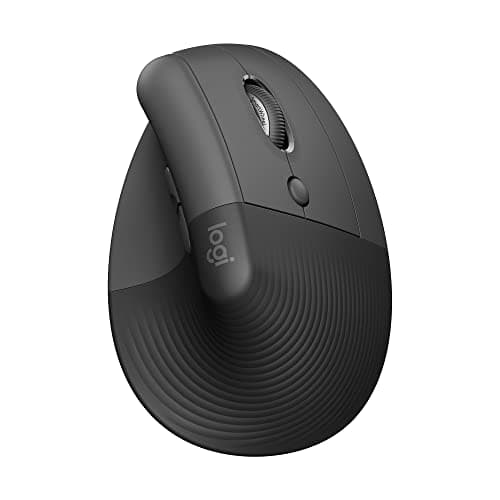
A vertical mouse simply removes that rotation. The body is tilted so your hand grips it in something close to a handshake, keeping the forearm in the position it prefers. It is the same reasoning behind split keyboards, applied to the other hand: a change in geometry rather than a claim about padding.
Two honest caveats before the picks. The first is that vertical mice are not universally better — they are better for forearm rotation strain specifically. If your discomfort is in the wrist crease or the base of the thumb, a trackball may serve you better, because it removes arm movement altogether rather than rotating it. The second is precision. A vertical mouse moves from the shoulder and elbow more than from the wrist, which is healthier and less fine-grained. For pixel-level design work or competitive gaming, this is a genuine trade rather than a free upgrade.
The specification that decides whether a given vertical mouse suits you is not the sensor or the button count — it is size. These devices are sculpted around a hand, and a shell built for a large hand leaves a small one stretching for the buttons, while a compact one cramps a large hand into a claw grip that undoes the benefit. Measure your hand from wrist crease to the tip of the middle finger before you shop, and treat that number as the primary filter. Scores below come from published specifications, the geometry of each shell, and aggregated owner reports, per how we pick.
The short answer
Quick picks
| # | Product | Best for | Score | Price |
|---|
| 01 | Logitech Lift Vertical Ergonomic MouseThe best vertical mouse for the most people. It carries the same 57-degree angle as Logitech's flagship in a shell that fits small and medium hands, adds a left-handed version, and costs considerably less. | Best overall | | $65.15·Amazon |
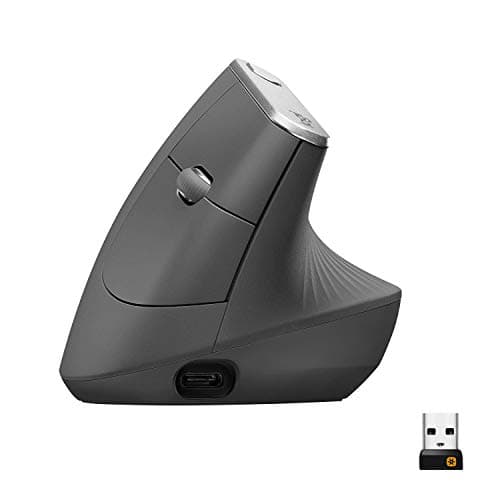
| 02 | Logitech MX Vertical Ergonomic MouseThe one that made the format mainstream, and still the best-built. A 57-degree angle, a high-resolution sensor that keeps precision usable, and materials that justify the price over years — if your hand is big enough for it. | Best for large hands | | $74.99·Amazon |
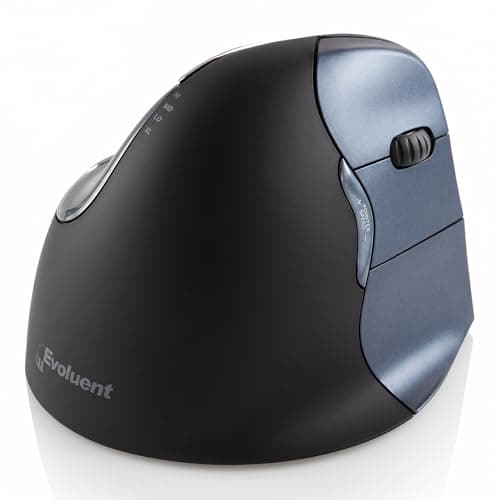
| 03 | Evoluent VerticalMouse 4 (VM4RW)The most upright design here, from the company that invented the category. A near-vertical shell with a thumb rest and a full set of programmable buttons, aimed at people managing an existing complaint. | Best fully upright design | | $109.45·Amazon |
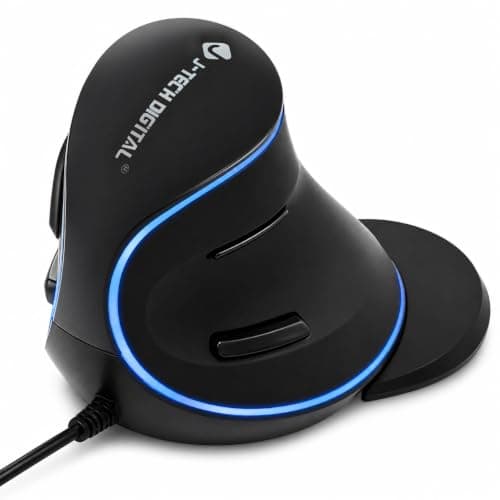
| 04 | | Best way to try the format | | $24.99·Amazon |
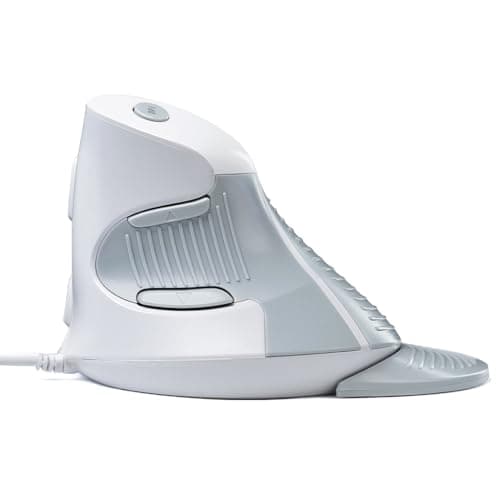
| 05 | DELUX Wired Ergonomic Vertical MouseThe cheapest vertical mouse we would actually put on a desk. Sized for medium hands, wired, and honest about what it is — a way to change your forearm angle for the price of a takeaway. | Best budget | | $13.99·Amazon |
#ad · Live prices from the Amazon Product API, as of October 23, 2026. Where we have no verified live price we show none — we would rather leave a gap than print a number that has rotted.
In detail
The picks, in full
Best overall
Logitech Lift Vertical Ergonomic Mouse
- Angle
- 57-degree vertical angle
- Connection
- Bluetooth or Logi Bolt receiver
- Hand size
- Sized for small to medium hands
- Clicks
- Quiet switches
- Availability
- Right-handed and left-handed versions
The best vertical mouse for the most people. It carries the same 57-degree angle as Logitech's flagship in a shell that fits small and medium hands, adds a left-handed version, and costs considerably less.
- Wrist Neutrality
- 9.2
- Precision
- 8.2
- Build
- 8.6
- Value
- 8.8
Pros
- +Fits the hand-size range most people actually have, rather than assuming a large hand
- +Same 57-degree geometry as the MX Vertical, so the ergonomic argument is identical
- +Quiet clicks make it viable in a shared room or on video calls
- +A left-handed version exists, which is uncommon anywhere in this category
Cons
- −Uses a replaceable battery rather than a rechargeable cell
- −Sensor and materials are a tier below the MX Vertical
- −Large hands will find it cramped, which is the same fit problem in reverse
Skip this if…
…you have large hands — this is the smaller shell and it will force a claw grip
Best for large hands
Logitech MX Vertical Ergonomic Mouse
- Angle
- 57-degree vertical angle
- Connection
- Bluetooth, Logitech USB receiver, or USB-C wired
- Sensor
- High-precision sensor with adjustable DPI
- Hand size
- Suits medium to large hands
- Charging
- USB-C rechargeable
The one that made the format mainstream, and still the best-built. A 57-degree angle, a high-resolution sensor that keeps precision usable, and materials that justify the price over years — if your hand is big enough for it.
- Wrist Neutrality
- 9.4
- Precision
- 8.6
- Build
- 9.4
- Value
- 7.6
Pros
- +Precision holds up well for a vertical mouse, so the usual accuracy penalty is smaller
- +Three connection modes and easy switching between multiple computers
- +Build quality and surface texture are a clear step above every cheaper pick
- +USB-C rechargeable rather than running on a replaceable cell
Cons
- −Costs several times the budget picks for a benefit that is largely shared
- −Too large for small hands, which end up stretching for the buttons
- −Only right-handed; there is no left-handed version
Skip this if…
…your hand is small — the shell is sized generously and a stretch grip defeats the purpose
Best fully upright design
Evoluent VerticalMouse 4 (VM4RW)
- Angle
- Near-vertical, more upright than the 57-degree designs
- Connection
- Wireless with USB receiver
- Buttons
- Programmable buttons with a thumb rest
- Support
- Lip along the base to keep the little finger off the desk
- Sizing
- Offered in multiple hand sizes
The most upright design here, from the company that invented the category. A near-vertical shell with a thumb rest and a full set of programmable buttons, aimed at people managing an existing complaint.
- Wrist Neutrality
- 9.7
- Precision
- 7.4
- Build
- 8
- Value
- 7.8
Pros
- +The most upright angle in this roundup, closest to a true neutral forearm
- +Base lip keeps the little finger from dragging, which is a genuine irritation on other designs
- +Multiple size options rather than one shell for everyone
- +Long-standing design with a track record in workplace ergonomic programs
Cons
- −A fully upright angle takes the longest to get used to of anything here
- −Precision is the weakest here; it moves from the shoulder more than any other pick
- −Styling and materials are dated next to the Logitech options at a similar price
Skip this if…
…you do fine cursor work — the most upright angle also gives up the most control
Best way to try the format
J-Tech Digital Wired Ergonomic Vertical Mouse
- Angle
- Vertical handshake angle
- Connection
- Wired USB
- Sensitivity
- Adjustable DPI settings
- Buttons
- Standard buttons plus browser navigation
- Power
- No battery required
The sensible way to test whether the format suits you before spending real money. Wired, adjustable sensitivity, and the same basic geometry as the expensive picks.
- Wrist Neutrality
- 8.6
- Precision
- 7.6
- Build
- 6.8
- Value
- 9.4
Pros
- +Costs a fraction of the premium picks while delivering the same core geometry
- +Wired means no batteries, no pairing, and no wake-up lag
- +Adjustable sensitivity helps offset the precision loss that comes with the format
- +A low-risk way to find out whether vertical suits you before committing
Cons
- −Cable on the desk, which is a step backward for a tidy setup
- −Materials and switch feel are plainly budget
- −One shell size, so hand fit is luck rather than choice
Skip this if…
…you have already decided vertical is for you — put the money toward a mouse you will keep
Best budget
DELUX Wired Ergonomic Vertical Mouse
- Angle
- Vertical handshake angle
- Connection
- Wired USB
- Hand size
- Designed around medium hands
- Buttons
- Standard buttons with DPI switch
- Orientation
- Right-handed
The cheapest vertical mouse we would actually put on a desk. Sized for medium hands, wired, and honest about what it is — a way to change your forearm angle for the price of a takeaway.
- Wrist Neutrality
- 8.4
- Precision
- 7.2
- Build
- 6.2
- Value
- 9.7
Pros
- +Removes the forearm rotation for roughly the price of a cheap keyboard
- +Medium-hand sizing suits more people than the very large premium shells
- +Wired, so there is nothing to charge or pair
- +Cheap enough that trying the format costs almost nothing
Cons
- −Switch feel and scroll wheel are the weakest here and will not last like the Logitech picks
- −No wireless option, so a cable stays on the desk
- −Single size and right-handed only
Skip this if…
…you use a mouse all day every day — at this price the switches are the part that gives out first
How to choose a vertical mouse
Size first, and it is not close. A vertical mouse is a sculpted shell that your hand either fits or does not, and a poor fit undoes the entire point — a hand stretching for buttons is a hand under tension. Measure from your wrist crease to the tip of your middle finger. Roughly seven inches and above suits the large shells like the MX Vertical; below that, the Lift and the medium-sized options will fit far better. This single measurement matters more than every other specification here combined.
Then decide how upright you want to go. The 57-degree designs are a deliberate compromise: most of the neutrality benefit, most of the precision retained, and a short adjustment period. Fully upright designs get closer to true neutral and cost you more control and a longer adjustment. If you are managing an existing forearm complaint, the more upright option is worth the trade. If you are preventing one, the compromise angle is the easier device to live with. And if what you actually want is a faster productivity mouse rather than a new angle, the sculpted flagships are a different decision entirely — see MX Master 4 vs MX Master 3S before assuming either of them fixes a wrist.
Do not skip the transition planning. Your hand has years of practice on a flat mouse, and a vertical one will feel clumsy for several days. Almost every returned vertical mouse was returned during that window. Move your pointer speed up slightly to compensate for the coarser control while you adjust, and give it a fortnight before you judge.
Finally, get the desk right or the mouse cannot help. A vertical mouse moves from the shoulder and elbow, which means the surface height matters more, not less: elbows at roughly ninety degrees, forearm supported, keyboard and mouse on the same plane. If your mouse currently sits higher than your keyboard, fix that before buying anything. A large desk mat also helps by giving the sensor one consistent surface across the whole sweep.
The same hand measurement decides conventional mice as well, and the two Logitech verticals here are the clearest same-angle, two-sizes pair available to compare against them — see the best mice by hand size for the published shell dimensions across both formats.
How we picked
We do not run a testing lab
We compiled the published manufacturer specifications, did the ergonomics, VESA and desk-depth math ourselves, and read aggregated owner reviews, then scored each product against a published rubric. The scores are judgments from documented research — they are not measurements we took, because we do not have a lab and we are not going to pretend we do. Every spec traces back to a listing or manual named in Sources.
Questions
Frequently asked
Do vertical mice actually help with wrist pain?+
They address forearm rotation specifically, by letting your hand sit in a handshake position rather than palm-down. If your discomfort comes from holding that twist all day, the change is meaningful. If it is in the wrist crease or thumb base, a trackball or a change in desk height may help more.
How long does it take to adjust to a vertical mouse?+
Most people feel clumsy for three to five days and normal within two weeks. The cursor control comes back first and the fine precision last. Raising your pointer speed slightly during the first week helps compensate while your hand relearns the movement.
Are vertical mice good for gaming?+
For slower games, yes. For anything requiring fast, precise aim, no — the format deliberately shifts movement from the wrist to the shoulder and elbow, which is better for your arm and worse for fine control. Many people keep a conventional mouse alongside for exactly this reason.
What angle should a vertical mouse be?+
Around 57 degrees is the popular compromise: most of the neutrality benefit with most of the precision retained. Fully upright designs get closer to a truly neutral forearm and cost more control. Neither is wrong; the upright ones suit managing an existing complaint, the angled ones suit preventing one.
Vertical mouse or trackball?+
A vertical mouse fixes forearm rotation but still moves your whole arm. A trackball keeps the arm still and moves only the thumb or fingers, which suits a cramped desk or a shoulder complaint. We compare them directly in our vertical mouse versus trackball page.
Receipts
Sources
We do not run a testing lab, and we do not pretend to. Specifications come from the manufacturer or retailer listing; the footprint and clearance math is ours and reproducible. Where we could not verify a number, we say so on the page rather than quietly leaving it out. Read our full method.