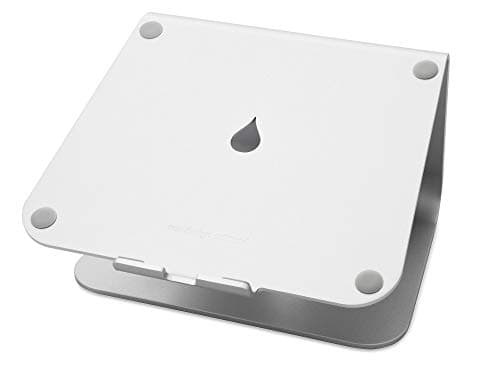
The problem with a laptop is welded into its shape. The screen and the keyboard sit a few inches apart and never move, so you only ever get to place one of them correctly. Set the keyboard where your hands are comfortable and the screen lands far too low; raise the screen to eye level and your hands float up somewhere around your ribs. No single posture satisfies both, which is why a laptop used flat on a desk quietly becomes a neck problem. A stand does one simple, decisive thing: it lifts the screen so you can slide an external keyboard underneath, and suddenly both halves live where they belong.
Three formats are worth knowing, and they map onto three different setups. A fixed riser — the Rain Design mStand, the Soundance, the tall Twelve South Curve — is a single rigid piece with no moving parts; it is the most stable, the best looking, and the choice for a laptop that mostly stays in one place. An adjustable stand — the Nulaxy, the UGREEN — trades a little rigidity for hinges that let you dial in the exact height and recline, which matters if more than one person uses it or you switch between an open-laptop and a keyboard-forward layout. The vertical or docked approach closes the lid entirely and feeds an external monitor, turning the laptop into a quiet box that takes up almost no desk.
Whichever format you pick, the stand only earns its keep alongside an external keyboard and mouse, because lifting the screen without moving your hands down just swaps a sore neck for sore shoulders. Do the quick math before you buy: measure how far the top of your open screen sits below your seated eye level, and that gap is roughly the lift you need. Most fixed risers add somewhere around five or six inches, which lands a 13- to 16-inch laptop close to the mark for an average-height desk; a very tall setup, or a very tall person, may want the extra elevation of the Curve or an adjustable stand pushed to its limit. The full reasoning lives in our guide to monitor height.
Two numbers decide whether a stand will actually work for you: the rated laptop size and the footprint. A stand sized for a 13-inch ultraportable can feel tippy under a 16-inch machine, and a cradle that grips a slim laptop may not close around a thick gaming one. Every pick below lists the size range it is built for, and we weight stability and build the way we spell out on how we pick— a stand is holding a very expensive object a hand’s width above a hard desk, so wobble is not a cosmetic complaint.
The short answer
Quick picks
| # | Product | Best for | Score | Price |
|---|
| 01 | Rain Design mStand Laptop StandThe one to beat: a single-piece aluminum riser that is rock-solid, looks the part, and lifts a 13- to 16-inch laptop close to eye level for an external keyboard. No moving parts to sag. | Best overall | | $38.99·Amazon |
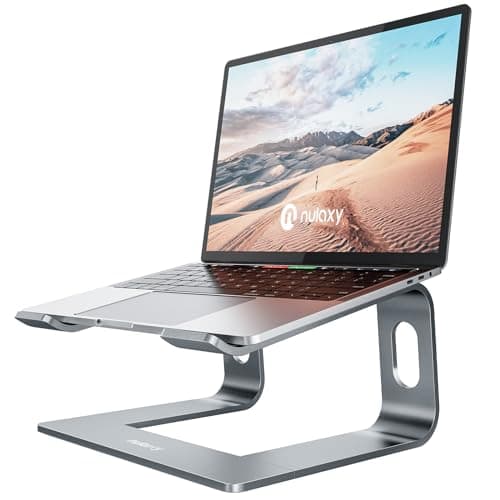
| 02 | Nulaxy Aluminum Laptop StandA sturdy adjustable stand at a sensible price. Hinges let you set the exact height and recline, and the wide base keeps even a big, heavy laptop steady. | Best value adjustable | | $17.99·Amazon |
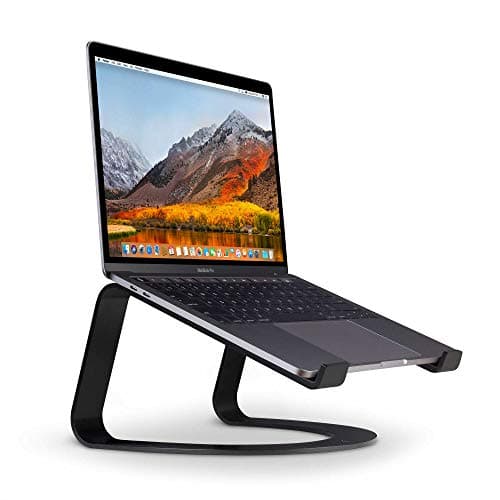
| 03 | Twelve South Curve Laptop StandA tall, elegant stand built for a docked, lid-open or clamshell setup feeding an external monitor. It lifts the screen higher than most, so it suits a permanent, keyboard-forward desk. | Best for a docked setup | | $59.95·Amazon |
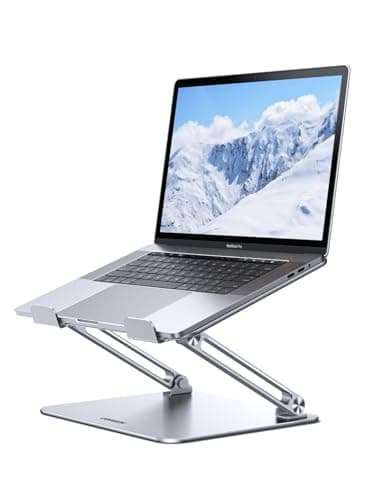
| 04 | UGREEN Adjustable Laptop StandA foldable aluminum stand that adjusts for height and angle, then collapses flat when you travel. The pick if the same laptop works at a desk and on the road. | Best foldable | | $23.99·Amazon |
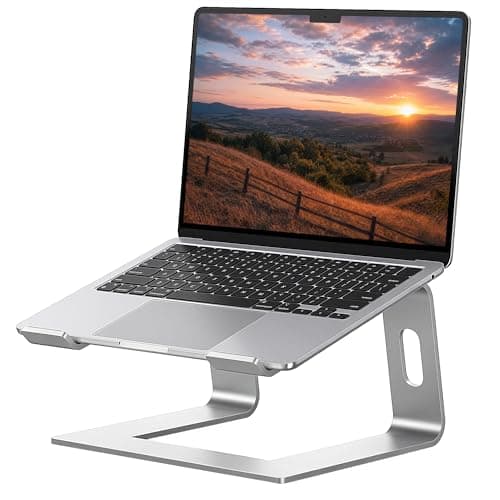
| 05 | Soundance Aluminum Laptop StandA clean, ventilated aluminum riser that nails the basics for the least money. Fixed height, no fuss, and open enough to help the laptop breathe. | Best budget | | $17.99·Amazon |
#ad · Live prices from the Amazon Product API, as of Sep 24, 2026. Where we have no verified live price we show none — we would rather leave a gap than print a number that has rotted.
In detail
The picks, in full
Best overall
Rain Design mStand Laptop Stand
- Material
- Single-piece die-cast aluminum
- Type
- Fixed-height riser (no adjustment)
- Screen lift
- Raises the screen about six inches
- Laptop size
- Sized for 13 to 16 in laptops
- Cable routing
- Rear slot routes a cable behind it
The one to beat: a single-piece aluminum riser that is rock-solid, looks the part, and lifts a 13- to 16-inch laptop close to eye level for an external keyboard. No moving parts to sag.
- Stability
- 9.4
- Build
- 9.5
- Ergonomic lift
- 8.9
- Versatility
- 8.6
Pros
- +One-piece casting is exceptionally rigid, with nothing to loosen
- +Clean, minimal aluminum look that matches most laptops
- +Rear slot keeps a charging or display cable tidy
- +Open underside helps air move under a warm laptop
Cons
- −Fixed height and angle, so it fits one ergonomic target only
- −Costs more than plain budget risers doing the same lift
Skip this if…
…you need to change the height or recline, or you want a stand that folds for travel
Best value adjustable
Nulaxy Aluminum Laptop Stand
- Material
- Aluminum alloy with silicone pads
- Type
- Height- and angle-adjustable
- Laptop size
- Holds 10 to 17 in laptops
- Base
- Wide anti-slip base rated for heavier laptops
- Airflow
- Open frame for cooling
A sturdy adjustable stand at a sensible price. Hinges let you set the exact height and recline, and the wide base keeps even a big, heavy laptop steady.
- Stability
- 8.7
- Build
- 8.6
- Ergonomic lift
- 8.9
- Versatility
- 9
Pros
- +Sets an exact height and recline instead of one fixed pose
- +Wide, weighted base stays planted under a large laptop
- +Handles a broad size range, up to 17-inch machines
- +Silicone pads grip the laptop and protect the finish
Cons
- −Adjustable joints are never quite as rigid as a solid casting
- −Bulkier on the desk than a slim fixed riser
Skip this if…
…you want the absolute steadiness of a one-piece riser and never plan to change the height
Best for a docked setup
Twelve South Curve Laptop Stand
- Material
- Powder-coated aluminum
- Type
- Tall fixed vertical stand
- Screen lift
- Raises the screen high for a docked layout
- Best use
- Built for an external keyboard and monitor
- Airflow
- Open curve for passive cooling
A tall, elegant stand built for a docked, lid-open or clamshell setup feeding an external monitor. It lifts the screen higher than most, so it suits a permanent, keyboard-forward desk.
- Stability
- 9
- Build
- 9.2
- Ergonomic lift
- 8.7
- Versatility
- 7.9
Pros
- +Lifts the laptop higher than most risers for a docked desk
- +Sculptural, matte aluminum design that anchors a setup
- +Fully open curve lets heat escape freely
- +Rigid single form with nothing to adjust or loosen
Cons
- −The tall lift assumes an external keyboard, not laptop typing
- −A larger footprint than a low, slim riser
Skip this if…
…you type on the laptop itself or want a low riser that keeps the built-in keyboard usable
Best foldable
UGREEN Adjustable Laptop Stand
- Material
- Aluminum alloy, foldable
- Type
- Height- and angle-adjustable, collapsible
- Laptop size
- Fits roughly 11.6 to 16 in laptops
- Portability
- Folds flat to carry in a bag
- Grip
- Silicone pads front and back
A foldable aluminum stand that adjusts for height and angle, then collapses flat when you travel. The pick if the same laptop works at a desk and on the road.
- Stability
- 8.2
- Build
- 8.3
- Ergonomic lift
- 8.6
- Versatility
- 8.9
Pros
- +Folds nearly flat, so it moves between desks or into a bag
- +Adjusts for both height and viewing angle
- +Aluminum keeps it light without feeling flimsy
- +Silicone contact points hold the laptop and desk in place
Cons
- −Folding hinges are less rigid than a fixed stand
- −Portability adds a few joints that can flex under a heavy laptop
Skip this if…
…the laptop never leaves the desk and you would rather have a steadier fixed riser
Best budget
Soundance Aluminum Laptop Stand
- Material
- Ventilated aluminum alloy
- Type
- Fixed-height ergonomic riser
- Laptop size
- Fits 10 to 15.6 in laptops
- Screen lift
- Raises the screen a few inches
- Airflow
- Open, hollow frame for airflow
A clean, ventilated aluminum riser that nails the basics for the least money. Fixed height, no fuss, and open enough to help the laptop breathe.
- Stability
- 8.4
- Build
- 8.2
- Ergonomic lift
- 8.3
- Versatility
- 7.9
Pros
- +Delivers a solid ergonomic lift for the least money here
- +Hollow aluminum frame lets heat escape well
- +Simple, sturdy build with no parts to fail
- +Neat enough to look at home on a tidy desk
Cons
- −Fixed height suits a narrower band of laptops and desks
- −Tops out around a 15.6-inch laptop, not larger machines
Skip this if…
…you have a 16-inch or larger laptop, or you want to adjust the height to your body
How to choose a laptop stand
Start with one question: does the laptop stay put, or does it travel? A laptop that lives on one desk is happiest on a fixed riser like the mStand or the Curve, because a single rigid casting has nothing to loosen, sag, or rattle, and it is the steadiest way to hold a costly machine a hand’s width above a hard surface. A laptop that moves between a desk, a couch, and a bag wants an adjustable, foldable stand instead, and you accept a few hinges in exchange for that flexibility.
Then check the fit. Every stand has a laptop-size range, and it matters at both ends: a cradle sized for a 13-inch ultraportable can feel tippy under a 16-inch machine, while a stand built for big laptops may leave a small one looking lost. Match the range to your actual laptop, not the one you might buy someday.
Material is mostly about heat and heft. Aluminum is the standard because it is rigid, it looks clean, and it draws warmth away from the laptop’s underside instead of trapping it the way a closed plastic tray can. An open frame helps further by letting air move under the machine.
Finally, do the height math and pair the stand with an external keyboard. Measure how far your open screen’s top edge sits below your seated eye level; that gap is the lift you need. Most fixed risers add around five or six inches, and the tall Curve adds more for a fully docked, keyboard-forward layout. Whatever you choose, the stand only fixes your neck once your hands come off the built-in keyboard and onto a separate one.
How we picked
We do not run a testing lab
We compiled the published manufacturer specifications, did the ergonomics, VESA and desk-depth math ourselves, and read aggregated owner reviews, then scored each product against a published rubric. The scores are judgments from documented research — they are not measurements we took, because we do not have a lab and we are not going to pretend we do. Every spec traces back to a listing or manual named in Sources.
Questions
Frequently asked
Are laptop stands good for your neck?+
Yes, with one condition. Lifting the screen toward eye level stops the downward head tilt that a flat laptop forces, which is the posture behind most laptop neck strain. The condition is that you also add an external keyboard and mouse, because raising the screen without lowering your hands just moves the strain to your shoulders.
Do I need an external keyboard with a laptop stand?+
In almost every case, yes. A stand lifts the screen and, with it, the built-in keyboard, so typing on the laptop’s own keys would mean reaching up around your chest. Pairing the stand with a separate keyboard and mouse is what lets the screen and your hands each sit where they belong.
What laptop size does a stand support?+
It varies by model, which is why each pick lists its range. The fixed risers here suit roughly 13- to 16-inch laptops, while some adjustable stands stretch to 17 inches. Match the range to your machine: a stand sized for a small ultraportable can feel unstable under a large, heavy laptop.
Fixed or adjustable laptop stand: which is better?+
A fixed riser is more stable and better looking, and it is ideal for a laptop that stays on one desk. An adjustable stand trades a little rigidity for the ability to set an exact height and recline, which is worth it if more than one person uses it or the laptop travels.
Does an aluminum stand help cool the laptop?+
It can help a little. Aluminum draws heat away from the laptop’s underside rather than trapping it, and an open-frame design lets air move under the machine. It is passive help, not a replacement for the laptop’s own fans, but it beats sitting flat on a desk that blocks the vents.
Receipts
Sources
We do not run a testing lab, and we do not pretend to. Specifications come from the manufacturer or retailer listing; the footprint and clearance math is ours and reproducible. Where we could not verify a number, we say so on the page rather than quietly leaving it out. Read our full method.