Skip to content
Chair & Cable

SECTION 04 · Keyboards & Mice

Logitech MX Master alternatives

The MX Master is a genuinely good mouse. It is also right-handed, heavy and sized for medium-to-large hands - so most people looking for an alternative want one specific thing back.

By Stephen V.Updated How we pick
#ad

We earn a commission when you buy through our Amazon links, at no extra cost to you. It never affects our rankings, and we say so when the cheaper product is the better buy. How this works.

If you want the MX Master’s multi-device switching and programmable buttons but your forearm is the problem, the Logitech MX Ergo S is the pick: a thumb trackball on a base that tilts to 20 degrees, so the arm stops moving and the forearm partly rotates to neutral. If you are left-handed — the single thing no MX Master has ever offered — the Kensington Expert Wireless Trackball is ambidextrous and the most precise device here. And the budget pick is the Kensington Orbit: the cheapest device on this page that keeps the scroll ring, at a fraction of an MX Master.

What the MX Master is known for

A fair alternatives page starts with the thing being replaced, stated from its own published specifications rather than from reviews. Across the 3S and the MX Master 4, these are the features people are actually trying to keep:

  • The MagSpeed scroll wheel with SmartShift, plus a second thumb wheel for horizontal scrolling. Nothing else in this registry has a free-spinning electromagnetic wheel, and if that is the feature you love, the honest answer is that no alternative here replaces it.
  • Eight buttons plus a gesture button on the MX Master 4, which is what makes it a workflow device rather than a pointer.
  • Multi-device switching between paired computers, over Bluetooth LE or a Logi Bolt receiver.
  • Quiet Clicks — Logitech states 90% less click noise on the MX Master 4 — and a 650 mAh battery rated up to 70 days.
  • The Darkfield sensor, 200 to 8,000 DPI in 50 DPI steps, which tracks on glass.

And these are the three things it does not do, which is why this page has readers at all: it is right-handed only, it is sized for medium-to-large hands (Logitech publishes 5.05 by 3.48 by 2.0 inches and 150 g for the MX Master 4), and it keeps your whole forearm moving across the desk like any mouse.

Which alternative matches which reason

If you want back…The pickWhat it matches the MX Master on
A still forearm, same multi-device workflowLogitech MX Ergo SMulti-device switching, programmable buttons, USB-C charging
A left hand, or either handKensington Expert Wireless TrackballWireless over Bluetooth or receiver, and far more precision
A neutral wrist, same Logitech softwareLogitech MX VerticalMulti-device pairing, USB-C recharge, a cursor-speed button
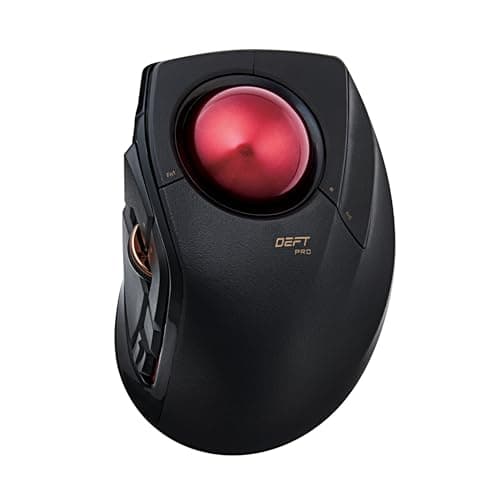
The button count, at a lower priceELECOM DEFT PROEight programmable buttons, three connection modes
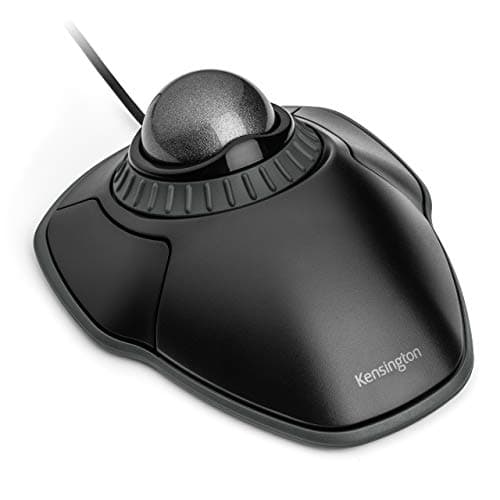
Just a lower priceKensington OrbitThe scroll ring, ambidextrous, smallest footprint

One thing to be clear about: four of the five picks here are trackballs or vertical mice, not conventional mice. That is not padding. This registry has no second eight-button-productivity mouse to put against the MX Master, and we do not invent products to fill a slot — so the alternatives are devices that beat it on a different axis rather than ones that imitate it badly. If what you want is genuinely “the MX Master but cheaper”, the real answer is the MX Master 3S instead of the 4, and that comparison page says why.

The short answer

Quick picks

#ProductBest forScorePrice
01
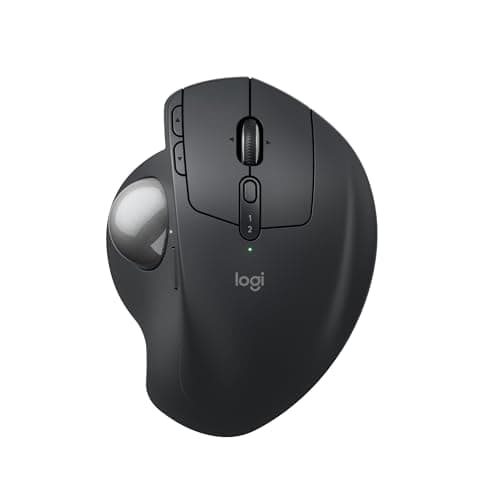
Logitech Logitech MX Ergo S Wireless Trackball
Logitech MX Ergo S Wireless Trackball

The closest thing to an MX Master that does not move. Same multi-device switching and programmable buttons, same Logitech software, but a thumb ball on a base that tilts to 20 degrees so the forearm is partly rotated to neutral.

The MX Master workflow, without the arm movement
8.7
$116.99Amazon
02
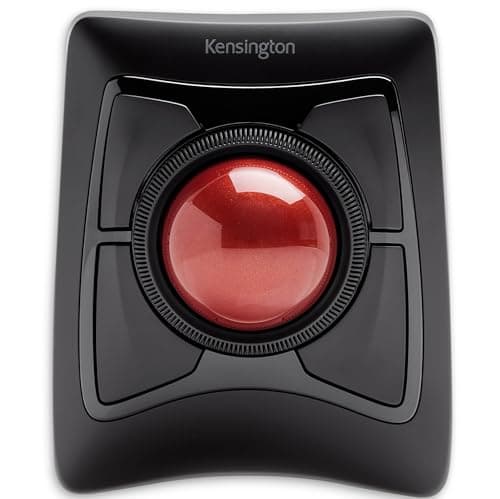
Kensington Kensington Expert Wireless Trackball (K72359WW)
Kensington Expert Wireless Trackball (K72359WW)

The answer to the one thing no MX Master offers: it works in either hand. A large finger-driven ball with a scroll ring, wireless, and more precise than any thumb device here.

Left-handed users, and precision work
8.6
$90.35Amazon
03
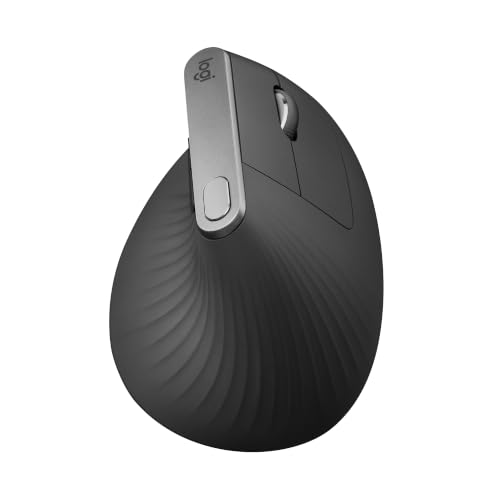
Logitech Logitech MX Vertical Ergonomic Mouse
Logitech MX Vertical Ergonomic Mouse

Still a mouse, still Logitech, still multi-device - but rotated 57 degrees so the wrist sits in a handshake position. The smallest change from an MX Master that actually changes something.

A neutral wrist, same software, lower price
8.5
$73.99Amazon
04
ELECOM ELECOM DEFT PRO Trackball Mouse
ELECOM DEFT PRO Trackball Mouse

The button-for-button answer at a much lower price. Eight programmable buttons - the same count as the MX Master 4 - plus three connection modes and an adjustable tilt.

Matching the button count for less
8.7
$59.99Amazon
05
Kensington Kensington Orbit Trackball with Scroll Ring (K75327WW)
Kensington Orbit Trackball with Scroll Ring (K75327WW)

The budget pick: the cheapest device here that still keeps the scroll ring, works in either hand, and takes less desk than a mouse. Wired, with nothing to charge.

Budget pick - the cheapest honest swap
7.8
$36.99Amazon

#ad · Live prices from the Amazon Product API, as of November 12, 2026. Where we have no verified live price we show none — we would rather leave a gap than print a number that has rotted.

In detail

The picks, in full

01
Logitech Logitech MX Ergo S Wireless Trackball

The MX Master workflow, without the arm movement

Logitech MX Ergo S Wireless Trackball

Type
Thumb-operated trackball
Tilt
Adjustable base, flat or tilted to 20 degrees
Connection
Bluetooth or Logitech receiver, USB-C charging
Buttons
Programmable buttons with precision-mode toggle
Multi-device
Switches between paired computers
8.7/10

The closest thing to an MX Master that does not move. Same multi-device switching and programmable buttons, same Logitech software, but a thumb ball on a base that tilts to 20 degrees so the forearm is partly rotated to neutral.

Matches MX Master
9
Comfort
9
Precision
8.4
Value
8.4

Pros

  • Keeps the two MX Master features people miss most: multi-device switching and programmable buttons
  • The tilting base combines a still arm with a partly rotated-neutral forearm
  • Precision-mode button drops tracking speed for detailed work
  • Build quality and switch feel are the best of any trackball we rank

Cons

  • Loads the thumb, so it is the wrong pick if your thumb is where the pain is
  • No free-spinning MagSpeed wheel - nothing here has one
  • Right-handed only, like the MX Master itself

Skip this if…

…your complaint is thumb-base pain - a finger-operated ball moves the work to stronger digits

$116.99View on Amazon

Price as of November 12, 2026. Prices change — Amazon's is the one that counts.

#ad · we may earn a commission from this link to Logitech MX Ergo S Wireless Trackball

02
Kensington Kensington Expert Wireless Trackball (K72359WW)

Left-handed users, and precision work

Kensington Expert Wireless Trackball (K72359WW)

Type
Finger-operated trackball with large ball
Scroll
Scroll ring around the ball
Connection
Wireless via Bluetooth or USB receiver
Handedness
Ambidextrous design
Wrist support
Detachable wrist rest included
8.6/10

The answer to the one thing no MX Master offers: it works in either hand. A large finger-driven ball with a scroll ring, wireless, and more precise than any thumb device here.

Matches MX Master
7.4
Comfort
8.8
Precision
9.4
Value
8.6

Pros

  • Ambidextrous, which is the single feature the MX Master line has never had
  • The large finger-driven ball is far more precise than any thumb design
  • The scroll ring is genuinely better than a wheel for long documents
  • Spreads work across strong fingers instead of loading the thumb

Cons

  • Large footprint - it takes more desk than an MX Master, not less
  • Steeper adjustment than a thumb ball; expect a week of awkwardness
  • Needs occasional cleaning of the bearings to stay smooth

Skip this if…

…desk space is the reason you wanted a change - this is the largest device on the page

$90.35View on Amazon

Price as of November 12, 2026. Prices change — Amazon's is the one that counts.

#ad · we may earn a commission from this link to Kensington Expert Wireless Trackball (K72359WW)

03
Logitech Logitech MX Vertical Ergonomic Mouse

A neutral wrist, same software, lower price

Logitech MX Vertical Ergonomic Mouse

Grip
Vertical - 57-degree angle
Handedness
Right-handed
Connection
Wireless - Bluetooth or the included Unifying receiver; USB-C charging
Sensor
Up to 4000 DPI
Buttons
Thumb buttons plus a cursor-speed toggle
8.5/10

Still a mouse, still Logitech, still multi-device - but rotated 57 degrees so the wrist sits in a handshake position. The smallest change from an MX Master that actually changes something.

Matches MX Master
8.4
Comfort
8.8
Precision
8
Value
8.6

Pros

  • Same Logitech multi-device pairing and software as the MX Master line
  • The 57-degree angle rotates the wrist into a neutral handshake position
  • Rechargeable over USB-C, with the receiver included rather than sold separately
  • Costs less than any current MX Master while staying in the flagship line

Cons

  • Right-handed only, and too large for small hands - the same two limits as the MX Master
  • Lower maximum DPI and no free-spinning wheel
  • The tall shape takes a week or two to feel normal

Skip this if…

…they are left-handed or have small hands - the Lift covers both, and our ergonomic mice roundup ranks it

$73.99View on Amazon

$119.9938% off

Price as of November 12, 2026. Prices change — Amazon's is the one that counts.

#ad · we may earn a commission from this link to Logitech MX Vertical Ergonomic Mouse

04
ELECOM ELECOM DEFT PRO Trackball Mouse

Matching the button count for less

ELECOM DEFT PRO Trackball Mouse

Type
Finger-operated trackball
Buttons
Eight programmable buttons
Connection
Wired, wireless receiver, or Bluetooth
Tilt
Adjustable tilt angle
Ball
Removable ball for cleaning
8.7/10

The button-for-button answer at a much lower price. Eight programmable buttons - the same count as the MX Master 4 - plus three connection modes and an adjustable tilt.

Matches MX Master
8.2
Comfort
8.6
Precision
8.8
Value
9

Pros

  • Eight programmable buttons, which is the MX Master 4 count at a fraction of the price
  • Three connection modes cover a desktop, a laptop and a tablet
  • Finger-driven ball gives better precision than a thumb design
  • Tilt adjustment and a removable ball keep it comfortable and smooth

Cons

  • The configuration software is functional rather than polished
  • Button density means a longer period of remembering which is which
  • Materials feel utilitarian next to any Logitech flagship

Skip this if…

…you want to plug it in and forget it - most of this device's value is in the setup

$59.99View on Amazon

Price as of November 12, 2026. Prices change — Amazon's is the one that counts.

#ad · we may earn a commission from this link to ELECOM DEFT PRO Trackball Mouse

05
Kensington Kensington Orbit Trackball with Scroll Ring (K75327WW)

Budget pick - the cheapest honest swap

Kensington Orbit Trackball with Scroll Ring (K75327WW)

Type
Finger-operated trackball, compact
Scroll
Scroll ring around the ball
Connection
Wired USB
Handedness
Ambidextrous
Footprint
The smallest device in this roundup
7.8/10

The budget pick: the cheapest device here that still keeps the scroll ring, works in either hand, and takes less desk than a mouse. Wired, with nothing to charge.

Matches MX Master
5.6
Comfort
8.4
Precision
7.4
Value
9.6

Pros

  • A fraction of an MX Master, and the cheapest way to find out whether a trackball suits you
  • Keeps the scroll ring, which is the best thing about Kensington's designs
  • Ambidextrous, so left-handed users are covered
  • Wired, so nothing to charge or pair

Cons

  • The small ball is less precise and less pleasant than the large Expert
  • Only two buttons, with no programmable extras - the opposite of an MX Master
  • Wired only, which is a step back for a tidy desk

Skip this if…

…precision matters - the small ball is the compromise that makes this one cheap and compact

$36.99View on Amazon

Price as of November 12, 2026. Prices change — Amazon's is the one that counts.

#ad · we may earn a commission from this link to Kensington Orbit Trackball with Scroll Ring (K75327WW)

Work out which MX Master feature you are actually replacing

Almost everyone who searches for an alternative is replacing one thing, not the whole mouse. Naming it first saves a return.

  • “It hurts.” Then the shape is the problem, not the brand. Where it hurts decides the answer: wrist and forearm point to a vertical grip, the whole arm points to a trackball, and the thumb base rules out thumb balls entirely. Our vertical mouse versus trackball page works through that fork, and the keyboard and mouse for wrist pain treats the keyboard as part of the same problem, which it usually is.
  • “It is too big.” Logitech publishes 5.05 by 3.48 by 2.0 inches for the MX Master 4. Measure your hand from wrist crease to middle fingertip and compare against the best mice by hand size, which ranks on published shell dimensions rather than on “runs small”.
  • “I am left-handed.” No MX Master is. The two Kensington trackballs here are ambidextrous, and they are the honest answer rather than a workaround.
  • “It costs too much.” Then compare the 3S against the 4 before you leave the line at all — the haptic panel is the whole premium on the 4, and if you never used the gesture button, you are paying for it twice.

What you give up by leaving the MX Master

Three things, and it is worth being blunt about them. The free-spinning MagSpeed wheel is genuinely unmatched in this registry. Logi Options+ Smart Actions is the most capable mouse software of any brand here, and the ELECOM and Kensington utilities are not close. And the MX Master tracks on glass, which the sensors in these picks are not specified to do.

What you gain is shape. Every pick above either stops your forearm moving, rotates your wrist toward neutral, or works in the other hand — and those are physical changes that no amount of software gets you. That is the real trade: the MX Master is the better device, and one of these is likely the better fit for your hand. If the fit is fine and you only wanted a cheaper mouse, stay in the line.
How we picked

We do not run a testing lab

We compiled the published manufacturer specifications, did the ergonomics, VESA and desk-depth math ourselves, and read aggregated owner reviews, then scored each product against a published rubric. The scores are judgments from documented research — they are not measurements we took, because we do not have a lab and we are not going to pretend we do. Every spec traces back to a listing or manual named in Sources.

Questions

Frequently asked

Is there a cheaper mouse that does the same thing as an MX Master?
Not feature-for-feature. Nothing in our registry pairs a free-spinning electromagnetic scroll wheel with a horizontal thumb wheel and eight buttons. The ELECOM DEFT PRO above matches the button count and the multi-mode connection for much less, and the Logitech MX Vertical keeps the same software and multi-device pairing at a lower price — but both change the shape to get there.
What is the best MX Master alternative for a left-handed user?
The Kensington Expert Wireless Trackball, which Kensington specifies as ambidextrous, or the cheaper Kensington Orbit if you want to try the format first. No MX Master has ever been made in a left-handed version, so this is not a preference — it is the only route.
Is the MX Master too big for small hands?
Logitech sizes it for medium-to-large hands and publishes 5.05 by 3.48 by 2.0 inches for the MX Master 4. If your hand is at the smaller end, the Logitech Lift is the same vertical idea in a smaller shell, and our ergonomic mice roundup ranks both with the dimensions stated.
Does a trackball actually help, or is it just different?
It changes what moves. With a mouse, your forearm travels across the desk all day; with a trackball, the device stays still and your thumb or fingers do the work. That removes the shoulder and forearm movement and concentrates load on the digits instead, which is a clear win if your complaint is arm or shoulder and a clear loss if it is thumb-base pain.

Keep reading

Receipts

Sources

We do not run a testing lab, and we do not pretend to. Specifications come from the manufacturer or retailer listing; the footprint and clearance math is ours and reproducible. Where we could not verify a number, we say so on the page rather than quietly leaving it out. Read our full method.