Skip to content
Chair & Cable

SECTION 04 · Keyboards & Mice

The best full-size keyboards (with a real number pad)

Compact boards win desk space. Full-size boards win data entry. This page ranks the full-size half of that trade on layout, published connection and what the number pad does to your mouse position.

By Stephen V.Updated How we pick
#ad

We earn a commission when you buy through our Amazon links, at no extra cost to you. It never affects our rankings, and we say so when the cheaper product is the better buy. How this works.

If you type numbers for a living — invoices, timesheets, a spreadsheet that never closes — the board to buy here is the Keychron V6: a wired 104-key mechanical with the number pad, hot-swap sockets and the best typing feel on this page. If price is the constraint, the Amazon Basics Ultra Premium Wireless Keyboard and Mouse Combo is the budget pick — the cheapest full-size set here that still recharges instead of eating AA cells. And if your right shoulder aches by the afternoon, read the ProtoArc EK04 entry first: it is the only board here that ships its number pad as its own unit, which is the cheapest fix for the one real problem with a full-size layout.

That problem is worth stating before the picks, because it is why the compact crowd is so loud. A number pad is about four inches of keyboard. It sits on the right, between your typing hands and your mouse, and it pushes the mouse that far out — so your right arm works at a wider angle all day. That is the real cost of a full-size layout. It is not a reason to avoid one. It is a reason to know which of the three answers you want.

The three honest answers to the number-pad problem

  1. Keep the pad and accept the reach. Correct if you use the number pad often. Ten-key entry on a dedicated pad is far faster than the number row, and a shoulder angle you can live with beats a workflow you cannot.
  2. Detach the pad. Put it on the left, or in a drawer, and bring the mouse back in toward your shoulder. The ProtoArc EK04 is the only board here that arrives this way in the box.
  3. Drop the pad entirely. The right answer if you touch it twice a month — and the subject of a different page. Our compact keyboards roundup ranks the boards that delete it, and keyboard and mouse ergonomics has the measurement that tells you whether your reach is actually a problem.

What we ranked on

Every board below publishes its layout, its connection and its key mechanism, so those are the three columns in the table. We did not rank on switch feel in the abstract — that is the subject of keyboard switches explained and it is a preference, not a specification. What a buyer on this page needs is narrower: does it have the pad, does it need a cable, and how tall is the keystroke.

BoardPublished layoutConnectionKey mechanism
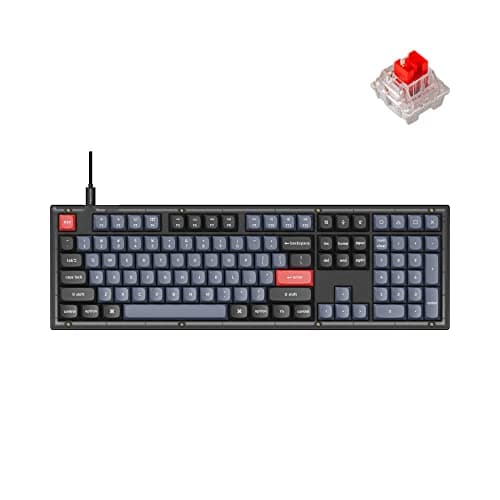
Keychron V6Full-size 104-key with number padWired USB-C onlyHot-swappable mechanical
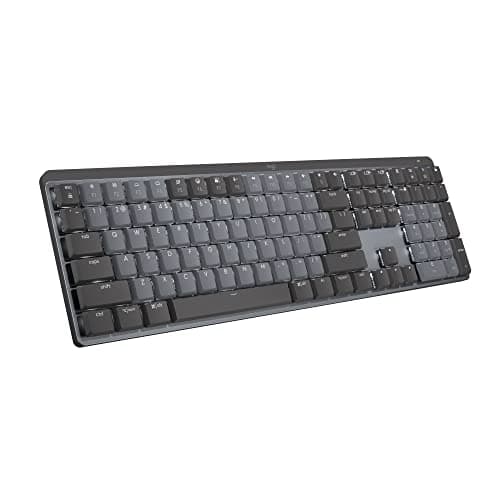
Logitech MX MechanicalFull-size with number padBluetooth or Logi Bolt receiverLow-profile mechanical
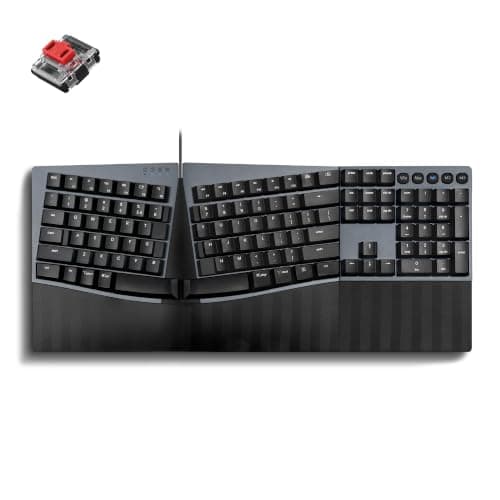
Perixx PERIBOARD-535RDSplit ergonomic, full-size with number padWired USBLow-profile red linear mechanical
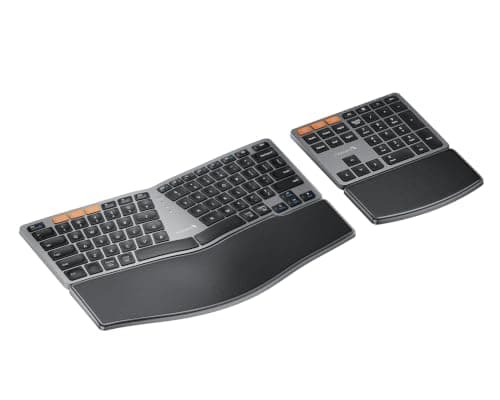
ProtoArc EK04Curved split keyset, number pad detached in the boxDual Bluetooth plus a 2.4 GHz receiverLow-profile, not backlit
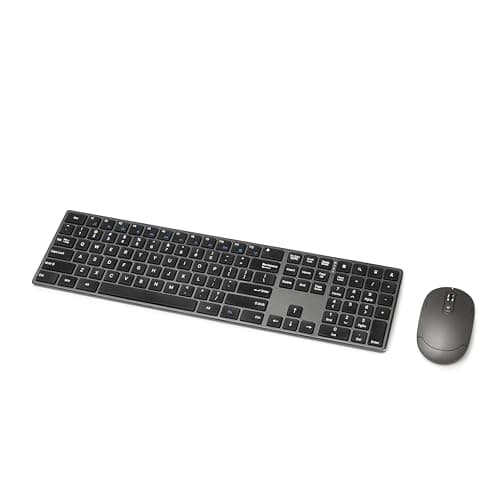
Amazon Basics Ultra Premium comboFull size with number pad, low-profile keysOne 2.4 GHz receiver for keyboard and mouseLow-profile membrane

Two things that table makes obvious. First, the only wired-only board here is also the one with the best typing feel — that is not a coincidence, it is where the money went. Second, both ergonomic layouts keep the number pad, which is why they are on this page at all: a split board that keeps the pad is still a full-size board, and it solves the shoulder angle in a different way than deleting keys does.

The short answer

Quick picks

#ProductBest forScorePrice
01
Keychron Keychron V6 Full-Size Mechanical Keyboard
Keychron V6 Full-Size Mechanical Keyboard

The full-size board to buy if you actually type numbers. A gasket-mounted 104-key layout with hot-swap sockets, QMK/VIA remapping and an optional knob - and the best typing feel on this page.

Anyone who uses the number pad daily
8.8
$89.99Amazon
02
Logitech Logitech MX Mechanical Wireless Keyboard
Logitech MX Mechanical Wireless Keyboard

The full-size board for a desk with two computers on it. The same number pad, low-profile mechanical switches including a tactile-quiet option, and three-device switching over Bluetooth or the Bolt receiver.

A cable-free desk with two machines
8.6
$169.00Amazon
03
Perixx Perixx PERIBOARD-535RD Ergonomic Split Mechanical
Perixx PERIBOARD-535RD Ergonomic Split Mechanical

The full-size board that fixes your wrists rather than your reach. A fixed split layout with real mechanical switches and a palm rest that tilts to a negative angle - and it keeps the number pad.

Wrist angle, without giving up the pad
8.0
$99.99Amazon
04
ProtoArc ProtoArc EK04 Wireless Ergonomic Keyboard with Separate Number Pad
ProtoArc EK04 Wireless Ergonomic Keyboard with Separate Number Pad

The one board here that lets you have the number pad and keep the mouse close. The pad ships as its own unit, so it can live on the left, in a drawer, or nowhere at all.

Keeping the pad and the mouse close in
8.4
$75.99Amazon
05
Amazon Basics Amazon Basics Ultra Premium Wireless Keyboard and Mouse Combo
Amazon Basics Ultra Premium Wireless Keyboard and Mouse Combo

The budget pick: the cheapest full-size layout here that still recharges rather than eating AA cells, and one receiver covers the keyboard and the mouse.

Budget pick - a second desk
7.7
$28.34Amazon

#ad · Live prices from the Amazon Product API, as of November 12, 2026. Where we have no verified live price we show none — we would rather leave a gap than print a number that has rotted.

In detail

The picks, in full

01
Keychron Keychron V6 Full-Size Mechanical Keyboard

Anyone who uses the number pad daily

Keychron V6 Full-Size Mechanical Keyboard

Layout
Full-size (104-key) with number pad
Connection
Wired USB-C
Switch type
Hot-swappable (pre-installed Keychron/Gateron)
Hot-swap
Yes - 3- and 5-pin sockets
Extras
Gasket mount, QMK/VIA, optional rotary knob
8.8/10

The full-size board to buy if you actually type numbers. A gasket-mounted 104-key layout with hot-swap sockets, QMK/VIA remapping and an optional knob - and the best typing feel on this page.

Layout
9.2
Typing feel
8.7
Features
8.4
Value
8.8

Pros

  • A full 104-key layout with the number pad exactly where data entry expects it
  • Gasket mount and stock foam give a fuller sound than most office boards
  • Hot-swap sockets and QMK/VIA, so number-pad keys can be remapped to macros
  • Strong value for a fully featured full-size board

Cons

  • Wired only - no wireless in this model
  • Full-height and heavy; a wrist rest helps for long sessions
  • The widest board here, so it pushes the mouse out furthest

Skip this if…

…you want wireless or a compact footprint

$89.99View on Amazon

Price as of November 12, 2026. Prices change — Amazon's is the one that counts.

#ad · we may earn a commission from this link to Keychron V6 Full-Size Mechanical Keyboard

02
Logitech Logitech MX Mechanical Wireless Keyboard

A cable-free desk with two machines

Logitech MX Mechanical Wireless Keyboard

Layout
Full-size with number pad
Connection
Wireless - Bluetooth or Logi Bolt receiver; USB-C charging
Switch type
Low-profile mechanical (tactile-quiet, linear, or clicky)
Hot-swap
No
Backlight
Smart backlight with proximity and ambient sensing
8.6/10

The full-size board for a desk with two computers on it. The same number pad, low-profile mechanical switches including a tactile-quiet option, and three-device switching over Bluetooth or the Bolt receiver.

Layout
8.8
Typing feel
8.4
Features
8.8
Value
8.2

Pros

  • A full number pad without a cable, which the Keychron above cannot offer
  • Low-profile mechanical keeps the wrists flatter than a full-height board
  • The tactile-quiet switch option suits shared offices and calls
  • Pairs to three devices and flows between them with Logitech Flow

Cons

  • Switches are not hot-swappable
  • No 2.4 GHz option - Bluetooth or the Bolt receiver only
  • Costs more than the wired Keychron for a shallower keystroke

Skip this if…

…you want to swap switches yourself or you prefer a tall, full-height keystroke

$169.00View on Amazon

$179.996% off

Price as of November 12, 2026. Prices change — Amazon's is the one that counts.

#ad · we may earn a commission from this link to Logitech MX Mechanical Wireless Keyboard

03
Perixx Perixx PERIBOARD-535RD Ergonomic Split Mechanical

Wrist angle, without giving up the pad

Perixx PERIBOARD-535RD Ergonomic Split Mechanical

Layout
Split ergonomic, full-size with number pad
Connection
Wired USB
Switch type
Low-profile red linear mechanical
Hot-swap
No
Palm rest
Tilt-adjustable at 0, -4 or -7 degrees
8.0/10

The full-size board that fixes your wrists rather than your reach. A fixed split layout with real mechanical switches and a palm rest that tilts to a negative angle - and it keeps the number pad.

Layout
8.4
Typing feel
8.2
Features
7
Value
8.4

Pros

  • A split ergonomic layout that still has the number pad, which most split boards drop
  • Mechanical switches on a split layout without the enthusiast price
  • The palm rest tilts to a negative angle, so the wrists are not bent upward
  • Plug-and-play wired USB with nothing to charge

Cons

  • Fixed split width and no tenting - the wrist rest tilts, the halves do not
  • No wireless option and no hot-swap sockets
  • Splitting the keyset and keeping the pad makes this a very wide board

Skip this if…

…you want wireless, hot-swap switches, or an adjustable split angle

$99.99View on Amazon

Price as of November 12, 2026. Prices change — Amazon's is the one that counts.

#ad · we may earn a commission from this link to Perixx PERIBOARD-535RD Ergonomic Split Mechanical

04
ProtoArc ProtoArc EK04 Wireless Ergonomic Keyboard with Separate Number Pad

Keeping the pad and the mouse close in

ProtoArc EK04 Wireless Ergonomic Keyboard with Separate Number Pad

Layout
Curved split keyset with a detached number pad in the box
Connection
Dual Bluetooth plus a 2.4 GHz USB receiver, three devices
Key mechanism
Low-profile keys, not backlit
Tilt
Four adjustable tilt legs underneath
Power
Rechargeable over USB-C; about 250 hours standby per charge
8.4/10

The one board here that lets you have the number pad and keep the mouse close. The pad ships as its own unit, so it can live on the left, in a drawer, or nowhere at all.

Layout
9
Typing feel
7.2
Features
8.2
Value
9

Pros

  • The number pad is a separate unit, which is the cheapest fix for a wide mouse reach
  • Pairs to three devices and switches with a keypress, over Bluetooth or the 2.4G receiver
  • Rechargeable rather than a battery drawer, and four tilt legs set the angle
  • Curved, fanned keyset with the letters still where your fingers expect them

Cons

  • The palm rest is a hard leather-finish surface and it does not come off
  • Low-profile keys feel soft next to any mechanical board here
  • No backlight, and the charging cable carries power only - no wired fallback

Skip this if…

…you want a cushioned wrist rest, a mechanical keystroke, or a board you can plug in when the battery dies

$75.99View on Amazon

$84.9911% off

Price as of November 12, 2026. Prices change — Amazon's is the one that counts.

#ad · we may earn a commission from this link to ProtoArc EK04 Wireless Ergonomic Keyboard with Separate Number Pad

05
Amazon Basics Amazon Basics Ultra Premium Wireless Keyboard and Mouse Combo

Budget pick - a second desk

Amazon Basics Ultra Premium Wireless Keyboard and Mouse Combo

Layout
Full size with number pad, low-profile keys
Connection
Single 2.4 GHz USB receiver for both devices, up to 33 ft
Battery
Built-in rechargeable lithium-ion in both halves
Charging
Micro-USB on keyboard and mouse
Receiver storage
Stowed in the keyboard base
7.7/10

The budget pick: the cheapest full-size layout here that still recharges rather than eating AA cells, and one receiver covers the keyboard and the mouse.

Layout
8
Typing feel
6.4
Features
6.6
Value
9.6

Pros

  • A full number pad at the lowest price on this page, with a mouse included
  • Rechargeable rather than disposable batteries, which is unusual at this price
  • Low-profile keys are quiet, which suits a shared room or a second desk
  • One receiver for both devices, stored in the keyboard so it survives being moved

Cons

  • Micro-USB charging in a USB-C world means keeping an old cable around
  • No Bluetooth and no device switching
  • Build quality is what the price implies - a functional set, not a nice one

Skip this if…

…this is your main desk - spend more on the surface you touch for eight hours.

$28.34View on Amazon

Price as of November 12, 2026. Prices change — Amazon's is the one that counts.

#ad · we may earn a commission from this link to Amazon Basics Ultra Premium Wireless Keyboard and Mouse Combo

Measure the reach before you choose the layout

The number-pad argument is usually conducted in opinions. It takes two minutes to settle with a tape measure. Sit at your desk in your normal working position and measure from the center of your keyboard’s letter keys to the center of your mouse. Then put your hands where they would be and look at your right elbow: if it is away from your side and your forearm angles outward, that is the cost you are paying. A number pad is roughly four inches of that distance, so removing it — or moving it — is worth about four inches of shoulder angle.

Three things reduce the reach without giving up the pad. Detaching it, as the ProtoArc does, is the cleanest. Shifting the whole keyboard left of center, so the pad sits in front of your right shoulder rather than beyond it, is free. And a keyboard tray wide enough for board and mouse together lets both come back toward you, which is a different and often bigger win — the tray page ranks platforms on width for exactly this reason.

Full-size, tenkeyless and 96%: what the names mean

Full-size, or 100%, means the complete 104-key set: letters, function row, navigation cluster and number pad. Tenkeyless, or TKL, is the same board with the pad removed — 87 keys. A 96% or 1800 layout keeps the number pad but squeezes everything together to save width, which is a real option if you want the pad and hate the reach, though nothing in our registry currently ships that layout, so there is no pick for it on this page.

Below full-size the deletions get real: a 75% board like the compact picks drops the pad and shuffles the navigation keys, and a 65% drops the function row as well. If you are choosing between the two ends of that spectrum rather than inside it, the honest question is not which is better. It is how many times a day you touch the keys that only one of them has.

A wrist rest matters more on a full-size board

Full-height mechanical boards sit tall, and the taller the board, the further your wrists extend upward to reach the keys. That is why the Keychron entry above carries a wrist-rest caveat and the low-profile boards do not. If you buy the V6, budget for a wrist rest in the same order. And if your wrists are already complaining, start at the best keyboard and mouse for wrist pain rather than here — layout is the wrong variable to solve pain with.
How we picked

We do not run a testing lab

We compiled the published manufacturer specifications, did the ergonomics, VESA and desk-depth math ourselves, and read aggregated owner reviews, then scored each product against a published rubric. The scores are judgments from documented research — they are not measurements we took, because we do not have a lab and we are not going to pretend we do. Every spec traces back to a listing or manual named in Sources.

Questions

Frequently asked

Is a full-size keyboard bad for your wrists?
Not by itself. The layout affects your mouse position, not your wrists — the number pad pushes the mouse about four inches further right, which widens the angle at your right shoulder. What affects your wrists is board height and typing angle, which is why a tall full-height board benefits from a wrist rest and a low-profile one usually does not.
Should I get a full-size keyboard or a tenkeyless one?
Count how often you use the number pad. If the answer is daily — accounting, data entry, CAD coordinates — buy full-size, because ten-key entry is much faster than the number row. If the answer is monthly, buy tenkeyless or compact and take the desk space and the closer mouse. If you are genuinely split, the ProtoArc EK04 above is the compromise: the pad is in the box but not attached.
Can I buy a separate number pad instead?
Yes, and it is a good answer if you already own a compact board you like. Our registry does not currently carry a standalone pad we have verified, so the pick here is the ProtoArc EK04, which ships one in the box with the keyboard. Either way the advantage is the same: a separate pad can live on the left, which keeps your mouse hand where it belongs.
Do any full-size keyboards have hot-swappable switches?
The Keychron V6 above does — 3- and 5-pin sockets, so switch type can change later without buying another board. None of the other full-size picks here do. The Logitech boards and both ergonomic layouts use fixed switches, which is the usual trade for wireless and for a lower price.

Keep reading

Receipts

Sources

We do not run a testing lab, and we do not pretend to. Specifications come from the manufacturer or retailer listing; the footprint and clearance math is ours and reproducible. Where we could not verify a number, we say so on the page rather than quietly leaving it out. Read our full method.