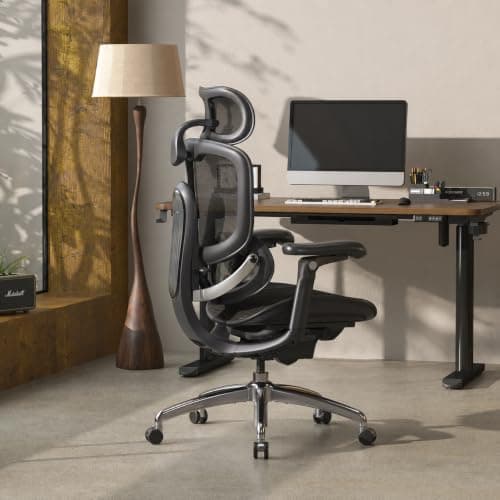
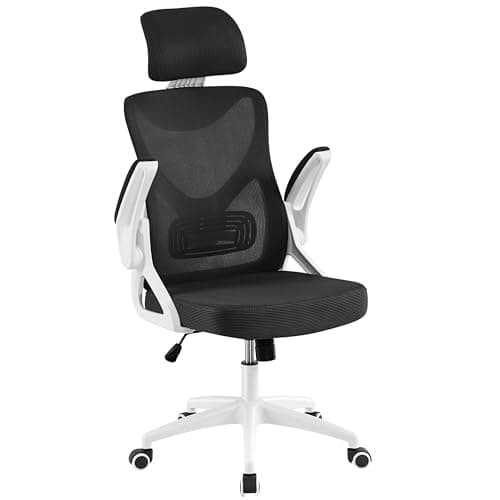
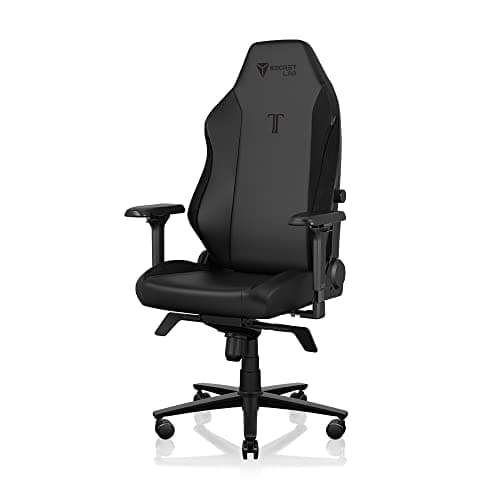
The chair to buy if the recline is the point is the Secretlab Titan Evo: Secretlab publishes up to 165 degrees, which is the furthest back any chair here goes, and it comes with a magnetic head pillow to use when you get there. If you want the same idea in mesh rather than foam, the SIHOO Doro C300 Pro V2 publishes three locked positions — 105, 120 and 135 degrees — which is the most useful recline specification on this page because it tells you exactly where it stops. The budget pick is the Yaheetech Ergonomic Office Chair: it has a reclining backrest and a headrest at the lowest price here, with the honest caveat that Yaheetech publishes no angle for it.
Nearly every office chair tilts. Very few of them recline in the way people mean when they search for it — back far enough to take the load off your spine, held there without you having to brace, with your head and neck supported. Three specifications separate those two things, and only one of them is usually in the marketing.
The three things that make a recline real
- A published angle. “Reclines” is not a specification. “135 degrees” is. For reference: a normal working posture is around 95 to 100 degrees, a genuine break position is 120 to 135, and anything past about 150 is a nap. If a listing gives you an adjective rather than a number, treat the recline as unknown.
- A lock. A free-floating tilt with tension control holds you up with spring pressure, which means your own weight is doing the work of staying back. A locking recline holds the angle for you — that is the difference between a chair you can rest in and a chair you can lean in. The Doro C300 locks at three stated angles; the Ergo3D locks at three positions within 135 degrees.
- Head support at that angle. Lean back 135 degrees in a chair with no headrest and your neck does the holding, which is worse than sitting up. Every pick here except one has a headrest; our headrest roundup ranks that feature on its own adjustment range.
What each chair publishes
| Chair | Published recline | Locks? | Head support |
|---|
| Secretlab Titan Evo | Up to 165 degrees | Yes | Magnetic head pillow |
| SIHOO Doro C300 Pro V2 | Three positions: 105, 120, 135 degrees | Yes, at each position | 3D headrest |
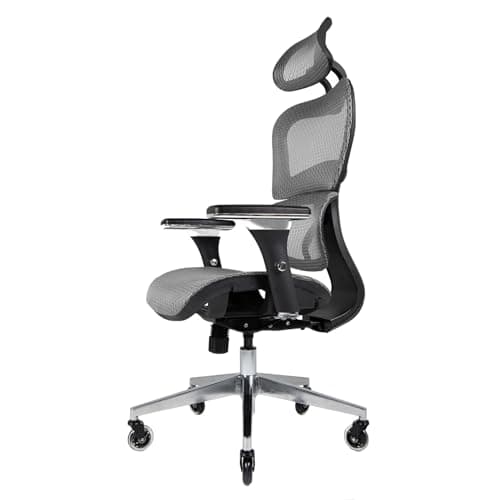
| Nouhaus Ergo3D | 135 degrees | Yes, 3-position lock | Headrest on the mesh back |
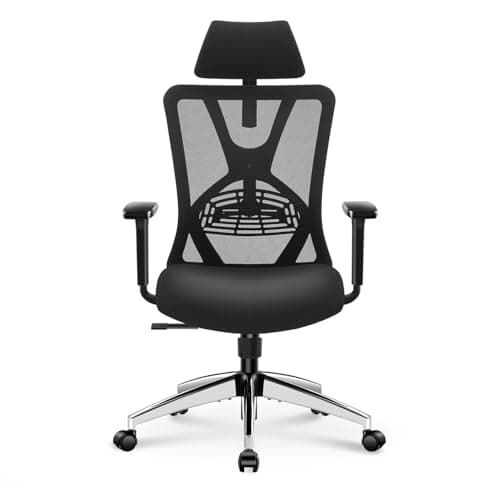
| Ticova Ergonomic | No angle published; tilt lock fitted | Yes, tilt lock | Adjustable headrest |
| Yaheetech Ergonomic | No angle published; reclining backrest | Not stated | Fixed headrest |
We have left the two bottom rows blank rather than filling them in, and that is deliberate. Both chairs genuinely recline — the Ticova has a tilt lock and the Yaheetech reclines far enough to be a real break position rather than a token tilt — but neither maker publishes a degree figure we could read, and inventing one would make the table useless. If the angle is the thing you care about, buy from the top three rows.
Where your feet go
The part nobody mentions: when you recline past about 120 degrees, your feet want to come up. Without that, you slide forward and the recline turns into a slouch. Two answers. A chair with a built-in footrest solves it in one purchase — the FlexiSpot ErgoX on our chairs under $500 page has a retractable one. Or add an under-desk footrest, which is the cheaper route and works with any chair here.
The short answer
Quick picks
| # | Product | Best for | Score | Price |
|---|
| 01 | Secretlab Titan Evo Office ChairThe furthest-reclining chair here by a wide margin: Secretlab publishes up to 165 degrees, and the magnetic head pillow means your neck is supported once you are back there. | The deepest published recline | | $669.00·Amazon |
| 02 | SIHOO Doro C300 Pro V2 Ergonomic ChairThe most useful recline specification on this page: three stated, locked positions at 105, 120 and 135 degrees, so you know exactly where the chair stops. In mesh, with a 3D headrest. | Knowing exactly where the recline stops | | Check price → |
| 03 | Nouhaus Ergo3D Ergonomic Office ChairA published 135-degree recline with a three-position lock on a full mesh back, which is the combination that makes a mid-priced chair genuinely restful rather than just tiltable. | All-day mesh with a locking recline | | $299.99·Amazon |
| 04 | | Lumbar that still fits when you lean | | $139.99·Amazon |
| 05 | | Budget pick - recline and a headrest, cheapest | | $68.26·Amazon |
#ad · Live prices from the Amazon Product API, as of November 12, 2026. Where we have no verified live price we show none — we would rather leave a gap than print a number that has rotted.
In detail
The picks, in full
The deepest published recline
Secretlab Titan Evo Office Chair
- Recline
- Up to 165 degrees, magnetic head pillow
- Back & seat
- Cold-cure foam, PU leatherette
- Lumbar
- 4-way integrated adjustable lumbar
- Armrests
- 4D metal armrests
- Sizing
- Sizes S/R/XL; XL rated up to ~395 lb; 5-year warranty
The furthest-reclining chair here by a wide margin: Secretlab publishes up to 165 degrees, and the magnetic head pillow means your neck is supported once you are back there.
- Recline Angle
- 9.8
- Head Support
- 9.2
- Support
- 9.5
- Value
- 7.8
Pros
- +165 degrees is a genuine lie-back rather than a lean, and it is a published figure
- +The magnetic head pillow is the head support a deep recline actually needs
- +4-way integrated lumbar keeps supporting you as the angle changes
- +Three sizes, so the recline geometry fits the body rather than an average
Cons
- −Foam and leatherette run warmer than mesh, and a long recline is where you notice heat
- −No footrest, so your feet need somewhere else to go past 120 degrees
- −Premium price and a firmer feel than plush chairs
Skip this if…
…you run warm and want the breathability of a mesh back.
Knowing exactly where the recline stops
SIHOO Doro C300 Pro V2 Ergonomic Chair
- Backrest
- 3 recline positions: 105, 120 and 135 degrees
- Back
- Breathable mesh with a 3D headrest
- Lumbar
- Dynamic self-adjusting lumbar support
- Armrests
- 8D Bionic adjustable armrests
- Capacity
- Up to 330 lb
The most useful recline specification on this page: three stated, locked positions at 105, 120 and 135 degrees, so you know exactly where the chair stops. In mesh, with a 3D headrest.
- Recline Angle
- 9
- Head Support
- 9
- Support
- 8.5
- Value
- 8.5
Pros
- +Three published, locked angles rather than a range and a tension dial
- +105 degrees is a working posture and 135 is a genuine break, in one chair
- +A 3D headrest you can position for the reclined angle, not just the upright one
- +Mesh back, which stays cooler through a long recline than foam does
Cons
- −Build feel does not match the top-tier brands
- −Dynamic lumbar is not manually height-set
- −No footrest, so past 120 degrees your feet need support elsewhere
Skip this if…
…you prefer a manual lumbar you set once and forget.
All-day mesh with a locking recline
Nouhaus Ergo3D Ergonomic Office Chair
- Recline
- 135 degrees, 3-position lock
- Back
- Full HD ElastoMesh
- Lumbar
- Adjustable lumbar support
- Armrests
- 4D adjustable armrests
- Capacity
- Up to 300 lb; blade wheels included
A published 135-degree recline with a three-position lock on a full mesh back, which is the combination that makes a mid-priced chair genuinely restful rather than just tiltable.
- Recline Angle
- 8.8
- Head Support
- 8.2
- Support
- 8.5
- Value
- 8.8
Pros
- +135 degrees locked at three angles, published rather than implied
- +Full mesh back stays cool across an eight-hour day and through a long lean
- +4D armrests move with you as the angle changes, which fixed arms do not
- +Blade wheels roll smoothly on hard floors
Cons
- −300 lb capacity is lower than the 330 lb picks here
- −Assembly and arm play draw the odd complaint
- −No footrest
Skip this if…
…you need a higher weight rating or a foam-cushioned seat.
Lumbar that still fits when you lean
Ticova Ergonomic Office Chair with Adjustable Lumbar Support
- Recline
- Tilt with tension control and a tilt lock; no angle published
- Lumbar
- Adjustable lumbar support, height and depth
- Back
- High-back breathable mesh
- Headrest
- Adjustable headrest
- Armrests
- Adjustable armrests
The value pick, and the one whose lumbar keeps working as you lean: the support moves in and out as well as up and down. A tilt lock holds the angle, though Ticova publishes no degree figure for it.
- Recline Angle
- 7
- Head Support
- 8.4
- Support
- 8.4
- Value
- 9.2
Pros
- +Lumbar adjustment in two directions, which is what keeps the support in place as the back angle changes
- +A tilt lock, so the angle is held rather than braced against a spring
- +Adjustable headrest, which most chairs at this price fix in one position
- +Mesh back keeps the chair cool over a long day
Cons
- −No published recline angle, so how far back it goes is unverified
- −Seat foam is the weak point and will compress noticeably within a couple of years
- −No seat-depth adjustment, so very tall or short users cannot dial in the fit
Skip this if…
…you are well outside average height - without seat depth adjustment, the fit cannot be corrected
Budget pick - recline and a headrest, cheapest
Yaheetech Ergonomic Office Chair with Headrest and Lumbar Support
- Recline
- Reclining backrest; no angle published
- Back
- High-back with headrest
- Lumbar
- Lumbar support built into the backrest
- Seat
- Height-adjustable padded seat
- Base
- Five-point caster base
The budget pick: a reclining backrest and a headrest at the lowest price here. It reclines far enough to be a real break position, and Yaheetech publishes no angle for it - take that as unknown, not as zero.
- Recline Angle
- 6.4
- Head Support
- 7.4
- Support
- 7.8
- Value
- 9.6
Pros
- +Reclines far enough to be a genuine break position rather than a token tilt
- +Headrest plus lumbar support at a price where most chairs have one or neither
- +The lowest cost of entry here for a chair with real back support
- +Light enough to move between rooms easily
Cons
- −No published recline angle and no stated lock
- −Lumbar support is built in rather than adjustable, so it fits whoever it fits
- −Material quality is the lowest here and the foam will show it first
Skip this if…
…the chair will be used eight hours a day for years - at this price, buy it for lighter use
$68.26·View on Amazon$73.998% off
Price as of November 12, 2026. Prices change — Amazon's is the one that counts.
#ad · we may earn a commission from this link to Yaheetech Ergonomic Office Chair with Headrest and Lumbar Support
How far back do you actually need to go?
Degrees are easier to shop with once you know what each band is for. Measured from the seat, roughly:
- 90 to 100 degrees — upright working posture. Every chair does this. It is where you will spend most of the day, and how to adjust an office chair sets it properly.
- 100 to 110 degrees — the relaxed working angle. Reclining slightly past upright transfers load from your lower back to the backrest, which is why a chair that holds 105 degrees is doing something useful all day rather than only at break time.
- 120 to 135 degrees — a genuine break. Reading, a long call, thinking. This is the band most people searching for a reclining chair want, and it is where the head support and the feet question start to matter.
- 150 degrees and past — a nap angle. Only the Titan Evo here goes there, and it needs the head pillow it comes with.
Tension control is not the same as a recline lock
Almost every office chair has a knob under the seat that sets recline tension. It makes the back harder or easier to push against — it does not hold an angle. A recline lock does: you lean to where you want, flip the lever, and the chair stays there without your body pushing. If a listing talks about tension but never about a lock, assume you will be bracing to stay back, which is the opposite of resting.
The practical test when the chair arrives: lean back to your preferred angle, lock it, then let your abdominal muscles go completely slack. If you stay put, the lock works. If you drift upright, the chair was holding you with a spring.
Why a reclining chair is harder on the rest of your setup
Leaning back moves your eyes. A monitor set for upright posture is suddenly too low, and you will tip your head forward to read it — which undoes the point of reclining in the first place. Two fixes: a monitor arm so the screen can follow you, or setting the screen height for the angle you actually work at rather than the one you sit up in. Monitor height ergonomics has the measurement for both, and it is the single most common mistake made with a reclining chair.
How we picked
We do not run a testing lab
We compiled the published manufacturer specifications, did the ergonomics, VESA and desk-depth math ourselves, and read aggregated owner reviews, then scored each product against a published rubric. The scores are judgments from documented research — they are not measurements we took, because we do not have a lab and we are not going to pretend we do. Every spec traces back to a listing or manual named in Sources.
Questions
Frequently asked
What recline angle should an office chair have?+
For working, 100 to 110 degrees — slightly past upright, so the backrest takes some of the load. For resting, 120 to 135 degrees. Anything beyond about 150 is a nap position and needs head support to be comfortable. The useful specification is not the maximum angle but whether the chair locks at the angle you will actually use.
Is reclining in an office chair bad for your back?+
No — staying in one position is the problem, whichever position it is. Changing angle through the day moves load between your spine, the backrest and your legs, which is why a locking recline is a genuinely useful feature rather than a luxury. What does cause trouble is reclining without head or foot support, because then your neck or your core does the holding.
Do I need a footrest with a reclining chair?+
Past roughly 120 degrees, usually yes. Without somewhere for your feet, you slide forward and the recline becomes a slouch. A chair with a built-in retractable footrest solves it; otherwise an
under-desk footrest is the cheap fix and works with every chair on this page.
Why do some chairs not publish a recline angle?+
Because they are not sold on it. Budget chairs frequently have a reclining backrest and a tension knob with no figure stated anywhere, which is the case for two of the five picks here. That does not mean they recline badly — it means the angle is unverified, so we have said so rather than guessing a number you cannot check.
Receipts
Sources
We do not run a testing lab, and we do not pretend to. Specifications come from the manufacturer or retailer listing; the footprint and clearance math is ours and reproducible. Where we could not verify a number, we say so on the page rather than quietly leaving it out. Read our full method.