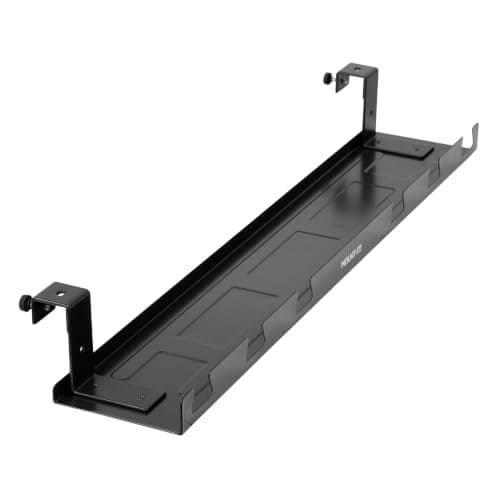
Almost every desk that looks untidy is untidy in the same place: a power strip on the floor with eight cables draped down to it. Every other cable problem — the dust, the tangle, the thing you kick, the cable that gets caught when the desk moves — is downstream of that one decision. A tray fixes it by giving the strip and all the slack a home under the desktop, in a channel that is out of sight and off the floor.
That is why the tray, not the sleeve or the tie, is the piece to buy first. A cable sleeve bundles the run between the desk and the wall, which is the visible half of the job. The tray removes the reason there is a run in the first place. Do the tray and you may find you need very little else; do the sleeves alone and you have tidied a symptom.
Trays divide by how they attach, and it is the decision that matters most. A screw-mount tray fixes into the underside of the desktop with wood screws. It is by far the strongest, it holds the most weight, and it puts permanent holes in your desk. A clamp or no-drill tray grips the desktop edge or the frame instead, which suits a rented desk, a glass top, or anything you do not want to drill — and it holds less. Both are legitimate; the wrong one for your desk is the expensive mistake.
Two measurements decide fit. Length: the tray should span most of the gap between the desk legs, because a short tray in a long desk leaves cable running unsupported at each end. And clearance: measure from the underside of the desktop to your knees when seated, because a deep tray on a low desk is something you will hit every day. Measure around anything already mounted under there too — a full-width tray and an under-desk PC mount want the same real estate, and the tray is much easier to reposition than a tower is. On a standing deskthere is a third consideration — the tray must clear the frame through the whole travel range, and everything in it has to tolerate being raised and lowered. Our under-desk cable guide covers the full method; this page ranks the trays. Scores follow how we pick.
The short answer
Quick picks
#ad · Live prices from the Amazon Product API, as of October 23, 2026. Where we have no verified live price we show none — we would rather leave a gap than print a number that has rotted.
In detail
The picks, in full
Best overall
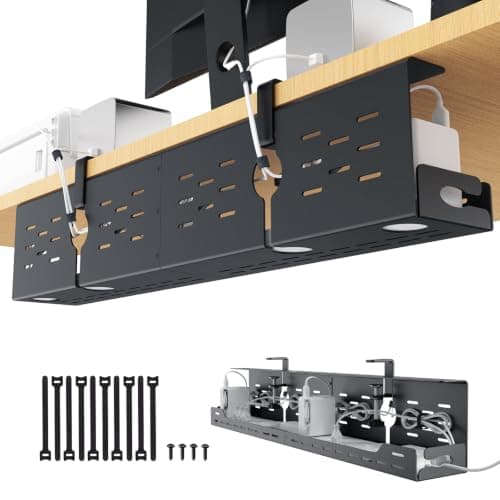
Mount-It! Premium Under Desk Cable Tray, 23" Steel
- Length
- 23" tray
- Material
- Heavy-duty steel construction
- Mounting
- Screw-mount to the underside of the desktop
- Capacity
- Holds a power strip plus adapters and slack
- Access
- Open basket design for easy re-routing
The tray to buy if you are willing to drill. Heavy-gauge steel, 23 inches long, and rigid enough to hold a full power strip plus a dock and every cable feeding them without any sag.
- Capacity
- 9.4
- Build
- 9.3
- Ease of Fitting
- 7.2
- Value
- 8.8
Pros
- +Steel construction takes the weight of a full strip, a dock, and several power bricks without flexing
- +23 inches spans enough of a typical desk that cables do not run unsupported at the ends
- +Open basket makes adding or removing a cable a ten-second job rather than a rebuild
- +The most secure fixing here, which matters on a standing desk that moves daily
Cons
- −Requires drilling pilot holes in the desktop, which is permanent
- −Not an option on glass, thin, or rented desks
- −Bare steel finish is functional rather than attractive if it is visible from a doorway
Skip this if…
…you cannot or will not put screws into the desk — the no-drill trays below exist for exactly that
Best for wide desks
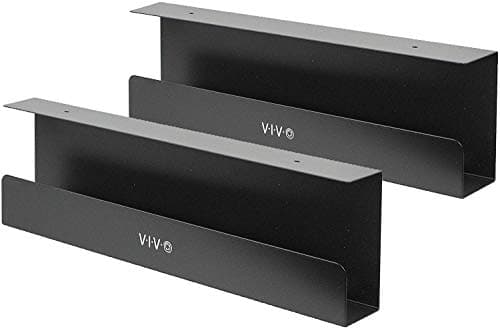
VIVO Under Desk Cable Management Trays, 17"
- Length
- 17" per tray
- Quantity
- Supplied as a pair
- Mounting
- Screw-mount under the desktop
- Function
- Doubles as a power strip holder and cord organizer
- Material
- Steel with a powder-coated finish
The sensible middle. Two 17-inch trays that double as power strip holders, which lets you split the load across a wide desk rather than cramming everything into one basket.
- Capacity
- 8.6
- Build
- 8.8
- Ease of Fitting
- 7.6
- Value
- 9.2
Pros
- +A pair of trays lets you put power at one end and data at the other, which keeps runs short
- +Powder-coated finish looks tidier than bare steel if the underside is ever visible
- +Doubles as a dedicated strip holder, so the strip is fixed rather than resting loose
- +Two shorter trays fit around desk frames that a single long tray would foul
Cons
- −Screw-mount only, with the same permanence caveat as the Mount-It!
- −17 inches each is short if you want one continuous channel
- −Splitting across two trays means running a linking cable between them
Skip this if…
…you want a single continuous channel across the desk — buy one long tray instead
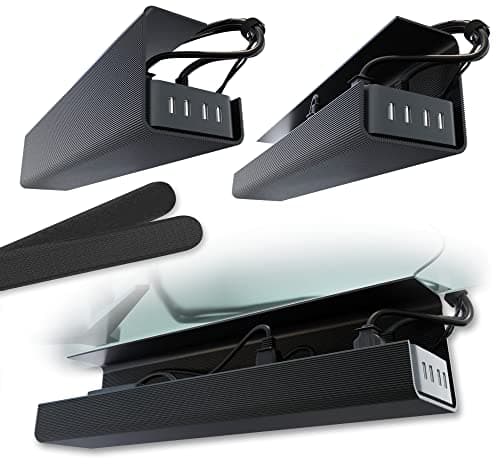
Best no-drill
Scanfield No-Screw Under Desk Cable Tray, 17" (2-Pack)
- Length
- 17" per tray
- Quantity
- Two-pack
- Mounting
- No-screw clamp fitting
- Best for
- Rented, glass, or warranty-covered desks
- Removal
- Comes off without leaving marks
The pick for a desk you cannot drill. Two 17-inch trays that clamp rather than screw, which makes them the answer for rented furniture, glass tops, and anything under warranty.
- Capacity
- 7.4
- Build
- 8
- Ease of Fitting
- 9.6
- Value
- 8.8
Pros
- +No holes at all, so it suits rented desks, glass tops, and anything you plan to resell
- +Two trays let you spread the load and keep individual runs short
- +Fits and removes in minutes with no tools beyond your hands
- +The obvious choice for anyone who moves desks or apartments regularly
Cons
- −Clamp fitting holds less weight than a screw mount, so a heavy dock is asking too much
- −Requires a compatible desktop thickness and a clear edge to grip
- −Less rigid than the steel screw-mount trays under a full load
Skip this if…
…you are loading a heavy dock and several power bricks — a clamp will not hold that securely
Best long tray
Univivi Under Desk Cable Management Tray, 32"
- Length
- 32" tray
- Mounting
- Screw-mount under the desktop
- Material
- Steel
- Coverage
- Spans most of a standard desk in one run
- Capacity
- Holds a strip, a dock, and full cable slack
The long one. At 32 inches it spans most of a standard desk in a single channel, which is the tidiest possible result and the reason to prefer one long tray over two short ones.
- Capacity
- 9.2
- Build
- 8.6
- Ease of Fitting
- 7
- Value
- 8.8
Pros
- +One continuous 32-inch channel means no unsupported cable between separate trays
- +Enough length to hold a power strip and a dock side by side rather than stacked
- +Fewer fixings to align than mounting two shorter trays
- +Best result on wide desks, where short trays always leave a gap
Cons
- −Too long for narrow desks and for frames with a central crossbar
- −Screw-mount only
- −Awkward to hold in place single-handed while marking the pilot holes
Skip this if…
…your desk is under about 48 inches wide or has a crossbar in the middle of the span
Best for standing desks
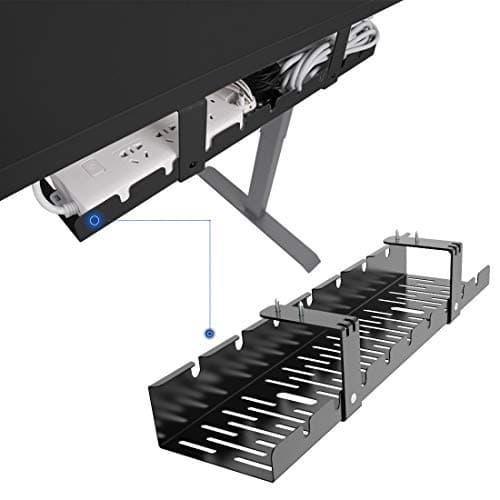
FLEXISPOT Under Desk Cable Management Tray
- Type
- Metal cable raceway tray
- Mounting
- Screw-mount under the desktop
- Designed for
- Height-adjustable desk frames
- Includes
- Cable ties for securing the run
- Profile
- Low profile to preserve knee clearance
The standing-desk pick, from a company that makes the frames. A metal raceway designed to sit against a moving frame and keep everything captive through the full travel.
- Capacity
- 7.8
- Build
- 8.6
- Ease of Fitting
- 8
- Value
- 8.8
Pros
- +Designed around adjustable frames, so it clears the mechanism through the full travel
- +Low profile keeps knee clearance on a desk that spends time at sitting height
- +Ties included, which is the other half of making a moving desk's cabling behave
- +Comes from the frame manufacturer, so fitment on their desks is a known quantity
Cons
- −Narrower than the basket-style trays, so it holds less bulk
- −A large power brick may not sit comfortably in the profile
- −Screw-mount, with the usual permanence caveat
Skip this if…
…you need to hide a dock and several bricks — this is a cable channel more than a shelf
How to choose a cable tray
Decide about drilling first, because it eliminates most of the field immediately. A screw-mount tray is stronger, holds more, and stays put on a desk that raises and lowers every day. If the desk is yours, the desktop is solid wood or particle board, and you are keeping it, screw-mount is the better product. If the desk is rented, glass-topped, under warranty, or something you will resell, take the clamp tray and accept a lower load limit.
Then measure twice. Length should cover most of the span between the desk legs; anything much shorter leaves cable hanging unsupported at each end, which is the problem you were trying to solve. Depth matters more than people expect — measure from the underside of the desktop to your knees when seated, and leave clearance. A deep tray on a low desk is something you will bruise a knee on within the week.
Add up the load honestly before you buy. A power strip is light. A power strip plus a laptop charger, a monitor brick, a dock, and the slack from six cables is not, and it is the combination that sags a clamp-mounted tray. If your under-desk pile includes more than a strip, bias toward steel and screws.
Finally, fit it in the right order or you will do it twice. Mount the tray first, then the power strip inside it, then plug everything in and route the cables, then bundle the slack with hook-and-loop straps rather than zip ties so you can change one cable later without cutting anything. Feed the single remaining run to the wall through a sleeve or raceway. That order takes about half an hour and it is the difference between a tidy desk and a tidy desk you can still work on — the full walkthrough is in our under-desk cable guide.
How we picked
We do not run a testing lab
We compiled the published manufacturer specifications, did the ergonomics, VESA and desk-depth math ourselves, and read aggregated owner reviews, then scored each product against a published rubric. The scores are judgments from documented research — they are not measurements we took, because we do not have a lab and we are not going to pretend we do. Every spec traces back to a listing or manual named in Sources.
Questions
Frequently asked
Do cable trays need to be screwed into the desk?+
Not all of them. Screw-mount trays are stronger and hold more weight, which matters if you are supporting a power strip, a dock, and several adapters. No-drill clamp trays grip the desktop instead and suit rented, glass, or warranty-covered desks, at the cost of a lower load limit.
What length cable tray do I need?+
Enough to span most of the gap between the desk legs. On a standard 48-inch desk, a 23 to 32-inch tray covers it well. Shorter trays leave cable running unsupported at each end, which is the untidiness you were trying to remove — or use two shorter trays and split the load.
Will a cable tray fit a standing desk?+
Yes, but check two things: that the tray clears the frame through the full travel range, and that everything inside is secured, because the contents move with the desk twice a day. Trays designed for adjustable frames handle both; a generic basket may foul the mechanism.
Can I put a power strip in a cable tray?+
Yes, and it is the main reason to fit one. Getting the strip off the floor removes dust, kicks, and the cluster of cables that hangs down to reach it. Use a strip with a flat plug or a low profile so it sits neatly, and leave airflow around it.
Tray or cable sleeve: which should I buy first?+
The tray. A sleeve tidies the visible run between desk and wall; the tray removes the reason that run exists by keeping the strip and all the slack under the desktop. Fit the tray and you may find you need very little else.
Receipts
Sources
We do not run a testing lab, and we do not pretend to. Specifications come from the manufacturer or retailer listing; the footprint and clearance math is ours and reproducible. Where we could not verify a number, we say so on the page rather than quietly leaving it out. Read our full method.