Upgrading a chair is the one desk purchase you feel in the first hour, not the first week. If you are replacing a mesh-back special that sagged into a hammock, the temptation is to buy the most famous name on the list and assume the money solves everything. It does not. What separates a great ergonomic chair from a merely expensive one is whether its adjustments actually land on your body, and whether the frame under them holds its shape after the honeymoon ends. This roundup ranks five chairs on exactly that.
The four adjustments that actually decide comfort
Ignore the feature checklist for a moment and focus on four movements. Seat height comes first: with your feet flat and your thighs roughly parallel to the floor, your elbows should sit near a right angle at the desk — the seated posture NIOSH and OSHA both describe. Armrests come second, and the axis count matters, because a 4-way arm that moves up, in, forward and back can support your elbows where a fixed post never will. Lumbar is third: a good chair lets you set where the support lands, by height and sometimes depth, so it meets the curve of your lower back rather than a generic average. Recline is fourth, and the detail buyers miss is the lock — a recline you can tension to your weight and hold at an angle offloads your spine far better than a backrest that either snaps upright or flops back.
Mesh, foam, or a hybrid
The back and seat material is the other fork. Full mesh breathes, keeps you cooler across a long day, and flexes with you; it is the default on most of this list. Molded foam is warmer and plusher, and it is what the supportive, gaming-style chairs use. A hybrid pairs a mesh back with a foam seat to split the difference. None is objectively best — mesh wins on heat, foam wins on cushioned feel, and your climate and preference decide it more than any spec sheet. If you want that trade-off broken down at the cushion level, Desk & Daylight’s comparison of mesh vs foam seats covers how each surface behaves across a full working day.
Fit is the spec nobody prints
The most important variable is the one no listing shows: whether the chair fits your body. The same model can be excellent for one person and wrong for another, which is why the Aeron ships in three frame sizes and why seat depth matters — you want a couple of fingers of clearance behind your knees. Before you rank features, rank fit; a chair you cannot size to your hips and height is uncomfortable at any tier. For the day-long specifics, our best office chairs for long hours roundup goes deeper on all-day support, and the Herman Miller vs Steelcasecomparison is the clearest look at what a flagship price actually buys. If your screen height is still wrong, no chair will fix your neck — pair the seat with the targets in our monitor height guide.
The short answer
Quick picks
| # | Product | Best for | Score | Price |
|---|
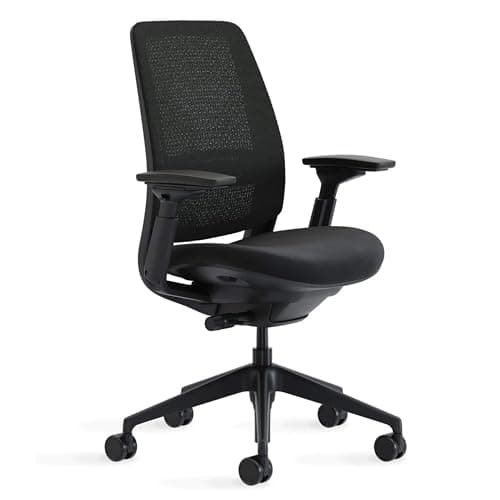
| 01 | Steelcase Series 2 Ergonomic Office ChairThe most complete balance of adjustability, build, and price here - a flexing LiveBack, 4-way arms, and a weight-activated recline that dials itself in, backed by a 12-year mechanism warranty. | Best overall | | $633.08·Amazon |
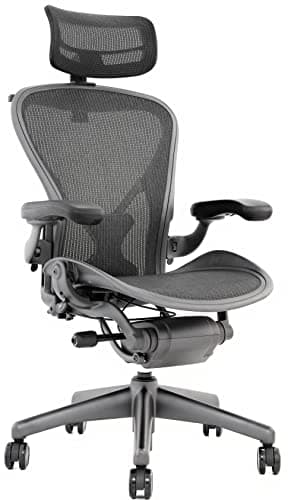
| 02 | Herman Miller Aeron ChairThe design icon and the breathing benchmark - a full 8Z Pellicle mesh seat and back, PostureFit SL sacral support, and three frame sizes so the fit is chosen, not compromised. It sits at the top price tier here. | Best premium buy | | $689.00·Amazon |
| 03 | No image SIHOO Doro C300 Pro Ergonomic ChairA flagship feature set at a fraction of the marquee price - dynamic self-adjusting lumbar, 6D armrests, and a 3D headrest that together read like a chair costing far more. | Best value flagship | | Check price → |
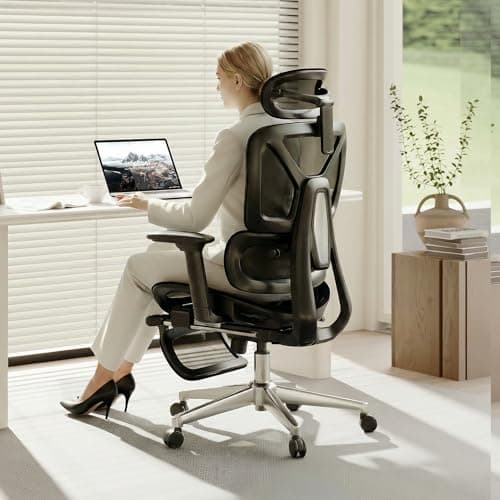
| 04 | | Best mid-range | | $269.99·Amazon |
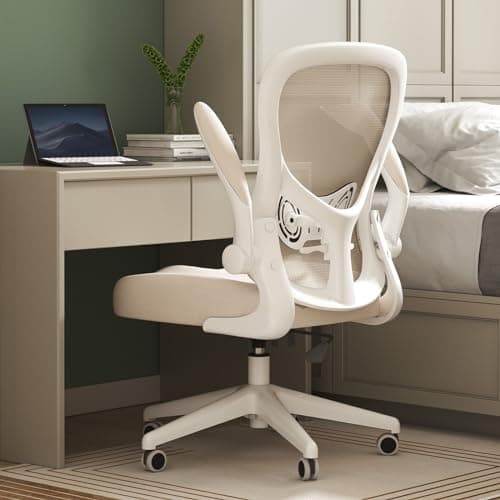
| 05 | Hbada J3 Ergonomic Office ChairThe two-figure chair that still gets the two things right that matter most - a breathable mesh back and a lumbar support you can actually move up and down. It leaves out the headrest to get there. | Best budget | | $116.00·Amazon |
#ad · Live prices from the Amazon Product API, as of Sep 24, 2026. Where we have no verified live price we show none — we would rather leave a gap than print a number that has rotted.
In detail
The picks, in full
Best overall
Steelcase Series 2 Ergonomic Office Chair
- Back type
- Air LiveBack mesh, flexes in two dimensions
- Lumbar
- Height-adjustable lumbar support
- Armrests
- 4-way adjustable (up/down, pivot, forward/back, side to side)
- Recline
- Weight-activated tension with 3 additional settings
- Capacity / warranty
- 400 lb; 12-year mechanism warranty
The most complete balance of adjustability, build, and price here - a flexing LiveBack, 4-way arms, and a weight-activated recline that dials itself in, backed by a 12-year mechanism warranty.
- Support
- 9
- Adjustability
- 8.5
- Build
- 9.5
- Value
- 8.5
Pros
- +LiveBack flexes with your spine instead of only bracing it
- +4-way arms and a height-adjustable lumbar as standard
- +Weight-activated recline needs no tension dialing
- +400 lb capacity and a 12-year mechanism warranty
Cons
- −Seat is firm out of the box for some sitters
- −No headrest in the standard configuration
Skip this if…
…you want an all-mesh seat or a built-in headrest.
Best premium buy
Herman Miller Aeron Chair
- Back & seat
- Full 8Z Pellicle suspension mesh
- Support
- PostureFit SL adjustable sacral and lumbar pads
- Sizing
- Three frame sizes: A, B, C
- Armrests
- Adjustable arms (fully adjustable option)
- Warranty
- 12-year, 3-shift limited warranty
The design icon and the breathing benchmark - a full 8Z Pellicle mesh seat and back, PostureFit SL sacral support, and three frame sizes so the fit is chosen, not compromised. It sits at the top price tier here.
- Support
- 9.5
- Adjustability
- 8
- Build
- 9.5
- Value
- 7
Pros
- +Full suspension mesh breathes better than anything here
- +PostureFit SL stabilizes the base of the spine
- +Three sizes (A/B/C) fit a wide range of bodies
- +12-year, 3-shift warranty and strong resale value
Cons
- −Highest price tier on the list
- −Firm mesh seat is not for everyone
- −Fewer on-the-fly adjustments than some rivals at the price
Skip this if…
…value and sheer adjustability matter more to you than the icon.
Best value flagship
SIHOO Doro C300 Pro Ergonomic Chair
- Back
- Breathable mesh with a 3D headrest
- Lumbar
- Dynamic self-adjusting lumbar support
- Armrests
- 6D adjustable armrests
- Backrest
- 4-position adjustable recline
- Capacity
- Up to 330 lb
A flagship feature set at a fraction of the marquee price - dynamic self-adjusting lumbar, 6D armrests, and a 3D headrest that together read like a chair costing far more.
- Support
- 8.5
- Adjustability
- 9
- Build
- 7.5
- Value
- 8.5
Pros
- +Self-adjusting dynamic lumbar tracks your spine as you move
- +6D armrests adjust in more directions than most rivals
- +3D headrest and breathable mesh included
- +Up to 330 lb capacity
Cons
- −Build feel does not match the top-tier brands
- −Dynamic lumbar is not manually height-set
Skip this if…
…you prefer a manual lumbar you set once and forget.
Best mid-range
FlexiSpot ErgoX Ergonomic Office Chair
- Seat & back
- AeroWeave air-mesh, breathable
- Lumbar
- Dynamic lumbar with a 5-level adjustable back
- Armrests
- 3D adjustable armrests
- Extras
- 3D headrest and a retractable footrest
- Capacity
- Up to 400 lb
A well-rounded mid-range mesh chair with a dynamic lumbar, 3D arms, a 3D headrest, and a retractable footrest - a lot of adjustment for a middle price.
- Support
- 8
- Adjustability
- 8.5
- Build
- 7.5
- Value
- 8.5
Pros
- +Dynamic lumbar plus a 5-level adjustable back
- +3D armrests and a 3D headrest included
- +Retractable footrest for breaks
- +Up to 400 lb capacity
Cons
- −Arms adjust in three directions, not four
- −Foam and finish are mid-tier, not flagship
Skip this if…
…you want flagship-grade materials or 4-way arms.
Best budget
Hbada J3 Ergonomic Office Chair
- Back
- Breathable mesh
- Lumbar
- Adjustable lumbar, 5cm of height travel
- Armrests
- Flip-up, 90 degrees
- Recline
- 90 to 115 degrees, lockable upright
- Capacity
- Up to 250 lb
The two-figure chair that still gets the two things right that matter most - a breathable mesh back and a lumbar support you can actually move up and down. It leaves out the headrest to get there.
- Support
- 6.8
- Adjustability
- 6
- Build
- 6.5
- Value
- 9.2
Pros
- +Breathable mesh back and a lumbar support with 5cm of height travel at a two-figure price
- +Armrests fold up 90 degrees, so the chair tucks fully under a shallow desk
- +The 90 to 115 degree tilt locks upright or releases to rock, which chairs this cheap often fix shut
- +PU wheels roll silently on hard floors and a three-year warranty backs it
Cons
- −No headrest at all, so this is a chair for upright desk work rather than leaning back
- −Armrests flip, but no height, depth or angle adjustment is listed
- −250 lb rating is the lowest here, and fewer seat and back adjustments than the pricier picks above
Skip this if…
…you sit all day and need flagship durability, or you want your head supported.
How to shop this list without overpaying
Start by being honest about your hours. If you sit for two or three at a stretch, a mid-range chair with adjustable lumbar and real armrests will serve you well, and the flagship tier is mostly paying for longevity you will not stress. If you are parked for eight-plus hours, the durability and adjustment range of the top picks stop being a luxury.
Then check three fit gates before the feature list. First, does the seat-height range cover your body so your feet land flat? Second, does the seat depth leave two fingers behind your knees, or does it slide to get there? Third, does the lumbar land on your lower back rather than your mid-spine? A chair that fails any of these is the wrong chair regardless of its score.
Read the warranty as a durability signal, not a formality. The premium task chairs here carry a 12-year warranty because their makers expect the frame and mechanism to outlast a decade of daily use; a budget chair with a one-year warranty is telling you something about its gas lift and arm posts. Finally, remember the chair is one part of a posture system. A dialed-in seat under a screen at the wrong height still leaves your neck craned — if you work off a laptop, add a laptop stand, and if you alternate sitting and standing, the same posture logic carries to a standing desk. Our how we pick page explains how these rankings are built from published specifications and owner feedback, not lab measurements.
If you are timing the purchase, the premium makers here have a documented record of November sales — our Black Friday home office deals hub lays out what Herman Miller and Steelcase actually did in the last two Novembers, with sources, and when a chair is worth waiting for. And if the chair is a gift, the honest advice is to choose it together; the splurge gift guide explains how.
Essentials
The small parts that finish the job
Nothing here changes a pick above, and none of it is a considered purchase. These are the cheap pieces that decide whether the expensive one works properly, and the ones people discover they are missing on the day the big box arrives.
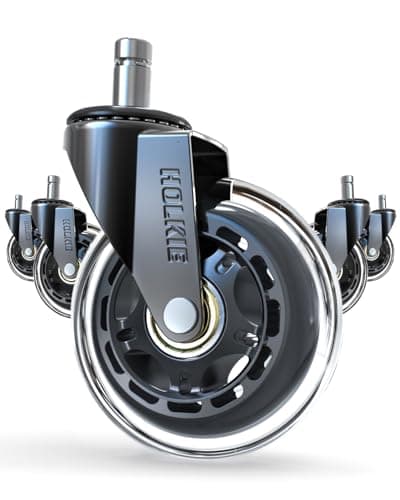
HOLKIE Rollerblade-Style Chair Casters, 3 in (set of 5)
The cheapest real upgrade a chair you already own can take. Hard nylon wheels fight carpet and skate on hard floors; wider rubber casters roll on both and stay put when you sit down.
Check first: chair stems are not standardized. Pull one existing caster out and measure its stem diameter and length against the listing before ordering.
#ad · Live prices from the Amazon Product API, as of Sep 24, 2026. Where we have no verified live price we show none. We may earn a commission, at no extra cost to you.
How we picked
We do not run a testing lab
We compiled the published manufacturer specifications, did the ergonomics, VESA and desk-depth math ourselves, and read aggregated owner reviews, then scored each product against a published rubric. The scores are judgments from documented research — they are not measurements we took, because we do not have a lab and we are not going to pretend we do. Every spec traces back to a listing or manual named in Sources.
Questions
Frequently asked
What is the most important adjustment on an ergonomic chair?+
Seat height, because it sets everything downstream. With your feet flat and thighs roughly parallel to the floor, your elbows should sit near a right angle at the desk — the seated posture NIOSH and OSHA describe. Get that wrong and no amount of lumbar or armrest tuning fully compensates.
Is a mesh or a foam chair better?+
Neither is universally better. Mesh breathes and runs cooler across a long day; molded foam feels plusher and warmer. A hybrid mesh-back, foam-seat chair splits the difference. Your climate and personal feel decide it more than any spec sheet.
Do I need a chair with a 12-year warranty?+
Not necessarily, but the warranty is a durability signal. A 12-year mechanism warranty means the maker expects the frame and gas lift to outlast a decade of daily use. If you sit all day, that longevity is worth paying for; for lighter use, a shorter warranty is fine.
How do I know what size chair I need?+
Check seat depth and height against your body. You want a couple of fingers of clearance between the seat’s front edge and the backs of your knees, and a height range that lets your feet rest flat. Some chairs, like the Aeron, come in distinct frame sizes for exactly this reason. See our long-hours roundup for more on fit.
Are premium ergonomic chairs worth the money?+
For heavy daily use, the premium buys adjustment range and a frame that holds its shape, which cheaper chairs lose over time. For a few hours a day, a mid-range chair with adjustable lumbar and real armrests captures most of the benefit. Match the tier to your hours.
Receipts
Sources
We do not run a testing lab, and we do not pretend to. Specifications come from the manufacturer or retailer listing; the footprint and clearance math is ours and reproducible. Where we could not verify a number, we say so on the page rather than quietly leaving it out. Read our full method.