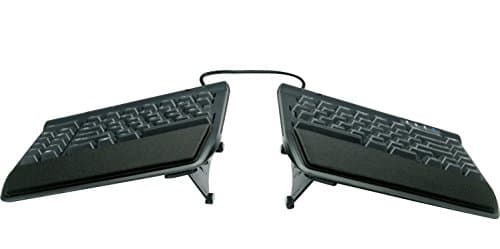
A conventional keyboard is a rectangle roughly 17 inches wide, and your shoulders are wider than that. To reach it, your upper arms rotate inward and your wrists angle outward to bring your fingers back onto the home row — a bend called ulnar deviation, and the posture behind a large share of desk-related wrist and forearm complaints. You can improve it slightly with a lower keyboard, a better chair, or a screen at the right height. You cannot fix it, because the geometry is built into the shape of the board.
A split keyboard fixes it by separating the halves so each hand sits directly in front of its own shoulder, forearms parallel, wrists straight. That is the entire proposition, and it is the reason split boards are the one ergonomic keyboard category with a mechanism you can see rather than just claim.
Splits come in three grades, and choosing between them is really a choice about how much change you are willing to absorb. A fixed splitkeeps one chassis with the halves angled apart — the Logitech-style approach. It is the smallest adjustment and the fastest to learn, and the width is decided by the manufacturer rather than by your shoulders. A fully separated board has two physical halves on a cable, so you set the distance and angle yourself; this is the format that actually solves the problem for wide shoulders. A contoured or columnar board goes further, curving the key wells and aligning the columns to finger length rather than the staggered rows inherited from typewriters. It is the biggest ergonomic gain and, without sugar-coating it, a real relearning period.
Be realistic about that adjustment. Moving to a fixed split costs most people a day or two of slower typing. A fully separated board is similar, because the layout itself has not changed. A contoured columnar board is a different matter — expect a genuinely awkward first week and several more before you are back to full speed. The people who love those boards all went through it. The people who returned them mostly did not know it was coming.
Picks are scored from published manufacturer specifications, the measurable geometry of each layout, and aggregated owner reports, per how we pick. We have not typed a novel on any of them in a lab, because we do not have one.
A split board fixes the sideways bend of the wrists and nothing else. If the hand that aches is the mousing one, pair it with a pointer that addresses forearm rotation: the best keyboard and mouse for wrist pain covers both halves of that.
The short answer
Quick picks
#ad · Live prices from the Amazon Product API, as of October 23, 2026. Where we have no verified live price we show none — we would rather leave a gap than print a number that has rotted.
In detail
The picks, in full
Best overall
Kinesis Freestyle2 Ergonomic Split Keyboard
- Type
- Fully separated split, wired USB-A
- Separation
- Halves separate up to 9" apart (20" version available)
- Layout
- Standard staggered QWERTY across both halves
- Tenting
- Optional VIP3 lifters add tenting angle
- Switches
- Low-force membrane
The split that solves the actual problem for the least money. Two genuinely separate halves on a connecting cable, so you set the width to your shoulders rather than accepting someone else's guess.
- Ergonomic Gain
- 9.2
- Typing Feel
- 6.8
- Adjustability
- 9
- Value
- 9.4
Pros
- +True separation means you match the halves to your shoulder width, which is the whole point of a split
- +Standard layout on each half, so the relearning curve is a day rather than a month
- +Optional lifters add tenting, which addresses forearm rotation as well as wrist angle
- +By far the cheapest way into a genuinely separated board
Cons
- −Membrane switches feel soft and vague next to any mechanical board here
- −Wired only, so there is a cable across the desk between the halves
- −The plastic chassis feels like an office peripheral rather than an object
Skip this if…
…typing feel matters to you — the ergonomics are right and the switches are the weak point
Best premium and most ergonomic
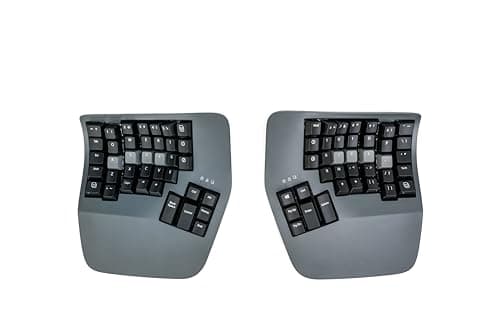
Kinesis Advantage360 Professional Split Ergonomic Keyboard
- Type
- Fully separated contoured split; Bluetooth LE between the halves and to the host
- Layout
- Concave key wells with columnar (matrix) key alignment
- Thumb keys
- Dedicated thumb clusters for modifiers
- Switches
- Hot-swappable mechanical - tactile brown or quiet linear pink
- Tenting
- Integrated, three settings (low, medium, high)
The most complete answer in the category and the biggest commitment. Two contoured key wells, columnar layout, thumb clusters, and mechanical switches — and a relearning period measured in weeks, not days.
- Ergonomic Gain
- 9.8
- Typing Feel
- 9.3
- Adjustability
- 9.6
- Value
- 6.6
Pros
- +Contoured wells and columnar columns match finger length and travel, which no flat board can do
- +Thumb clusters move modifiers off the little fingers, which is where a lot of strain accumulates
- +Hot-swappable mechanical switches mean you can tune the feel without replacing the board
- +Full onboard remapping, so the layout is yours rather than the factory's
Cons
- −The steepest learning curve here — realistically weeks before you are back to full speed
- −The most expensive keyboard in this roundup by a wide margin
- −Large footprint; the two halves take a lot of desk even separated
Skip this if…
…you switch between this and a laptop keyboard all day — the layouts fight each other and neither ends up fluent
Best easy transition
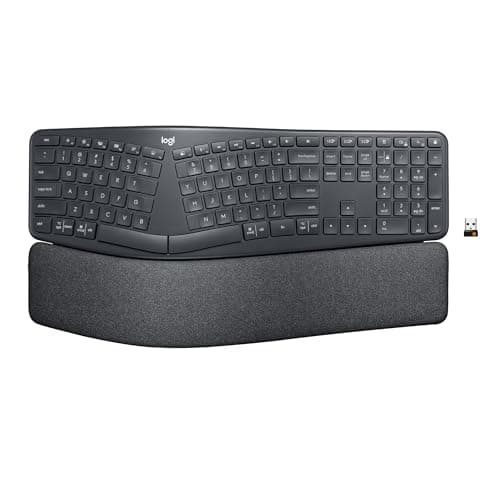
Logitech Ergo K860 Wireless Split Keyboard
- Type
- Fixed split, single chassis
- Connection
- Wireless via Bluetooth or Logi Bolt receiver
- Wrist support
- Integrated cushioned pillowed wrist rest
- Tilt
- Adjustable negative tilt legs
- Switches
- Scissor-style low profile
The gentlest way to get most of the benefit. A fixed-split curved board with a built-in cushioned wrist rest and a reverse tilt, wireless, with essentially no relearning period at all.
- Ergonomic Gain
- 8
- Typing Feel
- 8.2
- Adjustability
- 7
- Value
- 8.8
Pros
- +Fixed split means the layout is familiar enough that most people lose no typing speed at all
- +Genuinely good integrated wrist rest, rather than a thin strip pretending to be one
- +Negative tilt option supports a straighter wrist when the keyboard sits low
- +Wireless with a long battery life keeps one more cable off the desk
Cons
- −The split angle is fixed, so it is a compromise rather than a fit for your shoulders
- −Scissor switches are quiet and pleasant but not mechanical
- −Large chassis; the built-in wrist rest adds real depth to the desk footprint
Skip this if…
…you have broad shoulders — a fixed split cannot open far enough to put your hands truly in line
Best mechanical value
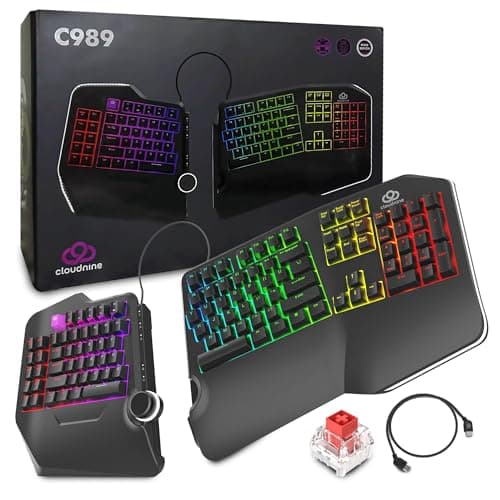
Cloud Nine C989 Ergonomic Split Mechanical Keyboard
- Type
- Split halves, up to 8 in apart, wired
- Switches
- Kailh Red linear mechanical
- Layout
- Full-size split, including a number pad section
- Lighting
- Per-key RGB backlighting
- Programming
- 10 macro keys, plus a USB pass-through
The mechanical split for people who do not want to relearn anything. Halves that pull up to eight inches apart, a standard full-size layout and real Kailh Red mechanical switches, at a price well under the contoured boards.
- Ergonomic Gain
- 8.6
- Typing Feel
- 9
- Adjustability
- 8.6
- Value
- 8.4
Pros
- +Real mechanical switches on a split board, which the Kinesis Freestyle2 does not offer
- +Keeps a full-size layout, so number-pad users do not have to give one up
- +Built-in 7-degree tenting and palm support, with halves that pull up to 8 inches apart
- +Considerably less expensive than the contoured premium boards
Cons
- −Kailh Reds are linear, so there is no tactile bump telling you a key registered
- −Bulky — a full-size split takes more desk than any other pick here
- −Standard staggered rows, so the gain comes from the split and the tenting, not the key layout
Skip this if…
…you need a tactile bump - the Kailh Reds here are linear all the way down
Best compact
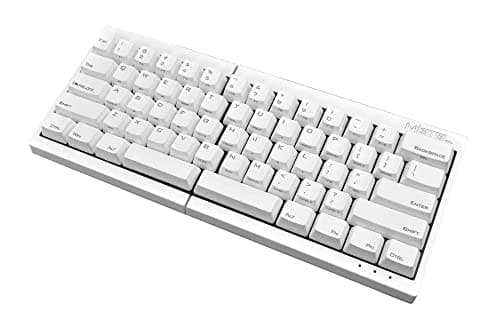
Mistel MD600 Split Mechanical Keyboard
- Type
- Fully separated 60% split, wired
- Switches
- Cherry MX mechanical
- Layout
- 60% — no function row or number pad
- Programming
- Onboard macro and layer programming
- Footprint
- The smallest of any pick here
The compact split. Two 60 percent halves with Cherry MX switches that take almost no desk, which matters when the same surface has to hold a keyboard, a mouse, and a laptop.
- Ergonomic Gain
- 8.2
- Typing Feel
- 9.1
- Adjustability
- 8.4
- Value
- 8.6
Pros
- +Cherry MX switches are the reference point for mechanical feel and longevity
- +Two small halves free an enormous amount of desk for the mouse
- +Separation and angle are entirely up to you
- +Onboard layers make the missing keys accessible without software
Cons
- −A 60% layout means arrows, function keys, and numbers all live on layers you have to learn
- −No wrist rest and no tenting, so it addresses width but not forearm rotation
- −The layer learning curve is real even though the typing layout is standard
Skip this if…
…you use function keys, arrows, or a number pad constantly — the layers will slow you down every day
How to choose a split keyboard
Start by deciding how much change you can absorb, because that single answer narrows the field faster than any specification. If you want the benefit with essentially no disruption, a fixed split is the honest recommendation, and you accept that the angle is a compromise. If you are prepared for a couple of slower days, a fully separated board with a standard layout gives you the real geometric fix. If you are willing to spend weeks getting fluent again in exchange for the largest ergonomic gain available, a contoured columnar board is the destination.
Then measure yourself, roughly. Sit up straight, let your arms hang, and bring your hands forward onto the desk without pulling your elbows in. The distance between your index fingers in that position is the separation you actually want. If it is much more than a standard keyboard’s width — and for most adults it is — a fixed split will not reach it and you want a fully separated board.
Consider tenting separately from splitting. Splitting fixes the sideways wrist bend; tenting — raising the inner edges of each half so your palms rotate toward each other — addresses forearm rotation, which is a different strain. Some boards include it, some offer it as an accessory, and some ignore it entirely. If your discomfort is in the forearm rather than the wrist, prioritize a board that tents.
Finally, set the height right or none of it works. A split keyboard at the wrong height simply relocates the problem, and the target is elbows at roughly ninety degrees with wrists flat or very slightly lower than the elbows. That usually means the keyboard sits lower than a standard desk surface, which is a chair-height and desk-height question rather than a keyboard one — our desk setup guide covers the whole chain, and a matching ergonomic mouse keeps the other hand from undoing the gain.
Then plan the first fortnight, because that is where most split keyboards are abandoned rather than returned. The typing-speed dip, the keys you will discover you have been hitting with the wrong hand, how far apart to set the halves and when to add tenting are all in switching to a split keyboard.
How we picked
We do not run a testing lab
We compiled the published manufacturer specifications, did the ergonomics, VESA and desk-depth math ourselves, and read aggregated owner reviews, then scored each product against a published rubric. The scores are judgments from documented research — they are not measurements we took, because we do not have a lab and we are not going to pretend we do. Every spec traces back to a listing or manual named in Sources.
Questions
Frequently asked
Are split keyboards actually better for your wrists?+
They address a specific, visible problem: on a conventional keyboard your hands sit closer together than your shoulders, so your wrists bend outward to reach the home row. Splitting the halves lets each hand sit in front of its own shoulder with the wrist straight. Whether that resolves an existing complaint depends on the complaint, but the geometric improvement is real and measurable.
How long does it take to get used to a split keyboard?+
A fixed split costs most people a day or two. A fully separated board with a standard layout is similar, because the key positions have not changed. A contoured columnar board is genuinely different — expect an awkward first week and several more before you are back to full speed.
What is the difference between a split and a tented keyboard?+
Splitting separates the halves horizontally, which fixes the sideways wrist bend. Tenting raises the inner edges so your palms rotate toward each other, which addresses forearm rotation. They are different problems, and some boards do one, some both.
Can you game on a split keyboard?+
Yes, and the separated formats are arguably better for it, because you can push the right half away and give the mouse the whole desk. The exception is contoured columnar boards, where the changed key positions take real relearning before muscle memory catches up.
Do I need a wrist rest with a split keyboard?+
A rest is for pausing on, not for typing on — resting your wrists while you type compresses exactly the structures the split is meant to protect. Some boards include one; if yours does not and you want one, choose a low, firm rest that keeps your wrists level rather than propped up.
Receipts
Sources
We do not run a testing lab, and we do not pretend to. Specifications come from the manufacturer or retailer listing; the footprint and clearance math is ours and reproducible. Where we could not verify a number, we say so on the page rather than quietly leaving it out. Read our full method.