Skip to content
Chair & Cable

SECTION 04 · Keyboards & Mice

The Best Mice for Your Hand Size

A mouse that is too small forces a claw grip; one that is too large turns every click into a stretch. Both show up as wrist ache that no amount of wrist rest fixes. Here are the shells, by the numbers.

By Stephen V.Updated How we pick
#ad

We earn a commission when you buy through our Amazon links, at no extra cost to you. It never affects our rankings, and we say so when the cheaper product is the better buy. How this works.

For large hands, buy the Logitech MX Master 4— at 5.05 x 3.48 x 2.0 in it is the biggest shell here and the only one that fills a long palm without a stretch to the buttons. For small to medium hands, buy the Logitech Lift, which Logitech itself sizes for small and medium hands and sells in a left-handed version. If you are between the two, or you have tried both and neither fitted, the Logitech ERGO M575S trackball is the format where hand size largely stops mattering.

Hand size is the least discussed and most decisive spec in a mouse. Grip style follows from it: a shell that is too short for your palm pushes you into a claw grip, where the fingers arch and the wrist extends, and a shell that is too large keeps your fingertips reaching for buttons that should be under them. Neither is a disaster for an hour. Both are a problem across a working day.

Measure your hand first

Two numbers, taken on a flat surface with your hand open and relaxed. Hand length is the distance from the base of your palm — the crease at your wrist — to the tip of your middle finger. Hand width is across the palm at the knuckles, excluding the thumb.

Then match roughly. A palm-grip mouse wants a shell about three quarters of your hand length, so the heel of your hand rests on the back of the mouse while your fingertips sit on the buttons. Shorter than that and your palm floats; longer and you are pushing the mouse from the middle of your hand. This is the same reasoning that makes a narrower keyboard more comfortable: it is about where your joints end up, not about the device.

The published numbers are not all equal

Logitech publishes exact dimensions and weights for its MX line, and we have used them. For the Lift and the Evoluent VerticalMouse 4, the makers publish a stated hand-size fit rather than a shell measurement, so that is what the specs below say — the manufacturer’s claim, labelled as such. We have not converted one into the other, and we have not measured any of these shells ourselves, because we do not have a lab and are not going to pretend otherwise.

Vertical mice change the question

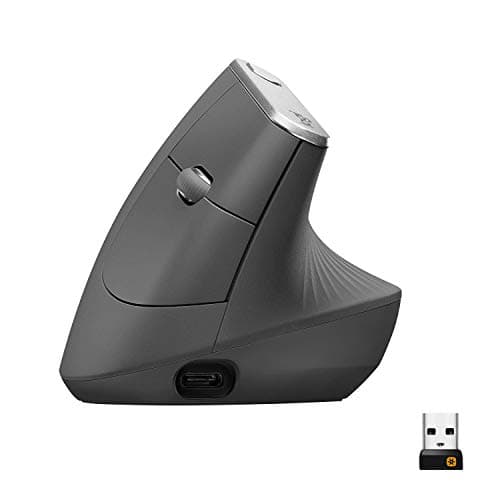
A vertical mouse rotates your forearm out of pronation, and that changes which dimension matters: height and the angle become as important as length. Logitech builds two at the same 57-degree angle in two shell sizes — the MX Vertical, which it describes as suiting medium to large hands, and the Lift, sized for small to medium. That pair is the clearest same-design, two-sizes comparison available, which is why both are below. The full vertical mouse roundup ranks the format on its own terms.

And a trackball ignores it

On a trackball, the device does not move and your arm does not either. Shell size still affects where your fingers land, but the reach-and-drag problem that makes a badly sized mouse hurt simply is not present. If you have replaced two mice and still have a sore wrist, that is the honest next thing to try — and our vertical mouse versus trackball comparison explains which complaint each format actually addresses.

The short answer

Quick picks

#ProductBest forScorePrice
01
Logitech Logitech MX Master 4
Logitech MX Master 4

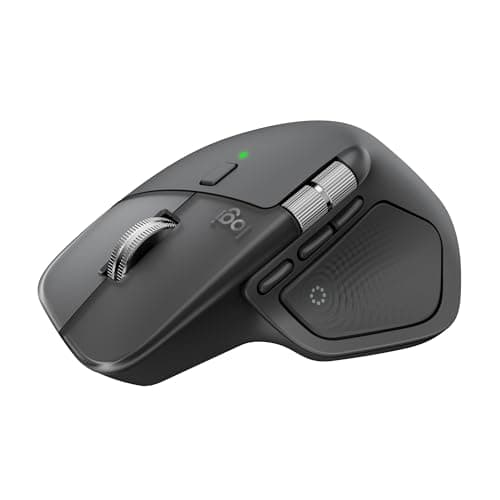
The largest shell here and the right default for a long palm. At 5.05 x 3.48 x 2.0 in it supports the whole hand in a palm grip, and the thumb panel puts shortcuts where a large hand can actually reach them.

Large hands, palm grip
8.0
$118.00Amazon
02
Logitech Logitech MX Master 3S Wireless Mouse
Logitech MX Master 3S Wireless Mouse

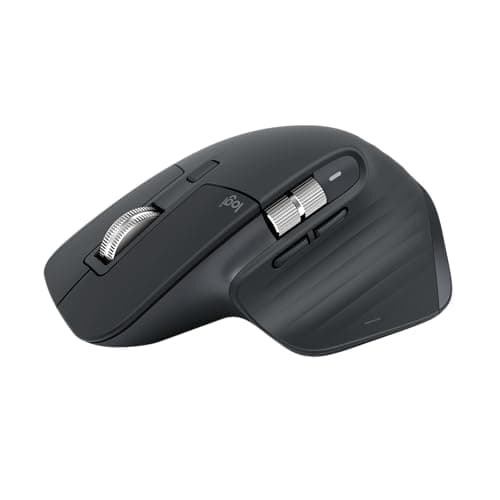
Fractionally smaller than the MX Master 4 in every dimension and considerably cheaper. The pick for a medium-to-large hand that found the 4 a little much, or for anyone who never used the thumb panel.

Medium to large hands
7.9
$94.99Amazon
03
Logitech Logitech Lift Vertical Ergonomic Mouse
Logitech Lift Vertical Ergonomic Mouse

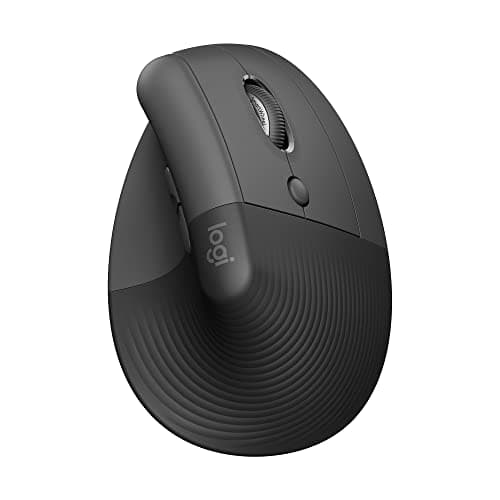
The small-hand pick, and the only mouse here Logitech explicitly sizes that way. The same 57-degree vertical angle as its flagship in a shell small hands can actually wrap, plus a left-handed version.

Small to medium hands
8.3
$69.95Amazon
04
Logitech Logitech MX Vertical Ergonomic Mouse
Logitech MX Vertical Ergonomic Mouse

The large-hand vertical. Same 57-degree angle as the Lift, a 4.72 x 3.11 x 3.09 in shell that Logitech says suits medium to large hands, and the option to run it wired over USB-C.

Large hands that want a vertical grip
8.3
$77.99Amazon
05
Logitech Logitech ERGO M575S Wireless Trackball
Logitech ERGO M575S Wireless Trackball

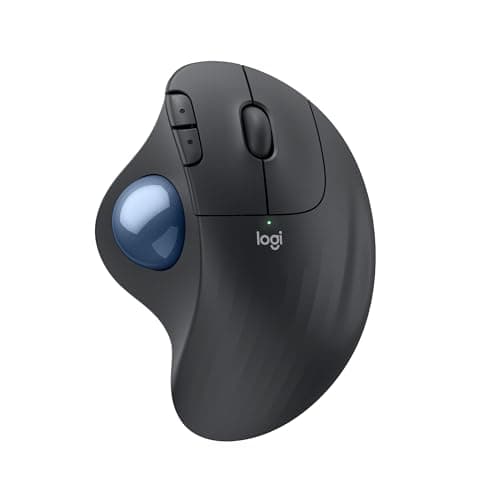
The answer when sizing itself is the problem. A thumb-operated trackball never travels, so a shell that is slightly wrong for your hand stops producing the reach-and-drag that a mis-sized mouse does.

When no mouse has fitted
8.4
$49.99Amazon

#ad · Live prices from the Amazon Product API, as of October 5, 2026. Where we have no verified live price we show none — we would rather leave a gap than print a number that has rotted.

In detail

The picks, in full

01
Logitech Logitech MX Master 4

Large hands, palm grip

Logitech MX Master 4

Size / weight
5.05 x 3.48 x 2.0 in; 5.29 oz (150 g)
Grip
Sculpted right-hand palm grip
Sensor
Darkfield, 200-8,000 DPI in 50 DPI steps
Buttons
8, plus a gesture button and the Haptic Sense Panel
Wireless
Bluetooth LE 5.1 or Logi Bolt; USB-C Bolt receiver in the box
Battery
650 mAh; up to 70 days
8.0/10

The largest shell here and the right default for a long palm. At 5.05 x 3.48 x 2.0 in it supports the whole hand in a palm grip, and the thumb panel puts shortcuts where a large hand can actually reach them.

Large-Hand Fit
9.8
Small-Hand Fit
5
Button Reach
9.4
Wrist Angle
7.6

Pros

  • The tallest and longest shell in this roundup, which is the whole point
  • 150 g of mass keeps a large hand from skating the mouse around
  • Thumb wheel and panel sit under a long thumb rather than behind it
  • Bolt receiver included, so it works on a machine with awkward Bluetooth

Cons

  • Too big for small hands - it will feel like pushing a brick
  • Right-handed only, with no left-handed version
  • The most expensive mouse here

Skip this if…

…your hand length is under about seven inches - the 3S is slightly smaller and the Lift much smaller.

$118.00View on Amazon

Price as of October 5, 2026. Prices change — Amazon's is the one that counts.

#ad · we may earn a commission from this link to Logitech MX Master 4

02
Logitech Logitech MX Master 3S Wireless Mouse

Medium to large hands

Logitech MX Master 3S Wireless Mouse

Size / weight
4.92 x 3.32 x 2.01 in; 4.97 oz (141 g)
Grip
Sculpted right-hand palm grip
Sensor
Darkfield, 200-8,000 DPI in 50 DPI steps
Buttons
7, plus a gesture button
Scroll
MagSpeed wheel with SmartShift; thumb wheel for horizontal
Wireless
Bluetooth LE or Logi Bolt (USB-A receiver on the standard edition only)
7.9/10

Fractionally smaller than the MX Master 4 in every dimension and considerably cheaper. The pick for a medium-to-large hand that found the 4 a little much, or for anyone who never used the thumb panel.

Large-Hand Fit
9.4
Small-Hand Fit
5.5
Button Reach
9
Wrist Angle
7.6

Pros

  • A sixth of an inch shorter and narrower than the 4, which is enough to matter
  • 141 g keeps it stable without being heavy
  • Same Darkfield sensor and MagSpeed wheel as the newer mouse
  • The best-value large mouse on this page by a wide margin

Cons

  • This listing is the Bluetooth edition - it does not include a Bolt receiver
  • Right-handed only
  • Still too large for a small hand

Skip this if…

…you need a bundled receiver, or you want the haptic thumb panel - that is the MX Master 4.

$94.99View on Amazon

$99.995% off

Price as of October 5, 2026. Prices change — Amazon's is the one that counts.

#ad · we may earn a commission from this link to Logitech MX Master 3S Wireless Mouse

03
Logitech Logitech Lift Vertical Ergonomic Mouse

Small to medium hands

Logitech Lift Vertical Ergonomic Mouse

Hand size
Sized for small to medium hands (per Logitech)
Angle
57-degree vertical angle
Connection
Bluetooth or Logi Bolt receiver
Sensor
Up to 4000 DPI
Battery
Replaceable AA
Availability
Right-handed and left-handed versions
8.3/10

The small-hand pick, and the only mouse here Logitech explicitly sizes that way. The same 57-degree vertical angle as its flagship in a shell small hands can actually wrap, plus a left-handed version.

Large-Hand Fit
5.5
Small-Hand Fit
9.6
Button Reach
8.6
Wrist Angle
9.6

Pros

  • The only pick here sold in a left-handed version
  • Vertical angle takes the forearm out of pronation, not just the wrist
  • Replaceable AA battery - nothing to charge and nothing to degrade
  • Quiet switches, which matters on a shared desk

Cons

  • Large hands will claw it - Logitech says so itself
  • 4000 DPI sensor rather than the 8000 DPI Darkfield units above
  • Vertical grip takes a few days of adjustment

Skip this if…

…your hand is long - the MX Vertical is the same angle in the larger shell.

$69.95View on Amazon

$79.9913% off

Price as of October 5, 2026. Prices change — Amazon's is the one that counts.

#ad · we may earn a commission from this link to Logitech Lift Vertical Ergonomic Mouse

04
Logitech Logitech MX Vertical Ergonomic Mouse

Large hands that want a vertical grip

Logitech MX Vertical Ergonomic Mouse

Hand size
Suits medium to large hands (per Logitech)
Size / weight
4.72 x 3.11 x 3.09 in; 4.41 oz (125 g)
Shape
Vertical, 57-degree angle, thumb rest
Sensor
400-4,000 DPI in 50 DPI steps; cursor-speed switch
Wireless
Bluetooth LE 4.2, Unifying receiver, or wired over USB-C
Battery
240 mAh; up to 4 months
8.3/10

The large-hand vertical. Same 57-degree angle as the Lift, a 4.72 x 3.11 x 3.09 in shell that Logitech says suits medium to large hands, and the option to run it wired over USB-C.

Large-Hand Fit
9.2
Small-Hand Fit
6
Button Reach
8.4
Wrist Angle
9.6

Pros

  • The tallest shell here at 3.09 in, which is what a large hand needs from a vertical
  • Three connection modes including wired, unusual in this category
  • Thumb rest keeps a big hand from gripping with the fingertips
  • Lighter than either MX Master at 125 g

Cons

  • Right-handed only
  • 4000 DPI and no Darkfield - it will not track on glass
  • Narrow mouse pad is not enough; a vertical grip wants room

Skip this if…

…your hands are small - the Lift is the same design one size down.

$77.99View on Amazon

$119.9935% off

Price as of October 5, 2026. Prices change — Amazon's is the one that counts.

#ad · we may earn a commission from this link to Logitech MX Vertical Ergonomic Mouse

05
Logitech Logitech ERGO M575S Wireless Trackball

When no mouse has fitted

Logitech ERGO M575S Wireless Trackball

Type
Thumb-operated trackball
Shape
Sculpted right-handed shell
Connection
Bluetooth or Logi Bolt receiver
Power
Replaceable battery with long life
Buttons
Standard buttons plus browser navigation
8.4/10

The answer when sizing itself is the problem. A thumb-operated trackball never travels, so a shell that is slightly wrong for your hand stops producing the reach-and-drag that a mis-sized mouse does.

Large-Hand Fit
8.4
Small-Hand Fit
8.4
Button Reach
8
Wrist Angle
8.8

Pros

  • The hand stays put, so shell length matters far less than on a mouse
  • Needs almost no desk space, which suits a keyboard tray
  • Long battery life on a replaceable cell
  • The cheapest way to find out whether the format suits you

Cons

  • Right-handed sculpt only
  • Thumb does all the pointing, which is its own adaptation
  • Fine cursor work is slower than with a good mouse at first

Skip this if…

…you do precision cursor work all day and have never used a trackball - try it before committing.

$49.99View on Amazon

Price as of October 5, 2026. Prices change — Amazon's is the one that counts.

#ad · we may earn a commission from this link to Logitech ERGO M575S Wireless Trackball

The shells, by the published numbers

MousePublished sizeWeightStated hand fit
MX Master 45.05 x 3.48 x 2.0 in150 gNot stated; largest shell here
MX Master 3S4.92 x 3.32 x 2.01 in141 gNot stated; second largest
MX Vertical4.72 x 3.11 x 3.09 in125 gMedium to large (Logitech)
Logitech LiftNot publishedNot publishedSmall to medium (Logitech)
ERGO M575SNot publishedNot publishedTrackball - hand does not travel

The blanks are deliberate. Logitech publishes full dimensions for the MX line and a stated hand-size fit for the Lift, and we are not going to fill the gaps with numbers lifted from a retailer listing. If an exact shell height decides your purchase, a store with a return window is a better test than any spec sheet.

Which to buy, by hand length

Long hand, palm grip, conventional shape. MX Master 4, or the 3S to save money. The 4 is larger in every dimension; the difference is small on paper and noticeable in the hand.

Long hand, wrist or forearm complaint. MX Vertical. The 3.09 in height is the spec that makes a vertical work for a big hand, and nothing else here is close to it.

Small hand. Logitech Lift, and the left-handed version if you are left-handed. It is the only pick on this page that exists in both.

Hand size is not really the problem.ERGO M575S. If two correctly sized mice have both ached, the thing to change is how much your arm moves, not how big the shell is — the trackball roundup goes deeper, and the ergonomic mouse roundup covers the field by complaint rather than by size.

Two things that undo a correctly sized mouse

A full-size keyboard. The number pad pushes your mouse hand out past your shoulder, and the resulting reach produces exactly the shoulder and neck ache people blame on the mouse. A tenkeyless or 75% board is the fix, and the ergonomics guide has the geometry.

A desk that is too high. If your elbow sits below the desk surface, your wrist extends to reach the mouse whatever shell you bought. Check the desk height guide, and if the desk cannot move, drop the input devices instead with an under-desk keyboard tray - most trays carry the mouse as well as the board.
How we picked

We do not run a testing lab

We compiled the published manufacturer specifications, did the ergonomics, VESA and desk-depth math ourselves, and read aggregated owner reviews, then scored each product against a published rubric. The scores are judgments from documented research — they are not measurements we took, because we do not have a lab and we are not going to pretend we do. Every spec traces back to a listing or manual named in Sources.

Questions

Frequently asked

What is the best mouse for large hands?
The Logitech MX Master 4, at 5.05 x 3.48 x 2.0 in, is the largest shell here and the best conventional palm-grip mouse for a long hand. If you want a vertical grip at that size, the MX Vertical is 3.09 in tall, which is the tallest shell on this page.
What is the best mouse for small hands?
The Logitech Lift, which Logitech sizes for small to medium hands and also sells left-handed. Its larger sibling, the MX Vertical, uses the same 57-degree angle but a shell Logitech says suits medium to large hands.
How do I measure my hand for a mouse?
Lay your hand flat and relaxed. Hand length is wrist crease to the tip of the middle finger; hand width is across the knuckles, thumb excluded. For a palm grip, look for a shell roughly three quarters of your hand length.
Does mouse size actually cause wrist pain?
Size does not cause injury by itself, but it decides your grip, and grip decides wrist extension and finger reach. A shell too small for your palm pushes you into a claw grip with the wrist held up, which is the posture most people are trying to get away from.
Is a bigger mouse always better if I have big hands?
Up to the point where your fingertips still rest naturally on the buttons. Past that you are pushing the mouse from the middle of your palm and stretching for the clicks, which is its own problem.

Keep reading

Receipts

Sources

We do not run a testing lab, and we do not pretend to. Specifications come from the manufacturer or retailer listing; the footprint and clearance math is ours and reproducible. Where we could not verify a number, we say so on the page rather than quietly leaving it out. Read our full method.