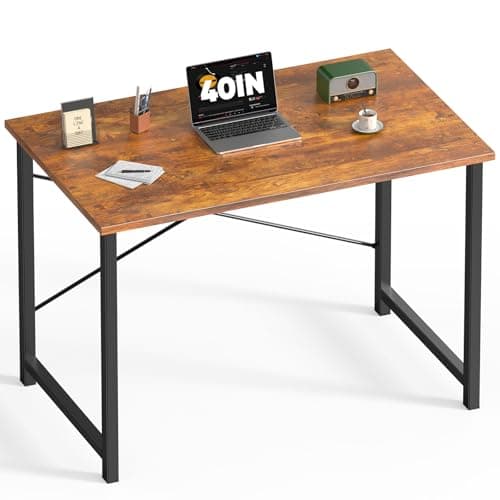
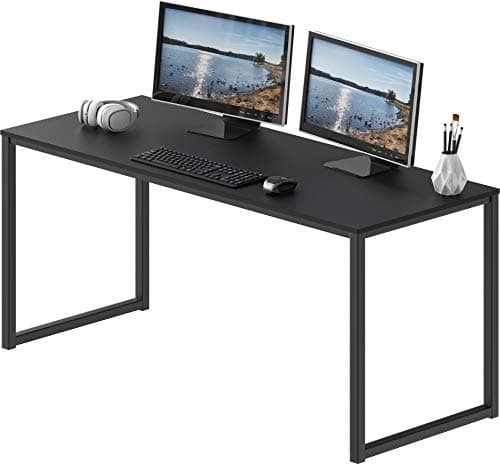
The desk to buy under $100 is the SHW Mission 55″: the widest top here, on a powder-coated steel frame, and SHW states it fits two monitors on a dual arm — which is the one thing most desks at this price cannot honestly claim. If you want height adjustment, the FEZIBO Electric Standing Desk 48 x 24 is the only electric desk on this page and the only route to a sit-stand surface under the cap. And the budget pick is the DUMOS 40 Inch Small Computer Desk: the cheapest desk here, and the only one that publishes a weight capacity (265 lb) and an X-shaped brace to back it up.
Under $100 there is no mystery about what you are buying: a laminated board on a steel frame. Every desk here is MDF or particleboard with a laminate finish, and that is not a criticism — it is the only construction that reaches this price. What varies, and what decides whether the desk works, is how much surface you get and how the top behaves when something heavy is clamped to its edge.
Depth decides more than width
Width is what the listing leads with. Depth is what makes the desk usable, because depth sets how far your monitor can sit from your eyes. The working minimum for a single screen at a comfortable distance is about 24 inches, and that is a hard number rather than a preference — our desk depth guide has the arithmetic behind it. Below roughly 20 inches you are either pushing the monitor against the wall or sitting too close to it, and no amount of width fixes that.
Three of the picks here publish a 24-inch depth. One is a corner desk where the depth varies along the L. One does not publish a depth at all, which we have said rather than filled in.
| Desk | Published surface | Height | Top material | Clears the 24″ depth minimum? |
|---|
| SHW Mission 55″ | 55″ W, fixed desk | Fixed, standard desk height | MDF with laminate | Depth not published as a figure |
| FEZIBO Electric 48 x 24 | 48″ x 24″ | Electric adjustment | Pre-drilled top on a steel frame | Yes, exactly 24″ |
| SHW Mission 48″ | 48″ W x 24″ D (approx.) | 29″ fixed | MDF with laminate | Yes |
| Mr IRONSTONE L-Shaped | Compact corner L-shape | Fixed | Laminate over particle board | Varies along the L |
| DUMOS 47″ | 47″ W x 24″ D (approx.) | 29″ fixed | Particleboard with laminate | Yes |
| DUMOS 40″ | 40″ W | 29.33″ | Scratch- and water-resistant top on steel | Depth not published |
The monitor-arm question, which is where cheap tops fail
A clamp-on monitor arm does not spread its load — it concentrates the weight of a screen onto two square inches of desk edge, and then levers against it every time the arm moves. On a solid wood or butcher-block top that is a non-event. On a laminated particleboard top it is the single most likely way to damage a desk at this price.
Three checks before you clamp anything to one of these:
- Is the back edge clear? A hutch, a rear rail or a cable channel along the back edge leaves nowhere for the clamp to sit. None of the picks here have a hutch, which is one reason they are on the page.
- How thick is the top, and is it hollow? Most arms specify a desk thickness range at both ends. A thin laminated top sits near the bottom of that range, and a hollow-core top can crush.
- Spread the load. A strip of plywood or a steel plate between clamp and laminate costs almost nothing and turns a point load into a distributed one. Our monitor arm installation guide has the full fit check, including grommet mounting, which is the better answer on a thin top.
If a dual-monitor arm is the plan, the SHW Mission 55-inch is the pick: SHW states the top fits two monitors on a dual arm, and it is the only desk here that makes that claim. Our desks for dual monitors page ranks on exactly that, with the combined-width arithmetic.
Price check. 5 of the 6 picks below were listed under $100 on Amazon as of November 12, 2026— the figure on each buy button is the live one, and where we have no verified price we show none rather than a number that has rotted.
The short answer
Quick picks
| # | Product | Best for | Score | Price |
|---|
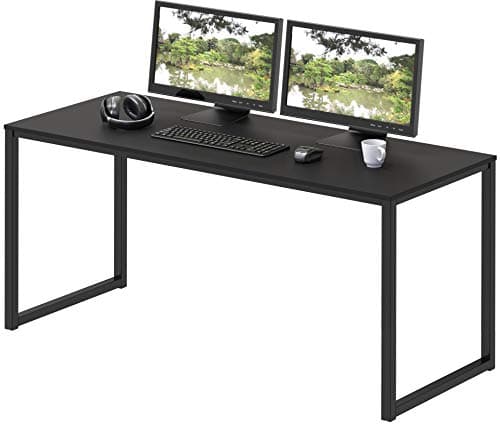
| 01 | SHW Mission 55" Home Office Computer DeskThe widest top under $100, on a powder-coated steel frame, and the only desk here SHW states will take two monitors on a dual arm. The best surface-per-dollar on the page. | Best overall - the most usable surface | | $99.97·Amazon |
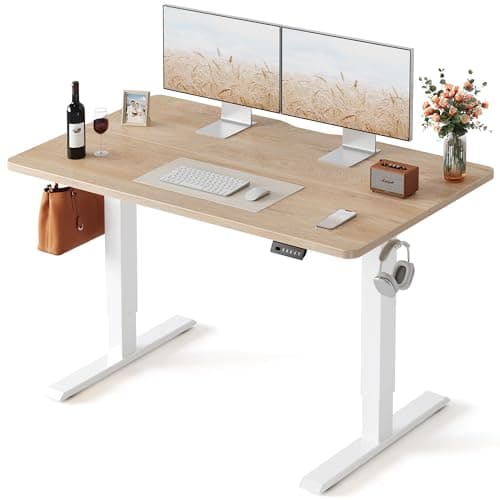
| 02 | FEZIBO Electric Standing Desk, 48 x 24The only electric height-adjustable desk that comes in under $100, which makes it the only route to a sit-stand surface at this budget. A single-motor frame under a pre-drilled 48 x 24 top. | The only sit-stand desk under the cap | | $99.99·Amazon |
| 03 | | Best straightforward value | | $89.97·Amazon |
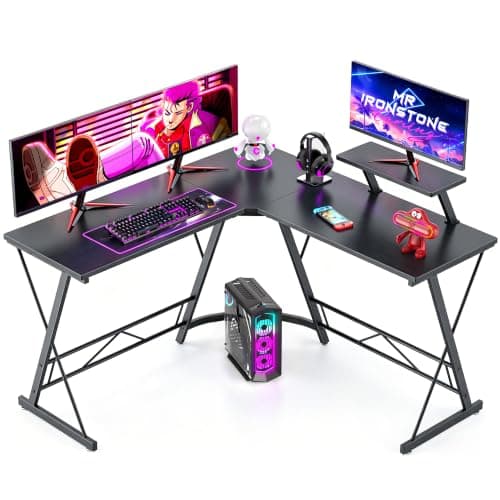
| 04 | | The only L-shape under the cap | | $64.99·Amazon |
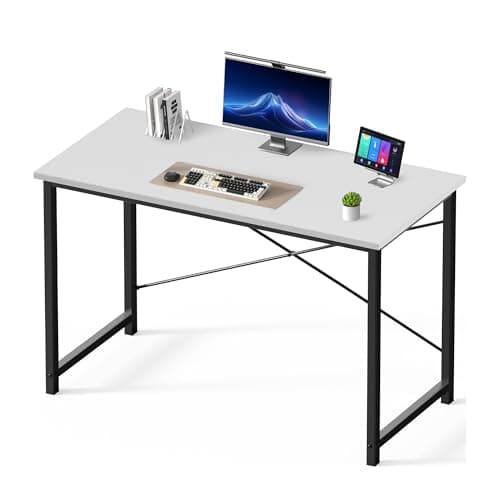
| 05 | | Cheapest full-depth top | | $52.99·Amazon |
| 06 | DUMOS 40 Inch Small Computer DeskThe budget pick: the cheapest desk here, and the only one that publishes a weight capacity - 265 lb, with an X-shaped brace behind the number. A small surface, honestly specified. | Budget pick - cheapest, and the only rated top | | Check price → |
#ad · Live prices from the Amazon Product API, as of November 12, 2026. Where we have no verified live price we show none — we would rather leave a gap than print a number that has rotted.
In detail
The picks, in full
Best overall - the most usable surface
SHW Mission 55" Home Office Computer Desk
- Surface
- 55" W fixed desk
- Height
- Fixed, standard desk height
- Top
- MDF with laminate finish
- Frame
- Powder-coated steel frame
- Fits
- Two monitors on a dual arm; tight on stock stands
The widest top under $100, on a powder-coated steel frame, and the only desk here SHW states will take two monitors on a dual arm. The best surface-per-dollar on the page.
- Usable Surface
- 9.2
- Build
- 7.6
- Arm Friendly
- 8.4
- Value
- 9
Pros
- +55 inches of width is enough for two screens plus a keyboard, which 48 inches is not
- +SHW states the top takes a dual monitor arm, which no other pick here claims
- +Powder-coated steel frame rather than the thin tube used at the very bottom of the market
- +MDF takes a clamp better than hollow-core particleboard
Cons
- −Fixed height, so it cannot be set to you - you adjust the chair instead
- −SHW does not publish a depth figure for this model
- −Two screens on their stock stands will overhang; the width assumes an arm
Skip this if…
…you want a sit-stand surface or a top you can refinish - this is laminate on MDF
The only sit-stand desk under the cap
FEZIBO Electric Standing Desk, 48 x 24
- Size
- 48" x 24" desktop
- Adjustment
- Electric height adjustment
- Frame
- Steel frame with crossbar
- Controller
- Push-button height control
- Assembly
- Frame bolts to a pre-drilled top
The only electric height-adjustable desk that comes in under $100, which makes it the only route to a sit-stand surface at this budget. A single-motor frame under a pre-drilled 48 x 24 top.
- Usable Surface
- 8
- Build
- 7
- Arm Friendly
- 7.4
- Value
- 9.4
Pros
- +Electric height adjustment at a price where almost everything is fixed-height
- +A 24-inch depth, which clears the minimum a monitor needs
- +The crossbar frame is steadier at seated height than a crossbar-free budget frame
- +The top arrives pre-drilled, so assembly is bolts rather than guesswork
Cons
- −A crossbar limits knee room and is the first thing better frames remove
- −FEZIBO publishes no weight capacity or height range figure for this model
- −A single-motor budget lift is slower and noisier than the dual-motor frames
Skip this if…
…you are loading it with three screens - step up to a rated frame from our standing desk frames page
Best straightforward value
SHW Mission 48" Home Office Computer Desk
- Surface
- 48" W x 24" D (approx.)
- Height
- 29" fixed
- Top
- MDF with laminate finish
- Frame
- Powder-coated steel A-frame
- Assembly
- Bolt-together, no electronics
The value default: 48 by 24 inches of MDF on a bolt-together steel A-frame, with no electronics to fail and a published depth that clears the monitor minimum.
- Usable Surface
- 8
- Build
- 7.8
- Arm Friendly
- 8.4
- Value
- 9
Pros
- +A published 24-inch depth, which is the figure that decides monitor distance
- +The steel A-frame is the most rigid geometry at this price
- +No motor, no controller, nothing electrical to fail
- +MDF rather than hollow particleboard, so a clamp has something to bite
Cons
- −48 inches is one screen and a keyboard, not two screens
- −Fixed at 29 inches, which is tall for shorter users
- −Plain looks; this is office furniture, not furniture
Skip this if…
…you need two monitors side by side - the 55-inch version above is the pick
The only L-shape under the cap
Mr IRONSTONE L-Shaped Corner Computer Desk
- Footprint
- Compact L-shape corner desk
- Orientation
- Assembles for either corner
- Surface
- Laminate over particle board
- Frame
- Steel tube legs with adjustable feet
- Underside
- Open, with no fixed storage
The only L-shape under $100, and it assembles for either corner. Two working planes out of one footprint, which is more total surface than any rectangular desk here.
- Usable Surface
- 8.8
- Build
- 6.8
- Arm Friendly
- 6
- Value
- 9
Pros
- +Two working planes, so the screen and the paperwork do not compete for the same space
- +Assembles for a left or right corner, which fits either side of a room
- +Adjustable feet matter more than they sound on an uneven floor under an L
- +Open underneath, so a tower or a keyboard tray both fit
Cons
- −Particle board under the laminate is the weakest top material here for a clamp
- −Depth varies along the L, so monitor distance depends where you sit
- −Corner joints are where a cheap L-shape develops a wobble first
Skip this if…
…you are clamping a heavy dual arm to it - particle board is the wrong material for a point load
Cheapest full-depth top
DUMOS 47" Computer Desk for Home Office
- Surface
- 47" W x 24" D (approx.)
- Height
- 29" fixed
- Top
- Particleboard with laminate
- Frame
- Steel tube legs
- Extras
- Often ships with a small hook or holder
A full 47 by 24 inch top at close to the bottom of the price range, on steel tube legs. The cheapest desk here that still clears the 24-inch depth minimum.
- Usable Surface
- 7.8
- Build
- 6.8
- Arm Friendly
- 6.4
- Value
- 9.2
Pros
- +A published 24-inch depth at one of the lowest prices on the page
- +47 inches is enough for a laptop, a screen and a notebook side by side
- +Steel tube legs rather than the composite legs some budget desks use
- +Simple assembly with no electronics
Cons
- −Particleboard top, so clamp loads need spreading
- −Fixed 29-inch height
- −The small included accessories vary by batch, so do not buy it for those
Skip this if…
…the desk needs to carry a heavy monitor arm without a spreader plate
Budget pick - cheapest, and the only rated top
DUMOS 40 Inch Small Computer Desk
- Width
- 40"
- Height
- 29.33"
- Weight capacity
- 265 lb
- Bracing
- X-shaped reinforcement structure
- Top
- Scratch- and water-resistant surface on a steel frame
The budget pick: the cheapest desk here, and the only one that publishes a weight capacity - 265 lb, with an X-shaped brace behind the number. A small surface, honestly specified.
- Usable Surface
- 6.6
- Build
- 7.4
- Arm Friendly
- 7
- Value
- 9.6
Pros
- +The only desk on this page with a published weight capacity, at 265 lb
- +X-shaped bracing is what that number rests on, and it is unusual at this price
- +A scratch- and water-resistant top, which matters most on the cheapest desk you own
- +40 inches fits rooms where a 48-inch desk does not
Cons
- −DUMOS does not publish a depth figure, so monitor distance is unverified
- −40 inches is one screen and a keyboard, with nothing spare
- −The cheapest frame here, and it is a two-screen desk only with an arm
Skip this if…
…you need room for two monitors or a document beside the keyboard - buy width instead
What you are not buying under $100
Three things, all of which have their own page if you decide they matter. Height adjustment — only the FEZIBO here adjusts, and a proper dual-motor sit-stand desk starts several times higher; budget standing desks is the cheapest honest entry point. A top worth refinishing — everything at this price is laminate on MDF or particleboard, and if you want a surface that lasts a decade the usual route is a frame plus your own top, where the budget goes into the slab. And storage — none of these have drawers; desks with drawers and storage ranks those separately.
Fixed height is fine if you set the chair instead
Five of the six picks here are fixed at about 29 inches, which is the standard desk height and too tall for a lot of people. That is not fatal, and it does not mean you need a standing desk. The order is: set the chair so your feet are flat and your thighs are roughly parallel to the floor, then look at your elbows. If they are below the desk surface, the desk is too high for you, and the fix is a footrest and a higher chair rather than a lower desk. Our desk height guide has the measurement, and under-desk footrests are the cheap half of the fix.
Spend the rest of the budget on what touches your body
A $90 desk and a $200 chair is a better setup than a $290 desk, every time. The desk is a surface that holds things at a height; the chair holds you, for eight hours. If the whole budget is tight, the best budget office chairs that are not junk is where the next money should go, and the desk setup guide puts the whole thing in order.
Three cheap additions that change a $90 desk
- A monitor arm or riser. Gets the screen to eye level and gives back the desk space the stand was using. A riser is the safer choice on a particleboard top, because it spreads the load instead of clamping.
- A cable tray. Nothing at this price has cable management. Under-desk trays screw or clamp on and keep the floor clear.
- A desk mat. On a laminate top it protects the finish, which is the part of a cheap desk that goes first. Desk mats and pads cost very little.
How we picked
We do not run a testing lab
We compiled the published manufacturer specifications, did the ergonomics, VESA and desk-depth math ourselves, and read aggregated owner reviews, then scored each product against a published rubric. The scores are judgments from documented research — they are not measurements we took, because we do not have a lab and we are not going to pretend we do. Every spec traces back to a listing or manual named in Sources.
Questions
Frequently asked
Can you get a decent desk for under $100?+
Yes, with one caveat: you are buying a laminated board on a steel frame, and every desk in this band is that. Within it, a 48 to 55 inch top with a published 24-inch depth on a steel A-frame is a genuinely good desk for a home office. What you are not getting is height adjustment, drawers, or a top worth refinishing.
How deep does a desk need to be for a monitor?+
About 24 inches for a single screen at a comfortable viewing distance. Below roughly 20 inches you are either pressing the monitor against the wall or sitting too close to it. A monitor arm helps, because it pushes the screen back over the desk edge and reclaims a few inches —
the desk depth guide has the arithmetic.
Can I clamp a monitor arm to a cheap desk?+
Usually, but spread the load. A clamp concentrates a screen’s weight onto a couple of square inches of edge, and a laminated particleboard top is the material most likely to dent or crush. A strip of plywood or a steel plate between the clamp and the desk fixes it for almost nothing; grommet mounting is better still if the top allows it.
Is there a standing desk under $100?+
One electric desk on this page comes in under the cap, and it is a single-motor frame with a crossbar rather than a proper dual-motor sit-stand desk. If height adjustment is the main reason you are buying, read
budget standing desks before committing — a slightly larger budget buys a meaningfully better lift.
Receipts
Sources
We do not run a testing lab, and we do not pretend to. Specifications come from the manufacturer or retailer listing; the footprint and clearance math is ours and reproducible. Where we could not verify a number, we say so on the page rather than quietly leaving it out. Read our full method.