The under-$150 tier is where the gift becomes something they would have bought eventually and kept putting off. A flagship mouse, a proper dual monitor arm, real speakers, a webcam that makes them look like they own a camera: these are the purchases desk people research, add to a cart, and abandon because the current thing still works. A gift here skips the abandonment step. The trade-off is that a few of these are closer to the personal end of the spectrum, so this page spends more words on who each one suits and what to check.
As on every page in this section, each pick is one we already rank on a category page, with the same specs and sources; the framing here is for the buyer, not the user. All six were under $150 at the live Amazon prices when this guide was written. The buttons carry today’s price, refreshed daily and hidden if it goes stale, so you will know if one has crossed the line before you commit.
The rule from the under-$50 guide still applies, loosened by one notch. Nothing here is sized to a body, and nothing needs their measurements. But two picks — the mouse and the keyboard — are objects people have opinions about, so they carry an honest note on when not to buy them. If the person you are buying for is the type who already has a strong view on their mouse, the arm, the speakers, the webcam or the mat will land better than the best mouse ever made.
The short answer
Quick picks
| # | Product | Best for | Score | Price |
|---|
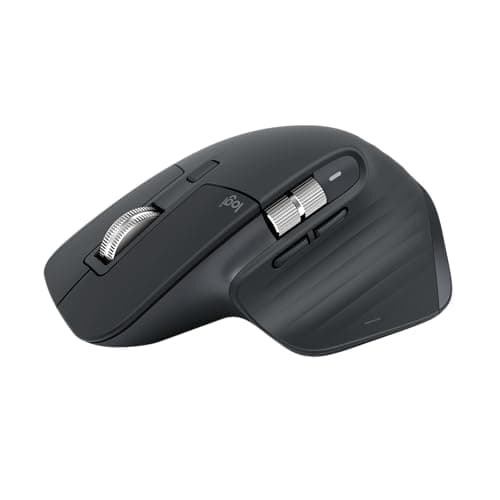
| 01 | Logitech MX Master 3S Wireless MouseThe safest premium gift on a desk, because it is the mouse enough people already want that it is a known quantity. For anyone still on a bundled or budget mouse it is an immediate, daily, noticeable upgrade. | Best overall under $150 | | $89.99·Amazon |
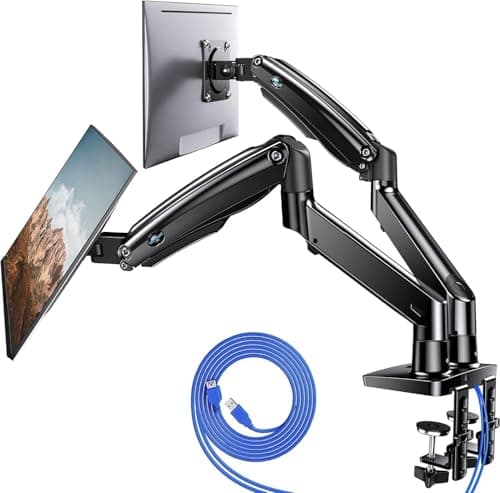
| 02 | HUANUO Dual Monitor Mount, Gas SpringThe gift for the person running two monitors on two factory stands. A dual gas-spring arm floats both screens at eye level, lines them up properly and gives back the whole strip of desk the stands were sitting on. | Best for a two-monitor desk | | $119.99·Amazon |
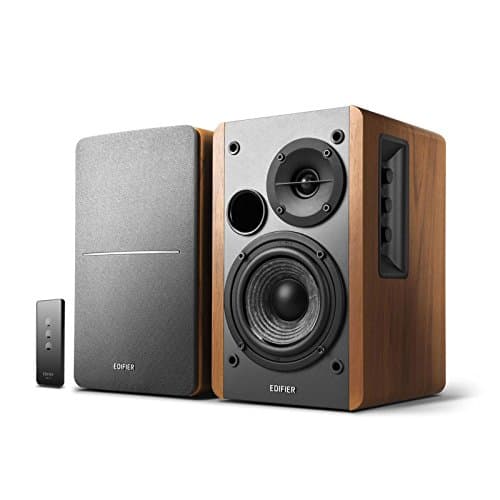
| 03 | Edifier R1280T Powered Bookshelf SpeakersThe gift for someone who listens to music at their desk through something they are slightly embarrassed by. Wooden cabinets, four-inch drivers and real bass and treble knobs - the biggest sound-per-dollar jump in our speaker ranking. | Best for music at the desk | | $149.99·Amazon |
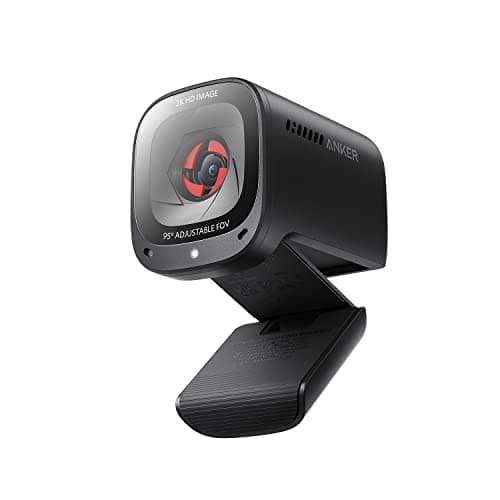
| 04 | Anker PowerConf C200 2K WebcamThe gift for the person who still looks like a shadow on video calls. 2K resolution, three fields of view, a built-in privacy cover and noise-canceling mics, at well under half the price of the flagship webcams. | Best for someone on calls all day | | $69.99·Amazon |
| 05 | Topo by Ergodriven Standing Desk MatThe gift for someone who owns a standing desk and stands on the bare floor. The contoured mat that defined the category, with mounds and edges that make them shift and stretch without deciding to. | Best for a standing desk owner | | $109.00·Amazon |
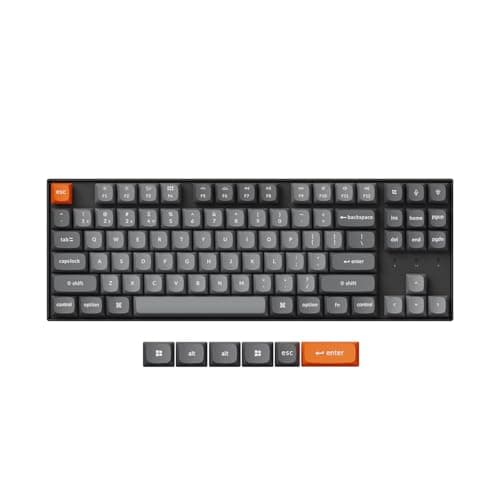
| 06 | Keychron K8 Max Wireless Mechanical KeyboardThe gift for the person who has mentioned mechanical keyboards but never bought one. Wireless, tenkeyless, quiet enough for a shared room, and hot-swappable, so the switches can be changed later without soldering - it grows with them. | Best for the keyboard-curious | | $79.99·Amazon |
#ad · Live prices from the Amazon Product API, as of Sep 24, 2026. Where we have no verified live price we show none — we would rather leave a gap than print a number that has rotted.
In detail
The picks, in full
Best overall under $150
Logitech MX Master 3S Wireless Mouse
- Type
- Wireless productivity mouse
- Connection
- Bluetooth (this edition has no receiver in the box), USB-C charging
- Scroll
- Electromagnetic scroll wheel with free-spin mode
- Multi-device
- Switches between multiple computers
- Clicks
- Quiet switches
The safest premium gift on a desk, because it is the mouse enough people already want that it is a known quantity. For anyone still on a bundled or budget mouse it is an immediate, daily, noticeable upgrade.
- Daily Use
- 9.6
- Unlikely to Own
- 7.4
- Universal Fit
- 7.6
- Value
- 8.8
Pros
- +A real upgrade for anyone still using a bundled or budget mouse, felt on the first day
- +Switches between a work laptop and a personal machine, which is the feature people did not know they wanted
- +Quiet clicks suit a shared room or an open office
- +Works on any operating system without installing anything
Cons
- −A mouse is personal - someone who already has a favorite may not switch
- −Sized for medium and large hands; small hands find it bulky
- −Right-handed only
Skip this if…
…they are left-handed, have small hands, or have ever told you which mouse they use - that is the person who will not change
Best for a two-monitor desk
HUANUO Dual Monitor Mount, Gas Spring
- Type
- Dual gas-spring arm, desk clamp and grommet
- Screen size
- Rated for 13" to 40" panels
- Mounting
- 75 x 75mm and 100 x 100mm VESA
- Movement
- Full height, tilt, swivel, and rotation on each arm
- Extras
- Integrated USB ports and cable routing channels
The gift for the person running two monitors on two factory stands. A dual gas-spring arm floats both screens at eye level, lines them up properly and gives back the whole strip of desk the stands were sitting on.
- Daily Use
- 9.4
- Unlikely to Own
- 8.6
- Universal Fit
- 7.2
- Value
- 9
Pros
- +The single biggest visual and ergonomic change you can make to a two-screen desk
- +Both screens move with one hand and stay exactly where they are put
- +Size range up to 40 inches covers an ultrawide plus a second panel
- +Clamp and grommet mounting both in the box, so awkward desk edges have an answer
Cons
- −Both monitors need a VESA pattern on the back - check before buying
- −Needs a clear rear desk edge deep enough for the clamp; some desks have a crossbar in the way
- −Assembly takes an evening, so it is a gift that arrives with a small project
Skip this if…
…you cannot confirm both screens have VESA holes and a clear desk edge to clamp to - our monitor arm guide explains what to look for
Best for music at the desk
Edifier R1280T Powered Bookshelf Speakers
- Drivers
- 4" bass driver and 13mm silk-dome tweeter per speaker
- Power
- 42W RMS total (21W per channel)
- Frequency response
- 75 Hz to 18 kHz
- Inputs
- Dual RCA and 3.5mm
- Controls
- Side-mounted bass, treble and volume knobs; remote included
- Cabinet
- Wooden enclosure, 146mm W x 196mm D x 234mm H
The gift for someone who listens to music at their desk through something they are slightly embarrassed by. Wooden cabinets, four-inch drivers and real bass and treble knobs - the biggest sound-per-dollar jump in our speaker ranking.
- Daily Use
- 8.8
- Unlikely to Own
- 8.4
- Universal Fit
- 7.6
- Value
- 9.4
Pros
- +Wooden cabinets and four-inch drivers sound like a different category from plastic desk speakers
- +Two inputs, so a computer and a phone or turntable can stay plugged in together
- +Physical tone knobs rather than an app, which is the right answer for a gift
- +A remote in the box
Cons
- −Each cabinet is about 9 inches tall and 8 inches deep - these need real desk space beside the monitor
- −Wired only; no Bluetooth on this model
- −Not magnetically shielded the way a dedicated desktop speaker is
Skip this if…
…their desk is narrow or already crowded - these are bookshelf speakers on a desk, and they need the room
Best for someone on calls all day
Anker PowerConf C200 2K Webcam
- Resolution
- 2K (1440p)
- Field of view
- Adjustable 65, 78, or 95 degrees
- Low light
- Low-light correction
- Privacy
- Built-in sliding privacy cover
- Audio
- Dual mics with AI noise canceling
The gift for the person who still looks like a shadow on video calls. 2K resolution, three fields of view, a built-in privacy cover and noise-canceling mics, at well under half the price of the flagship webcams.
- Daily Use
- 8.8
- Unlikely to Own
- 8
- Universal Fit
- 9.4
- Value
- 9.4
Pros
- +Three fields of view is the feature that most changes how a call looks, and it is rare at this price
- +Sliding privacy cover built in, which people notice and appreciate immediately
- +Works on any computer over USB with no software required for the basics
- +Clips to any monitor or laptop lid, so there is no compatibility question
Cons
- −Low-light handling is software correction, not a bigger sensor - a dim room still shows noise
- −Plastic build reflects the price
Skip this if…
…their laptop lives closed on a dock with no monitor to clip to - a webcam needs somewhere to sit
Best for a standing desk owner
Topo by Ergodriven Standing Desk Mat
- Type
- Contoured active standing mat
- Surface
- Sculpted terrain with mounds and raised edges
- Purpose
- Prompts position changes and calf stretches
- Material
- Firm polyurethane foam
- Edges
- Integrated sloped edges
The gift for someone who owns a standing desk and stands on the bare floor. The contoured mat that defined the category, with mounds and edges that make them shift and stretch without deciding to.
- Daily Use
- 8.6
- Unlikely to Own
- 9.2
- Universal Fit
- 7.8
- Value
- 7.6
Pros
- +The one accessory a standing desk owner almost never buys and always ends up wanting
- +Firm foam supports properly instead of sinking, which is the mistake cheap mats make
- +Purpose-built for standing desks rather than adapted from a kitchen mat
- +No size, no fit, no compatibility - it needs a floor
Cons
- −The most expensive standing mat we rank by a clear margin
- −Deliberately not flat, which some people find fidgety rather than freeing
- −Large footprint that does not tuck away neatly
Skip this if…
…they do not own a standing desk - without one, a standing mat has nothing to do
Best for the keyboard-curious
Keychron K8 Max Wireless Mechanical Keyboard
- Layout
- Tenkeyless (87-key)
- Connection
- Wireless - Bluetooth or 2.4 GHz; wired USB-C
- Switch type
- Hot-swappable (pre-installed Gateron)
- Hot-swap
- Yes
- Compatibility
- Mac and Windows keycaps and toggle
The gift for the person who has mentioned mechanical keyboards but never bought one. Wireless, tenkeyless, quiet enough for a shared room, and hot-swappable, so the switches can be changed later without soldering - it grows with them.
- Daily Use
- 9.6
- Unlikely to Own
- 7.8
- Universal Fit
- 6.8
- Value
- 8.6
Pros
- +Hot-swap sockets mean a wrong switch guess is a cheap fix, not a returned keyboard
- +Mac and Windows keycaps both in the box, so it fits whichever machine they use
- +Bluetooth, 2.4 GHz and wired, so it connects to anything
- +Gasket mount and foam keep it quiet enough for a shared room
Cons
- −A keyboard is the most opinionated object on a desk - only for someone who has expressed interest
- −Tenkeyless means no number pad, which matters for spreadsheet-heavy work
- −Taller than a slim board, so a wrist rest helps
Skip this if…
…they already own a mechanical keyboard, or they enter numbers all day and need a number pad
How to choose in the $50 to $150 tier
Sort the person first. Two monitors on factory stands: the dual arm, with the VESA check. Music through laptop speakers or a tinny pair: the Edifiers, if the desk has room. On video calls every day: the webcam. Owns a standing desk: the Topo. Still on a bundled mouse and has never mentioned mice: the MX Master 3S. Has said the words “mechanical keyboard” out loud and not followed through: the Keychron. If none of those match, drop a tier to the under-$50 guide, where every pick works for everyone, rather than forcing a fit up here.
The two personal picks, and when to skip them
The mouse and the keyboard are on this page because they are the two upgrades that change a working day most, and because both are safe for a specific kind of recipient: the person who has not yet formed an opinion. The MX Master 3S is right for someone still using whatever came in the laptop box. The K8 Max is right for someone who is curious about mechanical boards and has not committed. For anyone else — anyone who has ever told you what they use — skip both. That person will not switch, and the arm or the speakers will be the better gift by a distance. Our keyboard and mouse ergonomics guide explains why these objects are so personal in the first place. If the recipient has hinted at the newer MX Master 4 instead, the honest read on what its premium buys is in MX Master 4 vs MX Master 3S.
The checks that take thirty seconds
The dual arm needs both monitors to have VESA holes and the desk to have a clear rear edge for the clamp; our dual monitor arm roundup shows exactly what to look for. The speakers need roughly nine inches of height and eight of depth on either side of the monitor. The Topo needs a standing desk to exist. The webcam needs a monitor or an open laptop to clip to. Do the check that matches your pick and the gift cannot go wrong on fit.
If you want to go further
The next tier is the no-budget guide, where the reference monitor arm, the icon chair and the dock that ends the cable mess live. And if you are buying in November, the Black Friday deals hub records which of these product classes has a documented history of discounting and which does not, so you can decide whether to order now or wait for the sale window.
How we picked
We do not run a testing lab
We compiled the published manufacturer specifications, did the ergonomics, VESA and desk-depth math ourselves, and read aggregated owner reviews, then scored each product against a published rubric. The scores are judgments from documented research — they are not measurements we took, because we do not have a lab and we are not going to pretend we do. Every spec traces back to a listing or manual named in Sources.
Questions
Frequently asked
What is a good desk gift under $150?+
The Logitech MX Master 3S if they are still on a basic mouse; a dual gas-spring monitor arm if they run two screens on factory stands; Edifier R1280T speakers if they listen to music at the desk; a 2K webcam if they are on calls all day; the Topo mat if they own a standing desk. Each is a genuine upgrade rather than a nice touch.
Is a mechanical keyboard a good gift?+
Only for someone who has expressed interest and not yet bought one. Keyboards are the most opinionated object on a desk. The K8 Max is the safest choice for that person because it is hot-swappable - the switches can be changed later - and ships with both Mac and Windows keycaps. For anyone who already owns a mechanical board, choose something else on this list.
What should I check before buying a monitor arm as a gift?+
Two things: that the monitor has a VESA mounting pattern - four screw holes in a square on the back - and that the desk has a clear rear edge the clamp can grip. For a dual arm, both monitors need the pattern and each needs to be inside the arm’s size and weight rating. A photo of the back of the screen settles it.
Do the Edifier speakers need much space?+
Yes. Each cabinet is roughly 9 inches tall and 8 inches deep, so they need real room on either side of the monitor. On a narrow or crowded desk the Creative Pebble V3 from the under-$50 guide is the better fit; it is far smaller and runs off one USB-C cable.
Are these prices current?+
The prices in the buttons come live from Amazon and refresh daily; anything older than 48 hours is hidden rather than shown stale. All six picks were under $150 when the guide was written, and the button will show you if one has moved since.
Receipts
Sources
We do not run a testing lab, and we do not pretend to. Specifications come from the manufacturer or retailer listing; the footprint and clearance math is ours and reproducible. Where we could not verify a number, we say so on the page rather than quietly leaving it out. Read our full method.