SECTION 03 · Ergonomic Chairs
How to Adjust an Office Chair
Five adjustments, in an order that matters. Do them out of sequence and every one you set gets undone by the next.
We earn a commission when you buy through our Amazon links, at no extra cost to you. It never affects our rankings, and we say so when the cheaper product is the better buy. How this works.
Set an office chair in this order: seat height first, then seat depth, then lumbar height, then armrests, then recline tension. The order is the whole trick. Seat height changes where your elbows land, which changes where the armrests need to be. Seat depth changes how far back your hips sit, which changes where the lumbar support meets your spine. Do them in any other sequence and each adjustment invalidates the one before it, which is why so many people conclude the chair is wrong when the setup is.
1. Seat height, set from your elbows and the desk
Stand in front of the chair and raise or lower the seat until the top of the cushion is roughly level with your kneecap. That gets you close. Now sit, pull up to the desk, and rest your hands where you would type. Your elbows should sit at roughly 90 degrees, forearms close to parallel with the floor, and your shoulders should be relaxed rather than hunched or pulled down. Adjust the seat until they are.
At this point one of two things is true. Either your feet are flat on the floor, in which case you are done with this step. Or your feet are dangling, which means your desk is too tall for you. Do not lower the chair to fix it — that pushes your shoulders up and puts the strain in your neck. Either lower the desk if it adjusts, or put a footrest under your feet. The desk-height maths behind this is in how high should your desk be.
2. Seat depth, using the two-finger check
Sit all the way back so your hips touch the backrest, then check the gap between the front edge of the seat and the back of your knees. You want roughly two to three fingers of clearance. Too much and you are not using the seat you paid for, and your thighs are unsupported. Too little and the seat edge presses into the back of your knees, which people relieve by sliding forward — and once you slide forward, your lower back leaves the backrest and every other adjustment stops working.
If the chair has a seat-depth slide, use it. If it does not, and the seat is too deep for you, the workaround is a firm cushion behind your lower back to effectively shorten the seat. It is a compromise, not a fix, and it is a good reason to prioritize seat depth adjustment on your next chair if you are notably tall or short.
3. Lumbar support, at your curve rather than the average one
With your hips back against the backrest, run the lumbar support up and down until it meets the inward curve of your lower back. For most people this is around belt height. You are looking for firm, continuous contact — not a shove that pushes you forward off the backrest, and not a vague pressure somewhere in the middle of your back, which means the support is set too high and is doing nothing useful.
If your chair also adjusts lumbar depth, set that second: start with it retracted, then increase it until you can feel the support without feeling pushed. Two-axis lumbar adjustment is the single most useful feature on any chair for a sore back, which is why it drives the ranking in our chairs for back pain roundup.
4. Armrests, to meet your elbows where they already are
The armrests should just meet your elbows when your shoulders are relaxed and your forearms are in typing position. Not higher, which pushes your shoulders up. Not lower, which means your arms are unsupported and your shoulders and neck are holding them all day. The test: rest your arms on them and see whether your shoulders drop. If they rise, the arms are too high.
If the arms adjust for width or angle, bring them in or pivot them so they support your forearms in the position you actually type in, rather than splayed out. And if the armrests collide with the desk and stop you pulling in close, lower them out of the way entirely — sitting too far from the desk is worse than sitting with unsupported arms.
5. Recline tension, last and looser than you think
The tension knob under the seat sets how hard you have to push to lean back. Most people set it far too tight, which effectively locks them upright all day. Set it so you can lean back with gentle pressure and the chair supports you rather than springing you forward. If your chair has a weight-activated recline, there is nothing to set — that is the point of the mechanism.
Then actually use it. Reclining transfers some of your upper body weight from your lumbar spine to the backrest, and changing posture several times a day is more useful than holding one perfect position. If your chair locks at a few angles, learn where they are and move between them.
Check the rest of the workstation, then check the chair again
Two things outside the chair will undo all of the above. A monitor below eye level bends your neck forward and the rest of your spine follows — take the measurement in the monitor height guide. And a keyboard placed too far forward pulls you off the backrest to reach it; it should sit close enough that your elbows stay near your sides, which is covered in keyboard and mouse ergonomics.
Then come back to the chair after a week. The setting that feels right in the first five minutes is often slightly off — lumbar a notch too high is the most common one — and you will only notice once your body has stopped registering the change as novelty. Adjust one thing at a time and give each change a couple of days.
Quick reference: symptom to adjustment
If something specific is bothering you, start here rather than resetting the whole chair.
| What you notice | The usual cause | What to change |
|---|---|---|
| Shoulders creeping up while typing | Seat too low for the desk, or armrests too high | Raise the seat until elbows are near 90 degrees, then drop the armrests to meet them |
| Pressure behind the knees | Seat pan too deep | Slide the seat forward, or add a firm cushion behind your lower back |
| You keep sliding forward off the backrest | Seat too deep, feet unsupported, or keyboard too far away | Fix seat depth, add a footrest, and pull the keyboard closer |
| Ache in the middle of the back, not the lower back | Lumbar support set too high | Lower it until it meets the inward curve, roughly belt height |
| Numb or tingling thighs | Seat edge pressing into the underside of the thigh | Lower the seat, or support the feet so the pressure comes off the front edge |
| Neck ache with a comfortable back | Monitor height, not the chair | Raise the screen so the top edge meets your eyeline |
| You never lean back | Recline tension set too tight | Loosen it until gentle pressure moves the backrest |
Working with a chair that has fewer adjustments
Most chairs below the premium tier are missing at least one of the five adjustments above, and the workarounds differ in how well they hold up.
- No lumbar adjustment.A separate lumbar cushion strapped to the backrest is the standard fix, and it works — the catch is that it only supports one height, so position it carefully and re-check after a week. Avoid the very thick ones; they push you forward off the backrest.
- No seat-depth slide. A firm cushion behind your lower back effectively shortens the seat. It is a genuine compromise, since it also pushes you forward relative to the desk, so pull the chair in to match.
- Fixed armrests at the wrong height.If they are too high and cannot be lowered, they are worse than none — on many chairs they unbolt entirely, and typing with unsupported arms close to your sides beats typing with your shoulders shrugged.
- No recline lock. Set the tension loose enough to be usable and treat the recline as a stretch rather than a working position.
What adjustment cannot fix
If the seat foam has collapsed, no setting will hold your pelvis level, and the chair is done. If the gas lift sinks slowly through the day, the cylinder has failed and needs replacing — on most chairs this is a cheap, standard part. And if the chair simply has no lumbar adjustment, no seat-depth slide, and fixed arms, there is a limit to what sequence can achieve; at that point the honest answer is a different chair, and the ergonomic chairs roundup is where to start.
One limit worth naming: adjustment cannot fix a chair that is the wrong size for you. If the seat will not come down far enough for your feet to reach the floor, or the pan is deeper than your thigh however far back you sit, you are past what the levers can do. Our office chair sizing guide has the four measurements that tell you which it is, and Aeron vs Steelcase Leap V2 is the flagship comparison where sized-versus-adjustable is the whole argument.
If the height will not stay where you set it, no adjustment will fix it — the sinking chair guide works out which part has failed.
Essentials
The small parts that finish the job
Nothing here changes a pick above, and none of it is a considered purchase. These are the cheap pieces that decide whether the expensive one works properly, and the ones people discover they are missing on the day the big box arrives.
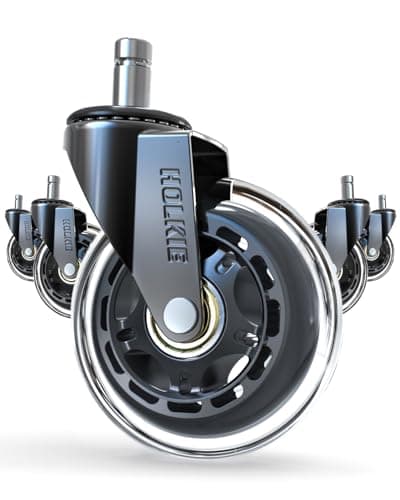
HOLKIE Rollerblade-Style Chair Casters, 3 in (set of 5)
The cheapest real upgrade a chair you already own can take. Hard nylon wheels fight carpet and skate on hard floors; wider rubber casters roll on both and stay put when you sit down.
Check first: chair stems are not standardized. Pull one existing caster out and measure its stem diameter and length against the listing before ordering.
#ad · Live prices from the Amazon Product API, as of October 23, 2026. Where we have no verified live price we show none. We may earn a commission, at no extra cost to you.
Questions
Frequently asked
What order should I adjust an office chair in?
How do I know if my chair is at the right height?
Where should the lumbar support sit?
How tight should the recline tension be?
My chair keeps sinking. Can that be adjusted?
Keep reading
Related
- The Best Chair MatsHow the chair rolls is part of how it is set up.
- The Best Mesh Office ChairsMesh punishes a badly set lumbar more than foam does.
- Best Office Chairs for Back PainWhen adjustment has hit the limit of what the chair can do.
- Best Ergonomic Office ChairsThe chairs with the adjustments this guide assumes.
- Best Under-Desk FootrestsFor step one, when the desk turns out to be too tall.
- How High Should Your Desk Be?The number the chair height is set against.
- How High Should Your Monitor Be?The screen undoes the chair if it sits too low.
- Keyboard and Mouse ErgonomicsWhere your hands go once the chair is right.
Receipts
Sources
- OSHA - Computer workstations eTool: chairs
- OSHA - Computer workstations eTool: good working positions
- CDC / NIOSH - Ergonomics and musculoskeletal disorders
- NHS - How to sit correctly
We do not run a testing lab, and we do not pretend to. Specifications come from the manufacturer or retailer listing; the footprint and clearance math is ours and reproducible. Where we could not verify a number, we say so on the page rather than quietly leaving it out. Read our full method.