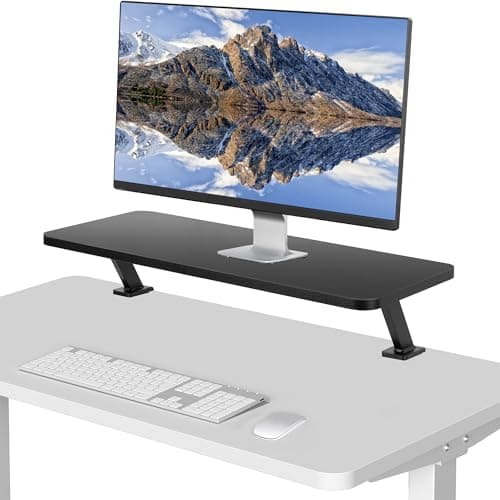
Most monitors sit too low. The stand in the box is usually designed to minimize shipping volume rather than to put the top of the screen near your seated eye level, and the result is a small, constant downward head tilt that your neck pays for over years. A riser fixes it in the simplest possible way: it puts a platform under the monitor and lifts the whole thing by a few inches.
There is a better answer for most people, and it is worth saying up front: a monitor arm gives continuous height adjustment, frees the entire desk surface, and lets you push the screen back. If your monitor has a VESA pattern, your desk has a clampable edge, and the budget stretches, buy the arm. This page exists for the three situations where an arm is not the answer: the monitor has no VESA holes at all, the desk cannot take a clamp or a grommet, or you want the storage a riser creates underneath rather than the empty space an arm creates.
That storage is a real feature and not a consolation. A riser turns the space beneath the screen into somewhere a keyboard slides away, a laptop lives, or stationery sits, which on a small desk is worth as much as the height gain. Two-tier wooden shelves and risers with drawers lean into this deliberately.
Work out how much lift you need before you shop, because it decides between fixed and adjustable. Sit at your desk in your normal posture, look straight ahead, and note where your eye line falls on the screen. The top of the display should sit at or just below that line. Measure the gap, and that is your target lift — most fixed risers add somewhere around four to six inches, which suits a typical monitor on a typical desk. If your gap is outside that, or if more than one person uses the desk, an adjustable riser is worth the extra. The full reasoning is in our monitor height guide, and rankings follow how we pick.
The short answer
Quick picks
#ad · Live prices from the Amazon Product API, as of October 23, 2026. Where we have no verified live price we show none — we would rather leave a gap than print a number that has rotted.
In detail
The picks, in full
Best overall
VIVO Clamp-On Desk Shelf, 26" Single Monitor Riser
- Type
- Clamp-on desk shelf
- Width
- 26" shelf
- Mounting
- Clamps to the rear desk edge
- Desk area
- Occupies no desktop space at all
- Adjustment
- Height set at the clamp posts
The clever one. It clamps to the back edge of the desk rather than standing on it, so the monitor gets its lift and you get the entire desk surface underneath completely clear.
- Lift
- 8.8
- Desk Space Saved
- 9.7
- Build
- 8.6
- Value
- 8.6
Pros
- +Clamping to the rear edge means zero desktop footprint, which no standing riser can match
- +Full width of the shelf stays usable underneath, unlike a riser with legs
- +Sturdier than a free-standing riser because it is fixed to the desk
- +Keeps the monitor pushed back, which also improves viewing distance
Cons
- −Needs an unobstructed rear desk edge within the clamp's thickness range
- −Height is set at assembly rather than adjusted day to day
- −Not an option on glass tops or desks with a rear frame rail
Skip this if…
…your desk has a crossbar or a lip at the back edge, which is exactly where the clamp needs to bite
Best value
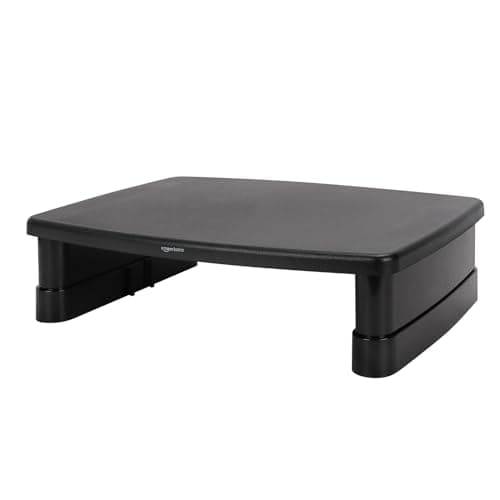
Amazon Basics Height Adjustable Monitor Stand Riser with Storage
- Type
- Free-standing adjustable riser
- Adjustment
- Multiple height settings
- Storage
- Storage organizer space underneath
- Surface
- Flat platform for a monitor or laptop
- Footprint
- Compact, single-monitor width
The sensible default. Height adjustable rather than fixed, which means it fits your eye line rather than an average one, with storage underneath and a price that is barely a decision.
- Lift
- 8.6
- Desk Space Saved
- 6.8
- Build
- 7.2
- Value
- 9.6
Pros
- +Adjustable height is genuinely rare at this price and it is the specification that matters
- +Storage underneath makes a small desk work harder
- +Cheap enough that trying it costs almost nothing if an arm turns out to be the right answer
- +Simple, with nothing mechanically to fail
Cons
- −Modest weight capacity — a large 32-inch panel is more than it wants
- −Plastic construction that looks its price on a nice desk
- −Occupies desktop area, unlike the clamp-on shelf
Skip this if…
…the monitor is large and heavy — check the panel weight against the rating before ordering
Best looking
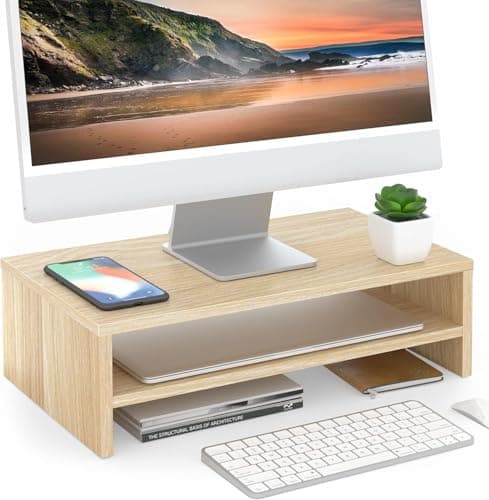
FITUEYES Wooden Monitor Stand Riser, 2-Tier
- Type
- Two-tier wooden riser
- Finish
- Oak-effect wood finish
- Tiers
- Monitor platform plus a lower storage shelf
- Storage
- Keyboard slides underneath the lower tier
- Assembly
- Simple flat-pack construction
The one that looks like furniture rather than an accessory. A two-tier oak-finish shelf that lifts the monitor and gives the desk a second level for everything that was cluttering the first.
- Lift
- 8
- Desk Space Saved
- 8.2
- Build
- 7.8
- Value
- 9.2
Pros
- +Wood finish suits a desk where a black plastic riser would look like an afterthought
- +Two tiers create genuine organized storage rather than one open gap
- +Keyboard tucks under the lower tier at the end of the day, clearing the desk entirely
- +Wide enough to take a monitor plus a small speaker or a phone stand
Cons
- −Fixed height, so it either matches your eye line or it does not
- −Two tiers take more desk depth than a single-level riser
- −Engineered wood rather than solid, so it marks
Skip this if…
…your required lift is outside the fixed height — measure first, because there is no adjustment
Best for dual monitors
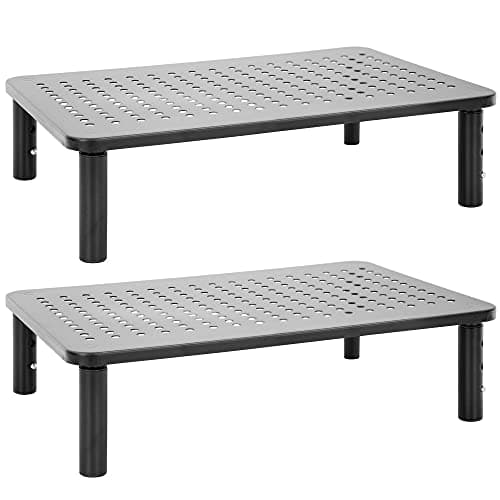
Mount-It! Metal Monitor Riser, 2-Pack
- Type
- Height-adjustable metal risers, supplied as a pair
- Quantity
- Two matching units
- Material
- Steel construction
- Adjustment
- Adjustable height on each riser independently
- Use
- Monitors, laptops, or printers
The dual-screen answer. Two matching height-adjustable metal risers, which is what you need to bring two different monitors to the same height without shimming one with books.
- Lift
- 8.8
- Desk Space Saved
- 6.4
- Build
- 8.8
- Value
- 8.8
Pros
- +A matched pair with independent adjustment is exactly what a mismatched dual setup needs
- +Steel takes considerably more weight than the plastic risers here
- +Independent adjustment lets you level two different monitors precisely
- +Also works to raise a printer or a laptop on a side desk
Cons
- −Two risers occupy two patches of desk, which is a lot of surface on a small desk
- −Bare metal appearance is functional rather than attractive
- −Adjustment is by repositioning legs rather than a smooth mechanism
Skip this if…
…you only have one monitor — you are buying and storing a second riser for nothing
Best with built-in USB
HUANUO Monitor Stand Riser with USB Ports
- Type
- Monitor riser with integrated USB hub
- Ports
- USB ports at the front edge
- Length
- Adjustable length
- Storage
- Open space underneath for a keyboard
- Surface
- Flat platform
The riser that also solves a cable problem. Built-in USB ports at the front edge mean the ports you use daily are at hand height instead of behind a tower or under the desk.
- Lift
- 8
- Desk Space Saved
- 7.6
- Build
- 7.8
- Value
- 8.8
Pros
- +Front-facing USB ports at desk height save reaching behind a tower every time you plug something in
- +Adjustable length means it suits different monitor widths
- +Keyboard still tucks underneath, so the storage benefit is intact
- +One object doing two jobs, which is the argument for it over a plain riser
Cons
- −The hub needs its own cable to the computer, which partly undoes the tidiness
- −Combination products age at the pace of their weakest part
- −Fixed height, with only the length adjustable
Skip this if…
…you already have a dock with front-facing ports — the hub is then duplicated hardware
How to choose a monitor riser
Measure the lift you need first, because it determines whether a fixed riser will do. Sit normally, look straight ahead, and note where your eye line crosses the screen. The top of the display should be at or just below it. The distance between where the top is now and where it should be is your target lift. Most fixed risers add four to six inches; if your gap is much larger or smaller, buy adjustable.
Then check the weight. Riser capacities vary enormously, from plastic platforms that suit a small monitor to steel units that will take a 32-inch panel. Weigh or look up your monitor with its stand on, since the stand is coming with it, and leave margin. This is the specification most often exceeded, and a riser flexing under a heavy screen is both unnerving and a genuine risk.
Decide what you want the space underneath to do, because that separates the formats. A plain riser gives you a gap that a keyboard slides into. A two-tier shelf organizes that gap into levels. A clamp-on desk shelf gives you the whole desktop back rather than a gap at all. On a small desk that last option is transformative, provided your desk has a rear edge the clamp can grip. And if the screen going on top is a laptop rather than a monitor, a riser is the wrong shape for the job — laptop stand vs monitor riser explains how much lift each one really gives.
Finally, be honest about whether an arm is the better purchase. If your monitor has a VESA pattern and your desk takes a clamp, an arm adjusts continuously, clears the whole surface, and moves with you between sitting and standing. A riser wins when there is no VESA pattern, when the desk cannot be clamped or drilled, or when you specifically want the storage. Our VESA guide tells you which camp you are in in about a minute.
How we picked
We do not run a testing lab
We compiled the published manufacturer specifications, did the ergonomics, VESA and desk-depth math ourselves, and read aggregated owner reviews, then scored each product against a published rubric. The scores are judgments from documented research — they are not measurements we took, because we do not have a lab and we are not going to pretend we do. Every spec traces back to a listing or manual named in Sources.
Questions
Frequently asked
How high should a monitor riser lift my screen?+
Enough that the top of the display sits at or just below your seated eye line when you look straight ahead. Measure the gap between where the top of the screen is now and where it should be — most fixed risers add four to six inches, which covers a typical monitor on a typical desk.
Monitor riser or monitor arm?+
An arm if your monitor has VESA holes and your desk takes a clamp: it adjusts continuously and frees the whole surface. A riser if the monitor has no VESA pattern, the desk cannot be clamped or drilled, or you specifically want storage under the screen rather than empty space.
Can a monitor riser hold a 32-inch monitor?+
Some can, most plastic ones cannot. Check the stated weight capacity against the monitor's weight with its stand attached, and leave margin. Steel risers handle large panels comfortably; lightweight plastic platforms are built for smaller screens.
Do monitor risers work for dual monitors?+
A single wide riser can hold two small screens, but a matched pair of adjustable risers works better, because two different monitors almost never have the same stand height. Independent adjustment is how you level them without shimming one with books.
Will a riser fix neck pain from a low monitor?+
It addresses the cause — the constant small downward head tilt a low screen forces. Whether that resolves an existing complaint depends on the complaint and on the rest of your setup, particularly chair height and viewing distance, which need to agree with the new screen position.
Receipts
Sources
We do not run a testing lab, and we do not pretend to. Specifications come from the manufacturer or retailer listing; the footprint and clearance math is ours and reproducible. Where we could not verify a number, we say so on the page rather than quietly leaving it out. Read our full method.