Skip to content
Chair & Cable

SECTION 04 · Keyboards & Mice

Switching to a Split Keyboard

The hard part is not the hardware. It is the two weeks where you type like a beginner, the keys your hands have been hitting with the wrong finger for years, and deciding how far apart the halves should sit.

By Stephen V.Updated How we pick
#ad

We earn a commission when you buy through our Amazon links, at no extra cost to you. It never affects our rankings, and we say so when the cheaper product is the better buy. How this works.

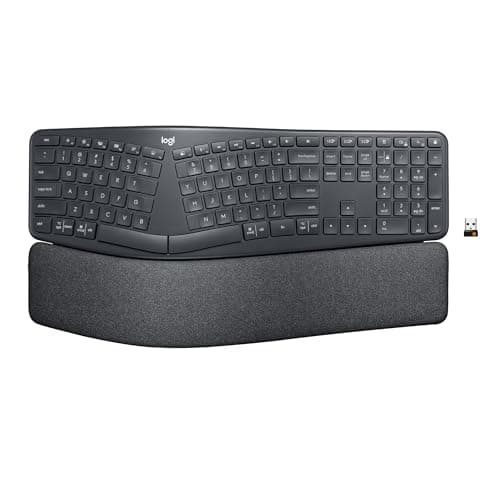
If you have never typed on a split board, start on the Logitech Ergo K860. It is a single-piece curved split with a fixed layout and an integrated palm rest, so it changes your hand angle without also asking you to decide where the halves go — and it is the board people keep rather than return. Expect roughly one to two weeks before your typing speed comes back, and expect to discover that you have been hitting at least two keys with the wrong hand for years.

A split keyboard exists to fix three specific things: ulnar deviation (wrists angled outward to reach a straight keyset), forearm pronation (palms rotated flat), and shoulder reach (hands held closer together than your shoulders are). A one-piece curved split fixes the first two. A fully separable board fixes all three, because you can set each half under its own shoulder. That additional freedom is also the thing that makes a fully split board harder to start on.

What the first two weeks actually feel like

Days one to three: slow and annoying.Expect to type at a fraction of your normal speed and to hit the gap between the halves more than once. The keys that break first are the ones in the middle of the board — B, Y, N and the number row — because a split layout forces each hand to own its half, and most self-taught typists cross over.

Days four to ten: the relearning. This is the useful part. You will find the specific keys you have been reaching across for, usually B with the right hand or Y with the left. Fixing those two habits is most of the adaptation, and it is permanent.

Week two onwards: back to normal, then better.Most people report normal speed somewhere in the second week, and the posture benefit becomes obvious once you stop thinking about the keys. The ache that sent you looking for a split board does not disappear on a schedule, and nobody can promise it will — a keyboard changes your joint angles, which is a mechanical change, not a treatment.

Do not switch the week of a deadline, and do not switch your mouse at the same time. One variable at a time; if you also need a different mouse, the shells in our mice-by-hand-size roundup can wait a fortnight.

How far apart should the halves go?

The rule is shoulder width, not maximum separation. Sit upright, let your arms hang, then bring your forearms up without moving your elbows outward. Where your hands land is where the halves go. For most adults that is somewhere between eight and twelve inches between the halves — wider than a normal keyboard, much narrower than the full width of a desk.

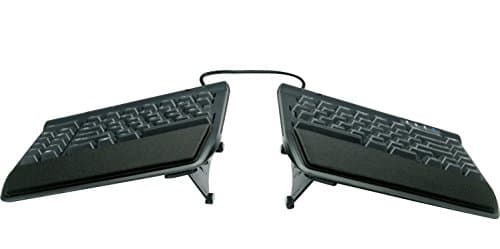
A common mistake is pushing the halves as far apart as the cable allows, which swaps one bad shoulder angle for another. The Kinesis Freestyle2’s separation is limited by the length of its linking cable, which is a useful constraint rather than a limitation.

Put the mouse between the halves if you can. It is the single biggest win available from a fully split board: with the number pad gone and the right half moved outward, your mouse hand no longer has to travel past your shoulder. That geometry is the same argument our keyboard and mouse ergonomics guide makes for narrow boards generally.

Tenting: the adjustment people forget

Tenting raises the inner edge of each half so your palms rotate toward each other, which addresses pronation rather than deviation. Start small — ten to fifteen degrees is plenty — and only after the basic split has become comfortable. Two changes at once makes it impossible to tell which one helped.

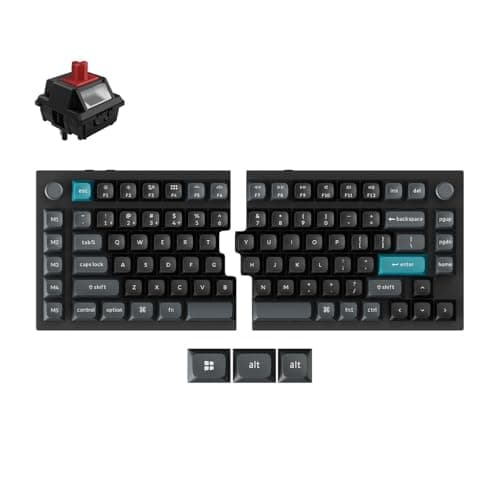
Check what your board offers before you buy. The Ergo K860 has a fixed pillowed split with reverse-tilt feet rather than adjustable tenting. The Freestyle2 is flat by default with optional accessory tenting kits. The Keychron Q11 has no built-in tenting either. If adjustable tenting is essential to you, it is a buying criterion, not something to add later.

Negative tilt beats positive tilt

Whatever board you choose, the back edge should not sit higher than the front. Flat is acceptable; tilted slightly away from you is better; propped up on flip-out feet at the back is the position that extends your wrists, and it is the default on most keyboards. If your desk is too high to allow a flat or negative angle, the fix is below the desk, not on it — an under-desk keyboard tray with negative tilt is the standard answer, and the desk height guide explains how to tell.

If you try it and hate it

Some people never get on with a split layout, and that is a legitimate outcome rather than a failure of discipline. Two fallbacks are worth knowing. A compact tenkeyless or 75% board gets most of the shoulder-reach benefit without changing the keyset at all — see the compact keyboard roundup. And a board with a detachable number pad, covered in the ergonomic keyboard roundup, does the same thing while keeping the numbers.

The short answer

Quick picks

#ProductBest forScorePrice
01
Logitech Logitech Ergo K860 Wireless Split Keyboard
Logitech Ergo K860 Wireless Split Keyboard

The right board to learn on. One piece, so the halves are already set correctly, with a curved keyset, an integrated cushioned palm rest and reverse-tilt feet. It changes your wrist angle without asking you to configure anything.

A first split keyboard
8.2
$149.99Amazon
02
Kinesis Kinesis Freestyle2 Ergonomic Keyboard
Kinesis Freestyle2 Ergonomic Keyboard

The cheapest way to get genuinely separate halves. Two independent units joined by a cable, low-force membrane keys, and a flat default you can tent later with an accessory kit. The board to buy if shoulder width is the real complaint.

Setting each hand under its own shoulder
8.6
$144.00Amazon
03
Keychron Keychron Q11 Ultra 8K Split Mechanical Keyboard
Keychron Q11 Ultra 8K Split Mechanical Keyboard

The board to graduate to, not to start on. A fully split 75% in machined metal with wirelessly synced halves and hot-swap MX sockets, so the switch feel stays yours to change after the layout stops being the hard part.

Keeping a real keystroke
8.1
Check price →

#ad · Live prices from the Amazon Product API, as of October 5, 2026. Where we have no verified live price we show none — we would rather leave a gap than print a number that has rotted.

In detail

The picks, in full

01
Logitech Logitech Ergo K860 Wireless Split Keyboard

A first split keyboard

Logitech Ergo K860 Wireless Split Keyboard

Layout
Full-size curved split, one piece, with number pad
Connection
Wireless - Bluetooth or Logi Bolt USB receiver
Key mechanism
Low-profile scissor (membrane)
Tilt / tenting
Fixed pillowed split; reverse-tilt feet
Palm rest
Integrated cushioned
8.2/10

The right board to learn on. One piece, so the halves are already set correctly, with a curved keyset, an integrated cushioned palm rest and reverse-tilt feet. It changes your wrist angle without asking you to configure anything.

Ease of Transition
9.6
Posture Gain
8
Adjustability
6.5
Value
8.8

Pros

  • Nothing to set up - the split angle is built in and correct out of the box
  • Reverse-tilt feet give the negative angle this page recommends
  • Integrated palm rest means no separate wrist rest to buy or align
  • Shortest adaptation period of the three boards here

Cons

  • Full-size with a number pad, so it does nothing for mouse reach
  • Halves cannot be separated, so shoulder width is not addressed
  • Membrane keystroke; no switch choice and no hot-swap

Skip this if…

…your main complaint is reaching sideways for the mouse - that needs a board you can actually separate.

$149.99View on Amazon

Price as of October 5, 2026. Prices change — Amazon's is the one that counts.

#ad · we may earn a commission from this link to Logitech Ergo K860 Wireless Split Keyboard

02
Kinesis Kinesis Freestyle2 Ergonomic Keyboard

Setting each hand under its own shoulder

Kinesis Freestyle2 Ergonomic Keyboard

Layout
Fully split - two separate halves joined by a cable
Separation
Halves separate up to the length of the linking cable
Connection
Wired USB
Key mechanism
Membrane (low-force)
Tenting
Flat by default; optional accessory tenting kits
8.6/10

The cheapest way to get genuinely separate halves. Two independent units joined by a cable, low-force membrane keys, and a flat default you can tent later with an accessory kit. The board to buy if shoulder width is the real complaint.

Ease of Transition
7.6
Posture Gain
9.4
Adjustability
8.2
Value
9

Pros

  • True separation, which is the only way to fix shoulder reach
  • Mouse can sit between the halves, the biggest win of the format
  • Low-force membrane keys are easy on hands coming off a long ache
  • Cheapest fully split board we recommend

Cons

  • Wired only, and the linking cable is one more thing on the desk
  • Tenting is an accessory purchase, not a built-in adjustment
  • No switch choice, no backlight, and a plain plastic build

Skip this if…

…you want to make one change at a time - a separable board is two changes, layout and position.

$144.00View on Amazon

Price as of October 5, 2026. Prices change — Amazon's is the one that counts.

#ad · we may earn a commission from this link to Kinesis Freestyle2 Ergonomic Keyboard

03
Keychron Keychron Q11 Ultra 8K Split Mechanical Keyboard

Keeping a real keystroke

Keychron Q11 Ultra 8K Split Mechanical Keyboard

Layout
75% split, two CNC-machined metal halves
Split
Wirelessly synced halves - no connecting cable
Connection
2.4 GHz, Bluetooth, or wired USB-C
Switch type
Hot-swappable 3-pin or 5-pin MX (pre-installed Keychron Silk POM)
Keycaps
KSA-profile PBT, for Mac and Windows
8.1/10

The board to graduate to, not to start on. A fully split 75% in machined metal with wirelessly synced halves and hot-swap MX sockets, so the switch feel stays yours to change after the layout stops being the hard part.

Ease of Transition
6.8
Posture Gain
9.4
Adjustability
8.6
Value
7.4

Pros

  • No tether between the halves, so position is genuinely unconstrained
  • Hot-swap sockets, which almost no split board offers
  • 75% layout also pulls the mouse hand inward
  • Metal build that will outlast several membrane boards

Cons

  • Two adaptations at once: split layout and a compressed 75% keyset
  • No built-in tenting
  • Heavy and expensive for a first experiment

Skip this if…

…this is your first split keyboard - learn the layout on something cheaper first.

Check price on Amazon →

No buyable offer at the last price check (October 5, 2026). We show nothing rather than a stale number.

#ad · we may earn a commission from this link to Keychron Q11 Ultra 8K Split Mechanical Keyboard

Which board for which complaint

Your complaintWhat fixes itBoard
Wrists angled outward at the keysA curved or angled keysetErgo K860
Reaching sideways for the mouseSeparable halves, number pad goneFreestyle2 or Q11
Palms held flat (pronation)TentingFreestyle2 with the tenting kit
Wrists bent up at the keyboardFlat or negative tilt, not feet upAny of the three, feet down
You want a mechanical keystroke tooHot-swap MX socketsKeychron Q11

A two-week plan that works

Day one. Set the halves at shoulder width and the tilt flat or slightly negative. Put the mouse between the halves if the board separates. Do not tent anything yet.

Days one to three.Type normally and accept the slowdown. Do not switch back to the old board in the evenings — alternating is what stretches a two-week adaptation into a two-month one.

Days four to seven. Watch for the specific keys you keep missing and fix the finger assignment deliberately. Five minutes of slow, correct typing beats an hour of fast guessing.

Week two. Once speed is back, make one adjustment: a little tenting, or a slightly wider separation. Then leave it alone for a week before changing anything else.

What a split keyboard will not do

It will not fix a desk at the wrong height, it will not fix a chair that leaves your elbows below the desk surface, and it is not a medical treatment. If you have a diagnosed condition, the board is one input among several and your clinician’s advice outranks ours. Our how we pick page is explicit about what our scores are and are not: judgments from published specifications and documented ergonomics, not clinical findings.

Two cheap things to fix alongside it: a wrist rest matched to the board’s length, from the wrist rest roundup, and the monitor height, which almost always needs correcting at the same time — the monitor height guide has the eye-level method.
How we picked

We do not run a testing lab

We compiled the published manufacturer specifications, did the ergonomics, VESA and desk-depth math ourselves, and read aggregated owner reviews, then scored each product against a published rubric. The scores are judgments from documented research — they are not measurements we took, because we do not have a lab and we are not going to pretend we do. Every spec traces back to a listing or manual named in Sources.

Questions

Frequently asked

How long does it take to get used to a split keyboard?
Most people are back to normal typing speed in one to two weeks, with the worst of it in the first three days. Alternating between your old keyboard and the new one in that period is the most common reason it takes longer.
Which split keyboard is easiest to learn on?
A one-piece curved split like the Logitech Ergo K860, because the layout is fixed and correct out of the box. A fully separable board asks you to learn the keyset and choose a position at the same time.
How far apart should split keyboard halves be?
Shoulder width. Let your arms hang, lift your forearms without moving your elbows outward, and put the halves where your hands land - usually eight to twelve inches apart for an adult. Maximum separation is not the goal.
Do I need tenting on a split keyboard?
Not on day one. Tenting addresses palm rotation rather than wrist angle, and it is easier to judge once the split itself feels normal. Ten to fifteen degrees is a sensible starting point when you do add it.
Will a split keyboard fix my wrist pain?
It changes your wrist and shoulder angles, which is a mechanical change that removes a common source of strain. It is not a treatment and nobody can promise an outcome. If you have a diagnosed condition, treat the keyboard as one part of a plan your clinician is leading.
Should I switch my mouse at the same time?
No. Change one thing, let it settle for two weeks, then change the next. If both need changing, start with the keyboard, because moving the halves apart often reduces the mouse reach that was the problem.

Keep reading

Receipts

Sources

We do not run a testing lab, and we do not pretend to. Specifications come from the manufacturer or retailer listing; the footprint and clearance math is ours and reproducible. Where we could not verify a number, we say so on the page rather than quietly leaving it out. Read our full method.