Everyone on your calls hears your room. A laptop microphone sits inches from a fan, points at the ceiling, and picks up every reflection off the wall behind you — which is why you sound distant and slightly echoey to everyone else and completely normal to yourself.
Fixing that is mostly one decision, and it is not the brand.
Dynamic or condenser?A condenser capsule is sensitive. It captures detail, and it captures the keyboard, the fan, the road outside and the reflection off the wall behind you. It is the right choice in a quiet, soft room. A dynamic capsule is much less sensitive and needs you close to it — four to six inches — which means it hears you loudly and the room quietly. In an ordinary home office with hard walls, a dynamic mic usually sounds better despite being technically less capable, and that is the most useful thing on this page.
Polar pattern is the second decision. Cardioid picks up from the front and rejects the rear, which is what you want for a single person at a desk. Omnidirectional hears everything equally; bidirectional hears front and back for two people facing each other; stereo captures a spread. Multiple patterns are useful if you record interviews or instruments, and irrelevant if you take calls.
Headphone monitoring is the third and easiest to overlook. A 3.5mm jack on the mic itself lets you hear your own voice with no delay, which is how you notice immediately that you are too far away or that the gain is clipping. Every mic on this list has one.
Two things that matter less than the marketing implies. Sample rate: 24-bit at 48kHz is more than enough for voice, and a mic offering 96kHz is not going to sound better on a call. And built-in effects: helpful for streaming, largely irrelevant for meetings.
Finally, placement. A microphone lying on the desk picks up every keystroke through the surface as well as through the air. Getting it on a boom arm or at least onto a desk mat rather than bare laminate is a free improvement, and one that a mechanical keyboard makes non-optional.
The short answer
Quick picks
#ad · Live prices from the Amazon Product API, as of October 23, 2026. Where we have no verified live price we show none — we would rather leave a gap than print a number that has rotted.
In detail
The picks, in full
Best overall
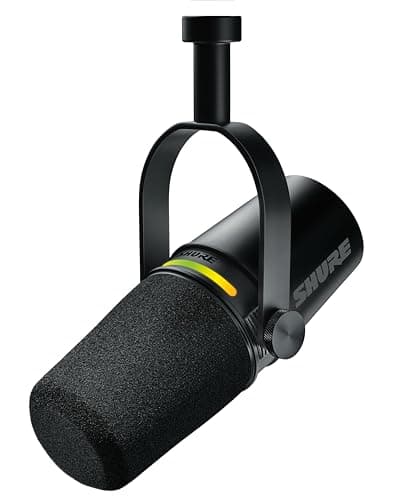
Shure MV7+ USB-C and XLR Podcast Dynamic Microphone
- Capsule
- Dynamic (moving coil)
- Polar pattern
- Unidirectional cardioid
- Connections
- USB-C and XLR, both usable
- Conversion
- 24-bit / 48 kHz
- Frequency response
- 50 Hz to 16 kHz
- Max SPL
- 128 dB
- Onboard DSP
- Real-time denoiser, digital popper stopper, reverb, EQ and compression via MOTIV Mix
- Controls
- Multicolor LED touch panel, headphone output
The right answer for an untreated room. A dynamic capsule that hears you and not your house, with onboard processing including a real-time denoiser, and an XLR output for the day you outgrow USB.
- Room Rejection
- 9.6
- Voice Quality
- 9.2
- Features
- 9.4
- Value
- 6.8
Pros
- +Dynamic capsule plus voice isolation means an ordinary room stops being audible
- +The real-time denoiser runs on the microphone rather than in call software, so it works everywhere
- +XLR as well as USB - it stays useful if you later add an audio interface
- +Touch panel doubles as a level meter, so you can see clipping before anyone hears it
Cons
- −The most expensive microphone here
- −Dynamic capsules need you within about six inches to sound their best
- −The DSP features need the MOTIV Mix desktop app on the USB connection
Skip this if…
…you sit far back from the desk - a dynamic mic rewards proximity and punishes distance.
Best condenser
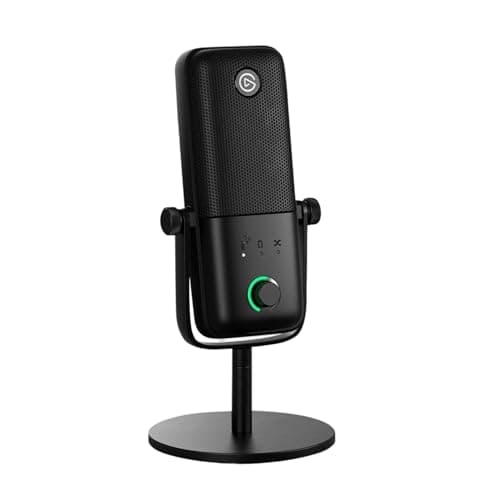
Elgato Wave:3 MK.2 USB Condenser Microphone
- Capsule
- 16 mm condenser
- Polar pattern
- Supercardioid
- Conversion
- 24-bit / 48 kHz
- Frequency response
- 70 Hz to 20 kHz
- Max SPL
- 130 dBSPL typical at 1 kHz
- Dynamic range
- 110 dB
- Connections
- USB-C, plus a 3.5mm headphone jack
- Protection
- Clipguard 2.0 lower-level backup signal
The best condenser for a desk, because the supercardioid pattern is tighter than the usual cardioid and Clipguard catches the peaks that ruin a take.
- Room Rejection
- 8.2
- Voice Quality
- 9
- Features
- 9
- Value
- 8.2
Pros
- +Supercardioid is a narrower pickup than standard cardioid, which helps in a live room
- +Clipguard records a second, lower-level signal so a sudden loud moment does not destroy the take
- +110 dB of dynamic range is genuinely wide for a USB condenser
- +Desk stand in the box, and it comes off cleanly for a boom arm
Cons
- −It is still a condenser - a noisy or echoey room will be audible
- −48kHz maximum, where some rivals offer 96kHz (which voice does not need)
- −Software-centric: the good features assume you run Elgato's mixer
Skip this if…
…your room is hard-walled and untreated - a dynamic mic will sound better with no effort.
Best plug-and-play
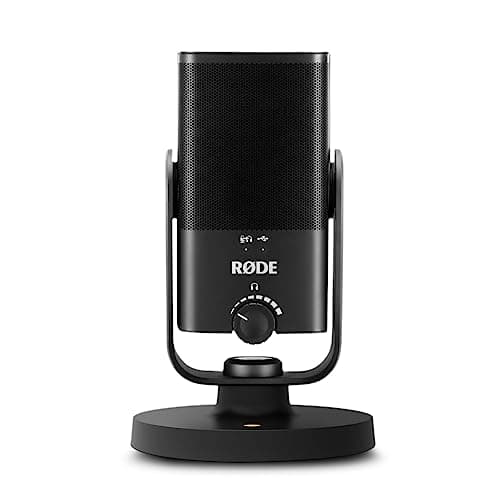
RODE NT-USB Mini Condenser USB Microphone
- Capsule
- Professional-grade electret condenser
- Polar pattern
- Cardioid
- Conversion
- 24-bit / 48 kHz
- Frequency range
- 20 Hz to 20 kHz
- Max SPL
- 121 dB at 1% THD
- Connections
- USB-C output, 3.5mm headphone output with zero-latency monitoring
- Stand
- Magnetic desktop base with 360 degree swivel; built-in pop filter
The one that needs nothing else. A built-in pop filter, a magnetic desk stand and zero-latency monitoring in a footprint the size of a coffee cup - plug it in and sound better.
- Room Rejection
- 7.8
- Voice Quality
- 8.8
- Features
- 8
- Value
- 8.8
Pros
- +Built-in pop filter means no separate screen cluttering the desk
- +Magnetic base detaches instantly for a boom arm and reattaches without tools
- +Zero-latency headphone monitoring built in, which is how you catch problems live
- +Smallest footprint of any two-way-capable mic here
Cons
- −Cardioid only - no pattern switching for interviews or instruments
- −Condenser capsule, so the room caveat applies
- −No onboard DSP or noise processing
Skip this if…
…you need multiple pickup patterns - this is deliberately a one-job microphone.
Best for multiple pickup patterns
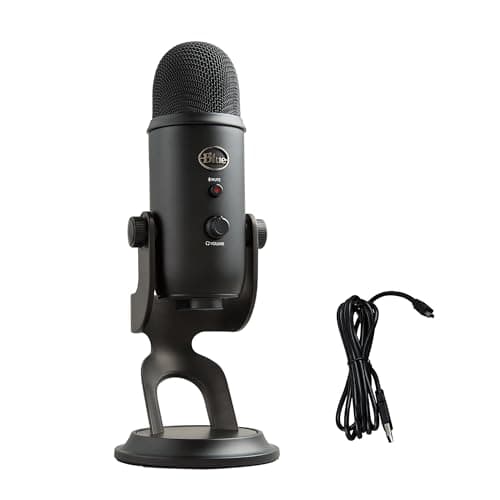
Blue Yeti USB Microphone
- Capsules
- Tri-capsule array, three 14mm condensers
- Polar patterns
- Cardioid, bidirectional, omnidirectional and stereo
- Conversion
- 16-bit / 48 kHz
- Frequency response
- 20 Hz to 20 kHz
- Max SPL
- 120 dB
- Controls
- Gain dial, mute button, zero-latency headphone output
The versatile one. Three capsules and four switchable patterns mean it covers a solo call, an in-person interview and a room recording without buying a second microphone.
- Room Rejection
- 7.4
- Voice Quality
- 8.2
- Features
- 9
- Value
- 8.4
Pros
- +Four patterns from one microphone, which nothing else here offers
- +Physical gain dial and mute button, both faster than any software equivalent
- +Bidirectional mode makes a two-person interview at one desk genuinely workable
- +Long-established support and a large accessory ecosystem
Cons
- −16-bit conversion rather than the 24-bit of everything else here
- −Large and heavy, and the included stand takes real desk space
- −Omnidirectional and stereo modes hear your entire room, which is usually the wrong thing
Skip this if…
…you only ever take calls - you are paying for three patterns you will never switch to.
Best budget
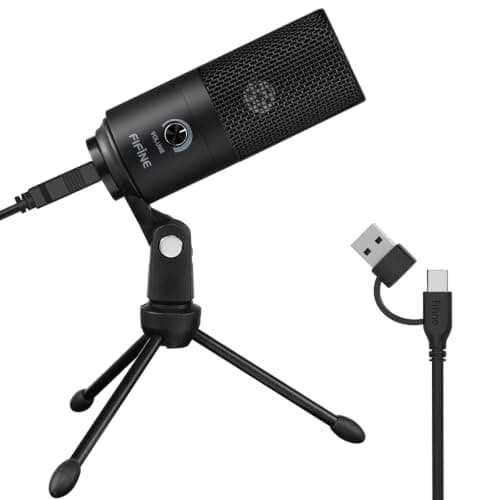
FIFINE K669B USB Condenser Microphone
- Capsule
- 16mm cardioid condenser
- Conversion
- 16-bit / 48 kHz
- Frequency range
- 80 Hz to 20 kHz
- Sensitivity
- -43 +/- 3 dB
- Body
- Solid metal with a tripod stand
- Controls
- Volume knob on the body
The cheapest step that actually changes how you sound. A metal-bodied cardioid condenser with a volume knob, for less than the price of a good cable.
- Room Rejection
- 7
- Voice Quality
- 7.2
- Features
- 6.4
- Value
- 9.8
Pros
- +Enormously better than any laptop microphone, for a trivial amount of money
- +Metal body resists handling noise better than the plastic mics at this price
- +Physical volume knob rather than software-only gain
- +Cardioid pattern rejects what is behind it, which is most of the benefit
Cons
- −No headphone monitoring jack, so you cannot hear yourself live
- −16-bit conversion and an 80Hz low end - voices lose some weight
- −Included tripod is short, so it sits low and picks up desk noise
Skip this if…
…you record rather than call - the lack of monitoring makes mistakes invisible until playback.
Dynamic or condenser, decided properly
Stand in the middle of the room you work in and clap once. If you hear a short ring or slap after the clap, the room is reflective — hard floor, bare walls, a window, a large desk surface. In that room, a dynamic microphone at close range will sound dramatically better than a condenser, because it is not sensitive enough to pick up the reflections.
If the clap dies immediately — carpet, curtains, bookshelves, soft furniture — a condenser will reward you with more detail and let you sit slightly further back.
This test is worth more than any amount of specification reading, and it is why the top pick on this page is a dynamic microphone despite condensers being technically more capable.
Distance is the free upgrade
The ratio between your voice and the room is set almost entirely by how close you are. Four to six inches from a dynamic mic, six to twelve from a condenser. Every inch further back raises the room and lowers you. A desk microphone on a short tripod, eighteen inches away and pointing at your chin, is throwing away most of what you paid for — which is the argument for a boom arm more than for a better microphone.
Keyboard noise, and what actually helps
A microphone on the desk hears your keyboard twice: through the air and through the surface. In order of effect: get the mic off the desk onto an arm; put a desk matunder the keyboard; use a cardioid or supercardioid pattern with the rear of the mic facing the keyboard; and if you type on a mechanical board, consider quieter switches — see keyboard switches explained.
What sample rate actually matters
24-bit at 48kHz is the practical standard and is more than sufficient for voice. 16-bit is audibly fine for calls and gives you less room to fix a badly-set gain afterwards. 96kHz offers nothing for speech. Judge a mic on capsule, pattern and monitoring; treat the sample rate as a tiebreak at best.
Where the microphone fits in the rest of the desk
A microphone is one third of a call setup. The others are a webcamthat is not the one built into your laptop lid, and lighting that puts something on your face — which on this site means a monitor light bar rather than a ring light, because a light bar is already pointed the right way. All three plug in, so plan the ports: a powered hub is usually needed by the time the third one arrives. If you would rather solve the whole call with one object instead of three, a work headsetcovers the microphone and the listening side together — at the cost of the sound quality and the on-camera look a real microphone gives you.
Essentials
The small parts that finish the job
Nothing here changes a pick above, and none of it is a considered purchase. These are the cheap pieces that decide whether the expensive one works properly, and the ones people discover they are missing on the day the big box arrives.
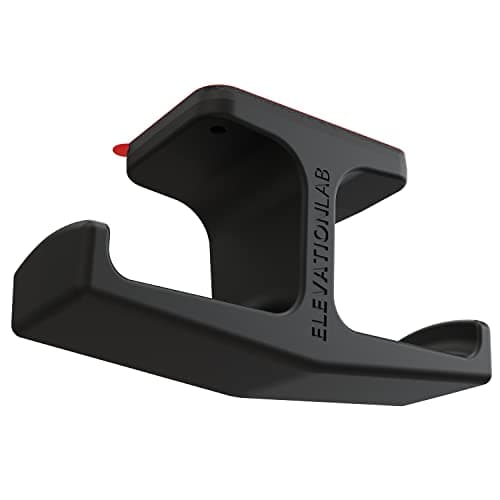
Elevation Lab The Anchor Under-Desk Headphone Mount
A headset left on the desk takes up the same surface an arm or a riser was bought to give back. Under the front edge it hangs in dead space, out of the way of the keyboard and off the cables.
Check first: adhesive mounts want a smooth, clean underside. Rough or heavily textured laminate will not hold one.
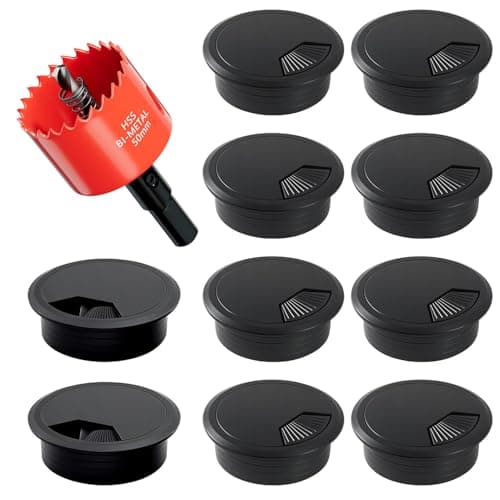
2-Inch Desk Grommet Kit with Hole Saw (10 pack)
Cables that drop straight through the desktop stay where you put them. Cables routed around the back edge get dragged every time the desk moves or the chair rolls back, which is what undoes a tidy run within a week. The hole saw is in the box, so the cut and the finished edge come from one purchase.
Check first: decide the hole position and check your desktop thickness before you cut. A grommet hole is not reversible.
#ad · Live prices from the Amazon Product API, as of October 23, 2026. Where we have no verified live price we show none. We may earn a commission, at no extra cost to you.
How we picked
We do not run a testing lab
We compiled the published manufacturer specifications, did the ergonomics, VESA and desk-depth math ourselves, and read aggregated owner reviews, then scored each product against a published rubric. The scores are judgments from documented research — they are not measurements we took, because we do not have a lab and we are not going to pretend we do. Every spec traces back to a listing or manual named in Sources.
Questions
Frequently asked
Is a dynamic or condenser microphone better for a home office?+
In an ordinary untreated room, dynamic. It is less sensitive, so it hears you loudly at close range and your room quietly. A condenser captures more detail and is the better choice in a soft, quiet space — carpet, curtains, bookshelves — where there is little for it to pick up.
What polar pattern should I use for video calls?+
Cardioid, which picks up from the front and rejects the rear. Point the back of the microphone at whatever you want ignored — usually the keyboard, a fan or a door. Omnidirectional and stereo modes hear the whole room, which is almost never what you want on a call.
How close should I be to a USB microphone?+
Four to six inches for a dynamic microphone, six to twelve for a condenser. Distance is the single biggest control you have over how much room is audible, and it is free. A mic sitting eighteen inches away on a short tripod is wasting most of its capability.
Do I need an audio interface with a USB microphone?+
No — a USB microphone contains its own converter and connects directly. An interface only becomes relevant if you move to XLR microphones, which is why a mic with both connections, like the Shure here, is the one that survives that transition.
Why does my microphone pick up my keyboard?+
Because it hears it through the air and through the desk. Lift the mic off the surface onto a boom arm, aim the rear of a cardioid capsule at the keyboard, and put a desk mat under the board to damp the surface. Those three together do more than any noise-suppression software.
Receipts
Sources
We do not run a testing lab, and we do not pretend to. Specifications come from the manufacturer or retailer listing; the footprint and clearance math is ours and reproducible. Where we could not verify a number, we say so on the page rather than quietly leaving it out. Read our full method.