Skip to content
Chair & Cable

SECTION 01 · Monitors & Arms

34-inch or 49-inch Ultrawide?

One is two 27-inch screens side by side. The other is two, plus a third you will keep turning your head to see. The deciding number is on your tape measure, not the spec sheet.

By Stephen V.Updated How we pick
#ad

We earn a commission when you buy through our Amazon links, at no extra cost to you. It never affects our rankings, and we say so when the cheaper product is the better buy. How this works.

Measure your desk before you read anything else on this page. A 34-inch 21:9 panel is roughly 32 inches of physical width and lives happily on a standard 48-inch desk. A 49-inch 32:9 panel is roughly 47 inches of physical width and needs a desk closer to 55 or 60 inches once you leave clearance at each end for anything else to exist. That single measurement decides this comparison for most people before resolution, panel technology, or price enters the argument.

The comparison at a glance

 34-inch (21:9)49-inch (32:9)
Typical resolution3440 × 1440 (UWQHD)5120 × 1440 (DQHD)
Equivalent screensAbout two 27-inch QHD panels side by sideAbout three 27-inch QHD panels side by side
Physical widthRoughly 32 inRoughly 47 in
Desk width needed48 in is comfortable55 to 60 in is realistic
Head movementEyes only; the panel stays in your field of viewReal head turning to read the far edges
Pixel densityAbout 110 PPI — the same as a 27-inch QHDAbout 108 PPI — effectively identical

That last row surprises people. Both sizes land near 110 pixels per inch, so text sharpness is essentially the same on either. You are not buying clarity when you step up to 49 inches; you are buying a third column, and paying for it in desk width and neck rotation.

What the extra width actually buys

At 3440×1440 you get two genuinely comfortable windows side by side — a browser and an editor, a document and a reference, a spreadsheet and a mail client. Snapping a third into that width leaves each one too narrow to be useful, so in practice a 34-inch ultrawide is a two-column machine. At 5120×1440 the third column becomes real: three windows at roughly 1700 pixels each, which is wide enough for code, a browser at a normal reading width, and a chat or terminal panel that you can actually read.

Whether that third column is worth it depends entirely on whether you currently run out of room. If you spend the day alt-tabbing between three things, it is the whole argument. If your workflow is two windows and a full-screen video call, the 49-inch panel gives you an expensive strip of desktop you will fill with a wallpaper.

The cost nobody puts on the spec sheet: head turning

At a normal arm’s-length viewing distance, a 34-inch curved panel sits inside the field of view you can scan with your eyes. A 49-inch panel does not. The far thirds require turning your head, and doing that a few hundred times a day is a genuine ergonomic cost that people discover in week two rather than in the store. The 1800R curve on most 49-inch panels helps by keeping the edges at a more even distance, and sitting slightly further back helps more, but neither eliminates it.

This is the practical reason a lot of people who try 49 inches end up back at 34. The width is not free. Read the monitor height and distance guide before committing, because the viewing distance that makes a 49-inch panel workable is further back than most desks allow.

Mounting: the 49-inch panel changes the arm question

A 34-inch ultrawide is at the top of what a general-purpose monitor arm handles — the Ergotron LX, for instance, is rated to 25 lb and 34 inches. A 49-inch panel is outside that entirely: heavier, and far wider, which multiplies the twisting force on the joint. If you plan to mount rather than use the included stand, budget for an arm rated for the size from the ultrawide arms roundup, and check the panel weight without its stand against the arm’s rating. The stand-versus-arm reasoning itself is in monitor arm vs stand.

The third option this comparison hides

Two 27-inch monitors cost less than either panel here, give you the same or more total area, and let you rotate one to portrait for code or documents — which no single ultrawide can do. What you give up is the center bezel and a second cable. That trade-off is argued out properly in ultrawide vs dual monitor, and it is worth reading before you spend 49-inch money.

The short answer

Quick picks

#ProductBest forScorePrice
01
LG LG 34WP65C-B 34" UltraWide QHD Curved
LG 34WP65C-B 34" UltraWide QHD Curved

The 34-inch case, made cheaply and well. 3440 x 1440 across a gentle 1800R curve gives you two full side-by-side windows on a desk that does not need rebuilding around it.

The 34-inch pick
8.9
Check price →
02
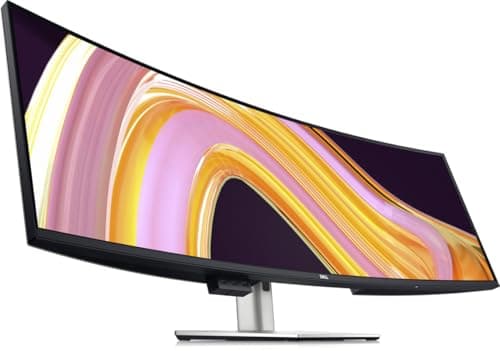
Dell Dell UltraSharp U4924DW 49" DQHD Curved
Dell UltraSharp U4924DW 49" DQHD Curved

The 49-inch case, argued properly for work rather than borrowed from gaming. 5120 x 1440 IPS Black with a real hub behind it, picture-by-picture for two machines, and a stand good enough to keep.

The 49-inch pick for work
8.1
$1,224.66Amazon
03
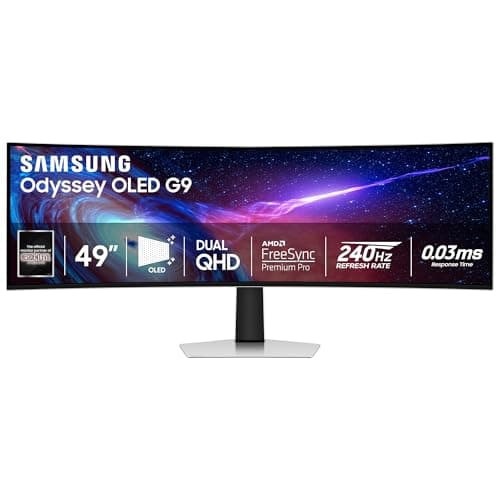
Samsung Samsung 49" Odyssey OLED G9 (G93SC)
Samsung 49" Odyssey OLED G9 (G93SC)

The 49-inch answer if the same desk also games. QD-OLED contrast and 240Hz at 5120 x 1440, with the burn-in caveat that comes with static taskbars all day.

The 49-inch pick for work and play
7.9
$999.99Amazon

#ad · Live prices from the Amazon Product API, as of Sep 6, 2026. Where we have no verified live price we show none — we would rather leave a gap than print a number that has rotted.

In detail

The picks, in full

01
LG LG 34WP65C-B 34" UltraWide QHD Curved

The 34-inch pick

LG 34WP65C-B 34" UltraWide QHD Curved

Screen
34" curved (1800R)
Resolution
3440 x 1440 (21:9 UWQHD)
Refresh rate
160Hz
Panel
VA, HDR10, AMD FreeSync
Desk width
Fits comfortably on a 48 in desk
8.9/10

The 34-inch case, made cheaply and well. 3440 x 1440 across a gentle 1800R curve gives you two full side-by-side windows on a desk that does not need rebuilding around it.

Image & Panel
8.4
Desk Fit
9.4
Usable Space
8
Value
9.6

Pros

  • 3440 x 1440 is two comfortable side-by-side windows with no center bezel
  • Fits a standard 48-inch desk without pushing peripherals off the edge
  • Whole panel stays inside your natural field of view with no head turning
  • Costs a fraction of a 49-inch panel of comparable quality

Cons

  • Not enough width for three genuinely usable columns of work
  • VA off-angle uniformity trails a true IPS panel

Skip this if…

you routinely work with three windows open and keep running out of horizontal room

Check price on Amazon →

No buyable offer at the last price check (Sep 6, 2026). We show nothing rather than a stale number.

#ad · we may earn a commission from this link to LG 34WP65C-B 34" UltraWide QHD Curved

02
Dell Dell UltraSharp U4924DW 49" DQHD Curved

The 49-inch pick for work

Dell UltraSharp U4924DW 49" DQHD Curved

Screen
49" curved, 32:9
Resolution
5120 x 1440 (DQHD)
Panel
IPS Black
Connectivity
USB-C hub with power delivery, RJ45 ethernet, DisplayPort, HDMI
Desk width
Needs roughly 47 in of clear desk
8.1/10

The 49-inch case, argued properly for work rather than borrowed from gaming. 5120 x 1440 IPS Black with a real hub behind it, picture-by-picture for two machines, and a stand good enough to keep.

Image & Panel
9.4
Desk Fit
6.4
Usable Space
9.6
Value
7

Pros

  • 5120 x 1440 supports three genuinely usable columns, which 34 inches cannot
  • IPS Black keeps color and contrast even across a panel this wide
  • Picture-by-picture drives two machines on one screen without a KVM
  • Built-in ethernet and USB-C power make it the dock as well as the display

Cons

  • Needs about 47 inches of clear desk, which rules out a lot of rooms
  • You will turn your head to read the far edges, and that is a real cost over eight hours
  • The most expensive way to buy screen area on this page

Skip this if…

your desk is under about 55 inches wide once you allow clearance at each end

$1,224.66View on Amazon

Price as of Sep 6, 2026. Prices change — Amazon's is the one that counts.

#ad · we may earn a commission from this link to Dell UltraSharp U4924DW 49" DQHD Curved

03
Samsung Samsung 49" Odyssey OLED G9 (G93SC)

The 49-inch pick for work and play

Samsung 49" Odyssey OLED G9 (G93SC)

Screen
49" curved (1800R), QD-OLED
Resolution
5120 x 1440 (DQHD, 32:9)
Refresh rate
240Hz
Ports
DisplayPort 1.4, HDMI 2.1, USB-C
Desk width
Needs about 1200mm
7.9/10

The 49-inch answer if the same desk also games. QD-OLED contrast and 240Hz at 5120 x 1440, with the burn-in caveat that comes with static taskbars all day.

Image & Panel
9.6
Desk Fit
6.2
Usable Space
9.6
Value
6

Pros

  • Per-pixel OLED contrast that no LCD ultrawide matches
  • 240Hz makes the same panel a genuine gaming display
  • Same 5120 x 1440 working width as the Dell

Cons

  • Static taskbars and docks all day carry a real burn-in risk on OLED
  • Roughly 1200mm of desk width is a hard requirement, not a suggestion

Skip this if…

your day is mostly static windows in the same positions - that is the OLED failure mode

$999.99View on Amazon

Price as of Sep 6, 2026. Prices change — Amazon's is the one that counts.

#ad · we may earn a commission from this link to Samsung 49" Odyssey OLED G9 (G93SC)

The verdict

Buy 34 inches unless you can name the third window. It fits a normal desk, it stays inside your field of view, its pixel density is identical, and it costs far less. The 34-inch ultrawide is the right answer for the large majority of desks, and the money saved buys the arm and the dock that make the setup actually work.

Buy 49 inches when three things are all true: you regularly run three windows and run out of room, your desk is 55 inches or wider with clearance to spare, and you are willing to accept head turning as the cost of the width. If you want the panel for work, the IPS Black Dell is the better instrument; if the same desk games, the QD-OLED Samsung is, with the burn-in caveat honestly weighed. Full fields for both sizes are in the best ultrawide monitors and the best super ultrawides.

And if neither end of this comparison fits, the rungs in between are real: 38 and 40 inches sit between these two panels, and the 40-inch class is the only one that adds vertical resolution rather than width. Both are covered in what size ultrawide monitor you need, with the desk span and viewing distance each rung demands.
How we picked

We do not run a testing lab

We compiled the published manufacturer specifications, did the ergonomics, VESA and desk-depth math ourselves, and read aggregated owner reviews, then scored each product against a published rubric. The scores are judgments from documented research — they are not measurements we took, because we do not have a lab and we are not going to pretend we do. Every spec traces back to a listing or manual named in Sources.

Questions

Frequently asked

Is a 49-inch ultrawide better than a 34-inch for work?
Only if you need a third column. A 49-inch 32:9 panel at 5120×1440 supports three usable windows; a 34-inch 21:9 at 3440×1440 supports two. If two is enough for your workflow, the 34-inch is better for work — it fits a normal desk, stays inside your field of view without head turning, and costs far less for the same text sharpness.
How wide a desk do I need for a 49-inch monitor?
The panel itself is roughly 47 inches wide, so plan on a desk of 55 to 60 inches to leave clearance at each end and room for anything else. A 34-inch panel is roughly 32 inches wide and sits comfortably on a standard 48-inch desk. If your desk is the constraint, see the wide desks roundup.
Is text sharper on a 34-inch or a 49-inch ultrawide?
Neither — they are effectively identical. A 34-inch at 3440×1440 lands near 110 pixels per inch and a 49-inch at 5120×1440 near 108, which is the same as a 27-inch QHD monitor. Stepping up in size buys horizontal space, not clarity.
Can a monitor arm hold a 49-inch ultrawide?
Only an arm specifically rated for it. General-purpose arms typically stop at 32 to 34 inches and around 17.6 to 25 lb, and a 49-inch panel exceeds both the weight and the width the joint was designed for. See the arms rated for ultrawides, and check the panel weight without its stand against the rating.
Would two 27-inch monitors be better than either?
For many people, yes — two 27-inch QHD screens cost less than a 34-inch ultrawide, give comparable total area, and let you rotate one to portrait. The cost is a bezel down the middle and a second cable. The full trade-off is in ultrawide vs dual monitor.

Keep reading

Receipts

Sources

We do not run a testing lab, and we do not pretend to. Specifications come from the manufacturer or retailer listing; the footprint and clearance math is ours and reproducible. Where we could not verify a number, we say so on the page rather than quietly leaving it out. Read our full method.