Skip to content
Chair & Cable

SECTION 02 · Standing Desks

How to Fix a Wobbly Standing Desk

Wobble is a geometry problem, not a build-quality mystery. Work through the causes in order and most desks are fixable in an afternoon - and you will know quickly if yours is not.

By Stephen V.Updated How we pick
#ad

We earn a commission when you buy through our Amazon links, at no extra cost to you. It never affects our rankings, and we say so when the cheaper product is the better buy. How this works.

Every height-adjustable desk wobbles more standing than sitting, and that is physics rather than a defect. Raise the top and you lengthen the lever between the floor and the point where you are typing, so the same sideways push produces more movement. The question is never whether your desk moves. It is whether it moves more than it should, and every one of the usual causes has a specific fix.

Work through them in this order. Each step is quick, each rules something out, and the expensive answers are at the bottom for a reason.

1. Level the feet before anything else

Nearly every standing desk frame has threaded leveling feet, and on most desks at least one of them is not touching the floor. A frame resting on three of four contact points will rock at any height, and it feels exactly like a flexing frame.

Push down firmly on each corner of the desktop in turn. If any corner drops and the desk rocks, that foot is short. Wind it down until it takes weight, then re-check the other three — adjusting one foot changes the load on the others. On carpet, do this at the height you actually work at, because the pile compresses differently under load.

This one step fixes a genuine share of “wobbly desk” complaints and costs nothing. Do it first, every time.

2. Retorque every bolt, in the right order

Standing desk frames are shipped flat-packed and loosen over the first few weeks as the joints bed in. The feet-to-column and column-to-crossbar bolts are the ones that matter; the ones holding the top to the frame matter less for wobble.

Do not just tighten what feels loose. Slacken each joint slightly, square the frame, then tighten in a cross pattern — the same way you would a wheel — so no single bolt pulls the frame out of alignment. A frame bolted up crooked will never stop moving, however tight the bolts are.

Diary this: retorque every bolt again after a month, and once a year thereafter. It is a five-minute job that prevents the slow return of wobble people usually blame on the desk wearing out.

3. Look for a crossbar, or the absence of one

A crossbar is the horizontal beam that ties the two leg columns together near the bottom. It is the single biggest structural contributor to side-to-side stiffness in a two-leg frame, and plenty of budget frames omit it to save cost and shipping weight.

If your frame has one, check it is bolted tight at both ends and that its width is set correctly for the tabletop — an adjustable crossbar left at its shortest setting under a wide top does very little. If your frame does not have one, adding an aftermarket stabilizer bar is the highest-value fix available short of replacing the frame, and it is the first pick below.

4. Check the height you actually work at

Stiffness falls off sharply near the top of a frame’s travel, because the telescoping columns have the least overlap there. If your standing height is within an inch or two of the frame’s maximum, you are working at the least stable point it has.

Confirm your standing height from a measurement rather than habit — our desk height guidehas the elbow method. People frequently set standing height too high, which both hurts the shoulders and maximizes wobble. If the correct height genuinely is near the frame’s ceiling, the frame is too short for you, and a three-stage frame with more range is the real answer.

5. Look at what is on the desk, and where

Load position changes wobble more than load weight. A heavy monitor arm clamped at one back corner puts a permanent twisting moment into the frame; the same weight centered puts almost none. If you have a dual arm or a triple mount off to one side, try moving the clamp toward the middle of the back edge before you buy anything.

Also check the tabletop itself. Press down hard midway between the two legs. If the top visibly bows, the top is the flexing part, not the frame, and no amount of stabilizer bar will help — a thicker or better-supported top is what fixes it.

6. Push the desk against a wall

Unglamorous and extremely effective. A desk with its back edge touching a wall cannot travel in the direction it most wants to, and the perceived wobble drops immediately. If the desk has to float in the room, this option is out, but it is worth knowing that it is the free version of the stabilizer bar.

The short answer

Quick picks

#ProductBest forScorePrice
01
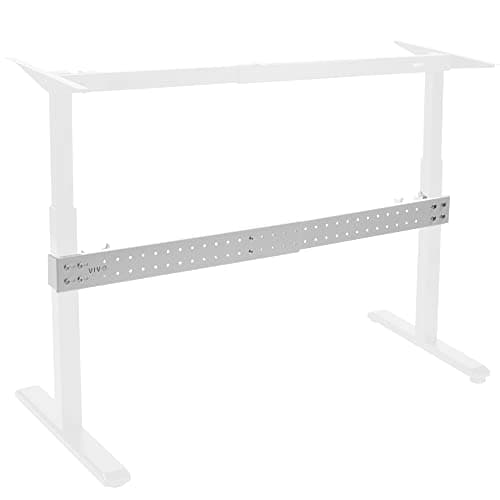
VIVO VIVO Universal Steel Clamp-On Desk Stabilizer Bar (DESK-STB01)
VIVO Universal Steel Clamp-On Desk Stabilizer Bar (DESK-STB01)

The retrofit crossbar. It clamps onto the two leg columns of an existing sit-stand frame and ties them together, which is exactly the missing structure on most frames that wobble.

Best retrofit fix
8.8
$69.99Amazon
02
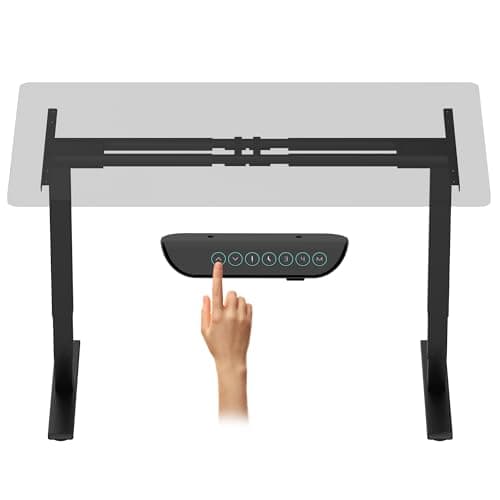
FLEXISPOT FLEXISPOT E6 Max Dual Motor 3-Stage Frame (Frame Only)
FLEXISPOT E6 Max Dual Motor 3-Stage Frame (Frame Only)

When the frame itself is the problem, this is the replacement. Three-stage columns and a 330 lb rating mean it is working well inside its limits at the height you stand at.

Best when the frame is the problem
8.1
$256.49Amazon

#ad · Live prices from the Amazon Product API, as of Sep 6, 2026. Where we have no verified live price we show none — we would rather leave a gap than print a number that has rotted.

In detail

The picks, in full

01
VIVO VIVO Universal Steel Clamp-On Desk Stabilizer Bar (DESK-STB01)

Best retrofit fix

VIVO Universal Steel Clamp-On Desk Stabilizer Bar (DESK-STB01)

Type
Clamp-on steel stabilizer bar
Width range
36" to 61.6", expandable
Fits
Sit-to-stand desk frames with two leg columns
Material
Steel
Installation
Clamps on - no drilling into the frame
8.8/10

The retrofit crossbar. It clamps onto the two leg columns of an existing sit-stand frame and ties them together, which is exactly the missing structure on most frames that wobble.

Stability Gain
9
Fitment Range
8.6
Ease of Install
8.8
Value
8.8

Pros

  • Adds the crossbar a budget two-leg frame was built without, which is the actual missing part
  • Clamps rather than bolts, so it fits frames it was never designed for
  • 36 to 61.6 inch range covers almost every desk width in common use
  • Costs a fraction of replacing the frame

Cons

  • Cannot help if the tabletop is what is flexing
  • Sits low across the leg span, so it competes with a tower or a footrest for space
  • Clamp fit depends on your column profile - measure before ordering

Skip this if…

your frame already has a factory crossbar - tighten that one instead.

$69.99View on Amazon

Price as of Sep 6, 2026. Prices change — Amazon's is the one that counts.

#ad · we may earn a commission from this link to VIVO Universal Steel Clamp-On Desk Stabilizer Bar (DESK-STB01)

02
FLEXISPOT FLEXISPOT E6 Max Dual Motor 3-Stage Frame (Frame Only)

Best when the frame is the problem

FLEXISPOT E6 Max Dual Motor 3-Stage Frame (Frame Only)

Lift
Dual motor, 3-stage columns
Height range
24.4" to 50"
Weight capacity
330 lb
Noise
Under 45 dB in operation
Controller
Four programmable height presets
8.1/10

When the frame itself is the problem, this is the replacement. Three-stage columns and a 330 lb rating mean it is working well inside its limits at the height you stand at.

Stability Gain
9.6
Fitment Range
9.2
Ease of Install
6
Value
7.4

Pros

  • Three-stage columns keep more overlap at standing height, which is where wobble shows up
  • 50-inch maximum means your standing height is not at the top of the travel
  • 330 lb rating leaves the frame working far inside its limits with an arm on top
  • Keeps your existing tabletop, so only the frame is replaced

Cons

  • The most expensive fix on this page by a wide margin
  • Means dismantling the desk and re-drilling the top for new mounting points
  • Overkill if leveling the feet would have solved it

Skip this if…

you have not worked through the free fixes above - most wobble does not need a new frame.

$256.49View on Amazon

$269.995% off

Price as of Sep 6, 2026. Prices change — Amazon's is the one that counts.

#ad · we may earn a commission from this link to FLEXISPOT E6 Max Dual Motor 3-Stage Frame (Frame Only)

What does not work

Three fixes come up constantly and are worth skipping.

Adding weight to the desk. A heavier top does not stop a frame flexing; it loads the same lever harder. It can slightly damp the oscillation so wobble decays faster after a push, which is why people believe it works, but the movement itself is unchanged.

Anti-vibration pads under the feet. These are designed to absorb high-frequency vibration from machinery. Desk wobble is a low frequency structural sway, and soft pads under the feet usually make it slightly worse by adding compliance at the one place you want rigidity.

Wall anchoring a moving desk. Bolting a sit-stand desk to the wall works right up until you change height, at which point either the anchor or the desk gives. If the desk never moves, you did not need a sit-stand desk.

How much wobble is normal?

A reasonable standard: at your standing height, with a normal load, a firm two-finger push on the front edge should produce a small movement that stops within one or two oscillations. Typing hard should not visibly shake the screens. Continuous shimmer while you type, or a wobble that keeps swaying after you stop pushing, is outside normal.

Also separate wobble from rocking. Rocking is the desk pivoting on an uneven foot — a sharp knock, easily reproduced, fixed by leveling. Wobble is a springy sway through the frame. They feel similar and have completely different causes, which is why leveling comes first in the order above.

Buying so this does not happen next time

If you are replacing rather than repairing, three specifications predict stability better than price does: three-stage columns rather than two, a crossbar rather than a bare two-leg frame, and a weight rating well above your actual load, because a frame working at a third of its rating behaves better than one near its ceiling. Frames measured on exactly those points are in the standing desk frame roundup, and complete desks are in the standing desk roundup.

One more thing to sort while the desk is apart: everything that plugs in should be mounted to the desk so it travels with it. A power lead that goes taut at full height is its own kind of instability, and the method is in cable management for a standing desk.

Essentials

The small parts that finish the job

Nothing here changes a pick above, and none of it is a considered purchase. These are the cheap pieces that decide whether the expensive one works properly, and the ones people discover they are missing on the day the big box arrives.

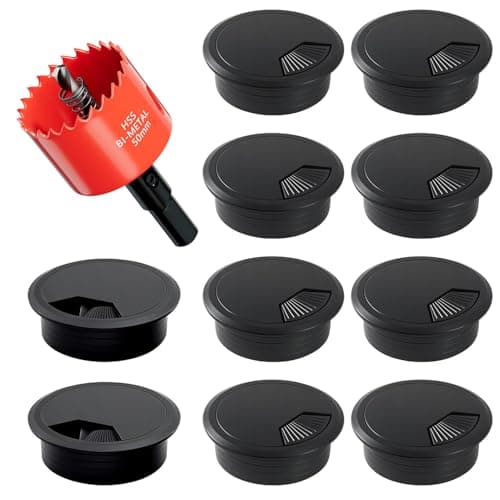
  • 2-Inch Desk Grommet Kit with Hole Saw (10 pack)

    2-Inch Desk Grommet Kit with Hole Saw (10 pack)

    Cables that drop straight through the desktop stay where you put them. Cables routed around the back edge get dragged every time the desk moves or the chair rolls back, which is what undoes a tidy run within a week. The hole saw is in the box, so the cut and the finished edge come from one purchase.

    Check first: decide the hole position and check your desktop thickness before you cut. A grommet hole is not reversible.

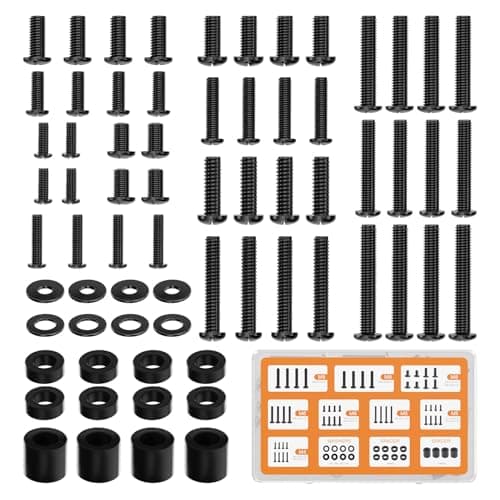
  • WALI Universal Mounting Hardware Set (M4, M5, M6, M8)

    WALI Universal Mounting Hardware Set (M4, M5, M6, M8)

    Arms ship with one length of screw. Thick panels, recessed VESA patterns and curved backs regularly need a longer thread or a spacer, and a mixed M4 to M8 kit turns a half-finished install into a ten-minute job.

#ad · Live prices from the Amazon Product API, as of Sep 6, 2026. Where we have no verified live price we show none. We may earn a commission, at no extra cost to you.

How we picked

We do not run a testing lab

We compiled the published manufacturer specifications, did the ergonomics, VESA and desk-depth math ourselves, and read aggregated owner reviews, then scored each product against a published rubric. The scores are judgments from documented research — they are not measurements we took, because we do not have a lab and we are not going to pretend we do. Every spec traces back to a listing or manual named in Sources.

Questions

Frequently asked

Why does my standing desk wobble when it is raised?
Because raising it lengthens the lever between the floor and the desktop, so the same sideways force produces more movement. All height-adjustable desks do this to some degree. It becomes a problem when the feet are not level, the bolts have loosened, the frame has no crossbar, or you are working near the top of the frame’s travel.
Does a crossbar really stop standing desk wobble?
It substantially reduces side-to-side sway, because it ties the two leg columns into one structure instead of two independent posts. It does nothing for front-to-back movement or for a tabletop that is flexing. Retrofit clamp-on bars exist for frames that shipped without one.
Will putting weight on my desk stop it wobbling?
No. Extra weight loads the same flexing structure harder; it does not stiffen it. It can make the wobble decay a little faster after a knock, which is why the idea persists, but the amount of movement per unit of force is unchanged.
Is some standing desk wobble normal?
Yes. A firm push on the front edge at standing height should produce a small movement that settles within a swing or two. What is not normal is visible shaking while you type, or a sway that keeps going after you stop pushing.
How do I stop my monitors shaking when I type?
Level the feet, retorque the frame bolts, and move the monitor arm clamp toward the center of the back edge rather than a corner — an off-center arm puts a twisting load into the frame. If the tabletop bows when you press between the legs, the top is the flexing part and a stiffer top is the fix.
Are two-leg standing desks less stable than three-leg or L-shaped ones?
Generally yes, in the side-to-side direction, because a two-leg frame has a narrower base and relies on the crossbar for lateral stiffness. An L-shaped frame with three columns triangulates itself and is noticeably steadier — see the L-shaped desk roundup if the room allows one.

Keep reading

Receipts

Sources

We do not run a testing lab, and we do not pretend to. Specifications come from the manufacturer or retailer listing; the footprint and clearance math is ours and reproducible. Where we could not verify a number, we say so on the page rather than quietly leaving it out. Read our full method.