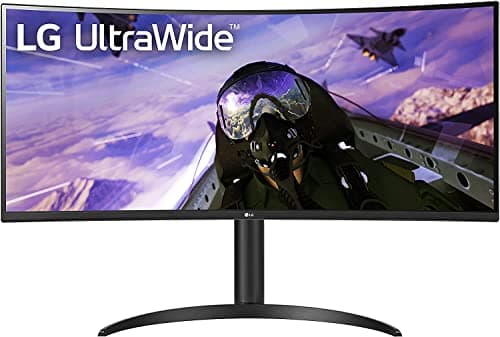
If you keep dragging windows around a 16:9 screen, wishing the desktop were wider, an ultrawide fixes the actual problem — width — without the bezel that splits a two-monitor rig down the middle. Our pick for most desks is the LG 34WP65C-B: a 34-inch curved panel at 3440×1440 and 160Hz that hands you roughly the horizontal room of two 24-inch monitors, at a price that leaves budget for the arm to hang it on.
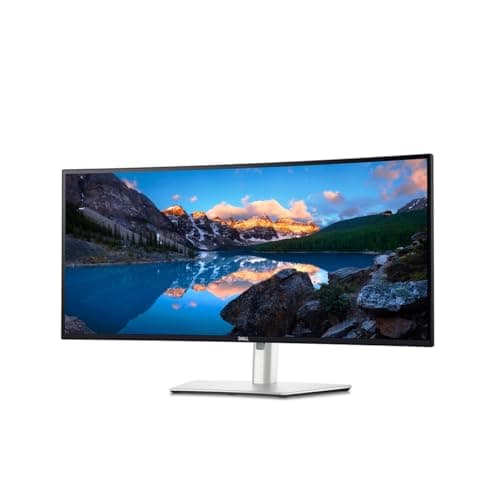
The math is what makes the 34-inch UWQHD class the default. At a normal desk distance, 3440×1440 gives you three comfortable app columns without shrinking text, and the gentle 1800R curve keeps the far edges from drifting off-axis. Step up only when a specific need justifies it. The Dell UltraSharp U3425WE earns the productivity crown because it is really a docking station wearing a monitor: Thunderbolt 4 with 90W charging, a 2.5-gigabit Ethernet jack, and a KVM that drives two computers from one keyboard and mouse. If your bottleneck is cables and machines, not pixels, that is the panel that clears the desk.
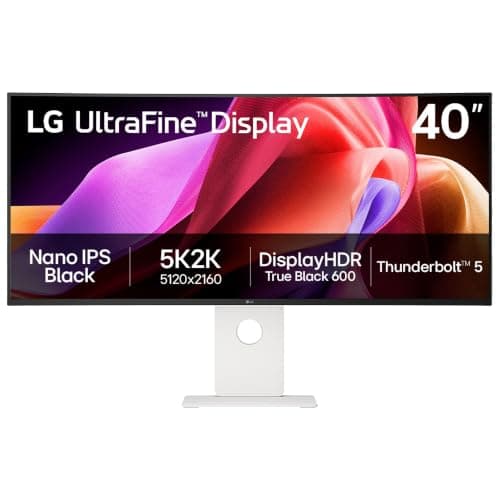
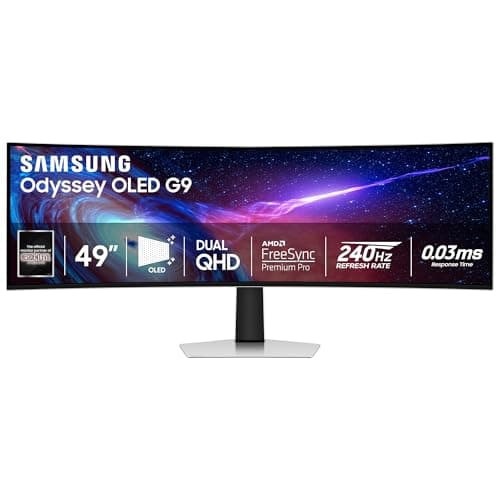
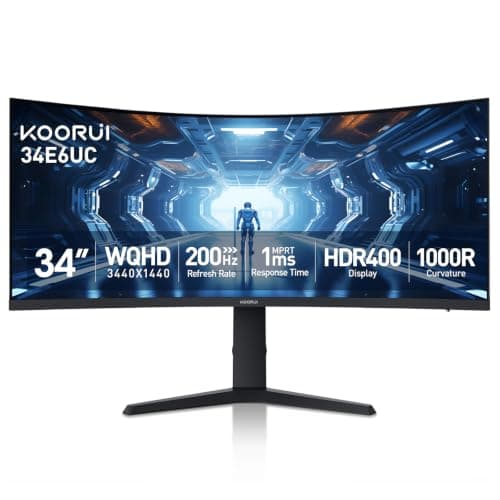
Above that sit two splurges with different jobs. The LG 40U990A-Wputs resolution first — 5120×2160 of 5K2K sharpness on a Nano IPS Black panel with Thunderbolt 5 — while the Samsung 49-inch Odyssey OLED G9 is the widest single screen most rooms can hold, a 240Hz QD-OLED that wants roughly 1200mm of desk before you buy. Both are wonderful and both are overkill for a spreadsheet. On the other end, the KOORUI 34-inch proves you can taste the ultrawide width for the price of a decent 27-inch, as long as you accept a plainer stand.
Whichever way you go, decide the mount at the same time as the panel. Almost every screen here carries a 100×100mm VESA pattern, so a monitor armcan reclaim the desk depth the bundled stand steals and set the top of the screen at eye level — the target our monitor height guide spells out. And if you are still torn between one wide screen and two separate ones, read ultrawide vs dual monitor before you commit; it weighs the trade honestly rather than declaring a universal winner.
The short answer
Quick picks
#ad · Live prices from the Amazon Product API, as of Sep 24, 2026. Where we have no verified live price we show none — we would rather leave a gap than print a number that has rotted.
In detail
The picks, in full
Best overall value
LG 34WP65C-B 34" UltraWide QHD Curved
- Screen
- 34" curved (1800R)
- Resolution
- 3440 x 1440 (21:9 UWQHD)
- Refresh rate
- 160Hz
- Panel
- VA, HDR10, AMD FreeSync
- VESA mount
- 100 x 100mm
The 34-inch UWQHD panel that gets the fundamentals right for the least money - 3440 x 1440, a fast 160Hz VA panel, and a gentle 1800R curve that makes one screen feel like two.
- Image & Panel
- 8.4
- Ergonomics
- 7.8
- Connectivity
- 7.8
- Value
- 9.6
Pros
- +3440 x 1440 across 34 inches gives roughly the width of two 24-inch monitors with no center bezel
- +160Hz VA panel is fast enough for gaming yet calm for spreadsheets and long reading
- +The 1800R curve keeps the far edges at a more even viewing distance
- +Standard 100 x 100mm VESA makes it easy to move onto an arm
Cons
- −VA blacks are good but off-angle uniformity trails a true IPS panel
- −The included stand handles tilt and some height, but a dedicated arm reaches further
- −No built-in USB hub or single-cable laptop charging
Skip this if…
…you do color-critical work where a wide-gamut IPS panel and a calibration report matter more than the price.
Best for productivity
Dell UltraSharp U3425WE 34" WQHD Curved
- Screen
- 34" curved (1900R), IPS Black
- Resolution
- 3440 x 1440 (21:9 WQHD)
- Refresh rate
- 120Hz
- Connectivity
- Thunderbolt 4 90W, 2.5GbE RJ45, KVM hub
- VESA mount
- 100 x 100mm
A 34-inch IPS Black productivity hub - Thunderbolt 4 with 90W charging, 2.5-gigabit Ethernet, and a KVM that lets one keyboard and mouse drive two computers.
- Image & Panel
- 8.6
- Ergonomics
- 8.8
- Connectivity
- 9.6
- Value
- 6.2
Pros
- +IPS Black deepens contrast over standard IPS while keeping wide viewing angles
- +Thunderbolt 4 delivers up to 90W, so a laptop charges over the same cable that carries the picture
- +Built-in 2.5-gigabit Ethernet and a KVM switch cut the cable count on a two-machine desk
- +Fully adjustable stand handles height, tilt, and swivel with a tidy port hub
Cons
- −120Hz is smooth for work and scrolling, but it is not a high-refresh gaming panel
- −Costs meaningfully more than a plain UWQHD panel of the same size
Skip this if…
…you mainly game and want a high refresh rate rather than a docking-station monitor.
Best premium 5K2K
LG 40U990A-W 40" UltraFine evo 5K2K Curved
- Screen
- 40" curved, Nano IPS Black
- Resolution
- 5120 x 2160 (5K2K, 21:9)
- Refresh rate
- 120Hz, AMD FreeSync Premium
- Connectivity
- Thunderbolt 5 (96W), HDMI 2.1, DisplayPort 2.1, RJ45 ethernet
- Stand
- Tilt, height and swivel adjustable
A 40-inch 5K2K showcase - 5120 x 2160 on a Nano IPS Black panel at 120Hz, with Thunderbolt 5 and an ethernet jack, for the desk that wants maximum resolution and width at once.
- Image & Panel
- 9.4
- Ergonomics
- 8.2
- Connectivity
- 9.6
- Value
- 5.6
Pros
- +5120 x 2160 packs 4K-class sharpness across a 21:9 ultrawide, so text stays crisp at size
- +Nano IPS Black reaches 99% DCI-P3 and a 2000:1 contrast ratio, with VESA DisplayHDR 600
- +Thunderbolt 5 carries video, data, and 96W of laptop charging on one cable, with ethernet behind it
- +The 40-inch width fits two full documents side by side with room to spare
Cons
- −The most expensive panel in this roundup by a wide margin
- −120Hz is generous for a work panel but short of a dedicated gaming ultrawide
- −A 40-inch curved panel needs real desk depth and width
Skip this if…
…your desk is shallow or your budget is tight - this is the splurge tier, not the value pick.
Best super-ultrawide
Samsung 49" Odyssey OLED G9 (G93SC)
- Screen
- 49" curved (1800R), QD-OLED
- Resolution
- 5120 x 1440 (DQHD, 32:9)
- Refresh rate
- 240Hz
- Ports
- DisplayPort 1.4, HDMI 2.1, USB-C
- Desk width
- Needs about 1200mm
A 49-inch QD-OLED super-ultrawide at 5120 x 1440 and 240Hz - the widest single screen most desks can hold, with per-pixel OLED contrast.
- Image & Panel
- 9.6
- Ergonomics
- 7.8
- Connectivity
- 8.6
- Value
- 6
Pros
- +QD-OLED delivers perfect blacks and vivid color that LCD ultrawides cannot match
- +5120 x 1440 is the horizontal space of two 27-inch QHD monitors in one seamless panel
- +240Hz makes it a genuine gaming display as well as a work canvas
Cons
- −Needs roughly 1200mm of desk width, which rules out many setups
- −OLED carries burn-in risk with static taskbars and docks over time
- −Super-ultrawide pricing sits at the top of the category
Skip this if…
…your desk is under about 1200mm wide, or your day is mostly static windows that risk OLED burn-in.
Best budget
KOORUI 34" Curved Ultrawide WQHD 144Hz
- Screen
- 34" curved (1500R)
- Resolution
- 3440 x 1440 (21:9)
- Refresh rate
- 144Hz
- Panel
- VA, Adaptive Sync
- VESA mount
- 100 x 100mm
A 34-inch 3440 x 1440 curved VA panel at 144Hz for the price of a good 27-inch - the way to try ultrawide without overspending.
- Image & Panel
- 7.4
- Ergonomics
- 6.4
- Connectivity
- 6.8
- Value
- 9
Pros
- +3440 x 1440 at 144Hz hits the ultrawide sweet spot for a budget price
- +The tight 1500R curve wraps the edges toward you at a normal desk distance
- +Delivers most of the width benefit of pricier panels for far less money
Cons
- −Basic stand and modest build compared with first-tier brands
- −Color and uniformity are good, not reference-grade
Skip this if…
…you want a premium stand, wide-gamut color, or a single-cable USB-C hub built in.
How to choose an ultrawide
Start with desk width, because it is the one spec that can veto a purchase. A 34-inch panel occupies roughly 32 inches of width and works on most desks; a 40-inch 5K2K panel wants more; a 49-inch super-ultrawide needs around 1200mm and enough depth that the curve does not force you too close. Measure before you fall for the picture. The full ladder — 34, 38, 40, 45 and 49 inches, with the clear desk span and viewing distance each one needs — is worked out in what size ultrawide monitor you need.
Then read the resolution against the size, not in isolation. On 34 inches, 3440×1440 is the comfort zone — sharp text, three usable columns, no scaling headaches. Jump to 40 inches and you want 5120×2160 to hold that density; a 34-inch resolution stretched across 40 inches would look soft. The labels for those grids are a minefield of their own — WUHD, UWQHD and DQHD are three different resolutions, two of them 5120 wide — and WUHD vs UWQHD explained decodes each one with the pixel density it produces at every size. Panel technology sets the ceiling on image quality: VA gives deep contrast for the money, IPS and IPS Black add color accuracy and wide angles, and QD-OLED delivers per-pixel light with a burn-in caveat you should weigh if your day is full of static docks and taskbars.
- Width bottleneck, sensible budget:a 34-inch UWQHD VA panel at 144–160Hz.
- One laptop, too many cables: a USB-C hub ultrawide with power delivery and a KVM.
- Maximum canvas, budget no object: 5K2K at 40 inches, or a 49-inch OLED if the desk allows.
Last, budget for the arm and the cabling in the same purchase. A wide panel on a flimsy bundled stand is the common mistake — it sits too low and eats the desk behind it. Plan the mount, then route the single input cleanly, and the ultrawide finally feels like the upgrade the spec sheet promised.
One note on timing: monitors are the product class with the broadest documented November discounts, so if you can wait for the sale window, the Black Friday home office deals hub records what ultrawides actually sold for in past Cyber Monday coverage and how to tell a real cut from an inflated list price.
How we picked
We do not run a testing lab
We compiled the published manufacturer specifications, did the ergonomics, VESA and desk-depth math ourselves, and read aggregated owner reviews, then scored each product against a published rubric. The scores are judgments from documented research — they are not measurements we took, because we do not have a lab and we are not going to pretend we do. Every spec traces back to a listing or manual named in Sources.
Questions
Frequently asked
What size ultrawide is best for a normal desk?+
A 34-inch panel at 3440×1440 is the default for most desks. It occupies about 32 inches of width, fits a standard 47–55 inch desk with room for a keyboard, and gives roughly the horizontal space of two 24-inch monitors without a center bezel.
Is an ultrawide better than two monitors?+
It depends on your work. An ultrawide removes the center bezel and simplifies cabling; two monitors give more total pixels and let you rotate one screen vertical. We weigh the whole trade in ultrawide vs dual monitor.
How much desk width does a 34-inch ultrawide need?+
Plan for roughly 32 inches of width for the panel itself, plus a little clearance on each side. A 49-inch super-ultrawide is a different story — it wants around 1200mm of desk before the curve and the stand fit comfortably.
Do ultrawide monitors work with a monitor arm?+
Yes. Nearly every ultrawide carries a 100×100mm VESA mount, so it drops onto a compatible arm. Check the arm’s weight rating first — a wide panel is heavier and longer than a 27-inch screen. Our monitor arm guide lists picks rated for large panels.
What resolution should a 34-inch ultrawide be?+
3440×1440, known as UWQHD. It keeps text sharp and gives three comfortable app columns at a normal viewing distance. Lower resolutions look soft across 34 inches; higher ones like 5K2K are worth it mainly once you go to 40 inches.
Receipts
Sources
We do not run a testing lab, and we do not pretend to. Specifications come from the manufacturer or retailer listing; the footprint and clearance math is ours and reproducible. Where we could not verify a number, we say so on the page rather than quietly leaving it out. Read our full method.