Skip to content
Chair & Cable

SECTION 04 · Keyboards & Mice

The best wireless keyboards for an office desk

Every wireless keyboard works on day one. What separates them is the radio and the battery - and only some makers publish a number for either.

By Stephen V.Updated How we pick
#ad

We earn a commission when you buy through our Amazon links, at no extra cost to you. It never affects our rankings, and we say so when the cheaper product is the better buy. How this works.

For most office desks the answer is the Logitech MX Keys S: it pairs to three machines, switches between them with a key, and Logitech publishes the battery figure — up to 10 days backlit, or up to 5 months with the backlight off. If you want a mechanical keystroke without a cable, the Keychron K8 Max is the pick, because it is the only board here with Bluetooth, a low-latency 2.4 GHz mode and a wired fallback. And the budget pick is the Logitech MK540 Advanced combo: one encrypted receiver for a keyboard and a mouse, with a keyboard battery Logitech rates up to 36 months on ordinary cells.

The reason this page exists separately from our mechanical, compact and quiet roundups is that none of those rank on the radio, and the radio is what wireless buyers actually get wrong. Switch feel is a preference. A board that drops a keystroke when you wake the machine, or needs charging every four days, is a daily irritation you cannot preference your way out of.

Three ways a keyboard goes wireless, and what each costs you

  • Bluetooth. No dongle, no USB port used, and it pairs to phones and tablets as well as computers. The cost is the handshake: Bluetooth boards are the ones that occasionally miss the first keystroke after the machine wakes, and a BIOS screen or a fresh OS install generally cannot see them at all.
  • A 2.4 GHz receiver. A dedicated dongle in a USB port. It behaves like a wired keyboard — instant, no pairing, visible to a BIOS — and it is the right choice for a desktop. The cost is a permanently occupied port and a dongle that can be lost. Logitech’s Bolt and Unifying receivers are this, with encryption.
  • Both, plus a cable. Tri-mode boards do all three. The Keychron and the NuPhy below are tri-mode, which is why they are the picks for anyone who needs the keyboard to work in a BIOS and on an iPad.

What the makers publish, and what they do not

Battery life is where keyboard marketing gets vague, so the table below only lists a runtime where the maker publishes one. Two of these five do not publish a figure we could read at source, and we have said so rather than estimating: an invented battery number is exactly the sort of claim that is impossible for a reader to check.

BoardConnectionDevicesPublished battery
Logitech MX Keys SBluetooth LE or Logi Bolt receiverUp to 3Up to 10 days backlit; up to 5 months backlight off
Keychron K8 MaxBluetooth, 2.4 GHz, or wired USB-CMultiple over BluetoothNot published at a source we could read
NuPhy Air75 V2Bluetooth, 2.4 GHz, or wired USB-CMultiple over BluetoothNot published at a source we could read
Logitech Ergo K860Bluetooth or Logi Bolt receiverUp to 3Not published as a figure on the listing
Logitech MK540 AdvancedOne Unifying receiver, encrypted1 (receiver only)Up to 36 months keyboard, up to 18 months mouse

The pattern worth noticing: the two boards with a published multi-year battery are both membrane boards running on replaceable cells, and the two tri-mode mechanical boards publish nothing. That is the real wireless trade, and it is not about brand quality. A backlit mechanical board with a rechargeable cell is doing far more work than a membrane board on two AAs, and it tells you less about how long it will last.

The short answer

Quick picks

#ProductBest forScorePrice
01
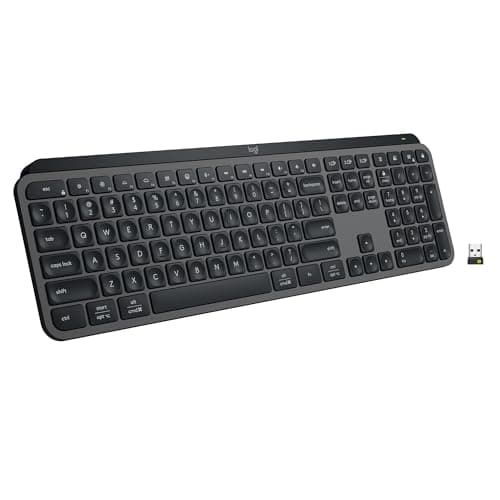
Logitech Logitech MX Keys S (the membrane case)
Logitech MX Keys S (the membrane case)

The wireless board to buy for a desk with more than one computer on it. Three-device switching, a published battery figure, and a backlight that manages itself so the figure means something.

Best overall wireless
8.7
$129.99Amazon
02
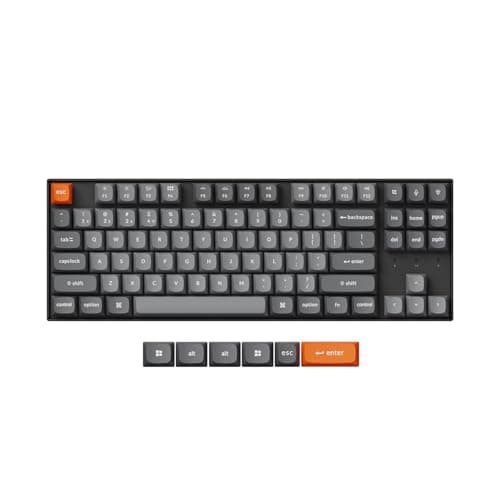
Keychron Keychron K8 Max Wireless Mechanical Keyboard
Keychron K8 Max Wireless Mechanical Keyboard

The only board here with all three routes: Bluetooth for a tablet, low-latency 2.4 GHz for the desktop, and a USB-C cable for a BIOS screen or a dead battery. Hot-swap sockets on top.

Best wireless mechanical
8.4
$39.00Amazon
03
NuPhy NuPhy Air75 V2 Low-Profile Mechanical
NuPhy Air75 V2 Low-Profile Mechanical

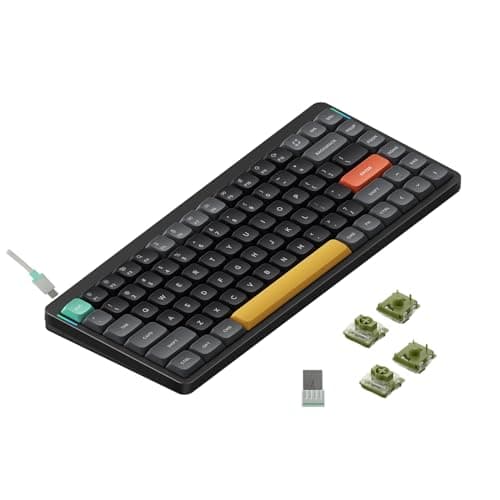
The tri-mode board for a desk that also has a laptop on it. A slim 75% layout with hot-swappable low-profile switches, Bluetooth, 2.4 GHz and a cable - the smallest footprint here.

Best slim wireless
8.2
$59.00Amazon
04
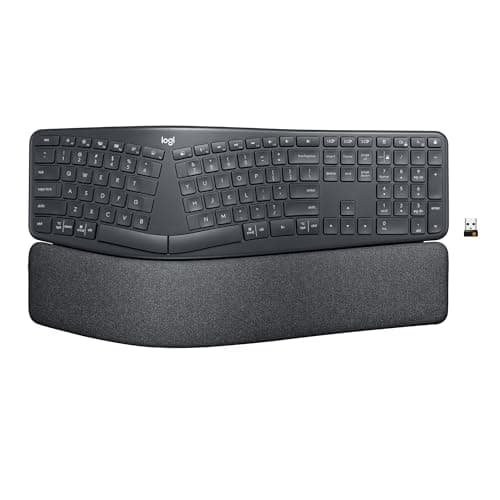
Logitech Logitech Ergo K860 Wireless Split Keyboard
Logitech Ergo K860 Wireless Split Keyboard

The wireless board for shoulders and wrists. A curved, pillowed split with a cushioned wrist rest built into the frame, on the same Bluetooth-or-Bolt radio and three-device switching as the MX Keys S.

Best wireless ergonomic
8.5
$149.99Amazon
05
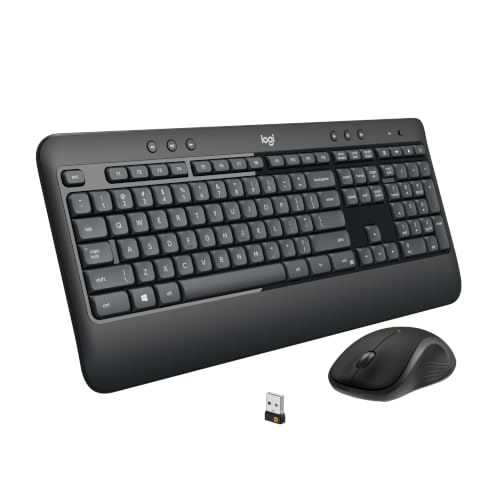
Logitech Logitech MK540 Advanced Wireless Combo
Logitech MK540 Advanced Wireless Combo

The budget pick, and the longest published battery life here by a wide margin: up to 36 months on the keyboard. One encrypted receiver covers both the keyboard and the mouse.

Budget pick - longest battery
8.3
$59.99Amazon

#ad · Live prices from the Amazon Product API, as of November 12, 2026. Where we have no verified live price we show none — we would rather leave a gap than print a number that has rotted.

In detail

The picks, in full

01
Logitech Logitech MX Keys S (the membrane case)

Best overall wireless

Logitech MX Keys S (the membrane case)

Connection
Bluetooth Low Energy or Logi Bolt receiver, up to 3 devices
Key mechanism
Low-profile scissor, spherically dished keycaps
Battery
1500mAh Li-Po - up to 10 days, or up to 5 months backlight off
Backlight
Proximity sensor plus ambient light sensor
Software
Logi Options+ with Smart Actions macros
8.7/10

The wireless board to buy for a desk with more than one computer on it. Three-device switching, a published battery figure, and a backlight that manages itself so the figure means something.

Connection
8.8
Battery
8.6
Multi-device
9.2
Value
8.2

Pros

  • Three-device switching, so one keyboard covers a work and a personal machine
  • Logitech publishes the runtime at both ends - backlit and backlight off
  • Genuinely quiet, which is the specification that matters on calls
  • Works over Bluetooth or the Bolt receiver, so it suits a laptop or a desktop

Cons

  • Nothing is replaceable - a failed key means a new keyboard
  • Shallow travel gives less feedback than any mechanical switch
  • No 2.4 GHz gaming-style mode and no wired fallback

Skip this if…

…you want to feel each keystroke register - scissor switches deliberately do not do that.

$129.99View on Amazon

Price as of November 12, 2026. Prices change — Amazon's is the one that counts.

#ad · we may earn a commission from this link to Logitech MX Keys S (the membrane case)

02
Keychron Keychron K8 Max Wireless Mechanical Keyboard

Best wireless mechanical

Keychron K8 Max Wireless Mechanical Keyboard

Layout
Tenkeyless (87-key)
Connection
Wireless - Bluetooth or 2.4 GHz; wired USB-C
Switch type
Hot-swappable (pre-installed Gateron)
Hot-swap
Yes
Compatibility
Mac and Windows keycaps and toggle
8.4/10

The only board here with all three routes: Bluetooth for a tablet, low-latency 2.4 GHz for the desktop, and a USB-C cable for a BIOS screen or a dead battery. Hot-swap sockets on top.

Connection
9.6
Battery
7
Multi-device
8.4
Value
8.6

Pros

  • Triple connection: Bluetooth, low-latency 2.4 GHz, or wired
  • The wired mode is a real fallback - a flat battery does not stop work
  • Hot-swap sockets and QMK/VIA remapping
  • Gasket mount and stock foam soften the sound for shared rooms

Cons

  • No published battery runtime we could verify at source
  • Taller than a low-profile board, so a wrist rest helps
  • Tenkeyless, so there is no number pad

Skip this if…

…you need a slim low-profile board or a fully silent keyboard straight out of the box

$39.00View on Amazon

Price as of November 12, 2026. Prices change — Amazon's is the one that counts.

#ad · we may earn a commission from this link to Keychron K8 Max Wireless Mechanical Keyboard

03
NuPhy NuPhy Air75 V2 Low-Profile Mechanical

Best slim wireless

NuPhy Air75 V2 Low-Profile Mechanical

Layout
Compact 75%
Connection
Wireless - Bluetooth or 2.4 GHz; wired USB-C
Switch type
Hot-swappable low-profile (Gateron low-profile)
Hot-swap
Yes
Feet
Adjustable feet with optional risers
8.2/10

The tri-mode board for a desk that also has a laptop on it. A slim 75% layout with hot-swappable low-profile switches, Bluetooth, 2.4 GHz and a cable - the smallest footprint here.

Connection
9.4
Battery
7
Multi-device
8.4
Value
8

Pros

  • Bluetooth, 2.4 GHz and wired all supported in a board this thin
  • Hot-swap low-profile sockets, which is uncommon at this height
  • Slim 75% layout saves desk depth and pairs neatly with a laptop
  • Low profile keeps the wrists flatter than a full-height mechanical

Cons

  • No published battery runtime we could verify at source
  • Compact layout drops the number pad and shuffles some keys
  • The low-profile switch choice is narrower than full-height

Skip this if…

…you need a number pad or a full set of dedicated navigation keys

$59.00View on Amazon

Price as of November 12, 2026. Prices change — Amazon's is the one that counts.

#ad · we may earn a commission from this link to NuPhy Air75 V2 Low-Profile Mechanical

04
Logitech Logitech Ergo K860 Wireless Split Keyboard

Best wireless ergonomic

Logitech Ergo K860 Wireless Split Keyboard

Layout
Full-size curved split, one piece, with number pad
Connection
Wireless - Bluetooth or Logi Bolt USB receiver
Key mechanism
Low-profile scissor (membrane)
Tilt / tenting
Fixed pillowed split; reverse-tilt feet
Palm rest
Integrated cushioned
8.5/10

The wireless board for shoulders and wrists. A curved, pillowed split with a cushioned wrist rest built into the frame, on the same Bluetooth-or-Bolt radio and three-device switching as the MX Keys S.

Connection
8.8
Battery
7.4
Multi-device
9.2
Value
8.4

Pros

  • The ergonomic layout on this page, with no cable to pull your hands out of position
  • Padded wrist rest is part of the frame, not a floppy add-on
  • Reverse-tilt feet let you set a slight negative angle
  • Connects over Bluetooth or the bundled receiver and pairs to three devices

Cons

  • The split and tenting are fixed - you cannot widen or steepen them
  • Membrane keys feel soft next to a mechanical board
  • Logitech does not publish a runtime figure for this board on the listing

Skip this if…

…you want to adjust the split width or tent angle yourself, or you prefer a crisp mechanical keystroke

$149.99View on Amazon

Price as of November 12, 2026. Prices change — Amazon's is the one that counts.

#ad · we may earn a commission from this link to Logitech Ergo K860 Wireless Split Keyboard

05
Logitech Logitech MK540 Advanced Wireless Combo

Budget pick - longest battery

Logitech MK540 Advanced Wireless Combo

Connection
Single Logitech Unifying USB receiver, encrypted, up to 10m
Keyboard
Full size with number pad and integrated palm rest
Keyboard battery
Rated up to 36 months
Mouse battery
Rated up to 18 months
Durability
Spill resistant to 60ml, abrasion-resistant key printing
8.3/10

The budget pick, and the longest published battery life here by a wide margin: up to 36 months on the keyboard. One encrypted receiver covers both the keyboard and the mouse.

Connection
8.2
Battery
9.8
Multi-device
5.5
Value
9.4

Pros

  • Three years of published keyboard battery on ordinary cells, which nothing else here approaches
  • One encrypted receiver for both devices, at the lowest price where that is true
  • Receiver connection behaves like a wire - no pairing, no wake-up lag
  • Spill resistance and abrasion-resistant printing are real durability features

Cons

  • No Bluetooth and no multi-device switching - the receiver is the only route
  • Membrane keyboard with a plastic rather than cushioned palm rest
  • Windows and ChromeOS focused; macOS support is not the priority

Skip this if…

…you need to switch between two machines - this set pairs to one receiver and stays there.

$59.99View on Amazon

Price as of November 12, 2026. Prices change — Amazon's is the one that counts.

#ad · we may earn a commission from this link to Logitech MK540 Advanced Wireless Combo

Pick the radio from the machine, not the keyboard

The decision is simpler than the marketing makes it look, and it starts with what you plug into.

  • A desktop that lives under the desk: take a 2.4 GHz receiver. It works before the operating system loads, which matters the one time a year you need to get into the BIOS, and you are not short of USB ports.
  • A laptop you dock and undock: take Bluetooth, or a board that does both. A dongle you have to move with the laptop defeats the point, and a dock can hold the receiver if you want the best of both.
  • Two machines on one desk: take a board with multi-device switching — the two Logitech picks above do three devices on a keypress. The alternative is a KVM switch, which moves the keyboard and the screens together, and running two computers at one desk works through all four routes.

Rechargeable or replaceable, and why the answer is not obvious

A rechargeable board never needs cells bought, and it dies without warning on a day you needed it. A board on AAs tells you nothing about its charge state and then runs for two or three years. The deciding question is whether the board has a wired fallback: the Keychron and the NuPhy above both charge over USB-C and keep typing while plugged in, so a flat battery costs you a cable, not a working day. The MX Keys S also charges over USB-C, which is the same protection.

If you go rechargeable, the backlight is the variable that matters most. Logitech publishes 10 days backlit and up to 5 months with the backlight off for the MX Keys S, which is a factor of about fifteen from one setting. Any wireless board with lighting on by default is a board you will charge weekly.

Where this page stops

This roundup ranks the radio and the battery. It deliberately does not rank the keystroke, because that is a preference with its own pages: mechanical versus membrane settles the first question, and the quiet keyboards roundup handles the shared-room constraint. If you need a number pad, every wireless board here except the Keychron and the NuPhy has one, and the full-size roundup ranks that layout properly.
How we picked

We do not run a testing lab

We compiled the published manufacturer specifications, did the ergonomics, VESA and desk-depth math ourselves, and read aggregated owner reviews, then scored each product against a published rubric. The scores are judgments from documented research — they are not measurements we took, because we do not have a lab and we are not going to pretend we do. Every spec traces back to a listing or manual named in Sources.

Questions

Frequently asked

Is Bluetooth or a USB receiver better for a keyboard?
A 2.4 GHz receiver is more reliable and works before the operating system loads, which is why it is the right choice for a desktop. Bluetooth uses no port and pairs to phones and tablets, which is why it is the right choice for a laptop. If you need both, buy a tri-mode board — the Keychron K8 Max and NuPhy Air75 V2 above do Bluetooth, 2.4 GHz and wired.
How long should a wireless keyboard battery last?
It depends entirely on the backlight and on whether it uses cells or a rechargeable pack. Logitech publishes up to 36 months for the MK540 on replaceable cells, and up to 10 days backlit or 5 months unlit for the rechargeable MX Keys S. Treat any board that does not publish a figure as unknown rather than assuming it is good — two of the five boards here publish nothing we could read.
Will a wireless keyboard add input lag?
Not in a way that matters for typing. A 2.4 GHz receiver is effectively indistinguishable from a cable for office work; Bluetooth adds a few milliseconds and, more noticeably, a wake-up handshake that can swallow the first keystroke after the machine sleeps. If that specific irritation is the problem, the receiver modes above are the fix.
Can one receiver run both a keyboard and a mouse?
Yes, and it is the reason the MK540 is on this page. Logitech’s Unifying and Bolt receivers pair multiple devices to a single dongle, so one USB port covers the keyboard and the mouse. Our keyboard and mouse combos page ranks sets on exactly that.

Keep reading

Receipts

Sources

We do not run a testing lab, and we do not pretend to. Specifications come from the manufacturer or retailer listing; the footprint and clearance math is ours and reproducible. Where we could not verify a number, we say so on the page rather than quietly leaving it out. Read our full method.