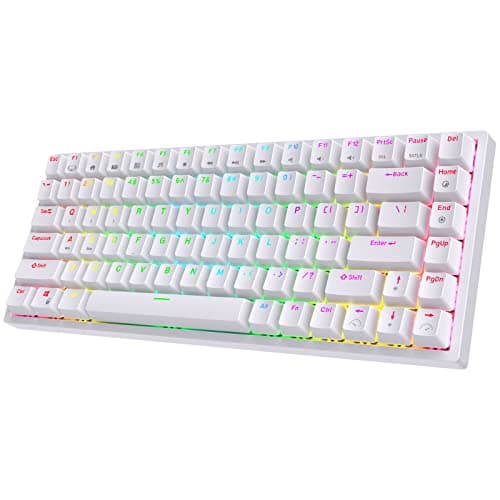
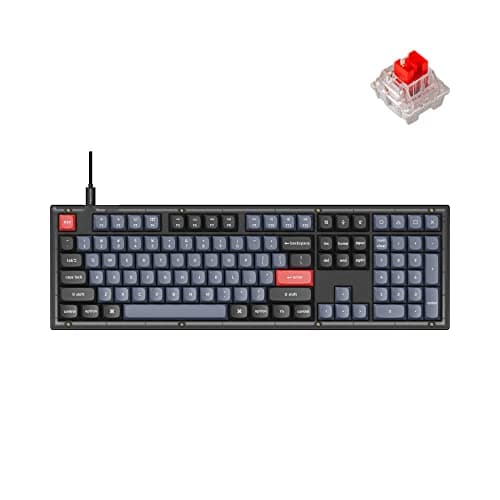
The hot-swappable keyboard to buy for a work desk is the Keychron V6: a full-size gasket-mounted board with 3- and 5-pin MX sockets, which is the widest socket standard there is, plus QMK and VIA firmware so the layout is as changeable as the switches. The budget pick is the RK ROYAL KLUDGE RK84, the cheapest board in this registry with sockets at all — it proves hot-swap is not a premium feature, it is a design decision. At the other end, the Kinesis Advantage360 Professional is the only contoured split here with hot-swappable switches, which matters because a contoured board is the one you are least likely to be able to return comfortably.
Hot-swap is worth a page of its own because it is the rare keyboard specification that changes what you own rather than how the board looks or sounds today. On a soldered keyboard the switch you bought is the switch you keep: if the linear switches turn out to feel vague under your fingers, the fix is a new keyboard. On a socketed board the fix is a $20 pack of switches and ten minutes with a puller. That is also the cheapest way to find out what you actually like, which almost nobody knows before their second board.
Not all sockets take the same switch
This is the part listings skate over. “Hot-swappable” describes the mechanism, not the compatibility, and there are three families on this page that do not interchange:
- 5-pin MX sockets take both 5-pin and 3-pin MX-style switches, which is effectively the whole mainstream aftermarket. The Keychron V6 and Q11 Ultra publish 3- and 5-pin support.
- 3-pin only sockets take 3-pin switches, or 5-pin ones after you clip the two plastic alignment legs off with flush cutters — a thirty-second job, but a job.
- Low-profile sockets are a different size entirely. The Keychron K3 Max and NuPhy Air75 V2 use low-profile switches, and a standard MX switch will not fit either one. The aftermarket is real but much smaller.
| Keyboard | Layout | Socket | Connection | Firmware |
|---|
| Keychron V6 | Full size, 104 keys | 3- and 5-pin MX | Wired USB-C | QMK / VIA |
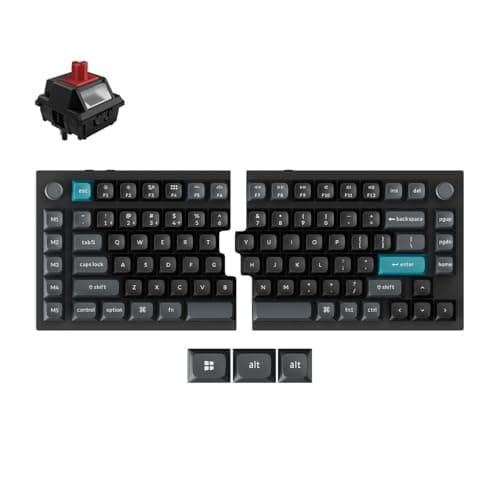
| Keychron Q11 Ultra 8K | 75 percent split, two metal halves | 3- and 5-pin MX | 2.4 GHz, Bluetooth, USB-C | QMK / Launcher |
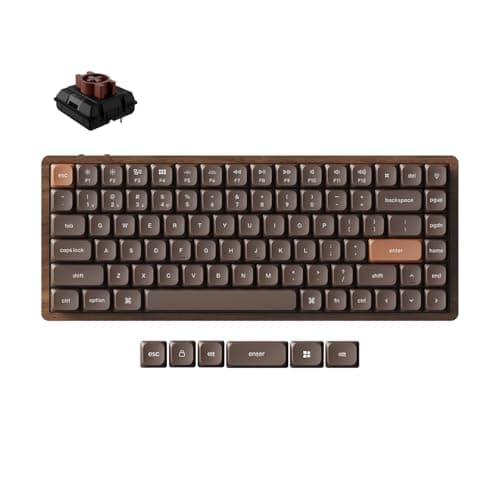
| Keychron K3 Max | 75 percent low profile | Low-profile (Keychron Milk POM) | 2.4 GHz, Bluetooth 5.2, wired | QMK / Launcher |
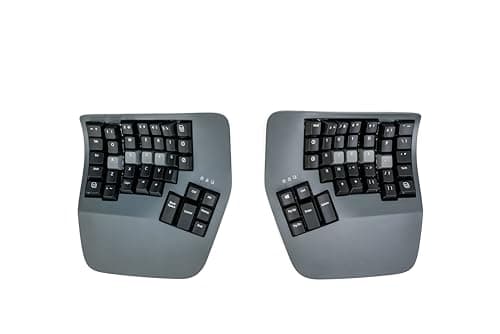
| Kinesis Advantage360 Professional | Contoured split, columnar | MX-style, tactile or quiet linear | Bluetooth LE, including between halves | SmartSet / ZMK |
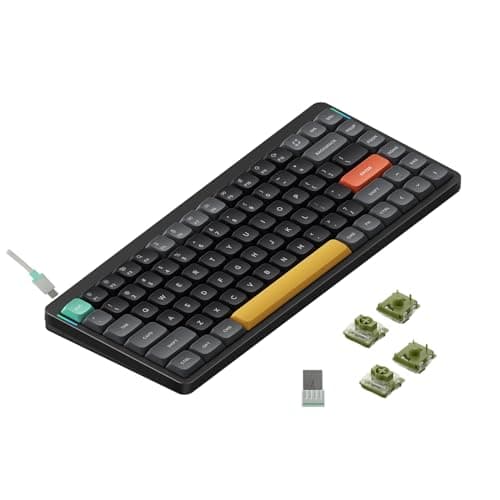
| NuPhy Air75 V2 | Compact 75 percent | Low-profile (Gateron) | Bluetooth, 2.4 GHz, USB-C | VIA-compatible |
| RK ROYAL KLUDGE RK84 | 75 percent, 84 keys | MX-style | Bluetooth, 2.4 GHz, USB-C | Vendor software |
What hot-swap does not fix
- The case and the mount. Sockets change the switch, not what the switch is bolted to. A gasket-mounted board on foam sounds and feels different from a switch plate screwed to a plastic tray, with identical switches in both. The V6 is gasket mounted and the Q11 Ultra is CNC-machined metal; that is what the money buys, not the sockets.
- Layout regret. No socket turns a tenkeyless board into a full-size one. Full size versus compact is the decision to get right first, because it is the one you cannot undo.
- Cross-machine software. QMK and VIA are powerful inside the board and do nothing across two computers. If you want one keyboard driving two machines with a key press, that is a different axis — the combos roundup ranks it, and MX Keys alternatives covers what Logitech’s layer adds.
- Wrist angle. A tall mechanical board raises your hands, which makes a wrist rest close to mandatory. Keyboard and mouse ergonomics is the free part of the fix and a wrist rest is the cheap part.
The short answer
Quick picks
| # | Product | Best for | Score | Price |
|---|
| 01 | Keychron V6 Full-Size Mechanical KeyboardThe widest socket standard on a layout a work desk actually wants: 3- and 5-pin MX sockets, a gasket mount, a full number pad and QMK/VIA, so both the switches and the layout stay changeable. | Best overall - widest socket, full size | | $58.49·Amazon |
| 02 | Keychron Q11 Ultra 8K Split Mechanical KeyboardThe sockets with no compromises attached: two CNC-machined metal halves that sync wirelessly, 3- and 5-pin MX support, 8K polling and QMK. It is the most board on this page and priced accordingly. | Sockets plus a split, no compromises | | $215.99·Amazon |
| 03 | Keychron K3 Max Ultra-Slim Wireless MechanicalThe low-profile answer, and the one to pick if a tall mechanical board is what put you off last time. Low-profile sockets rather than MX, so check the aftermarket before you commit - it is real but smaller. | Best low-profile hot-swap | | $93.74·Amazon |
| 04 | | Contoured split, switches still changeable | | $479.00·Amazon |
| 05 | NuPhy Air75 V2 Low-Profile MechanicalThe cheap route into low-profile sockets, with three ways to connect and adjustable feet plus optional risers. Same socket caveat as the K3 Max: low-profile switches only, not MX. | Cheapest low-profile sockets | | $56.05·Amazon |
| 06 | RK ROYAL KLUDGE RK84 Wireless MechanicalThe budget pick: the cheapest board in this registry with sockets at all, and still a 75 percent layout with arrow keys and three ways to connect. Proof that hot-swap is a design decision, not a premium tier. | Budget pick - cheapest board with sockets | | $56.99·Amazon |
#ad · Live prices from the Amazon Product API, as of November 21, 2026. Where we have no verified live price we show none — we would rather leave a gap than print a number that has rotted.
In detail
The picks, in full
Best overall - widest socket, full size
Keychron V6 Full-Size Mechanical Keyboard
- Layout
- Full-size (104-key) with number pad
- Connection
- Wired USB-C
- Switch type
- Hot-swappable (pre-installed Keychron/Gateron)
- Hot-swap
- Yes — 3- and 5-pin sockets
- Extras
- Gasket mount, QMK/VIA, optional rotary knob
The widest socket standard on a layout a work desk actually wants: 3- and 5-pin MX sockets, a gasket mount, a full number pad and QMK/VIA, so both the switches and the layout stay changeable.
- Socket Compatibility
- 9.6
- Case & Mount
- 8.8
- Firmware Freedom
- 9.2
- Value
- 8.8
Pros
- +Full number pad for data entry, plus a programmable knob option
- +Gasket mount and stock foam give a fuller sound than most office boards
- +Hot-swap sockets and QMK/VIA remapping
- +Strong value for a fully featured full-size board
Cons
- −Wired only — no wireless in this model
- −Full-height and heavy; a wrist rest helps for long sessions
Skip this if…
…you want wireless or a compact footprint
Sockets plus a split, no compromises
Keychron Q11 Ultra 8K Split Mechanical Keyboard
- Layout
- 75% split, two CNC-machined metal halves
- Split
- Wirelessly synced halves — no connecting cable
- Connection
- 2.4GHz, Bluetooth, or wired USB-C
- Switch type
- Hot-swappable 3-pin or 5-pin MX (pre-installed Keychron Silk POM)
- Keycaps
- KSA-profile PBT, for Mac and Windows
The sockets with no compromises attached: two CNC-machined metal halves that sync wirelessly, 3- and 5-pin MX support, 8K polling and QMK. It is the most board on this page and priced accordingly.
- Socket Compatibility
- 9.6
- Case & Mount
- 9.6
- Firmware Freedom
- 9.2
- Value
- 7.4
Pros
- +Split halves plus a genuine full-metal mechanical feel in one board
- +Hot-swap sockets let you change switches without soldering
- +Remapping and layers in Keychron's web Launcher, with a full metal frame
- +A programmable knob and M1-M5 macro keys for volume, shortcuts or whatever you map them to
Cons
- −Runs ZMK, so QMK and VIA keymaps do not carry over
- −No tenting without a third-party stand or a DIY solution
- −Costs and weighs far more than a membrane ergo board
Skip this if…
…you want a light board, built-in tenting, or your existing QMK/VIA keymap
Best low-profile hot-swap
Keychron K3 Max Ultra-Slim Wireless Mechanical
- Layout
- 75% low-profile
- Connection
- 2.4 GHz (1000Hz polling), Bluetooth 5.2 to 3 devices, or wired
- Switch type
- Hot-swappable Keychron Milk POM low-profile
- Firmware
- QMK, remapped in the Keychron Launcher web app
- Acoustics
- IXPE acoustic foam plus latex switch-support foam
- Keycaps
- Double-shot PBT, Mac layout, Windows compatible
The low-profile answer, and the one to pick if a tall mechanical board is what put you off last time. Low-profile sockets rather than MX, so check the aftermarket before you commit - it is real but smaller.
- Socket Compatibility
- 7.8
- Case & Mount
- 8.6
- Firmware Freedom
- 9
- Value
- 8.6
Pros
- +QMK means every key can be remapped and layered in the browser-based Launcher
- +1000Hz polling over 2.4GHz, which is the difference between wireless feeling instant and not
- +Milk POM switches are 31 percent slimmer than full-profile, which is where the thinness comes from
- +Double-shot PBT keycaps rather than the ABS most boards at this price use
Cons
- −The PBT keycaps are non-shine-through, so the backlight does not light the legends
- −Low-profile switch selection is limited, hot-swap or not
- −QMK configuration is a rabbit hole if you let it be
Skip this if…
…you never want to open a configurator - the K8 Max does the same job with less setup.
Contoured split, switches still changeable
Kinesis Advantage360 Professional Split Ergonomic Keyboard
- Type
- Fully separated contoured split; Bluetooth LE between the halves and to the host
- Layout
- Concave key wells with columnar (matrix) key alignment
- Thumb keys
- Dedicated thumb clusters for modifiers
- Switches
- Hot-swappable mechanical - tactile brown or quiet linear pink
- Tenting
- Integrated, three settings (low, medium, high)
The only contoured split here with sockets, which is where hot-swap is worth the most: a contoured board takes weeks to judge, and by then the switch weight is the one thing you still want to change.
- Socket Compatibility
- 8.4
- Case & Mount
- 9
- Firmware Freedom
- 9.4
- Value
- 6.6
Pros
- +Contoured wells and columnar columns match finger length and travel, which no flat board can do
- +Thumb clusters move modifiers off the little fingers, which is where a lot of strain accumulates
- +Hot-swappable mechanical switches mean you can tune the feel without replacing the board
- +Full onboard remapping, so the layout is yours rather than the factory's
Cons
- −The steepest learning curve here — realistically weeks before you are back to full speed
- −The most expensive keyboard in this roundup by a wide margin
- −Large footprint; the two halves take a lot of desk even separated
Skip this if…
…you switch between this and a laptop keyboard all day — the layouts fight each other and neither ends up fluent
Cheapest low-profile sockets
NuPhy Air75 V2 Low-Profile Mechanical
- Layout
- Compact 75%
- Connection
- Wireless — Bluetooth or 2.4 GHz; wired USB-C
- Switch type
- Hot-swappable low-profile (Gateron low-profile)
- Hot-swap
- Yes
- Feet
- Adjustable feet with optional risers
The cheap route into low-profile sockets, with three ways to connect and adjustable feet plus optional risers. Same socket caveat as the K3 Max: low-profile switches only, not MX.
- Socket Compatibility
- 7.6
- Case & Mount
- 8
- Firmware Freedom
- 8.4
- Value
- 8.8
Pros
- +Slim 75% layout saves desk depth and pairs neatly with a laptop
- +Hot-swap low-profile sockets, which is uncommon at this height
- +Bluetooth, 2.4 GHz, and wired all supported
Cons
- −Compact layout drops the dedicated number pad and shuffles some keys
- −The low-profile switch choice is narrower than full-height
Skip this if…
…you need a number pad or a full set of dedicated navigation keys
Budget pick - cheapest board with sockets
RK ROYAL KLUDGE RK84 Wireless Mechanical
- Layout
- Compact 75% (84-key)
- Connection
- Wireless — Bluetooth or 2.4 GHz; wired USB-C
- Switch type
- Hot-swappable mechanical
- Hot-swap
- Yes
- Backlight
- RGB
The budget pick: the cheapest board in this registry with sockets at all, and still a 75 percent layout with arrow keys and three ways to connect. Proof that hot-swap is a design decision, not a premium tier.
- Socket Compatibility
- 8.2
- Case & Mount
- 7
- Firmware Freedom
- 6.8
- Value
- 9.4
Pros
- +Hot-swap sockets and tri-mode wireless at a budget price
- +Compact 75% layout keeps arrow and navigation keys
- +An easy, low-cost entry into swappable switches
Cons
- −Stock switches and stabilizers are noisier than the premium boards
- −Build and software are more basic than the higher tiers
Skip this if…
…you want the quietest possible typing or premium build and stabilizers
How a switch change actually goes
- Pull the keycaps with the wire puller that came in the box. Wire, not the ring type — a ring puller scuffs PBT caps.
- Pull the switch straight up with the switch puller, gripping the top and bottom tabs rather than the sides. Straight up matters: angled pulls are how sockets get damaged, and a damaged socket is the one failure mode that is not user-repairable.
- Check the pins on the new switch are straight before it goes anywhere near the board. A bent pin folds under and makes a key that works sometimes, which is a far more annoying fault than a key that never works.
- Press down evenly until it clicks home, then test the key before you put the cap back on. Do a row at a time, not the whole board.
Which switch to put in
For an office, the honest default is a quiet linear or a light tactile. Clicky switches in a shared room are a social decision, not a typing one. Keyboard switches explained covers the three families and what the weight figures mean, and the quiet keyboards roundup is the page if noise is the constraint — worth reading before you spend on switches, because the case does as much for the sound as the switch does.
Hot-swap on an ergonomic board is worth more, not less
It is tempting to treat sockets as an enthusiast feature, but the board where they pay off hardest is the ergonomic one. A contoured or split keyboard takes a week or two of adjustment before your hands tell you anything useful, which is well past most return windows — switching to a split keyboard has the timeline. Being able to change the switch weight at that point, rather than the whole keyboard, is the difference between an adjustment and a write-off. That is why the Advantage360 Professional and the Q11 Ultra are on this page rather than only on the ergonomic roundup.
If the number you care about is price rather than sockets, the best keyboards under $100 includes two of these boards alongside the ergonomic and membrane options at that cap.
How we picked
We do not run a testing lab
We compiled the published manufacturer specifications, did the ergonomics, VESA and desk-depth math ourselves, and read aggregated owner reviews, then scored each product against a published rubric. The scores are judgments from documented research — they are not measurements we took, because we do not have a lab and we are not going to pretend we do. Every spec traces back to a listing or manual named in Sources.
Questions
Frequently asked
What does hot-swappable mean on a keyboard?+
The switches sit in sockets soldered to the circuit board instead of being soldered in themselves, so you can pull one out with a puller and press another in. No iron, no solder, no disassembly beyond lifting the keycap. It means the feel of the board is a later decision rather than a permanent one.
Will any mechanical switch fit a hot-swap keyboard?+
No, and this is the mistake to avoid. MX-style sockets take MX-style switches; a 5-pin socket also takes a 3-pin switch, and a 5-pin switch fits a 3-pin socket once you clip the two alignment legs. Low-profile sockets - the Keychron K3 Max and NuPhy Air75 V2 here - take only low-profile switches, which are a different size entirely.
Is a hot-swappable keyboard worth it for office work?+
If you have never owned a mechanical keyboard, yes, more than for an enthusiast: you do not yet know whether you prefer linear or tactile, and sockets turn that from a $100 mistake into a $20 experiment. If you already know exactly which switch you want, the sockets matter mainly as a repair path for a dead key.
What is the cheapest hot-swappable keyboard worth buying?+
The RK ROYAL KLUDGE RK84, which is the cheapest board with sockets in this registry and still gives you three ways to connect plus a 75 percent layout that keeps the arrow keys. What it gives up against the Keychron boards is the case, the firmware and the published socket standard.
Receipts
Sources
We do not run a testing lab, and we do not pretend to. Specifications come from the manufacturer or retailer listing; the footprint and clearance math is ours and reproducible. Where we could not verify a number, we say so on the page rather than quietly leaving it out. Read our full method.