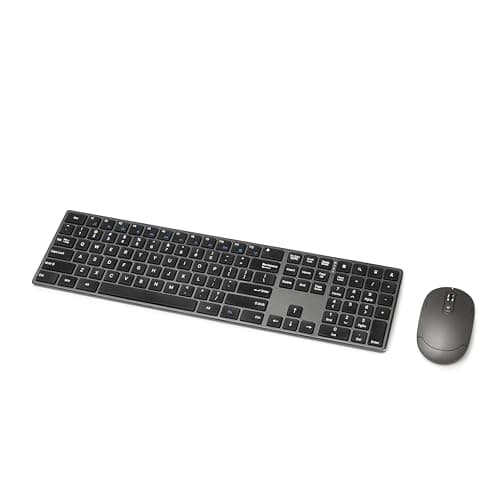
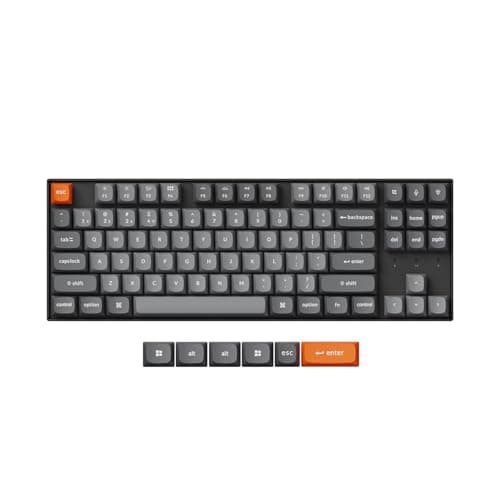
Under $100 the keyboard to buy for work is the Keychron K8 Max: a tenkeyless board with hot-swappable switch sockets, Bluetooth, a 2.4 GHz receiver and wired USB-C, plus Mac and Windows keycaps in the box. Hot-swap is the specification that changes what you own rather than how it looks — it means the feel of the board is a $20 decision later instead of a permanent one now. The budget pick is the Amazon Basics Ultra Premium Wireless Combo, which puts a full-size board and a mouse on the desk for roughly a quarter of the cap. If your hands hurt rather than your ears, the Perixx PERIBOARD-535RD is the only genuinely split mechanical board that stays under $100.
The useful way to read this price band is as a three-way fork. Spend the full hundred on a mechanical board and you get sockets, a case and a switch you chose. Spend it on an ergonomic board and you get a split keyset and a tilt range, with a simpler mechanism. Spend half of it on a membrane combo and you get a mouse too, plus the longest battery ratings on this page by a wide margin. Nothing under $100 gives you two of those three.
The six, by mechanism
| Keyboard | Layout | Mechanism | Connection | Hot-swap |
|---|
| Keychron K8 Max | Tenkeyless, 87 keys | Mechanical (Gateron) | Bluetooth, 2.4 GHz, USB-C | Yes |
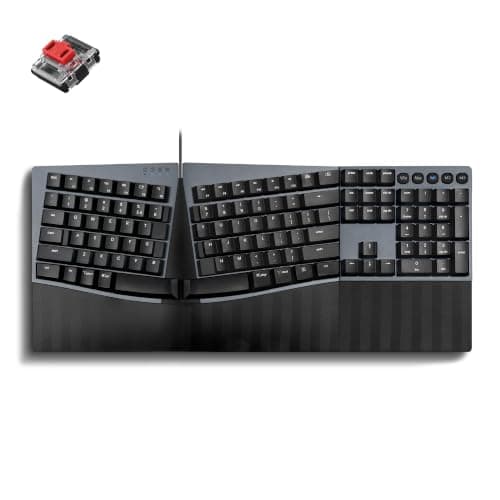
| Perixx PERIBOARD-535RD | Split, full size with number pad | Low-profile red linear mechanical | Wired USB | No |
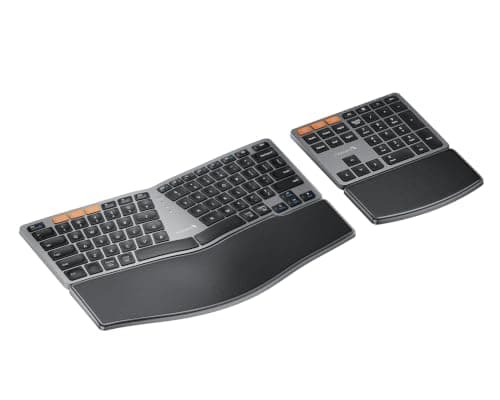
| ProtoArc EK04 | Curved split, detached number pad | Low-profile keys | Bluetooth × 2 plus 2.4 GHz | No |
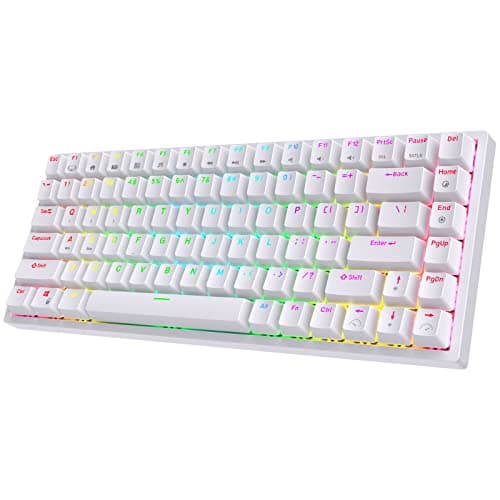
| RK ROYAL KLUDGE RK84 | 75 percent, 84 keys | Mechanical | Bluetooth, 2.4 GHz, USB-C | Yes |
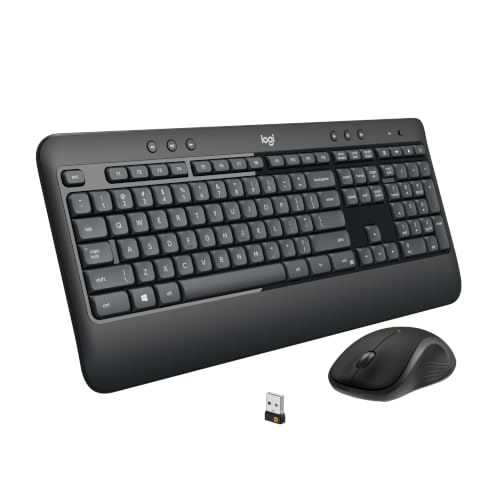
| Logitech MK540 (with mouse) | Full size with palm rest | Membrane | One Unifying receiver | No |
| Amazon Basics Ultra Premium (with mouse) | Full size, low profile | Membrane | One 2.4 GHz receiver | No |
Two of the six are hot-swappable and both are mechanical; the other four are not, and on a soldered board the switch you buy is the switch you keep. If you have never chosen a switch before, keyboard switches explained covers linear, tactile and clicky without the marketing, and mechanical versus membrane is the honest version of the argument this page is built on.
What $100 does not buy on a keyboard
- A published battery figure on a mechanical board. Logitech publishes runtimes; Keychron and RK ROYAL KLUDGE do not publish a figure we could read at source for these boards, so we have not invented one. The two membrane combos are the only boards here with a rated life, and they are enormous: 36 months for the MK540 keyboard and 18 for its mouse.
- Proximity-sensor backlighting and desktop software. The backlight that wakes when your hands approach, and the Logi Options+ layer with Flow across two machines, are above this cap — our MX Keys alternatives page works through what that software layer is worth.
- An aluminum case or a gasket mount. Plastic cases at this price. The sound and the flex are where you notice, which is why the quiet keyboards roundup ranks on what the case does rather than the switch alone.
- Three-device switching with a dedicated key per device. The ProtoArc manages three and the Keychron pairs multiple hosts; the two combos use a single receiver and switch nothing. The combos roundup is the page for that axis.
Price check. 6 of the 6 picks below were listed under $100 on Amazon as of November 21, 2026— the figure on each buy button is the live one, and where we have no verified price we show none rather than a number that has rotted.
The short answer
Quick picks
| # | Product | Best for | Score | Price |
|---|
| 01 | Keychron K8 Max Wireless Mechanical KeyboardThe best board under $100 because it is the one you can still change: hot-swappable switch sockets, three ways to connect, and Mac plus Windows keycaps in the box on a tenkeyless layout that suits a work desk. | Best overall - hot-swap mechanical | | $39.00·Amazon |
| 02 | Perixx PERIBOARD-535RD Ergonomic Split MechanicalThe only genuinely split mechanical board that stays under the cap, and the one to buy if the reason you are shopping is your wrists rather than the sound. Three published tilt positions, full number pad, wired only. | Best split ergonomic under $100 | | $94.99·Amazon |
| 03 | | Ergonomic shape, wireless, number pad detached | | $64.99·Amazon |
| 04 | RK ROYAL KLUDGE RK84 Wireless MechanicalThe cheapest hot-swappable mechanical board here, and the one to pick if desk space is tighter than your budget. A 75 percent layout keeps the arrows and loses almost two inches of width. | Cheapest hot-swap, smallest footprint | | $56.99·Amazon |
| 05 | Logitech MK540 Advanced Wireless ComboThe board with the only serious battery claim on this page - rated up to 36 months on the keyboard and 18 on the mouse, both from one encrypted Unifying receiver - and it brings a mouse with it. | Longest published battery life, with a mouse | | $39.99·Amazon |
| 06 | | Budget pick - keyboard and mouse, cheapest | | $28.34·Amazon |
#ad · Live prices from the Amazon Product API, as of November 21, 2026. Where we have no verified live price we show none — we would rather leave a gap than print a number that has rotted.
In detail
The picks, in full
Best overall - hot-swap mechanical
Keychron K8 Max Wireless Mechanical Keyboard
- Layout
- Tenkeyless (87-key)
- Connection
- Wireless — Bluetooth or 2.4 GHz; wired USB-C
- Switch type
- Hot-swappable (pre-installed Gateron)
- Hot-swap
- Yes
- Compatibility
- Mac and Windows keycaps and toggle
The best board under $100 because it is the one you can still change: hot-swappable switch sockets, three ways to connect, and Mac plus Windows keycaps in the box on a tenkeyless layout that suits a work desk.
- Mechanism
- 9.4
- Layout for Work
- 8.8
- Connectivity
- 9.2
- Value Under $100
- 8.6
Pros
- +Triple connection: Bluetooth, low-latency 2.4 GHz, or wired
- +Hot-swap sockets and QMK/VIA remapping
- +Gasket mount and stock foam soften the sound for shared rooms
- +Mac and Windows layouts both in the box
Cons
- −Taller than a low-profile board, so a wrist rest helps
- −Stock switches are quiet-ish, not silent — swap to silent switches for a truly hushed desk
Skip this if…
…you need a slim low-profile board or a fully silent keyboard straight out of the box
Best split ergonomic under $100
Perixx PERIBOARD-535RD Ergonomic Split Mechanical
- Layout
- Split ergonomic, full-size with number pad
- Connection
- Wired USB
- Switch type
- Low-profile red linear mechanical
- Hot-swap
- No
- Palm rest
- Tilt-adjustable at 0, -4 or -7 degrees
The only genuinely split mechanical board that stays under the cap, and the one to buy if the reason you are shopping is your wrists rather than the sound. Three published tilt positions, full number pad, wired only.
- Mechanism
- 8.2
- Layout for Work
- 8
- Connectivity
- 6
- Value Under $100
- 8.4
Pros
- +Mechanical switches on a split ergo layout without the enthusiast price
- +Fixed split with a tilt-adjustable wrist rest suits a first move to ergonomics
- +Simple plug-and-play wired USB
Cons
- −Fixed split width and no tenting - the wrist rest tilts, the halves do not
- −No wireless option and no hot-swap sockets
Skip this if…
…you want wireless, hot-swap switches, or an adjustable split angle
Ergonomic shape, wireless, number pad detached
ProtoArc EK04 Wireless Ergonomic Keyboard with Separate Number Pad
- Layout
- Curved split keyset with a detached number pad in the box
- Connection
- Dual Bluetooth plus a 2.4 GHz USB receiver, three devices
- Key mechanism
- Low-profile keys, not backlit
- Tilt
- Four adjustable tilt legs underneath
- Power
- Rechargeable over USB-C; about 250 hours standby per charge
The ergonomic answer for people who want the number pad somewhere else entirely: a curved split keyset with the number pad detached in the box, three paired devices, and a published 250 hours of standby.
- Mechanism
- 7.2
- Layout for Work
- 8.6
- Connectivity
- 8.8
- Value Under $100
- 8.8
Pros
- +The number pad is a separate unit, so you can leave it off and bring the mouse in closer to your shoulder
- +Pairs to three devices and switches with a keypress, over Bluetooth or the bundled 2.4G receiver
- +Rechargeable rather than a battery drawer, and the four tilt legs let you set the angle yourself
- +Curved, fanned keyset with the letters still where your fingers expect them, so the adjustment is short
Cons
- −The palm rest is a hard leather-finish surface and it does not come off — no cushion, no choice
- −Low-profile keys feel soft next to any mechanical board here
- −No backlight, and the charging cable carries power only - there is no wired fallback
Skip this if…
…you want a cushioned wrist rest, a mechanical keystroke, or a board you can plug in when the battery dies
$64.99·View on Amazon$84.9924% off
Price as of November 21, 2026. Prices change — Amazon's is the one that counts.
#ad · we may earn a commission from this link to ProtoArc EK04 Wireless Ergonomic Keyboard with Separate Number Pad
Cheapest hot-swap, smallest footprint
RK ROYAL KLUDGE RK84 Wireless Mechanical
- Layout
- Compact 75% (84-key)
- Connection
- Wireless — Bluetooth or 2.4 GHz; wired USB-C
- Switch type
- Hot-swappable mechanical
- Hot-swap
- Yes
- Backlight
- RGB
The cheapest hot-swappable mechanical board here, and the one to pick if desk space is tighter than your budget. A 75 percent layout keeps the arrows and loses almost two inches of width.
- Mechanism
- 8.8
- Layout for Work
- 7.6
- Connectivity
- 9
- Value Under $100
- 9.2
Pros
- +Hot-swap sockets and tri-mode wireless at a budget price
- +Compact 75% layout keeps arrow and navigation keys
- +An easy, low-cost entry into swappable switches
Cons
- −Stock switches and stabilizers are noisier than the premium boards
- −Build and software are more basic than the higher tiers
Skip this if…
…you want the quietest possible typing or premium build and stabilizers
Longest published battery life, with a mouse
Logitech MK540 Advanced Wireless Combo
- Connection
- Single Logitech Unifying USB receiver, encrypted, up to 10m
- Keyboard
- Full size with number pad and integrated palm rest
- Mouse
- Contoured ambidextrous shape with rubber side grips
- Keyboard battery
- Rated up to 36 months
- Mouse battery
- Rated up to 18 months
- Durability
- Spill resistant to 60ml, abrasion-resistant key printing
The board with the only serious battery claim on this page - rated up to 36 months on the keyboard and 18 on the mouse, both from one encrypted Unifying receiver - and it brings a mouse with it.
- Mechanism
- 6.4
- Layout for Work
- 8.6
- Connectivity
- 8
- Value Under $100
- 9.4
Pros
- +One receiver for both devices, encrypted, at the lowest price where that is true
- +Ambidextrous mouse works for left-handed users, which almost no combo bothers with
- +Spill resistance and abrasion-resistant printing are real durability features, not padding
- +Three years of keyboard battery on ordinary cells
Cons
- −No Bluetooth and no multi-device switching - the receiver is the only route
- −Membrane keyboard with a plastic rather than cushioned palm rest
- −Windows and ChromeOS focused; macOS support is not the priority
Skip this if…
…you need to switch between two machines - this set pairs to one receiver and stays there.
Budget pick - keyboard and mouse, cheapest
Amazon Basics Ultra Premium Wireless Keyboard and Mouse Combo
- Connection
- Single 2.4 GHz USB receiver for both devices, up to 33 ft
- Layout
- Full size with number pad, low-profile keys
- Battery
- Built-in rechargeable lithium-ion in both halves
- Charging
- Micro-USB on keyboard and mouse
- Receiver storage
- Stowed in the keyboard base
The budget pick: a full-size low-profile board and a mouse for roughly a quarter of the cap, both rechargeable, both on one receiver. It does the job and it does not pretend to do more.
- Mechanism
- 6
- Layout for Work
- 8.2
- Connectivity
- 7.6
- Value Under $100
- 9.6
Pros
- +One receiver for both devices at the lowest price on this list
- +Rechargeable rather than disposable batteries, unusual at this price
- +Low-profile keys are quiet, which suits a shared room or a second desk
- +Receiver stores in the keyboard, so it survives being moved
Cons
- −Micro-USB charging in a USB-C world means keeping an old cable around
- −No Bluetooth and no device switching
- −Build quality is what the price implies - this is a functional set, not a nice one
Skip this if…
…this is your main desk - spend more on the surface you touch for eight hours.
Layout first, switch second
The specification that changes your desk most is not the switch, it is the number pad. A full-size board puts the mouse roughly four inches further right, which over an eight-hour day is the shoulder reach people blame on their chair. If you use the number pad daily, keep it — the Perixx and both combos above are full size. The full-size roundup ranks that field without a cap. If you touch it twice a month, drop it: the K8 Max is tenkeyless and the RK84 is smaller again, and the compact roundup covers how small is too small.
What hot-swap actually means
On a hot-swappable board the switches sit in sockets instead of being soldered to the circuit board, so you pull one out with a $5 puller and press another in. That matters for two reasons. First, it means you can buy the board now and fix the feel later, which is the cheapest way to discover you prefer tactile switches to linear ones. Second, a dead switch is a 30-second repair rather than a dead keyboard. Of the two hot-swap boards here, the K8 Max is the one we would start with, because the Mac and Windows keycap sets are in the box and the tenkeyless layout suits a work desk better than the RK84’s 75 percent.
If the reason you are shopping is pain
Then the number to spend money on is the angle, not the switch. A split keyset lets each hand sit at its own shoulder width instead of being pulled toward the middle, and a negative tilt drops the far edge of the board below the near edge so the wrists stop extending. The Perixx publishes three tilt positions (0, −4 and −7 degrees) and the ProtoArc has four adjustable legs. The ergonomic keyboards roundup ranks the field above this cap, split keyboards covers the fully separated designs, and keyboard and mouse ergonomics is the free part — height, distance and tray position do more than any board.
One more cheap fix worth naming: a tall board makes a wrist rest close to mandatory, and a wrist rest costs a fraction of a keyboard. The wrist rests roundup has the field.
How we picked
We do not run a testing lab
We compiled the published manufacturer specifications, did the ergonomics, VESA and desk-depth math ourselves, and read aggregated owner reviews, then scored each product against a published rubric. The scores are judgments from documented research — they are not measurements we took, because we do not have a lab and we are not going to pretend we do. Every spec traces back to a listing or manual named in Sources.
Questions
Frequently asked
What is the best keyboard under $100 for office work?+
The Keychron K8 Max. It is a tenkeyless mechanical board with hot-swappable switch sockets, Bluetooth, a 2.4 GHz receiver and wired USB-C, and it ships with both Mac and Windows keycaps. The hot-swap sockets are the reason it is first: the feel of the board stays changeable after you buy it.
Can you get a mechanical keyboard for under $100?+
Yes, and three of the six boards here are mechanical. What you give up against a board half again the price is the case — plastic rather than aluminum, no gasket mount — and any published battery figure. What you keep is the switch, the sockets on the two hot-swap boards, and wired USB-C as a fallback.
Is a keyboard and mouse combo better value than a keyboard alone?+
On price per device, obviously. On everything else, it depends what hurts. The MK540 combo is rated for up to 36 months on the keyboard and 18 on the mouse from one Unifying receiver, which no mechanical board here comes close to. What it cannot do is change its own feel, switch between two computers, or fix a wrist angle.
Does a cheaper keyboard mean a worse typing feel?+
Not necessarily, and that is the point of a hot-swap board. The switch under the key does most of the work, and on the K8 Max or the RK84 you can replace it for a few dollars. What price reliably buys is the case: a heavier, stiffer case sounds lower and flexes less, which is the difference you hear rather than feel.
Receipts
Sources
We do not run a testing lab, and we do not pretend to. Specifications come from the manufacturer or retailer listing; the footprint and clearance math is ours and reproducible. Where we could not verify a number, we say so on the page rather than quietly leaving it out. Read our full method.