Skip to content
Chair & Cable

SECTION 04 · Keyboards & Mice

The best wireless mice for work

Every mouse here is wireless. They are not wireless in the same way, and the difference shows up the first time you plug the desk into a second computer.

By Stephen V.Updated How we pick
#ad

We earn a commission when you buy through our Amazon links, at no extra cost to you. It never affects our rankings, and we say so when the cheaper product is the better buy. How this works.

The wireless mouse to buy for work is the Logitech MX Master 3S: a sculpted right-hand palm grip, an 8000 DPI sensor that tracks on glass, and the MagSpeed wheel plus a second thumb wheel — the most capable productivity mouse here by a distance. One caveat worth knowing before you order: this edition ships without a Logi Bolt receiver, so it is a Bluetooth mouse, and Bluetooth is the one radio that cannot follow a KVM switch. The budget pick is the Logitech ERGO M575S — the cheapest genuinely wireless mouse here, with a replaceable cell and the choice of Bluetooth or a Logi Bolt receiver. If you need one mouse to work on a machine you cannot install software on, pick a mouse with a receiver, not a mouse with the best feature list.

That is the whole reason this page exists. Mouse roundups normally rank shape, and shape matters — but on a desk with a dock, a KVM or a work laptop with a locked software policy, the radio decides whether the mouse works at all. Three different radios appear below and they behave differently in exactly the situations this site is about.

Three radios, three different desks

  • Bluetooth uses no USB port at all, which is why it is the default on laptops. It is also pure software: the host operating system owns the pairing, so a Bluetooth mouse cannot be switched between two computers by a KVM switch, and it is the radio most likely to take a second to wake.
  • A proprietary receiver (Logi Bolt, Logitech Unifying) is a dongle that looks like a plain USB mouse to the host. That is its advantage: plug it into a KVM or a dock and the mouse follows the switch, because the computer on the other side just sees a mouse. It costs you a USB port, and losing the dongle is a real failure mode.
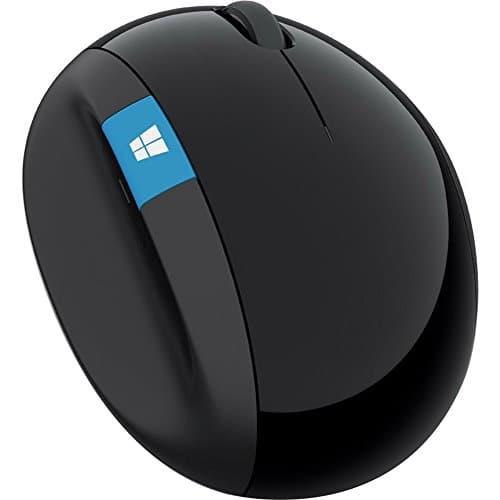
  • A 2.4 GHz nano receiver behaves the same way for switching purposes but is usually paired to one device at the factory, so there is no re-pairing and no software at all. The Microsoft Sculpt below is this type.
MouseShapeRadioPowerFollows a KVM?
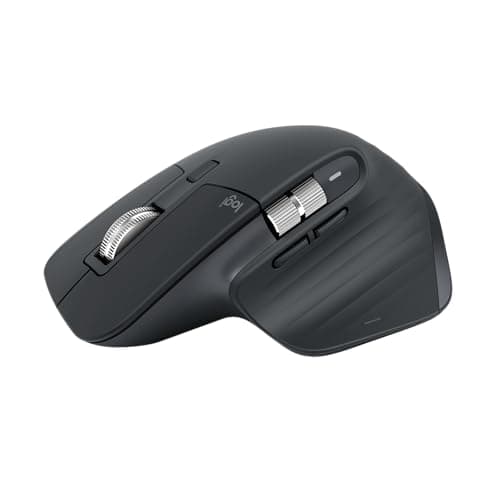
Logitech MX Master 3SSculpted palm grip, right-handedBluetooth (no receiver in this edition)Rechargeable, USB-CNo
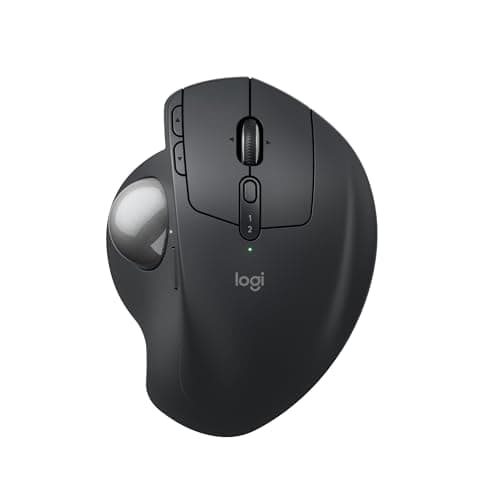
Logitech MX Ergo SThumb trackball, tilting baseBluetooth or Logitech receiverRechargeable, USB-CYes, on the receiver
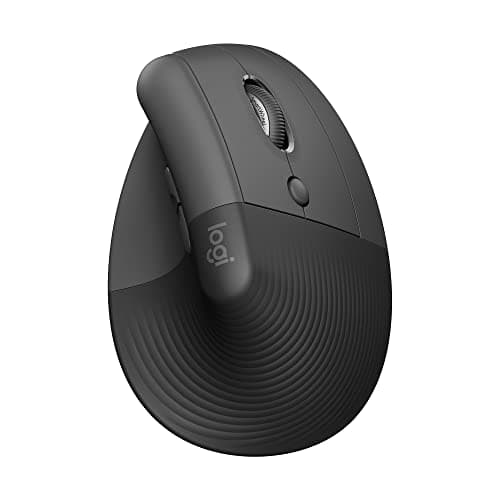
Logitech LiftVertical, 57 degreesBluetooth or Logi BoltReplaceable AAYes, on the receiver
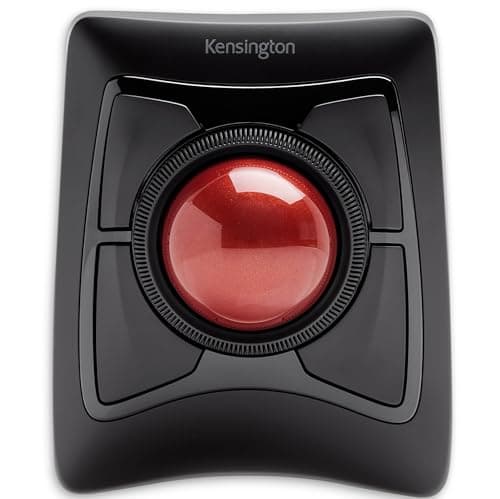
Kensington ExpertFinger trackball, ambidextrousBluetooth or USB receiverReplaceable cellsYes, on the receiver
Microsoft Sculpt Ergonomic MouseSculpted dome, right-handed2.4 GHz nano receiver onlyReplaceable cellsYes
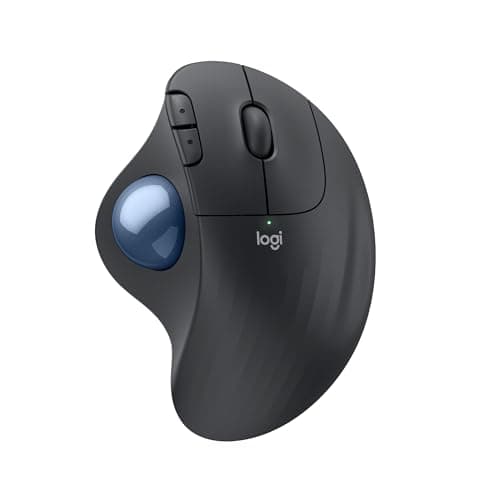
Logitech ERGO M575SThumb trackball, right-handedBluetooth or Logi BoltReplaceable cellYes, on the receiver

On battery life, we are only going to print what makers publish. Logitech publishes a figure for the M575S as a long replaceable-battery life and the Lift runs on a replaceable AA; neither Kensington nor Microsoft publishes a runtime for the two cell-powered mice here that we could read at source, and the two rechargeable Logitech mice charge over USB-C. Rather than carry an estimate, the table above states the power source and stops there. The practical rule is the one nobody markets: a mouse you can put a fresh AA into never dies at 9am, and a mouse you charge over USB-C never needs a trip to a drawer.

Four of the six are trackballs or vertical mice, and that is not an accident of selection: this registry holds almost no conventional wireless mouse besides the MX Master line, because the buyer this site is built for is usually replacing a conventional mouse that hurt. If a conventional shape is what you want, the MX Master 3S is the pick and MX Master alternatives covers what the rest of the field can and cannot reproduce.

The short answer

Quick picks

#ProductBest forScorePrice
01
Logitech Logitech MX Master 3S Wireless Mouse
Logitech MX Master 3S Wireless Mouse

The most capable wireless mouse here and the one most people should buy - as long as the desk has one computer on it. This edition is Bluetooth only, which is the one radio a KVM switch cannot carry.

Best overall - one computer, most mouse
8.4
$75.99Amazon
02
Logitech Logitech MX Ergo S Wireless Trackball
Logitech MX Ergo S Wireless Trackball

The pick for a desk with two computers on it: Bluetooth or a Logitech receiver, so it can follow a KVM, plus a base that tilts to 20 degrees and a thumb ball that means the arm never travels.

Best for a two-computer desk
8.8
$90.24Amazon
03
Logitech Logitech Lift Vertical Ergonomic Mouse
Logitech Lift Vertical Ergonomic Mouse

The vertical answer, on either Bluetooth or a Logi Bolt receiver, running on a replaceable AA - which is the failure mode most offices prefer, because the fix is a drawer rather than a cable.

Best vertical - forearm pronation
8.7
$56.98Amazon
04
Kensington Kensington Expert Wireless Trackball (K72359WW)
Kensington Expert Wireless Trackball (K72359WW)

The only ambidextrous pick here, which makes it the one to buy for a shared or hot-desked position, with a scroll ring and a detachable wrist rest and the choice of Bluetooth or a USB receiver.

Best ambidextrous - shared desks
8.4
$90.35Amazon
05
Microsoft Microsoft Sculpt Ergonomic Mouse
Microsoft Sculpt Ergonomic Mouse

The one with no software and nothing to pair: a 2.4 GHz nano receiver that works the moment it is plugged in, which is exactly what a locked-down work laptop will let you do.

Locked-down machines - no software needed
7.5
$75.70Amazon
06
Logitech Logitech ERGO M575S Wireless Trackball
Logitech ERGO M575S Wireless Trackball

The budget pick and the cheapest genuinely wireless mouse here: Bluetooth or a Logi Bolt receiver, a replaceable cell Logitech rates for a long life, and a thumb ball that stops the shoulder travel.

Budget pick - cheapest wireless, receiver included
8.9
$37.98Amazon

#ad · Live prices from the Amazon Product API, as of November 21, 2026. Where we have no verified live price we show none — we would rather leave a gap than print a number that has rotted.

In detail

The picks, in full

01
Logitech Logitech MX Master 3S Wireless Mouse

Best overall - one computer, most mouse

Logitech MX Master 3S Wireless Mouse

Grip
Sculpted right-hand palm grip
Handedness
Right-handed
Connection
Wireless — Bluetooth (this edition ships without a Logi Bolt receiver); USB-C charging
Sensor
Up to 8000 DPI (tracks on glass)
Scroll
MagSpeed electromagnetic wheel plus thumb wheel
8.4/10

The most capable wireless mouse here and the one most people should buy - as long as the desk has one computer on it. This edition is Bluetooth only, which is the one radio a KVM switch cannot carry.

Radio Flexibility
7
Power Convenience
8.8
Feature Depth
9.4
Value
8.4

Pros

  • Tall sculpted body supports the palm without going fully vertical
  • MagSpeed wheel flips between ratcheted and free-spin scrolling
  • Quiet clicks and a horizontal thumb wheel aid all-day desk work
  • 8K sensor tracks on almost any surface, including glass

Cons

  • A sculpted shape, not a vertical one — less wrist rotation than a true vertical
  • Large and right-handed only

Skip this if…

…your goal is maximum wrist rotation from a true vertical shape

$75.99View on Amazon

$99.9924% off

Price as of November 21, 2026. Prices change — Amazon's is the one that counts.

#ad · we may earn a commission from this link to Logitech MX Master 3S Wireless Mouse

02
Logitech Logitech MX Ergo S Wireless Trackball

Best for a two-computer desk

Logitech MX Ergo S Wireless Trackball

Type
Thumb-operated trackball
Tilt
Adjustable base, flat or tilted to 20 degrees
Connection
Bluetooth or Logitech receiver, USB-C charging
Buttons
Programmable buttons with precision-mode toggle
Multi-device
Switches between paired computers
8.8/10

The pick for a desk with two computers on it: Bluetooth or a Logitech receiver, so it can follow a KVM, plus a base that tilts to 20 degrees and a thumb ball that means the arm never travels.

Radio Flexibility
9.4
Power Convenience
8.8
Feature Depth
8.8
Value
8

Pros

  • The tilting base is the feature no other trackball here has — it combines the still arm with a partly rotated-neutral forearm
  • Precision-mode button drops the tracking speed for detailed work, which offsets the format's weakness
  • Build quality and switch feel are the best in this roundup
  • Multi-device switching makes it practical on a desk with two machines

Cons

  • Loads the thumb, so it is the wrong pick if your thumb is where the pain is
  • The most expensive trackball here
  • Right-handed only, with no left-handed version

Skip this if…

…your complaint is thumb-base pain — a finger-operated ball moves the work to stronger digits

$90.24View on Amazon

$119.9925% off

Price as of November 21, 2026. Prices change — Amazon's is the one that counts.

#ad · we may earn a commission from this link to Logitech MX Ergo S Wireless Trackball

03
Logitech Logitech Lift Vertical Ergonomic Mouse

Best vertical - forearm pronation

Logitech Lift Vertical Ergonomic Mouse

Grip
Vertical — 57-degree angle
Handedness
Right-handed (left-handed version available)
Connection
Wireless — Bluetooth or Logi Bolt receiver
Sensor
Up to 4000 DPI
Battery
Replaceable AA
8.7/10

The vertical answer, on either Bluetooth or a Logi Bolt receiver, running on a replaceable AA - which is the failure mode most offices prefer, because the fix is a drawer rather than a cable.

Radio Flexibility
9.4
Power Convenience
8.6
Feature Depth
8
Value
8.6

Pros

  • Smaller shell fits small-to-medium hands the MX Vertical is too big for
  • Available in a left-handed model, which is rare for vertical mice
  • Quiet clicks and multi-device pairing

Cons

  • Uses a replaceable AA rather than a built-in rechargeable cell
  • Too small for large hands

Skip this if…

…you have large hands or you want a built-in rechargeable battery

$56.98View on Amazon

$79.9929% off

Price as of November 21, 2026. Prices change — Amazon's is the one that counts.

#ad · we may earn a commission from this link to Logitech Lift Vertical Ergonomic Mouse

04
Kensington Kensington Expert Wireless Trackball (K72359WW)

Best ambidextrous - shared desks

Kensington Expert Wireless Trackball (K72359WW)

Type
Finger-operated trackball with large ball
Scroll
Scroll ring around the ball
Connection
Wireless via Bluetooth or USB receiver
Handedness
Ambidextrous design
Wrist support
Detachable wrist rest included
8.4/10

The only ambidextrous pick here, which makes it the one to buy for a shared or hot-desked position, with a scroll ring and a detachable wrist rest and the choice of Bluetooth or a USB receiver.

Radio Flexibility
9
Power Convenience
8
Feature Depth
8.4
Value
8.2

Pros

  • The large ball driven by fingers is far more precise than any thumb design here
  • Scroll ring is genuinely better than a wheel for long documents once you are used to it
  • Ambidextrous, so left-handed users are not an afterthought and you can swap hands to rest one
  • Spreads the work across strong fingers rather than loading the thumb

Cons

  • Large footprint — it takes more desk than a mouse, which partly undoes the space argument
  • Steeper adjustment than a thumb ball; expect a week of awkwardness
  • Needs occasional cleaning of the bearings to stay smooth

Skip this if…

…desk space is the reason you wanted a trackball — this is the largest device in the roundup

$90.35View on Amazon

Price as of November 21, 2026. Prices change — Amazon's is the one that counts.

#ad · we may earn a commission from this link to Kensington Expert Wireless Trackball (K72359WW)

05
Microsoft Microsoft Sculpt Ergonomic Mouse

Locked-down machines - no software needed

Microsoft Sculpt Ergonomic Mouse

Grip
Sculpted dome (partial ergonomic tilt)
Handedness
Right-handed
Connection
Wireless 2.4 GHz USB receiver
Sensor
1000 DPI (BlueTrack)
Buttons
Thumb scoop with a Windows button
7.5/10

The one with no software and nothing to pair: a 2.4 GHz nano receiver that works the moment it is plugged in, which is exactly what a locked-down work laptop will let you do.

Radio Flexibility
7.6
Power Convenience
8
Feature Depth
6.8
Value
7.6

Pros

  • Domed shape fills the palm and eases wrist pressure without a steep tilt
  • A gentler transition than a full vertical for people new to ergo mice
  • Thumb-scoop Windows button is handy on Windows

Cons

  • Proprietary 2.4 GHz receiver, no Bluetooth
  • Low 1000 DPI sensor feels slow on a high-resolution screen

Skip this if…

…you want a true vertical angle, Bluetooth, or a high-DPI sensor

$75.70View on Amazon

Price as of November 21, 2026. Prices change — Amazon's is the one that counts.

#ad · we may earn a commission from this link to Microsoft Sculpt Ergonomic Mouse

06
Logitech Logitech ERGO M575S Wireless Trackball

Budget pick - cheapest wireless, receiver included

Logitech ERGO M575S Wireless Trackball

Type
Thumb-operated trackball
Connection
Bluetooth or Logi Bolt receiver
Power
Replaceable battery with long life
Shape
Sculpted right-handed shell
Buttons
Standard buttons plus browser navigation
8.9/10

The budget pick and the cheapest genuinely wireless mouse here: Bluetooth or a Logi Bolt receiver, a replaceable cell Logitech rates for a long life, and a thumb ball that stops the shoulder travel.

Radio Flexibility
9.4
Power Convenience
9
Feature Depth
7.6
Value
9.4

Pros

  • Short learning curve — hand posture is close to a normal mouse, so most people adapt in days
  • Very long battery life on a single replaceable cell
  • Comfortable sculpted shell that supports the hand rather than just holding a ball
  • The least expensive route to a trackball worth keeping

Cons

  • No tilt adjustment, so the forearm stays in the flat mouse position
  • Thumb-driven precision is adequate rather than good
  • Right-handed only

Skip this if…

…you want the forearm-angle benefit as well as the still-arm benefit — that is what the tilting MX Ergo S adds

$37.98View on Amazon

$49.9924% off

Price as of November 21, 2026. Prices change — Amazon's is the one that counts.

#ad · we may earn a commission from this link to Logitech ERGO M575S Wireless Trackball

If the desk has two computers on it

This is where the radio stops being a footnote. A mouse on a receiver can be plugged into a KVM switch or a USB switch and will follow whichever machine the switch is pointed at, because the host only ever sees a generic USB mouse. A Bluetooth mouse cannot: the pairing lives in the operating system, so switching means re-pairing or using the mouse’s own device-switch button, if it has one. Two computers, one desk works through all four routes, and the KVM roundup ranks the switches themselves.

Multi-device switching is not the same as a KVM

Several mice here pair to more than one computer and switch with a button on the base. That is convenient and it is not the same thing: the mouse moves, the keyboard does not, and the screen does not. A KVM moves all three. If you want one button for everything, the switch is the purchase; if you only want the mouse to follow you to a laptop on the same desk, multi-device pairing is cheaper and simpler.

Shape still decides whether you keep it

The radio decides whether the mouse works. The shape decides whether your forearm still hurts in a month, and those are independent questions. Three honest rules from keyboard and mouse ergonomics:

  1. If the ache is in the forearm, the problem is usually pronation — the twist of the wrist to put a palm flat. A vertical mouse like the Lift addresses that directly, and the vertical mice roundup ranks that field.
  2. If the ache is in the shoulder, the problem is travel: the whole arm is moving the mouse across the desk. A trackball does not move at all, which is why three of the picks above are trackballs — the trackball roundup has the detail, and vertical mouse versus trackball is the fork between the two.
  3. If nothing aches, buy for hand size and feature count rather than for therapy. Mice by hand size has the measurement, which takes about ten seconds with a ruler.

A cheaper first move, before any of this: a keyboard tray that puts the mouse at elbow height fixes more wrists than any mouse does, and a full-size keyboard pushes the mouse about four inches further right than a tenkeyless one.
How we picked

We do not run a testing lab

We compiled the published manufacturer specifications, did the ergonomics, VESA and desk-depth math ourselves, and read aggregated owner reviews, then scored each product against a published rubric. The scores are judgments from documented research — they are not measurements we took, because we do not have a lab and we are not going to pretend we do. Every spec traces back to a listing or manual named in Sources.

Questions

Frequently asked

Is Bluetooth or a USB receiver better for a wireless mouse?
A receiver is better on a desk with a dock, a KVM switch or a computer you cannot install software on, because the host just sees a plain USB mouse and the mouse follows whatever the switch is pointed at. Bluetooth is better on a laptop with no spare port, and it is the only option if you refuse to carry a dongle. If you want both, pick a mouse that publishes both - four of the six here do.
Will a wireless mouse work through a KVM switch?
On a receiver, yes - plug the dongle into the KVM’s USB port and the mouse switches with everything else. On Bluetooth, no: the pairing belongs to the operating system, so the KVM has nothing to switch. This is the single most common wireless-mouse disappointment on a two-computer desk.
Rechargeable or replaceable batteries?
Replaceable cells mean the mouse is never out of action for longer than it takes to find an AA, which is the reason the Logitech Lift and the ERGO M575S remain popular in offices. Rechargeable over USB-C means no cells to buy and a quick top-up from the same cable as everything else. Neither is better; pick the failure mode you prefer.
What is the best wireless mouse for working from home?
The MX Master 3S if you want the most capable conventional mouse and the desk has one computer on it. The MX Ergo S or the ERGO M575S if the desk has two, because both offer a receiver as well as Bluetooth and both stop the shoulder travel a conventional mouse demands.

Keep reading

Receipts

Sources

We do not run a testing lab, and we do not pretend to. Specifications come from the manufacturer or retailer listing; the footprint and clearance math is ours and reproducible. Where we could not verify a number, we say so on the page rather than quietly leaving it out. Read our full method.